
1. Úvod
Děkuji za nákupasing the ULTIMEA Aura A60 U2621 7.1ch Dolby Atmos Soundbar System. This manual provides essential information for setting up, operating, and maintaining your new sound system. Please read this manual thoroughly before use to ensure proper functionality and to maximize your audio experience.

Figure 1.1: Immersive audio experience with the ULTIMEA Aura A60 system.
2. Bezpečnostní informace
Abyste snížili riziko úrazu elektrickým proudem, požáru nebo poškození zařízení, dodržujte prosím následující bezpečnostní opatření:
- Nevystavujte toto zařízení dešti nebo vlhkosti.
- Na přístroj nepokládejte předměty naplněné tekutinami, jako jsou vázy.
- Zajistěte dostatečné větrání. Neblokujte žádné větrací otvory.
- Neinstalujte v blízkosti zdrojů tepla, jako jsou radiátory, tepelné regulátory, kamna nebo jiná zařízení (včetně amplifikátory), které produkují teplo.
- Chraňte napájecí kabel před šlapáním nebo přiskřípnutím, zejména u zástrček, zásuvek a v místě, kde vychází z přístroje.
- Používejte pouze nástavce/příslušenství určené výrobcem.
- Odpojte toto zařízení během bouřky s blesky nebo když se delší dobu nepoužívá.
- Veškeré opravy svěřte kvalifikovanému servisnímu personálu.
3. Obsah balení
Zkontrolujte prosím, zda jsou všechny položky přítomny a v dobrém stavu:
- ULTIMEA Aura A60 Soundbar
- Wireless Subwoofer (4-inch, BassMX Technology)
- 4 x Surround Speakers (2 front, 2 rear)
- Dálkové ovládání
- HDMI kabel
- Napájecí adaptér/kabely
- Uživatelská příručka (tento dokument)
4. Konec produktuview
The ULTIMEA Aura A60 U2621 is a 7.1ch Dolby Atmos soundbar system designed to deliver an immersive home theater audio experience. It features a main soundbar unit, a powerful wireless subwoofer with BassMX technology, and four surround speakers.
4.1 Main Soundbar Unit
The main soundbar unit houses 3 main channels for clear dialogue and primary audio. It serves as the central hub for all audio connections.

Figure 4.1: Main soundbar unit with front surround speakers.
4.2 Bezdrátový subwoofer
The dedicated 4-inch wireless subwoofer incorporates BassMX technology to enhance low frequencies, providing deep and resonant bass for a more impactful audio experience.

Figure 4.2: Wireless subwoofer with BassMX technology.
4.3 prostorových reproduktorů
The system includes four surround speakers: two front and two rear. The rear speakers connect wirelessly to the soundbar, minimizing cable clutter and allowing flexible placement to create an expansive acoustic space.

Figure 4.3: Diagram of 7.1ch sound distribution.
4.4 Vstupní/Výstupní porty
The soundbar features multiple input options for versatile connectivity:
- HDMI eARC: For high-quality audio transmission and seamless TV integration.
- Optický: Digitální audio vstup.
- AUX: Analogový audio vstup.
- USB: Pro přehrávání médií.
- Bluetooth: Wireless audio streaming.

Figure 4.4: Rear panel connections, including HDMI eARC.
5. Nastavení
5.1 Fyzické umístění
Optimal placement of your sound system components is crucial for the best audio experience.
- Soundbar: Place the soundbar centrally below your television. Ensure it is not obstructed.
- subwoofer: Position the wireless subwoofer on the floor near the soundbar. Experiment with placement to find the best bass response for your room.
- Přední prostorové reproduktory: Place the two wired front surround speakers to the left and right of your TV, ideally at ear level when seated.
- Zadní prostorové reproduktory: Position the two wireless rear surround speakers behind your primary listening position, to the left and right. These speakers will automatically connect wirelessly to the soundbar once powered on.

Figure 5.1: Recommended speaker placement for Dolby Atmos.
5.2 Připojení
Pro připojení soundbaru postupujte takto:
- Připojení napájení: Connect the power cables to the soundbar, subwoofer, and surround speakers, then plug them into a power outlet.
- HDMI eARC (doporučeno): Connect one end of the provided HDMI cable to the HDMI eARC port on your soundbar and the other end to the HDMI eARC/ARC port on your TV. This connection supports Dolby Atmos and allows for TV remote control of the soundbar.
- Optické připojení (alternativa): If your TV does not have an HDMI eARC/ARC port, connect an optical cable (not included) from your TV's optical output to the OPTICAL input on the soundbar.
- AUX Connection (Alternative): For analog audio sources, connect a 3.5mm AUX cable (not included) from your device's audio output to the AUX input on the soundbar.
- USB připojení: Insert a USB drive into the USB port on the soundbar for direct media playback.
- Bluetooth párování: To connect a Bluetooth device, select the Bluetooth input on the soundbar. On your device, search for 'ULTIMEA Aura A60' and pair.
6. Návod k obsluze
6.1 Zapnutí/vypnutí
Stisknutím tlačítka napájení na soundbaru nebo na dálkovém ovladači systém zapnete nebo vypnete.
6.2 Výběr vstupu
Use the 'Input' button on the remote control or the soundbar to cycle through available input sources: HDMI eARC, Optical, AUX, USB, and Bluetooth.

Figure 6.1: Remote control for easy operation.
6.3 Ovládání hlasitosti
Adjust the master volume using the 'Volume Up' and 'Volume Down' buttons on the remote control or the soundbar. You can also adjust subwoofer and surround speaker levels independently.
6.4 Sound Modes and EQ Presets
The Aura A60 offers various sound modes and EQ presets to optimize audio for different content and preferences.
- Dedicated Modes: Select from 6 specialized modes: Movie, Music, Voice, Sports, Game, and Night.
- Předvolby EQ: Access 121 professional EQ presets for genres like Bass, Pop, Classical, and Rock via the ULTIMEA app.

Figure 6.2: 121 preset EQ matrix for customized audio.
6.5 Ovládání aplikace
Download the ULTIMEA app to your smartphone for advanced control and customization options, including a 10-band EQ and access to all EQ presets.
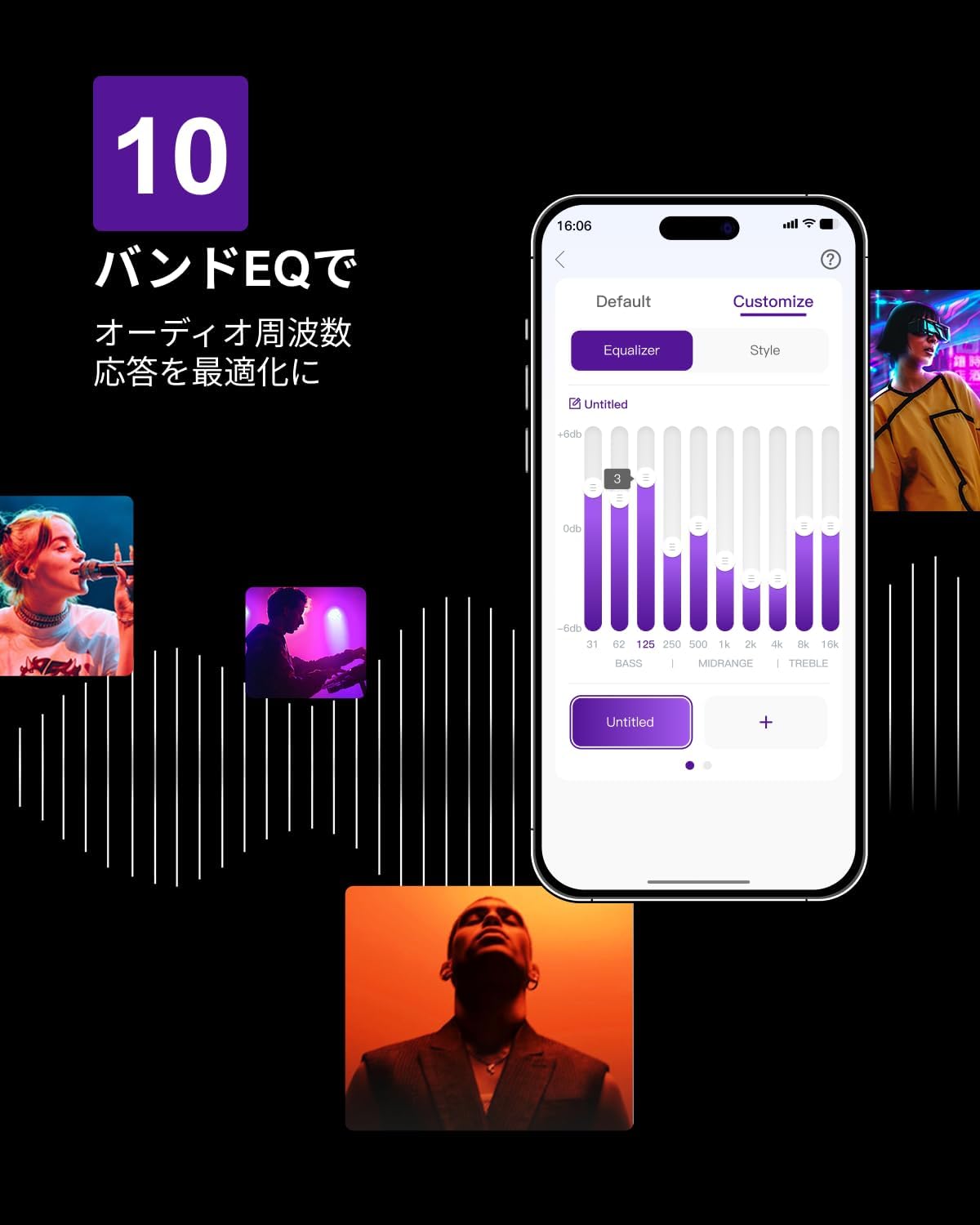
Figure 6.3: ULTIMEA mobile application interface.
7. Údržba
To ensure the longevity and optimal performance of your ULTIMEA Aura A60 soundbar system, follow these simple maintenance guidelines:
- Čištění: Use a soft, dry cloth to wipe the surfaces of the soundbar, subwoofer, and speakers. Do not use liquid cleaners or abrasive materials, as they may damage the finish.
- Větrání: Ujistěte se, že všechny větrací otvory zůstávají volné a neblokované, aby se zabránilo přehřátí.
- Skladování: Pokud systém skladujete delší dobu, odpojte jej od napájení a uložte jej na chladném a suchém místě mimo dosah přímého slunečního záření a extrémních teplot.
8. Řešení problémů
Pokud se se soundbarem setkáte s problémy, podívejte se na následující běžné problémy a jejich řešení:
| Problém | Možná příčina | Řešení |
|---|---|---|
| Žádný zvuk ze soundbaru. | Nesprávně zvolený vstup, příliš nízká hlasitost, nesprávně připojené kabely. | Verify the correct input source. Increase volume. Check all cable connections (HDMI, Optical, AUX). Ensure the soundbar is powered on. |
| No sound from subwoofer/surround speakers. | Subwoofer/speakers not paired or powered on, volume too low. | Ensure subwoofer and surround speakers are powered on. They should automatically pair. If not, refer to the pairing instructions in the full manual (if available) or contact support. Increase their individual volume levels. |
| Zkreslený nebo špatná kvalita zvuku. | Incorrect audio settings, poor source quality, interference. | Adjust EQ settings or try different sound modes. Ensure the audio source is high quality. Check for nearby electronic devices causing interference. |
| Problémy s připojením Bluetooth. | Device out of range, not in pairing mode, interference. | Ensure the soundbar is in Bluetooth pairing mode. Move your device closer to the soundbar. Disconnect and re-pair the device. |
Pokud problém přetrvává i po vyzkoušení těchto řešení, kontaktujte prosím zákaznickou podporu společnosti ULTIMEA.
9. Specifikace
| Funkce | Detail |
|---|---|
| Značka | POSLEDNÍ |
| Název modelu | Aura A60 |
| Číslo modelu | U2621 |
| Typ reproduktoru | Soundbar with 7.1ch Surround Sound |
| Audio technologie | Dolby Atmos, BassMX Technology |
| Konektivita | HDMI eARC, Bluetooth, Optical, AUX, USB |
| Subwoofer | 4-inch Wired Subwoofer (integrated BassMX) |
| Prostorové reproduktory | 4 (2 wired front, 2 wireless rear) |
| Řízení | Remote Control, ULTIMEA App |
| Barva | Černý |
| Rozměry (D x Š x V) | 9 cm x 40 cm x 7 cm (Soundbar, approximate) |
| Země původu | Čína |
10. Záruka a podpora
ULTIMEA is committed to providing high-quality products and customer satisfaction. Your Aura A60 U2621 soundbar system comes with comprehensive support.
10.1 Informace o záruce
Specific warranty details may vary by region. Please refer to the warranty card included with your product or visit the official ULTIMEA webstránky, kde najdete nejaktuálnější záruční podmínky.
10.2 Zákaznická podpora
For any questions, technical assistance, or troubleshooting not covered in this manual, please contact our dedicated support team:
- 365-Day Support: Our expert staff is available year-round to assist you.
- Živý chat: Instant responses are available via live chat on our webmísto.
- Vrácení: We offer a 30-day return policy with free shipping for your peace of mind.

365-Day Expert Support

Instant Live Chat

30denní bezplatné vrácení
Pro další pomoc prosím navštivte ULTIMEA Brand Store.


