
Zavedení
This manual provides detailed instructions for the assembly, operation, and maintenance of your Jocoevol Farmhouse 57" Lift Up Executive Desk. Please read all instructions carefully before assembly and use to ensure safe and proper functionality. Keep this manual for future reference.
Bezpečnostní informace
VAROVÁNÍ: Nedodržení těchto bezpečnostních pokynů může vést ke zranění nebo poškození produktu.
- Stůl vždy sestavujte na měkkém a čistém povrchu, abyste zabránili poškrábání.
- Před použitím se ujistěte, že je veškerý spojovací materiál bezpečně utažený. Pravidelně kontrolujte a v případě potřeby dotahujte.
- Do not overload drawers or the desktop. Refer to specifications for weight limits.
- Uchovávejte malé díly a obalové materiály mimo dosah dětí a domácích zvířat.
- Use caution when operating the lift-up mechanism to avoid pinching fingers or objects.
- Tento výrobek je určen pouze pro vnitřní použití.
Obsah balení
Před zahájením montáže ověřte, zda jsou všechny níže uvedené součásti přítomny a nepoškozené. Pokud některé součásti chybí nebo jsou poškozené, ihned kontaktujte zákaznickou podporu.
- Desktop Panels (Lift-up sections and fixed sections)
- Side Cabinets (Left and Right)
- Center Support Structure
- Drawers (5 total, including file výstavce)
- Přihrádka na klávesnici
- Lift Mechanism Hardware
- Výsuvy a úchytky zásuvek
- Háček na sluchátka
- Charging Station Unit (Built-in USB Outlet, USB Ports, Type-C)
- Montážní materiál (šrouby, hmoždinky, zámky s vačky atd.)
- Návod k použití

Obrázek: Rozložený view of desk components, including drawers, cabinets, lift-up desktop, and headphone hook.
Nastavení a montáž
Assembly requires two people and basic tools (not included, e.g., Phillips head screwdriver, hammer). Follow the numbered steps carefully.
- Připravte si pracovní prostor: Clear a spacious, clean, and soft area for assembly to prevent damage to the desk components.
- Assemble Side Cabinets: Begin by assembling the left and right side cabinets. Attach the back panels and internal shelves as per the included hardware instructions. Ensure all cam locks and screws are tightened.
- Instalace výsuvných zásuvek: Attach the drawer slides to the interior of the side cabinets and the center support structure. Pay attention to the orientation of the slides (left/right, front/back).
- Sestavení zásuvek: Construct the drawer boxes. Attach the drawer fronts with the beadboard detailing and install the retro-style handles. Insert the assembled drawers into their respective slides.
- Podpora připojovacího centra: Connect the center support structure, which includes the keyboard tray housing, between the two side cabinets. Secure with provided hardware.
- Install Lift Mechanism and Desktop: Attach the gas spring lift mechanisms to the center support and the underside of the lift-up desktop panels. Carefully align and secure the desktop panels to the lift mechanism and the fixed side cabinet tops.
- Instalace přihrádky na klávesnici: Slide the ergonomic keyboard tray into its designated slot beneath the lift-up desktop.
- Připojte nabíjecí stanici: If not pre-installed, integrate the built-in charging station (2-Outlet, USB Ports, Type-C) into the designated cutout on the desktop. Ensure all connections are secure.
- Připojení háčku pro sluchátka: Secure the headphone hook to the side of the desk as desired.
- Závěrečná kontrola: Verify that all screws, bolts, and connections are tight. Test the lift-up mechanism, drawers, and keyboard tray for smooth operation.
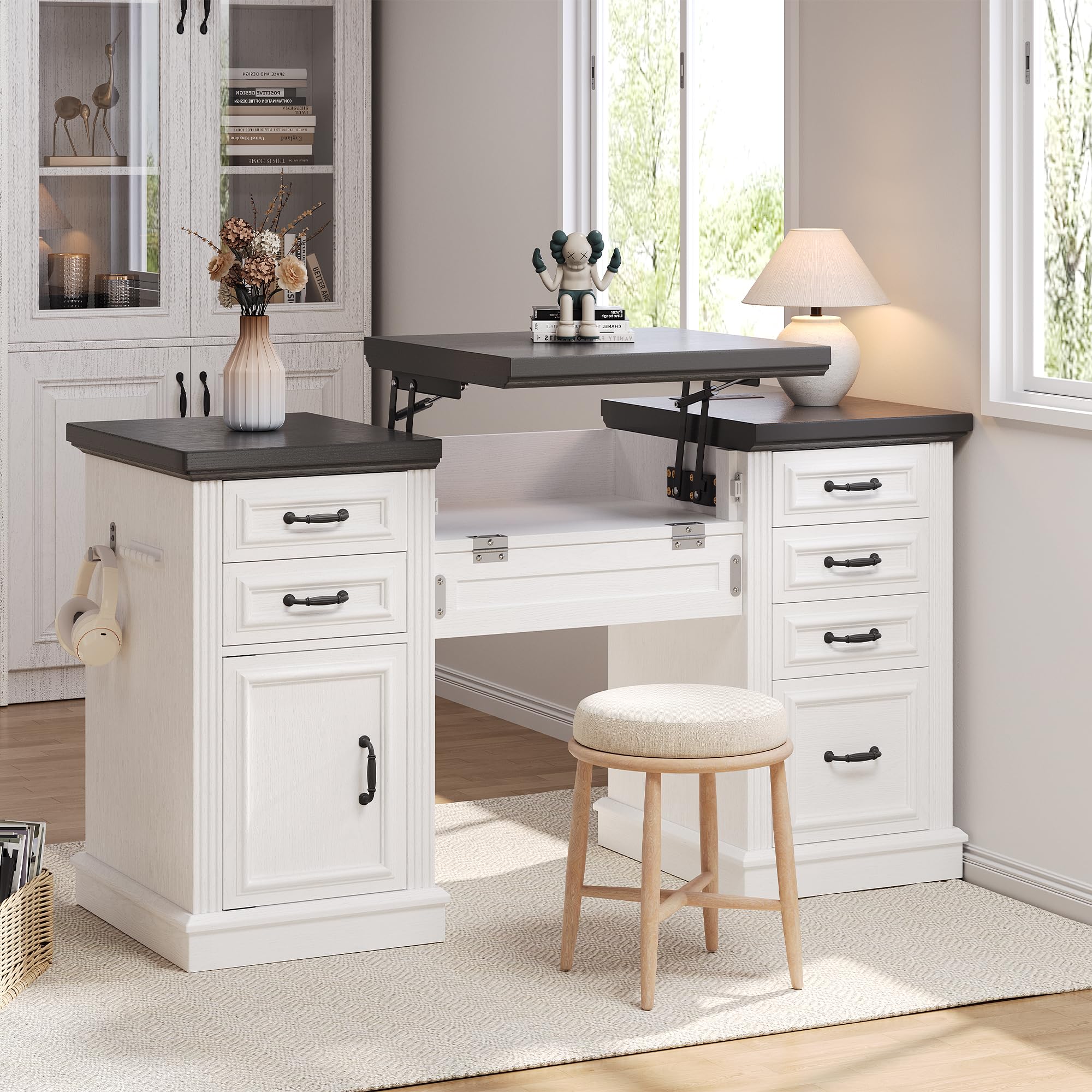
Obrázek: Sestavený stůl, připravený k použití.
Návod k obsluze
Lift-Up Desktop Mechanism
The desk features a gas spring lift mechanism for seamless sit-stand transitions.
- Ke zvýšení: Gently lift the front edge of the center desktop panel. The gas springs will assist in raising the desktop to your desired standing height.
- Snížit: Apply gentle downward pressure to the center desktop panel. Guide it smoothly back into the closed position. Ensure no objects or fingers are in the path of the closing mechanism.

Image: Detail of the gas spring lift mechanism and keyboard tray.
Zásuvky a File Skříň
The desk includes five functional drawers and a dedicated file cabinet for organized storage.
- Standardní zásuvky: Pull the retro-style handles to open and push to close. These are suitable for small items, notebooks, and office supplies.
- File Skříň: The bottom drawer on one side is designed as a file cabinet. It accommodates letter and legal-sized documents. Ensure files are properly hung on the internal rails.
- Quick-Access Desk Dresser: The cabinet on the left side provides additional storage for larger items or binders. Open the door to access.

Image: A functional drawer storing office essentials.

Image: The spacious file drawer with hanging folders.

Image: The quick-access desk dresser cabinet.
Ergonomický zásobník na klávesnici
The slide-out keyboard tray provides a comfortable position for your keyboard and mouse.
- Použití: Gently pull the tray forward from beneath the desktop.
- Chcete-li uložit: Push the tray back until it is fully recessed under the desktop.
Nabíjecí stanice
Integrovaná nabíjecí stanice poskytuje pohodlný přístup k napájení pro vaše zařízení.
- Plug the desk's power cord into a standard wall outlet.
- Use the 2 AC outlets, USB-A ports, and USB-C port to charge up to four devices simultaneously.
- Ensure devices are compatible with the provided charging outputs.

Image: Diagram of the convenient charging station.
Údržba
- Čištění: Otřete povrchy stolu reklamouamp hadříkem. Nepoužívejte agresivní chemikálie nebo abrazivní čisticí prostředky, které mohou poškodit povrchovou úpravu.
- Kontrola hardwaru: Pravidelně kontrolujte všechny šrouby a spoje, abyste se ujistili, že jsou pevně utažené. V případě potřeby je dotáhněte pro zachování stability.
- Zvedací mechanismus: The gas springs are designed for long-term use and generally require no maintenance. Do not attempt to lubricate or disassemble the mechanism.
- Posuvy zásuvek: Pokud zásuvky ztuhnou, lze na kluzáky nanést malé množství maziva na bázi silikonu.
Odstraňování problémů
Pokud narazíte na problémy se stolem, podívejte se na následující běžná řešení:
- Nestabilita stolu: Ensure all assembly hardware is fully tightened. Check that the desk is placed on a level surface.
- Zásuvky se neposouvají hladce: Verify that drawer slides are correctly installed and free of obstructions. Check for any loose hardware on the slides or drawer boxes.
- Lift Mechanism Issues: If the lift mechanism is difficult to raise or lower, ensure no objects are obstructing its movement. Do not force the mechanism. If issues persist, contact customer support.
- Nabíjecí stanice nefunguje: Confirm the desk's power cord is securely plugged into a functional wall outlet. Check that devices are properly connected to the charging ports.
For problems not addressed here, please contact Jocoevol customer support.
Specifikace
| Funkce | Detail |
|---|---|
| Značka | Jocoevol |
| Číslo modelu | C-1654 |
| Design stolu | Executive Desk with Lift-Up Feature |
| Styl | Statek |
| Barva | Bílá+černá |
| Rozměry produktu (D x Š x V) | 21.6"H x 57"Š x 30.3"V |
| Hmotnost položky | 115.3 libry |
| Typ materiálu | Umělé dřevo |
| Počet zásuvek | 5 (včetně 1 file výstavce) |
| Možnosti úložiště | 5 drawers + 1 file cabinet + 1 quick-access cabinet |
| Speciální funkce | Built-In USB Outlet, File Storage Drawer, Large Desktop, Headphone Hook, Ergonomic Keyboard Tray |
| Požadovaná montáž | Ano |
| Pokyny pro péči o produkt | Otřete pomocí Damp Tkanina |

Obrázek: Rozměry produktu nadview.
Záruka a podpora
Jocoevol stands behind the quality of its products. For warranty information, replacement parts, or technical assistance, please contact Jocoevol customer support through the retailer where the product was purchased or visit the official Jocoevol webmísto.
Please have your model number (C-1654) and purchase date available when contacting support.