
Konec produktuview
The Blaupunkt Bremen SQR 46 DAB Retro Car Stereo is a modern reinterpretation of the classic 1-DIN car radio from the 1980s. It combines vintage aesthetics with contemporary technology, offering a comprehensive in-car entertainment experience. This unit features Bluetooth connectivity, dual USB ports, SD card slot, AUX input, and AM/FM radio, along with DAB+ digital tuner capabilities. The package includes the receiver, a fully enclosed under-dash/overhead installation mounting kit, and a 22-inch radio antenna, providing a complete solution for various vehicle installations.
Co je v krabici
- Blaupunkt Bremen SQR 46 DAB Retro Car Stereo Receiver: The main head unit for audio playback and control.
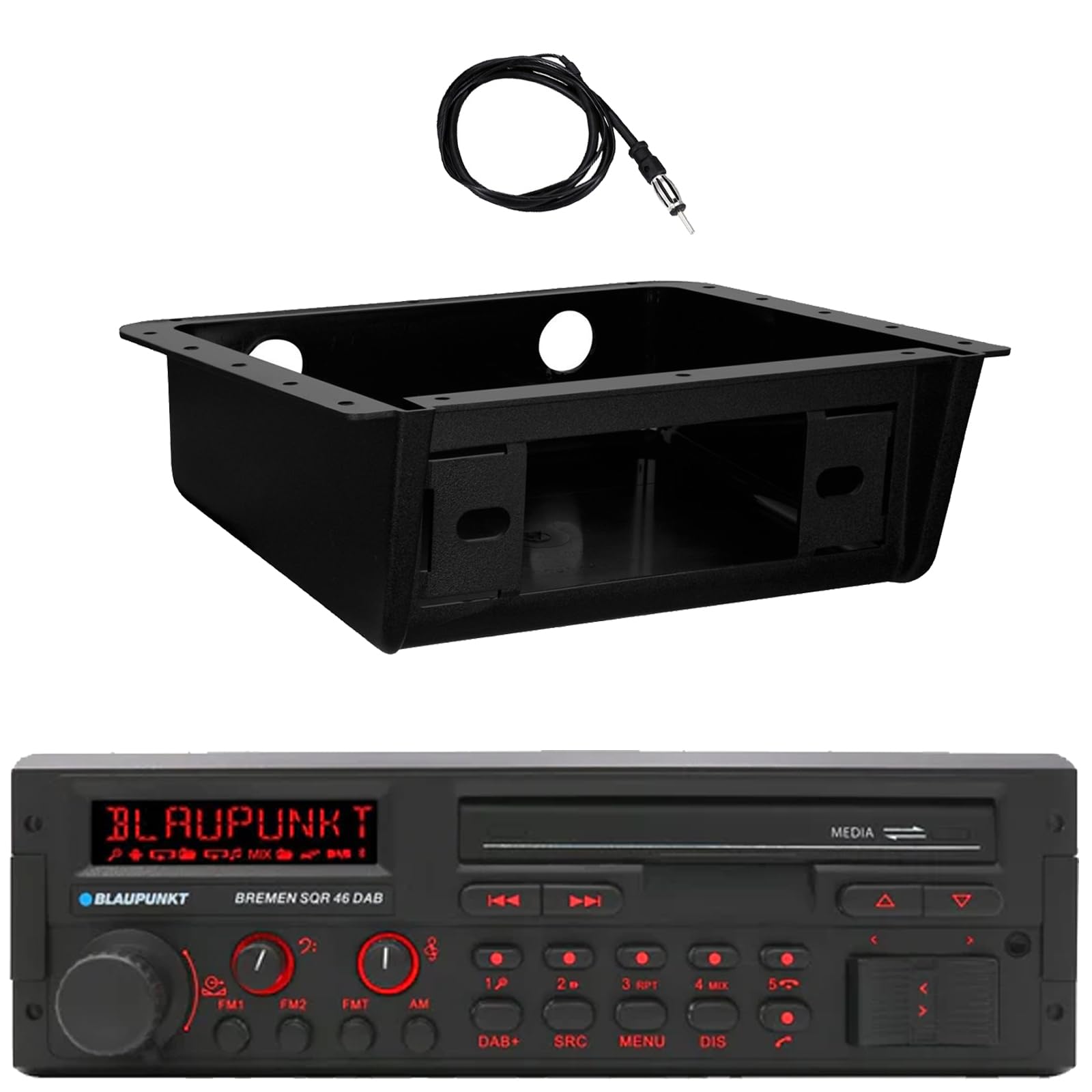
Obrázek: Přední strana view of the Blaupunkt Bremen SQR 46 DAB car stereo receiver, showing the display, control knobs, and buttons.
- Fully Enclosed Under Dash/Overhead Installation Mounting Kit: A premium housing designed for secure installation of the receiver under the dashboard or overhead.

Image: Black, rectangular under-dash/overhead mounting kit, designed to house a single DIN car stereo.
- 22" Radio Antenna: A flexible marine-grade antenna for improved AM/FM radio reception.

Image: Coiled black wire antenna with a silver connector at one end.
Nastavení a instalace
Proper installation is crucial for optimal performance. It is recommended that installation be performed by a qualified professional. This section provides general guidelines.
1. Montáž přijímače
- Under Dash/Overhead Installation: The included mounting kit is designed to fully enclose the single DIN receiver. Secure the kit to a suitable flat surface under the dashboard or overhead using appropriate fasteners (not included).
- Insert the Blaupunkt Bremen SQR 46 receiver into the mounting kit. Ensure it is securely seated and locked into place.
- Alternatively, the unit can be installed in a standard single DIN opening in your vehicle's dashboard.
2. Připojení vodičů
- Připojení napájení: Connect the yellow wire to a constant 12V power source, the red wire to a switched 12V accessory power source, and the black wire to a chassis ground.
- Připojení reproduktorů: Connect the speaker wires to your vehicle's speakers, ensuring correct polarity for each speaker.
- Připojení antény: Connect the 22" radio antenna to the antenna input on the rear of the receiver. Route the antenna cable away from other wiring to minimize interference.
- Pomocné vstupy: If using external devices, connect them to the AUX-in port.
- RCA výstupy: Pro připojení externích amplifiers, use the RCA pre-outs.
3. Počáteční zapnutí
- After all connections are made, turn on your vehicle's ignition.
- Stisknutím tlačítka napájení na přijímači jej zapněte.
- Follow any on-screen prompts for initial setup, such as language selection or clock setting.
Návod k obsluze
Základní ovládací prvky
- Vypínač: Stiskněte pro zapnutí nebo vypnutí jednotky.
- Knoflík hlasitosti: Otočením upravíte úroveň hlasitosti. Stisknutím ztlumíte/zapnete zvuk.
- Tlačítko SRC (Zdroj): Press to cycle through available audio sources: AM, FM, DAB+, Bluetooth, USB, SD, AUX.
- Tlačítko MENU: Přístup k nastavení systému a úpravám zvuku.
- DIS (Display) Button: Change display information or dim the display.
- Track/Tune Buttons (<< / >>): Use to skip tracks in media modes or tune radio frequencies.
Radio Operation (AM/FM/DAB+)
- Stiskněte tlačítko SRC tlačítko dokud AM, FMnebo DAB+ je vybráno.
- Použijte Track/Tune buttons to manually tune frequencies or seek for the next strong station.
- Přednastavené stanice: Press and hold numbered buttons (1-6) to save the current station as a preset. Press briefly to recall a saved station.
Provoz Bluetooth
- Párování:
- Ujistěte se, že je na vašem mobilním zařízení povoleno Bluetooth.
- Vybrat Bluetooth as the source on the receiver using the SRC tlačítko.
- On your mobile device, search for available Bluetooth devices and select "Blaupunkt Bremen SQR 46".
- V případě potřeby potvrďte párování.
- Streamování zvuku: Po spárování můžete streamovat zvuk ze svého zařízení. Použijte Track/Tune buttons on the receiver to skip tracks.
- Hands-free volání: When a call comes in, the unit will display caller information. Press the green call button to answer, or the red call button to reject/end.
Přehrávání z USB/SD karty
- Insert a USB drive into one of the USB ports or an SD card into the SD card slot.
- The unit will automatically switch to the USB or SD source and begin playback. If not, press the SRC tlačítko pro výběr správného zdroje.
- Použijte Track/Tune tlačítka pro navigaci mezi skladbami.
Vstup AUX
- Connect an external audio device (e.g., MP3 player) to the AUX-in port using a 3.5mm audio cable.
- Vybrat AUX as the source using the SRC tlačítko.
- Ovládejte přehrávání z připojeného zařízení.
Nastavení zvuku
- Stiskněte tlačítko MENU button to access audio settings such as Bass, Treble, Balance, Fader, and Equalizer presets.
- Rotate the volume knob to adjust values and press it to confirm selections.
Údržba
- Čištění jednotky: K otření předního panelu a displeje použijte měkký, suchý hadřík. V případě odolných nečistot lehceamphadřík vodou. Nepoužívejte agresivní chemikálie, abrazivní čisticí prostředky ani rozpouštědla.
- Porty USB/SD: Keep the USB and SD card slots free of dust and debris.
- Obecná péče: Nevystavujte jednotku extrémním teplotám, delšímu přímému slunečnímu záření nebo nadměrné vlhkosti.
Odstraňování problémů
| Problém | Možná příčina | Řešení |
|---|---|---|
| Žádná síla | Nesprávné zapojení; Spálená pojistka; Vypnuté zapalování vozidla. | Check power and ground connections. Verify vehicle fuse and unit fuse. Ensure vehicle ignition is on. |
| Žádný zvuk | Příliš nízká hlasitost; Aktivováno ztlumení; Nesprávné zapojení reproduktorů; Není vybrán zdroj. | Zvyšte hlasitost. Vypněte ztlumení. Zkontrolujte připojení reproduktorů. Vyberte správný zdroj zvuku. |
| Bluetooth se nepřipojuje | Device not in pairing mode; Unit not in Bluetooth source; Interference. | Ensure Bluetooth is enabled on device and unit. Put device in pairing mode. Try re-pairing. Move closer to the unit. |
| Špatný příjem rádia | Anténa není připojena; Poškozená anténa; Oblast se slabým signálem. | Check antenna connection. Inspect antenna for damage. Try tuning to a stronger station or moving to a different location. |
| USB/SD karta se nepřehrává | Nepodporováno file formát; Poškozené médium; Vybrán nesprávný zdroj. | Zajistit files are in a supported format (e.g., MP3, WMA). Try a different USB drive/SD card. Select USB/SD source. |
Specifikace
| Funkce | Detail |
|---|---|
| Značka | BLAUPUNKT |
| Číslo modelu | Bremen SQR 46 |
| Technologie připojení | Pomocný, Bluetooth |
| Typ ovladače | Stiskněte tlačítko |
| Speciální funkce | Built-In Bluetooth, USB, SD Card, AUX-in, DAB+ digital tuner |
| Kompatibilní zařízení | Amplifier, Smartphones, USB drives, SD cards |
| Režim zvukového výstupu | Stereo |
| Typ zvukového výstupu | RCA (6 channels) |
| Počet jednotek | 1 (Přijímač) |
| Zahrnuté komponenty | Receiver, Stereo Install Kit, Radio Antenna |
Informace o záruce
This Blaupunkt Bremen SQR 46 DAB Retro Car Stereo comes with a 1 roky záruka výrobce. This warranty covers defects in materials and workmanship under normal use. Please retain your proof of purchase for warranty claims. For detailed terms and conditions, refer to the warranty card included with your product or visit the official Blaupunkt webmísto.
Zákaznická podpora
For further assistance, technical support, or warranty inquiries, please contact Blaupunkt customer service. You can typically find contact information on the official Blaupunkt webwebu nebo v dokumentaci dodané s vaším produktem.
Oficiální Webmísto: www.blaupunkt.com (Please note: This link is a general placeholder. Refer to your product's specific documentation for the most accurate support contact information.)