
Zavedení
This manual provides comprehensive instructions for the setup, operation, maintenance, and troubleshooting of your Kreo Swarm 65 Wireless Mechanical Gaming Keyboard. Please read this manual carefully before using the product to ensure optimal performance and longevity.
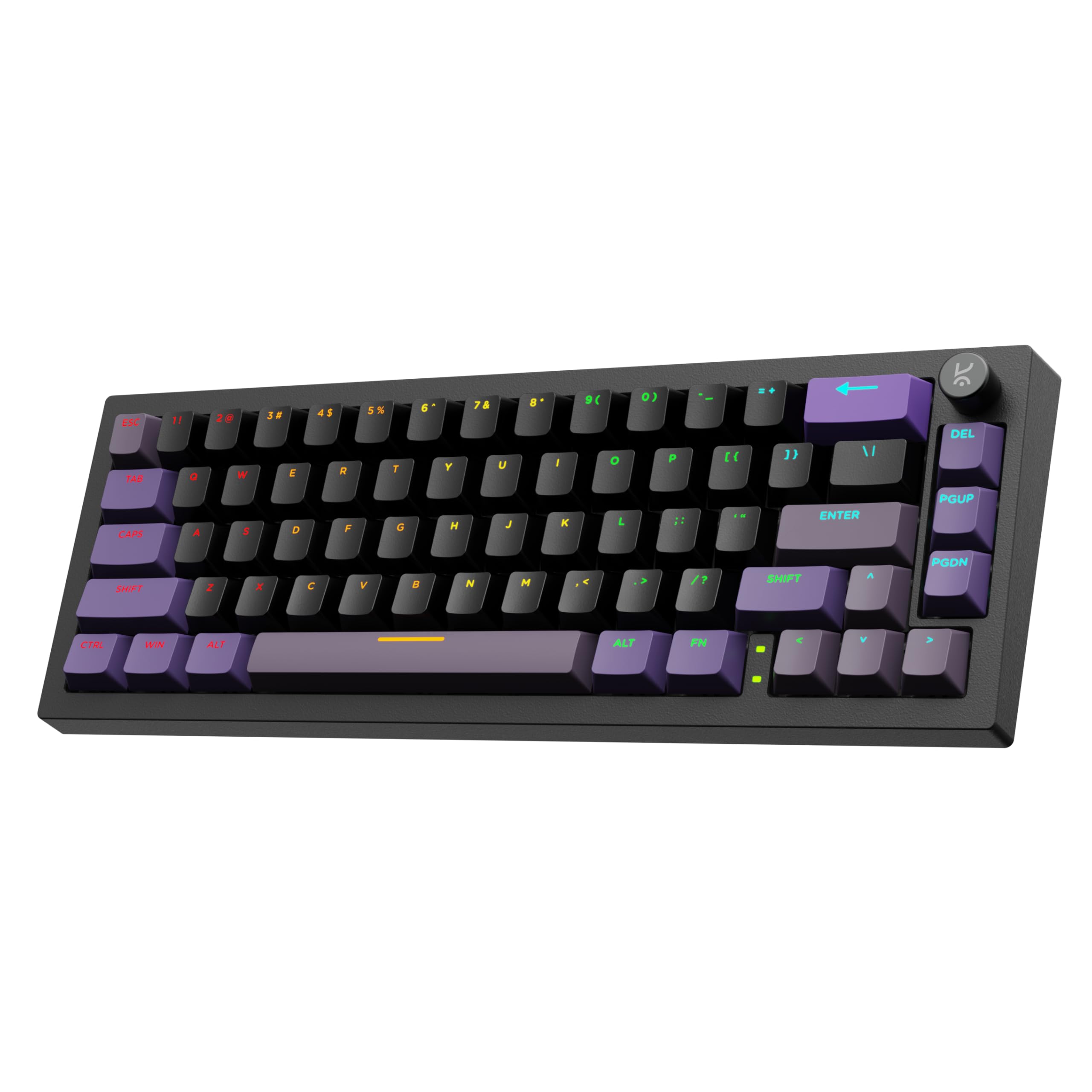
Image: The Kreo Swarm 65 Wireless Mechanical Gaming Keyboard, showcasing its compact 65% layout and RGB lighting.
Obsah balení
- Kreo Swarm 65 Wireless Mechanical Gaming Keyboard
- USB-C kabel
- 2.4GHz bezdrátový dongle
- Stahovač klíčů
- Stahovák spínačů
- Uživatelská příručka (tento dokument)
Konec produktuview
The Kreo Swarm 65 is a versatile mechanical keyboard designed for gaming and productivity, featuring multiple connectivity options and customizable components.
Klíčové vlastnosti:
- Třírežimové připojení: Podporuje Bluetooth 5.0, bezdrátové připojení 2.4 GHz a kabelové připojení USB-C.
- Provedení s těsněním: Provides cushioned keystrokes and improved acoustics.
- 5-Layer Sound Dampening: Reduces case ping and stabilizes typing sound for a quieter experience.
- Hot-Swap PCB: Compatible with 3-pin and 5-pin mechanical switches without soldering.
- Klávesnice Doubleshot PBT: Durable keycaps with a Cherry profile for clear RGB diffusion.
- Kompaktní rozvržení 65 %: A 67-key layout that includes arrow keys and navigation buttons.
- Customizable Metal Volume Knob: Pro pohodlné ovládání zvuku.
- Per-Key RGB Lighting: North-facing LEDs with software control for personalized illumination.
- Dlouhá výdrž baterie: 4000mAh battery offering up to 200 hours of use (RGB off).
- Kompatibilita napříč platformami: Supports Windows, macOS, Linux, and Android.

Image: An exploded diagram illustrating the internal layers of the Kreo Swarm 65 keyboard, including Lucidus Keycaps, Upper Cover, Kreo Starling Switches, Polycarbonate Plate, Switch Plate Foam, Switch Film Sheets, PCB, PCB Foam, Silicone Pad, and Bottom Shell.

Image: A close-up showing the doubleshot PBT keycaps with a Cherry profile, highlighting their construction for durability and light transmission.

Image: A visual comparison demonstrating the difference between a doubleshot PBT shadowless keycap, which provides brighter and more even illumination, and a normal keycap, which may appear dimmer near rounded edges.
Nastavení
1. Nabíjení klávesnice
Before first use, connect the keyboard to a USB power source using the provided USB-C cable. The charging indicator will show the battery status.
2. Připojení klávesnice
The Kreo Swarm 65 supports three connection modes:
- Drátový režim USB-C: Připojte klávesnici přímo k zařízení pomocí kabelu USB-C. Klávesnice se automaticky přepne do kabelového režimu.
- Bezdrátový režim 2.4 GHz:
- Locate the 2.4GHz wireless dongle. It is stored in the dedicated dongle slot on the keyboard's underside.
- Vložte hardwarový klíč do volného portu USB na vašem počítači.
- Switch the keyboard's mode selector to 2.4GHz. The keyboard should connect automatically.
- Bluetooth 5.0 Wireless Mode:
- Switch the keyboard's mode selector to Bluetooth.
- Na svém zařízení (počítač, notebook, tablet, chytrý telefon) povolte Bluetooth a vyhledejte nová zařízení.
- Select "Kreo Swarm 65" from the list of available devices to pair.
- The keyboard can store up to 3 paired Bluetooth devices. Use the dedicated shortcut keys (e.g., Fn + 1, Fn + 2, Fn + 3) to switch between them.

Image: The Kreo Swarm 65 keyboard connected via USB, 2.4GHz wireless, and Bluetooth to a laptop, desktop, and tablet, demonstrating its tri-mode connectivity and compatibility with Mac/Windows software.

Obrázek: Detailní záběr view of the dedicated dongle slot on the underside of the Kreo Swarm 65 keyboard, designed for secure storage of the 2.4GHz wireless receiver.
Návod k obsluze
1. Základní funkce klávesnice
The Kreo Swarm 65 features a compact 65% layout. Standard keys function as labeled. For secondary functions (e.g., F-keys, media controls), use the Fn key in combination with the corresponding key.
2. Ovládání RGB osvětlení
The keyboard features per-key RGB lighting with multiple customizable modes. Use the following shortcuts or the dedicated software for control:
- Fn + \: Cyklické přepínání mezi RGB světelnými efekty.
- Fn + klávesy se šipkami: Upravte jas a rychlost efektů.
- Ovládání softwaru: Download the Kreo software from the official website to customize lighting, macros, and key assignments.
3. Customizable Metal Volume Knob
The metal knob located on the top right of the keyboard provides convenient control:
- Střídat: Upravte hlasitost nahoru nebo dolů.
- Stiskněte: Ztlumit nebo zapnout zvuk.
- Přizpůsobení softwaru: The knob's functions can be remapped using the Kreo software.

Image: A close-up of the customizable metal volume knob on the Kreo Swarm 65 keyboard, indicating its function can be tailored to user workflow.
4. Cross-Platform Compatibility
The keyboard supports both Windows and macOS layouts. Use the dedicated shortcut (e.g., fn + A pro Windows, Fn + S for macOS, consult the keyboard's specific key legends if different) to switch between operating system layouts. It is also plug-and-play compatible with Linux and Android devices.
Údržba
1. Čištění klávesnice
- Před čištěním odpojte klávesnici od všech zdrojů napájení.
- Použijte měkký hadřík, který nepouští vlákna dampKlávesy a šasi otřete vodou nebo jemným čisticím roztokem.
- Pro odstranění prachu a nečistot mezi klávesami použijte stlačený vzduch.
- To clean under the keycaps, use the provided keycap puller to carefully remove them.
2. Výměna kláves a přepínačů
The Kreo Swarm 65 features a hot-swap PCB, allowing for easy replacement of switches without soldering.
- Výměna krytky kláves: Use the provided keycap puller to gently remove keycaps. Align new keycaps and press them firmly onto the switch stem.
- Výměna spínače:
- First, remove the keycap using the keycap puller.
- Use the provided switch puller to grip the top and bottom clips of the switch.
- Jemně vytáhněte spínač přímo nahoru a vyjměte jej z desky plošných spojů.
- Zarovnejte piny nového 3pinového nebo 5pinového spínače s otvory na desce plošných spojů.
- Nový spínač pevně zatlačte na místo, dokud nezaklapne. Ujistěte se, že kolíky nejsou ohnuté.

Image: A close-up of the Kreo Swarm 65's 5-pin hot-swap PCB, showing the sockets ready for switch installation, indicating unlimited switch compatibility.
Odstraňování problémů
| Problém | Možná příčina | Řešení |
|---|---|---|
| Klávesnice nereaguje v bezdrátovém režimu. | Low battery, incorrect mode, dongle not connected, Bluetooth not paired. | Charge the keyboard. Ensure the mode switch is set correctly (2.4GHz or Bluetooth). Re-insert the 2.4GHz dongle. Re-pair Bluetooth. Try wired mode to confirm keyboard functionality. |
| RGB lighting not working or dim. | Brightness set too low, lighting effect turned off, software issue. | Adjust brightness using Fn + Arrow Up. Cycle through effects using Fn + \. Check Kreo software settings. |
| Klávesy se neregistrují nebo se píší dvakrát. | Faulty switch, debris under keycap/switch, software conflict. | Remove keycap and clean around the switch. If issue persists, replace the switch. Update keyboard firmware/software. |
| Cannot switch between devices (Bluetooth). | Device not properly paired, incorrect shortcut used. | Ensure all devices are paired correctly. Use Fn + 1/2/3 to switch. Re-pair if necessary. |
Specifikace
| Značka | Kreo |
| Název modelu | Swarm 65 Starling |
| Číslo modelu | KM3R651BK |
| Technologie připojení | Bluetooth 5.0, bezdrátové připojení 2.4 GHz, kabelové připojení USB-C |
| Popis klávesnice | Mechanické |
| Typ přepínače | Starling Linear (also compatible with GTMX Tactile) |
| Materiál krytky klíče | Dvojitý shot PBT |
| Rozložení | 65 % (67 kláves) |
| Kapacita baterie | 4000 XNUMX mAh |
| Výdrž baterie (RGB vypnuto) | Až 200 hodin |
| Míra hlasování | 1000Hz (Wired & Wireless) |
| Kompatibilní zařízení | Počítač, notebook, tablet, chytrý telefon |
| Operační systémy | Windows, MacOS, Linux, Android |
| Rozměry produktu | 25 x 14 x 3 cm |
| Hmotnost položky | 500 g |
| Země původu | Čína |
Záruka a podpora
For warranty information and technical support, please refer to the official Kreo website or contact customer service using the details below:
- Výrobce: Kreo, Koramangala 4-B Block, Bengaluru, Karnataka 560034
- Telefon: 9611507877
- E-mail: help@kreo-tech.com
Uschovejte si prosím doklad o koupi pro uplatnění záruky.