
1. Úvod
Thank you for choosing the SJCAM C400 4K Pocket Vlog Action Camera. This manual provides essential information for setting up, operating, and maintaining your camera. Please read it carefully before use to ensure optimal performance and longevity of your device.

The SJCAM C400 is a versatile 4K pocket vlog action camera designed for capturing high-quality video and photos in various scenarios.
2. Bezpečnostní informace
- Nevystavujte fotoaparát extrémním teplotám ani přímému slunečnímu záření po delší dobu.
- Uchovávejte fotoaparát mimo dosah silných magnetických polí.
- Zabraňte pádu fotoaparátu na zem nebo jeho vystavení silným nárazům.
- Nepokoušejte se fotoaparát rozebírat ani upravovat.
- Ensure all ports are dry before charging or connecting to other devices.
- Používejte pouze schválené příslušenství a nabíječky.
3. Obsah balení
Ověřte, zda balení obsahuje všechny následující položky:
- Kamerová jednotka SJCAM C400
- Rukojeť baterie
- Držák rámu
- Vodotěsné pouzdro
- USB kabel
- Řemínek na ruku
- Konzola
- Zadní klip
- Flat Bottom Bracket
- Základna přilby
- Stativ
- Magnetický pásek

Image showing the SJCAM C400 camera and its various included accessories.
4. Fotoaparát skončilview
Familiarize yourself with the main components of your SJCAM C400 camera:
- Front Touch Screen: 1.3-inch display for intuitive control and preview.
- Úvodní obrazovka: 2.23-inch display for detailed viewa nastavení.
- Čočka: High-quality f/2.0 large aperture lens with 154° ultra-wide-angle FOV.
- Tlačítko napájení / režimu: Used to power on/off and switch between modes.
- Tlačítko spouště/záznamu: Spuštění/zastavení nahrávání nebo pořízení fotografií.
- Port USB Type-C: Pro nabíjení a přenos dat.
- Slot pro microSD kartu: Pro vložení paměťové karty.

The SJCAM C400 features dual screens for versatile operation and monitoring.
5. Nastavení
5.1. Nabíjení baterie
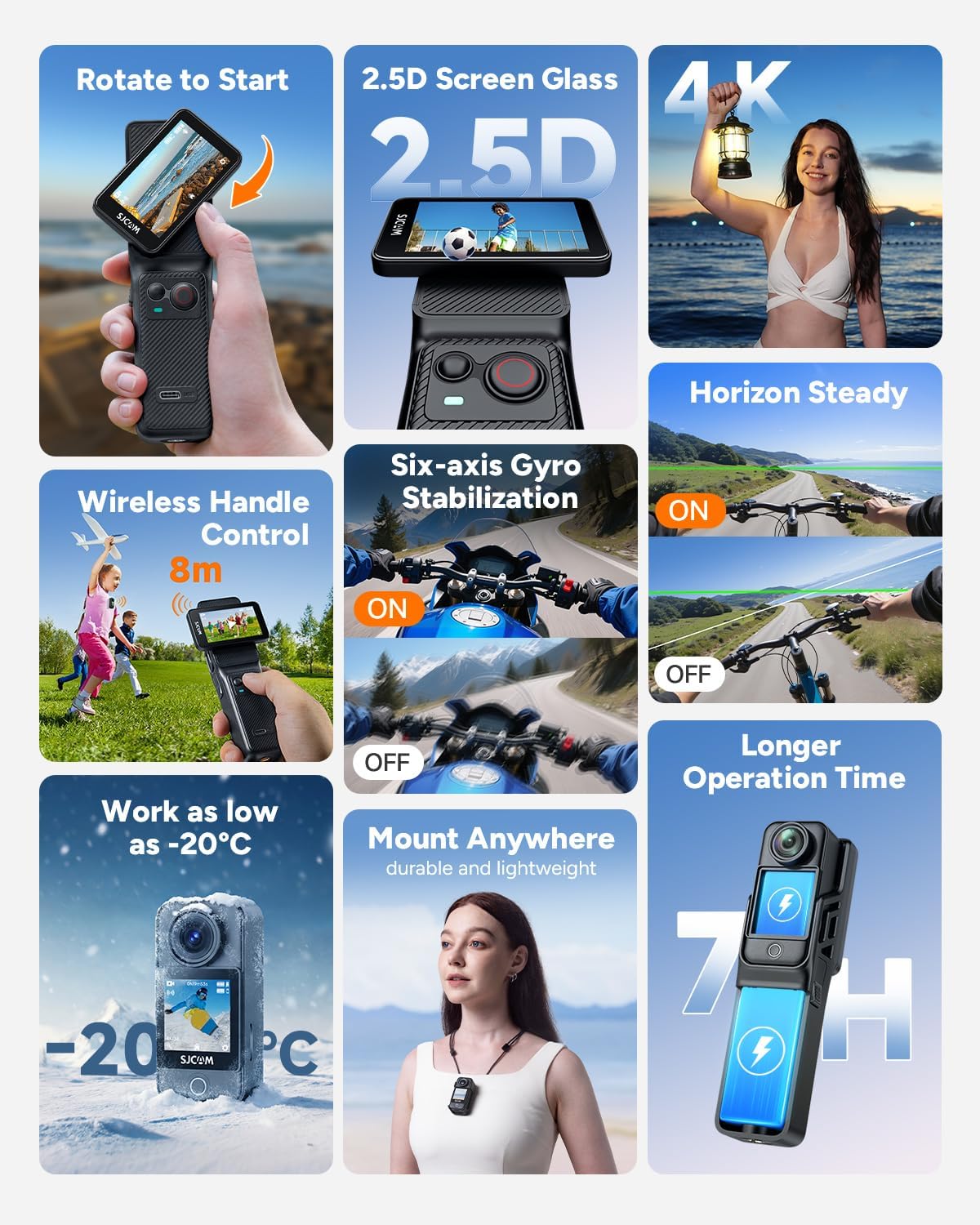
Connect the camera to a power source using the provided USB Type-C cable. The charging indicator will show the charging status. A full charge provides approximately 460 minutes (7 hours 40 minutes) of continuous 4K30fps recording when using both the camera and battery handle.
The camera and battery handle provide extended operation time.
5.2. Vložení karty MicroSD
Locate the MicroSD card slot on the camera. Insert a compatible MicroSD card (up to 128GB, Class 10 or higher recommended) with the contacts facing down until it clicks into place.
5.3. Zapnutí/vypnutí
Press and hold the Power/Mode button for a few seconds to power the camera on or off.
5.4. Počáteční nastavení
Upon first use, you may need to set the language, date, and time. Navigate through the menu using the touch screen to configure these settings.
6. Ovládání fotoaparátu
6.1. Základní ovládací prvky a dotyková obrazovka
The SJCAM C400 features a responsive touch screen for easy navigation. Swipe and tap to access menus, change settings, and switch between shooting modes. The front 1.3-inch screen allows for intuitive composition adjustments, especially for vlogging.

The large screen offers intuitive control and a clear view tvého jídlatage.
6.2. Rotating Screen Functionality
The camera's screen can be rotated to switch between horizontal (16:9) and vertical (9:16) recording orientations, ideal for different platforms like YouTube and TikTok.

Easily switch between horizontal and vertical video formats by rotating the screen.
6.3. Nahrávání videa a pořizování fotografií
The C400 supports 4K/30fps, 2.5K, and 1080P video resolutions. Press the Shutter/Record button to start or stop recording. For photos, switch to photo mode and press the Shutter/Record button.

Experience sharp, clear, and vivid images with 4K resolution.
6.4. Stabilizace obrazu
The camera features 6-axis Electronic Image Stabilization (EIS) and Horizon Steady functions to ensure smooth and stable footage, even during dynamic activities.

6-axis gyro stabilization and Horizon Steady keep your footage smooth and level.
6.5. Bezdrátové ovládání
The detachable handheld controller connects via Bluetooth, allowing you to operate the camera remotely from up to 8 meters away. The controller screen provides a real-time preview.

Control your camera wirelessly from a distance of up to 8 meters.
6.6. Režimy fotografování
The C400 offers various shooting modes for creative capture:
- Normální nahrávání: Standard video capture.
- Interval Recording (Time-lapse): Zhuštěte dlouhé události do krátkých videí.
- Zpomalený pohyb: Capture detailed movements (e.g., 720P/120fps).
- Detekce pohybu: Automatically records when motion is detected.
- Nahrávání ve smyčce: Continuously records, overwriting older footage.
- Sériové snímání: Pořiďte více fotografií v rychlém sledu.
- Časovač fotografování: Nastavte prodlevu před pořízením fotografie.

Time-lapse mode captures the essence of changing scenes.
6.7. Voděodolné použití
When placed in its professional waterproof case, the C400 is waterproof up to 30 meters (98 feet), making it suitable for snorkeling, surfing, and cycling in the rain.

The waterproof case allows for underwater recording up to 30 meters.
6.8. Hands-free POV
The compact design and magnetic strap allow for easy, hands-free Point-of-View (POV) recording, perfect for vlogging and capturing daily activities.

Capture hands-free POV footage with the magnetic strap accessory.
6.9. Webcam Mode & Live Streaming
Připojte fotoaparát k počítači přes USB, abyste jej mohli používat jako webcam. The C400 also supports direct live streaming to compatible platforms without additional equipment.

Utilize the camera for webcam functionality or direct live streaming.
7. Údržba
7.1. Čištění fotoaparátu
Use a soft, lint-free cloth to clean the camera body and lens. For stubborn smudges on the lens, use a specialized lens cleaning solution and cloth. Do not use harsh chemicals or abrasive materials.
7.2. Péče o baterie
To prolong battery life, avoid fully discharging the battery frequently. Store the camera with a partially charged battery (around 50%) if not used for extended periods. Do not expose the battery to extreme heat.
7.3. Skladování
Store the camera in a cool, dry place, away from dust and moisture. When storing for long periods, remove the MicroSD card and ensure the battery is partially charged.
8. Řešení problémů
| Problém | Možná příčina | Řešení |
|---|---|---|
| Fotoaparát se nezapne. | Slabá baterie; vadná baterie; porucha fotoaparátu. | Charge the battery fully. Try a different charging cable/adapter. If issue persists, contact support. |
| Nelze nahrávat video/fotit. | No MicroSD card; MicroSD card full; MicroSD card error; incorrect mode. | Insert a MicroSD card. Delete files or replace card. Format the card. Switch to correct mode. |
| Špatná kvalita obrazu/videa. | Znečištěný objektiv; špatné světelné podmínky; nesprávné nastavení. | Clean the lens. Ensure adequate lighting. Adjust resolution, exposure, or other settings. |
| Wireless control not working. | Bluetooth/Wi-Fi off; out of range; pairing issue. | Ensure Bluetooth/Wi-Fi is enabled on both devices. Move closer to the camera. Re-pair the devices. |
9. Specifikace
| Funkce | Detail |
|---|---|
| Značka | SJCAM |
| Číslo modelu | C400 |
| Technologie fotosenzoru | CMOS (1/2.8 palce) |
| Rozlišení záznamu videa | 4K (30fps), 2.5K, 1080P |
| Clona objektivu | f/2.0 |
| Pole View (FOV) | 154° široký úhel |
| Optický zoom | 8X |
| Stabilizace obrazu | 6-axis Gyro (EIS) |
| Velikost přední obrazovky | 1.3 palců (dotyková obrazovka) |
| Velikost hlavní obrazovky | 2.23 palců |
| Konektivita | Bluetooth, Wi-Fi (5G), USB Type-C |
| Paměťová média | MicroSD karta (až 128 GB) |
| Vodotěsná hloubka | 30 metrů (s vodotěsným pouzdrem) |
| Životnost baterie | Approx. 460 minutes (4K30fps with handle + small battery) |
| Rozměry produktu | 3.8 x 3.8 x 14 cm |
| Hmotnost produktu | 760 g |
10. Záruka a podpora
The SJCAM C400 comes with a 1letá bezplatná záruka from the date of purchase. For any technical issues or inquiries, please contact our 24hodinová online podpora. Refer to the official SJCAM webkonkrétní kontaktní údaje naleznete na webových stránkách nebo v nákupní dokumentaci.
11. Volitelné příslušenství
Enhance your SJCAM C400 experience with a range of optional accessories:
- Prodlužovací adaptér
- Pomocné světlo
- Magnetický přívěsek
- Additional Tripods and Mounts

A selection of optional accessories to expand your camera's capabilities.