
1. Důležité bezpečnostní pokyny
Please read all safety instructions carefully before using the WANBO Cube 1 Projector. Keep this manual for future reference.
- Napájení: Používejte pouze dodaný napájecí adaptér. Ujistěte se, že hlasitosttage odpovídá požadavkům projektoru.
- Větrání: Neblokujte větrací otvory. Zajistěte dostatečné proudění vzduchu kolem projektoru, abyste zabránili přehřátí.
- Expozice tekutin: Keep the projector away from water or other liquids. Do not operate with wet hands.
- Čištění: Před čištěním projektor odpojte ze zásuvky. Použijte měkký, suchý hadřík. Nepoužívejte tekuté ani aerosolové čisticí prostředky.
- Umístění: Umístěte projektor na stabilní, rovný povrch. Neumísťujte jej na přímé sluneční světlo ani do blízkosti zdrojů tepla.
- Ochrana očí: Do not look directly into the projector lens when the device is on.
- Demontáž: Nepokoušejte se projektor rozebírat ani opravovat sami. Požádejte o pomoc kvalifikovaný servisní personál.
2. Konec produktuview
The WANBO Cube 1 is a compact and versatile smart projector designed for home entertainment. Featuring Android TV 11.0, a 360-degree rotating stand, and a built-in 8W HiFi speaker, it delivers an immersive viewing experience with ease of use.
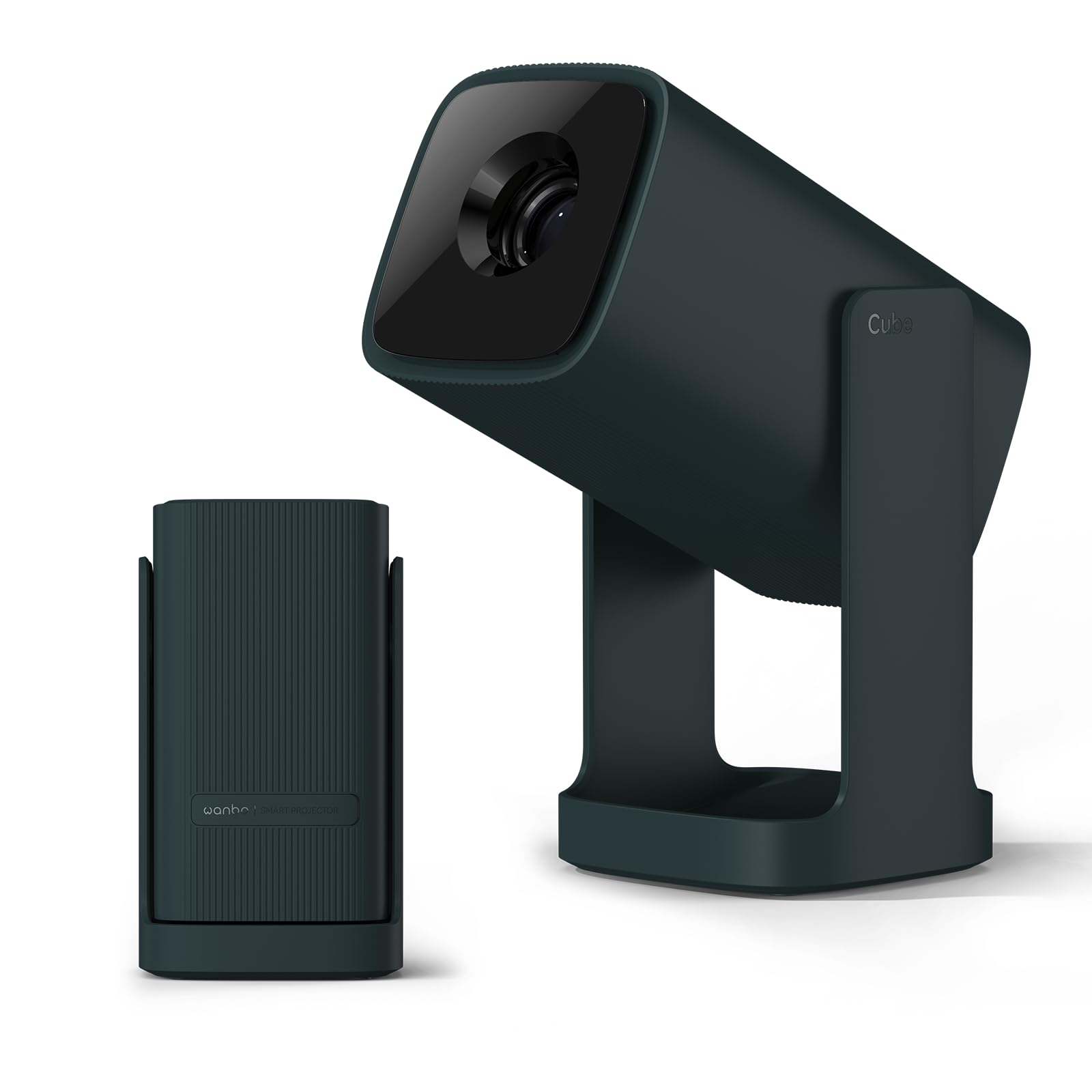
Image: The WANBO Cube 1 Projector in its dark green finish.

Obrázek: Detailní záběr view of the WANBO Cube 1, highlighting its compact and sleek design.
Video: Overview of the WANBO Cube 1 Projector's features, including its design, automatic adjustments, and smart capabilities.
Klíčové vlastnosti:
- Android TV 11.0: Access popular streaming apps directly from Google Play Store, including Netflix, Prime Video, YouTube, Disney+, and more.
- Otočný stojan o 360°: Project onto walls, ceilings, or any surface with flexible angle adjustments. The integrated stand also protects the lens when folded.
- Kompaktní a přenosné: Weighing approximately 0.9kg, its small size makes it easy to carry for various uses.
- Vysoce kvalitní projekce: 200 ISO lumens brightness and a 1.2:1 throw ratio allow for a 100-inch screen from approximately 2.7 meters.
- Pohlcující zvuk: Built-in 8W HiFi speaker delivers rich sound without the need for external speakers.
- Smart Image Adjustment: Features electric focus, automatic vertical keystone correction, and 4-point manual correction for a perfectly rectangular image.
- Všestranná konektivita: Supports HDMI (ARC), USB, 3.5mm audio jack, 5GHz/2.4GHz dual-band Wi-Fi, and Bluetooth 5.0 for seamless connection to various devices.
- Tichý provoz: Operates at a low noise level of 28dB, ensuring an undisturbed viewzkušenosti.
3. Obsah balení
Ověřte, zda je v balení obsaženo vše:
- WANBO Cube 1 Projector
- Dálkové ovládání
- Napájecí kabel
- Uživatelská příručka (tento dokument)
4. Začínáme: Nastavení
4.1 Počáteční zapnutí
- Připojte napájecí kabel k projektoru a poté do elektrické zásuvky.
- Stisknutím tlačítka napájení na projektoru nebo na dálkovém ovladači jej zapněte.
4.2 Párování dálkového ovládání
If the remote control is not responsive, it may need to be paired:
- Ensure the projector is on.
- Namiřte dálkový ovladač na projektor.
- Press and hold the indicated pairing button (refer to remote control diagram in the physical manual if available) until the pairing indicator appears on screen.
4.3 Síťové připojení
- From the Android TV home screen, navigate to Nastavení.
- Vybrat Síť a internet.
- Vyberte svou síť Wi-Fi a zadejte heslo.
4.4 Úprava obrazu
The WANBO Cube 1 offers several ways to achieve a perfect image:
- Elektrické ostření: Use the remote control to fine-tune the image sharpness.
- Automatická vertikální korekce lichoběžníkového zkreslení: The projector automatically adjusts the image to be rectangular when placed at an angle vertically.
- 4bodová manuální korekce lichoběžníkového zkreslení: For precise adjustments, especially when projecting from a side angle, use the manual 4-point correction feature in the settings.
- Funkce zoom: Upravte velikost promítací plochy od 50 % do 100 % tak, aby se přizpůsobila projekční ploše, aniž byste museli projektor přemisťovat.

Image: Illustration of the one-touch adjustment capabilities, including electric focus and keystone correction.

Image: Visual representation of the short-throw lens, showing different screen sizes at various distances.
5. Provoz
5.1 Rozhraní Android TV 11.0
The projector runs on official Android TV 11.0, providing a user-friendly interface for navigating content and apps.

Image: The Android TV 11.0 home screen displaying various streaming applications.
5.2 App Installation and Streaming
Access a wide range of entertainment by installing apps directly from the Google Play Store:
- Navigate to the Google Play Store icon on the home screen.
- Hledat your desired apps (e.g., Netflix, Prime Video, YouTube, Disney+, Hulu, U-NEXT, AbemaTV, TVer).
- Install and open the apps to start streaming.

Image: The Netflix interface projected by the WANBO Cube 1, demonstrating high-quality streaming.
5.3 Google Cast and Voice Assistant
- Google Cast: Easily mirror content from your smartphone or PC to the projector. Ensure both devices are connected to the same Wi-Fi network.
- Hlasový asistent: Use the built-in voice assistant by pressing the dedicated button on your remote and speaking commands for search, playback, and more.

Image: A user interacting with the Google Assistant feature on the WANBO Cube 1 Projector.
5.4 Audio výstup
The projector features an integrated 8W HiFi speaker for clear and powerful audio. No additional speakers are required for a complete audio-visual experience.

Image: The WANBO Cube 1 Projector highlighting its powerful 8W HiFi speaker for immersive sound.
5.5 Časovač vypnutí
Utilize the sleep timer function to automatically power off the projector after a set period, ideal for watching content before sleep.

Image: The projector operating quietly, with a visual of the sleep timer function on the screen.
6. Konektivita
The WANBO Cube 1 offers multiple wired and wireless connection options:
- HDMI (ARC compatible): Connect gaming consoles, TV sticks, laptops, and other HDMI-enabled devices.
- USB: Connect USB drives for media playback or other peripherals.
- 3.5mm audio jack: Připojte externí sluchátka nebo reproduktory.
- Dual-band Wi-Fi (5GHz/2.4GHz): For fast and stable internet connection and wireless mirroring.
- Bluetooth 5.0: Pair with wireless speakers, headphones, or other Bluetooth devices.

Image: A close-up of the projector's rear panel, showing the HDMI, USB, and audio ports.
7. Údržba
7.1 Čištění projektoru
- Před čištěním se ujistěte, že je projektor vypnutý a odpojený od sítě.
- K otření vnějšího povrchu použijte měkký, suchý hadřík, který nepouští vlákna.
- For the lens, use a specialized lens cleaning cloth or brush. Do not use abrasive materials or harsh chemicals.
7.2 Ochrana čočky
The integrated 360° rotating stand doubles as a lens cover. When the stand is folded, it protects the lens from dust and scratches, eliminating the need for a separate lens cap.

Image: The WANBO Cube 1's minimalist design, showing how the integrated stand protects the lens when closed.
8. Řešení problémů
If you encounter issues with your WANBO Cube 1 Projector, refer to the following table for common problems and solutions:
| Problém | Možná příčina | Řešení |
|---|---|---|
| Žádné napájení/Nezapíná se | Power cord not connected properly; Power outlet issue; Projector fault. | Check power cord connection. Try a different outlet. Contact support if issue persists. |
| Rozmazaný obraz | Focus not adjusted; Keystone not corrected; Projector too far/close to screen. | Use electric focus to sharpen. Apply automatic or manual keystone correction. Adjust projection distance. |
| Žádný zvuk nebo špatná kvalita zvuku | Volume too low; Muted; External audio device not connected correctly; Source audio issue. | Increase volume. Unmute. Check external audio connections. Verify audio output from source device. |
| Dálkové ovládání nefunguje | Batteries low/dead; Not paired; Obstruction. | Vyměňte baterie. Znovu spárujte dálkový ovladač (viz kapitola 4.2). Ujistěte se, že mezi dálkovým ovladačem a projektorem nejsou žádné překážky. |
| Nelze se připojit k Wi-Fi | Nesprávné heslo; Problém s routerem; Mimo dosah. | Double-check Wi-Fi password. Restart router. Move projector closer to router. |
9. Specifikace
| Funkce | Detail |
|---|---|
| Značka | WANBO |
| Číslo modelu | Kostka 1 |
| Doporučené použití | Domácí kino |
| Operační systém | Android TV 11.0 |
| Jas | 200 ISO lumenů |
| Nativní rozlišení | 1280 x 720 pixelů |
| Poměr házení | 1.2:1 (krátká projekční vzdálenost) |
| Reproduktor | 8W HiFi Built-in Speaker |
| Konektivita | HDMI (ARC), USB, 3.5mm Audio, Infrared |
| Bezdrátové připojení | 5GHz/2.4GHz Dual-band Wi-Fi, Bluetooth 5.0, Chromecast |
| Hmotnost | Přibl. 0.9 kg |
| Úroveň hluku | 28 dB |
| Speciální funkce | Internet compatible, Built-in speaker, Short throw, Automatic Keystone Correction, Electric Focus, 360° Rotating Stand |
| Země původu | Čína |
10. Záruka a podpora
Informace o záruce a technickou podporu naleznete v záručním listu dodaném s vaším produktem nebo navštivte oficiální webové stránky WANBO. webwebu. Uschovejte si účtenku jako doklad o koupi.
If you require further assistance, please contact WANBO customer service.