
1. Úvod
The Reflexion HIF2082DAB is a versatile retro-style music system designed to combine nostalgic aesthetics with modern audio technology. This unit integrates a turntable, CD player, DAB+/FM radio, USB playback and recording capabilities, and Bluetooth 5.3 connectivity. It is equipped with external speakers to deliver clear and powerful sound, making it a comprehensive audio solution for various environments.
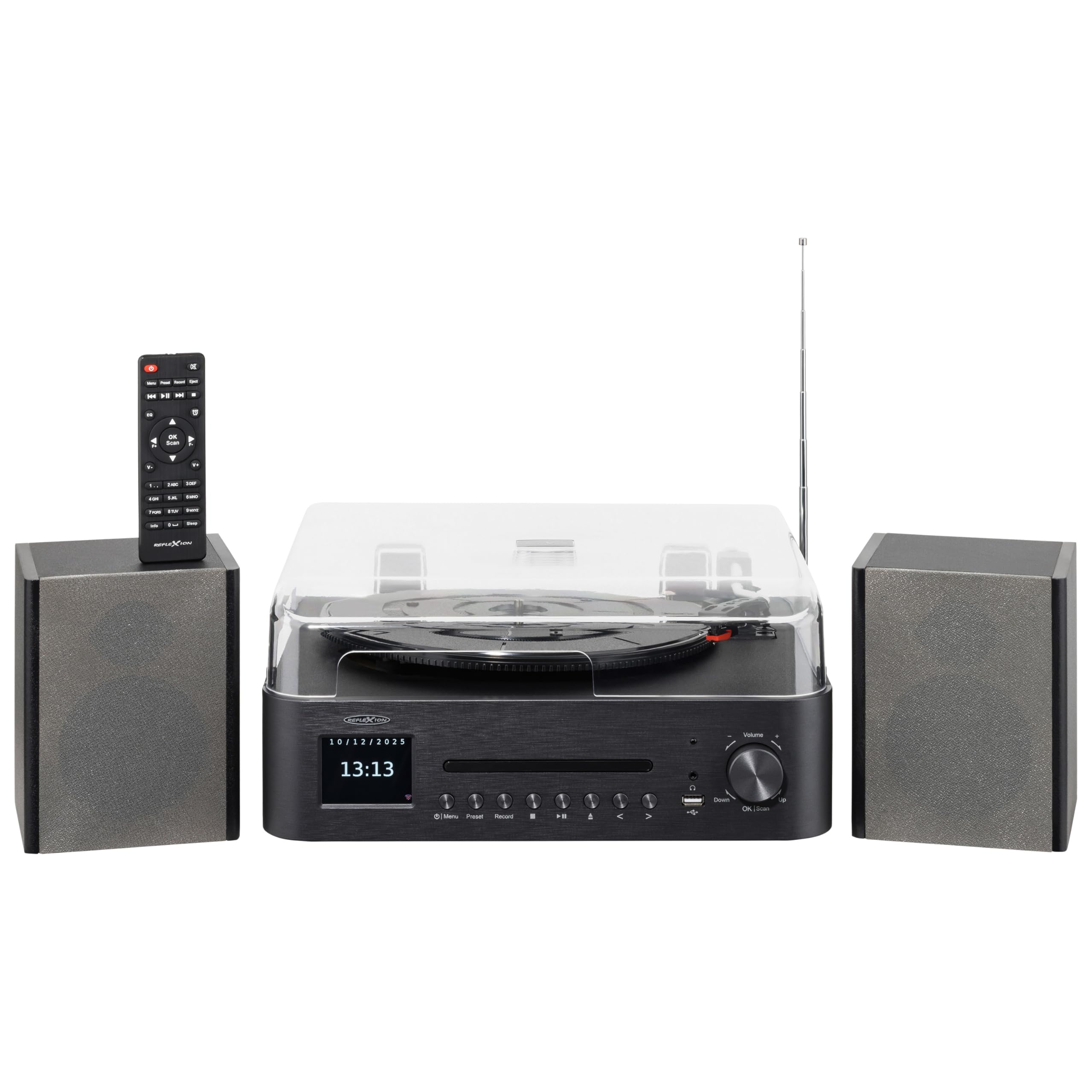
Image 1.1: The Reflexion HIF2082DAB Retro Turntable with included external speakers.
2. Bezpečnostní pokyny
- Před použitím zařízení si pečlivě přečtěte všechny pokyny.
- Návod uschovejte pro budoucí použití.
- Nevystavujte jednotku dešti ani vlhkosti, abyste předešli požáru nebo úrazu elektrickým proudem.
- Zajistěte dostatečné větrání; neblokujte žádné větrací otvory.
- Umístěte jednotku na stabilní, rovný povrch.
- Používejte pouze nástavce/příslušenství určené výrobcem.
- Odpojte jednotku během bouřky s blesky nebo pokud se delší dobu nepoužívá.
- Veškeré opravy svěřte kvalifikovanému servisnímu personálu.
3. Obsah balení
Zkontrolujte prosím, zda jsou ve vašem balení obsaženy všechny níže uvedené položky:
- 1 x Reflexion HIF2082DAB Main Unit
- 2 stereo reproduktory
- 1 x napájecí kabel
- 1 x Remote Control (2 AAA batteries not included)
- 1 x Návod k použití

Image 3.1: Included remote control and power cable.
4. Konec produktuview
4.1 Přední panel a ovládací prvky
The front panel features the main display, control buttons for various functions, and the CD tray. The volume knob and USB port are also located here for easy access.
4.2 Top Panel (Turntable)
The top panel houses the semi-automatic turntable, including the platter, tonearm, and stylus. A protective dust cover is also provided.

Obrázek 4.1: Detail view of the turntable with auto-stop and tonearm return features highlighted.
4.3 Připojení zadního panelu
The rear panel includes connections for the external speakers, Line Out for connecting to an external amplifier, and Aux In for connecting external audio sources.

Image 4.2: Rear panel showing speaker terminals, Line Out, Aux In, and power input.
5. Nastavení
5.1 Vybalení a umístění
- Opatrně vyjměte všechny součásti z obalu.
- Place the main unit and speakers on a stable, level surface, ensuring adequate ventilation around the unit.
- Chraňte jednotku před přímým slunečním zářením, zdroji tepla a vlhkostí.
5.2 Připojení reproduktorů
- Connect the included stereo speakers to the speaker terminals on the rear of the main unit. Ensure correct polarity (red to red, black to black).
5.3 Připojení napájení
- Insert the power cable into the AC input on the rear of the unit.
- Plug the other end of the power cable into a suitable wall outlet (AC 100-240V).
5.4 Počáteční nastavení
- Upon first power-on, the unit may prompt you to select a language and set the time/date. Follow the on-screen instructions using the navigation buttons and OK/Scan button.
6. Návod k obsluze
6.1 Obsluha gramofonu
- Výběr rychlosti: Choose the appropriate speed (33, 45, or 78 RPM) using the speed selector switch.
- Přehrávání nahrávky: Place a record on the platter. Remove the stylus protector. Gently lift the tonearm using the cueing lever and position it over the desired track. Lower the tonearm slowly onto the record.
- Funkce automatického zastavení: The turntable features an auto-stop function that automatically stops the platter when a record finishes playing. The tonearm will also return to its rest position.
6.2 CD přehrávač
- Press the CD mode button.
- Press the Eject button to open the CD tray. Place a CD (audio CD or MP3 CD) with the label side up.
- Press Eject again to close the tray. Playback will begin automatically.
- Use the Skip/Search buttons to navigate tracks and Play/Pause for playback control.
6.3 DAB+/FM Radio
- Press the DAB+ or FM mode button.
- Automatické skenování: For DAB+, the unit will automatically scan for available stations. For FM, press and hold the OK/Scan button to perform an auto scan.
- Ruční ladění: Use the navigation buttons to manually tune to a frequency.
- Předvolby: Save your favorite stations by pressing and holding the Preset button, then selecting a preset number. Recall saved stations by pressing the Preset button and selecting the desired number.
6.4 Připojení Bluetooth
- Press the Bluetooth mode button. The display will show "Pairing" or similar.
- Povolte Bluetooth na svém mobilním zařízení (chytrém telefonu, tabletu atd.).
- Hledat "Reflexion HIF2082DAB" in your device's Bluetooth list and select it to pair.
- Once paired, you can stream audio from your device to the HIF2082DAB.
6.5 Přehrávání a nahrávání z USB
- USB přehrávání: Insert a USB flash drive (up to 32GB, FAT format) containing MP3 files into the USB port. Press the USB mode button. The unit will automatically detect and play MP3 files.
- USB Recording (from Vinyl): While playing a vinyl record, press the Record button. The unit will begin recording the audio directly to the connected USB drive as an MP3 file. Press Record again to stop.
6.6 Budík a časovač vypnutí
- Poplach: The unit features two adjustable alarms. Access the alarm settings through the menu to set wake-up times and desired audio sources (e.g., radio, CD).
- Časovač vypnutí: Set the sleep timer (up to 90 minutes) to automatically turn off the unit after a specified duration. This is useful for falling asleep to music.
7. Údržba
7.1 Čištění jednotky
- Otřete přístroj měkkým, suchým hadříkem. Nepoužívejte abrazivní čisticí prostředky ani rozpouštědla.
- For the dust cover, use a soft, slightly damp hadříkem, poté důkladně osušte.
7.2 Péče o stylus
- Pravidelně čistěte stylus měkkým kartáčkem, jemně jej kartáčujte zezadu dopředu.
- Replace the stylus when sound quality deteriorates or after approximately 300-500 hours of use to prevent damage to your records.
8. Řešení problémů
| Problém | Možná příčina | Řešení |
|---|---|---|
| Žádná síla | Napájecí kabel není připojen; Vadná zásuvka | Ujistěte se, že je napájecí kabel bezpečně připojen; zkuste jinou zásuvku. |
| Žádný zvuk | Volume too low; Speakers not connected; Incorrect input mode | Increase volume; Check speaker connections; Select correct source mode |
| Gramofon se neotáčí | Speed selector incorrect; Auto-stop engaged | Check speed setting; Ensure tonearm is over the record |
| Špatný příjem rádia | Anténa není vysunutá; Slabý signál | Fully extend the telescopic antenna; Reposition the unit for better reception |
| Párování Bluetooth se nezdařilo | Zařízení je příliš daleko; Bluetooth není na zařízení povolen; Jednotka není v režimu párování | Move device closer; Enable Bluetooth; Ensure unit is in pairing mode |
9. Specifikace
- Značka: Reflexion
- Model: HIF2082DAB
- Barva: Černý
- Rozměry (D x Š x V): 32.9 x 37.1 x 16 cm (12.95 x 14.61 x 6.3 palce)
- Hmotnost produktu: 6.5 kilogramů (14.33 liber)
- Technologie Bluetooth: Ano
- Počet reproduktorů: 2 (External Stereo Speakers)
- Max Speaker Power: 2 x 160 W (Peak Power)
- Rychlosti gramofonu: 33, 45, 78 ot./min
- Zobrazit: 2.8" Color TFT Display
- USB kompatibilita: Up to 32GB, FAT format (for MP3 playback and recording)
- Rádio: DAB+, FM
- Další vlastnosti: CD Player (MP3/Audiobook compatible), USB Recording, Remote Control, Dual Alarms, Sleep Timer, Auto-Stop with Tonearm Return, Line Out, Aux In.
10. Záruka a podpora
For warranty information and customer support, please refer to the warranty card included in your package or contact your local Reflexion dealer or service center. Keep your proof of purchase for any warranty claims.
For further assistance, you may also visit the official Reflexion website or consult the contact information provided in the original product documentation.