
TECKNET TK-HS023
TECKNET TK-HS023 V5.4 Bluetooth Trucker Headset
Uživatelská příručka
1. Úvod
This manual provides detailed instructions for the proper use, setup, and maintenance of your TECKNET TK-HS023 V5.4 Bluetooth Trucker Headset. Please read this manual thoroughly before using the product to ensure optimal performance and longevity.
Obsah balení
- TECKNET TK-HS023 Bluetooth headset
- USB nabíjecí kabel
- Uživatelská příručka
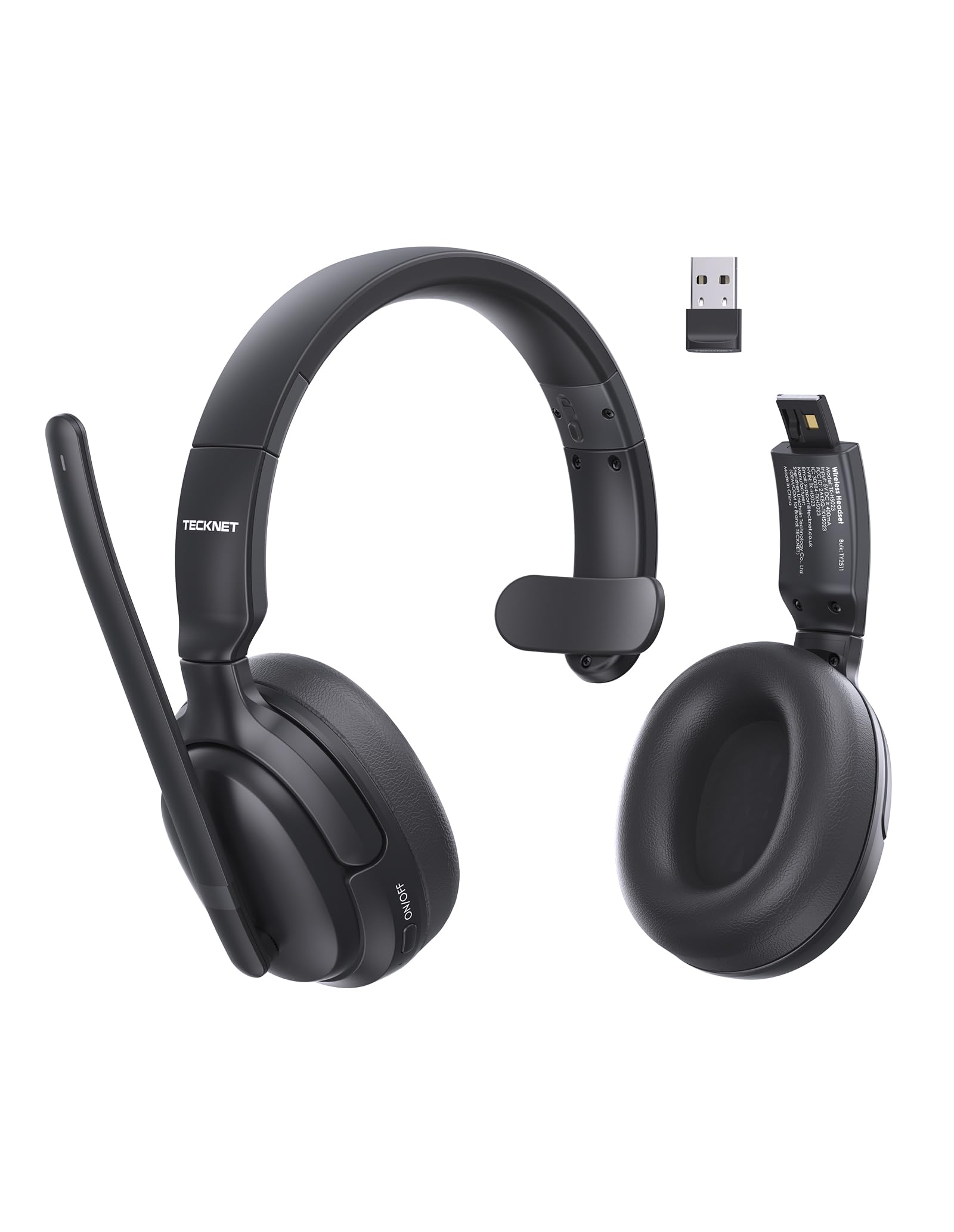
Image 1.1: TECKNET TK-HS023 Bluetooth Trucker Headset. This image displays the headset with its adjustable headband and microphone boom.
2. Vlastnosti produktu
- Mikrofon s potlačením hluku s umělou inteligencí: Designed to filter out background noise, ensuring clear voice transmission in noisy environments.
- Single-Ear Design: Allows users to remain aware of their surroundings while using the headset.
- Dual-Device Seamless Connectivity: Connects to two Bluetooth devices simultaneously, enabling easy switching between calls and audio.
- Baterie s dlouhou výdrží: Provides extended usage time on a single charge.
- Stable Bluetooth V5.4 Connection: Offers reliable wireless connectivity with a range of up to 15 meters.
- Easy Call & Audio Controls: Intuitive buttons for managing calls, adjusting volume, and controlling media playback.
- Nastavitelná čelenka: Zajišťuje pohodlné nošení pro různé velikosti hlavy.
3. Nastavení
3.1 Nabíjení headsetu
Before initial use, fully charge the headset. A full charge takes approximately 2 hours and provides up to 65 hours of battery life.
- Připojte menší konec nabíjecího kabelu USB k nabíjecímu portu na sluchátkách s mikrofonem.
- Connect the large end of the USB charging cable to a USB power source (e.g., computer USB port, wall adapter).
- The LED indicator on the headset will show the charging status. It typically turns red during charging and blue or off when fully charged.
3.2 Párování Bluetooth
Připojení sluchátek s mikrofonem k zařízení přes Bluetooth:
- Ujistěte se, že je náhlavní souprava plně nabitá.
- Power on the headset by pressing and holding the Multi-Function Button (MFB) until the LED indicator flashes blue and red alternately, indicating pairing mode.
- Na svém zařízení (chytrý telefon, tablet, notebook) povolte Bluetooth a vyhledejte dostupná zařízení.
- Select "TECKNET TK-HS023" from the list of found devices.
- Once connected, the LED indicator on the headset will flash blue slowly or turn solid blue.
Připojení dvou zařízení: After pairing with the first device, disable Bluetooth on the first device, then put the headset back into pairing mode to connect to a second device. Once the second device is paired, re-enable Bluetooth on the first device. The headset should automatically connect to both devices, allowing seamless switching.
4. Návod k obsluze
4.1 Ovládání náhlavní soupravy
- Multifunkční tlačítko (MFB): Power on/off, Play/Pause, Answer/End Call, Reject Call, Redial.
- Zvýšení hlasitosti (+): Zvýšení hlasitosti, Další skladba (dlouhé stisknutí).
- Snížit hlasitost (-): Snížení hlasitosti, Předchozí skladba (dlouhé stisknutí).
- Tlačítko ztlumení: Mute/unmute microphone during a call.
4.2 Správa hovorů
- Přijmout hovor: Stiskněte jednou MFB.
- Ukončit hovor: Během hovoru stiskněte jednou multifunkční tlačítko.
- Odmítnout hovor: Stiskněte a podržte MFB po dobu 2 sekund.
- Znovu vytočit poslední číslo: Double-press the MFB when not on a call.
- Ztlumit mikrofon: Press the Mute button during a call. Press again to unmute.
4.3 Přehrávání zvuku
- Přehrát/pozastavit: Stiskněte jednou MFB.
- Další skladba: Dlouze stiskněte tlačítko pro zvýšení hlasitosti (+).
- Předchozí skladba: Dlouze stiskněte tlačítko pro snížení hlasitosti (-).
4.4 AI Noise Cancelling Microphone
The integrated AI Noise Cancelling Microphone actively reduces ambient noise, such as engine sounds or office chatter, to ensure your voice is transmitted clearly to the other party during calls. Position the microphone boom approximately 1-2 inches from your mouth for best performance.
5. Údržba
5.1 Čištění
- Otřete sluchátka s mikrofonem měkkým, suchým nebo lehce navlhčeným hadříkem.amp tkanina.
- Nepoužívejte agresivní chemikálie, čisticí rozpouštědla ani silné čisticí prostředky.
- Zabraňte vniknutí vlhkosti do jakýchkoli otvorů.
5.2 Skladování
- Sluchátka skladujte na chladném a suchém místě mimo dosah extrémních teplot.
- Zabraňte delšímu vystavení přímému slunečnímu záření nebo vlhkosti.
6. Řešení problémů
Běžné problémy a řešení
- Sluchátka se nezapínají: Ujistěte se, že je náhlavní souprava plně nabitá.
- Nelze spárovat se zařízením:
- Ujistěte se, že jsou sluchátka v režimu párování (LED bliká modře a červeně).
- Ujistěte se, že je na vašem zařízení povoleno Bluetooth.
- Přesuňte náhlavní soupravu blíže k vašemu zařízení.
- Restartujte headset i zařízení.
- Žádný zvuk nebo špatná kvalita zvuku:
- Zkontrolujte úroveň hlasitosti na sluchátkách i na připojeném zařízení.
- Ensure the headset is within the 15-meter Bluetooth range.
- Disconnect and reconnect the headset to your device.
- Zkontrolujte, zda nedochází k rušení jinými bezdrátovými zařízeními.
- Mikrofon nefunguje:
- Ujistěte se, že mikrofon není ztlumený.
- Zkontrolujte nastavení mikrofonu na připojeném zařízení.
7. Specifikace
| Funkce | Specifikace |
|---|---|
| Značka | TECNET |
| Název modelu | TK-HS023 |
| Technologie připojení | Bezdrátové připojení (Bluetooth V5.4) |
| Dosah Bluetooth | Až 15 metrů |
| Umístění uší | Over Ear (Single-ear design) |
| Mikrofon | AI potlačení šumu |
| Doba nabíjení baterie | Přibližně 2 hodin |
| Průměrná životnost baterie | Až 65 hodin |
| Kompatibilní zařízení | Mobilní telefony, stolní počítače, notebooky, tablety |
| Další funkce | Adjustable Headband, Volume Control, Dual-Device Connectivity |
| Barva | Černý |
8. Záruka a podpora
8.1 Informace o záruce
The TECKNET TK-HS023 Bluetooth Trucker Headset comes with a 3-letá záruka od data nákupu. Tato záruka se vztahuje na výrobní vady a zajišťuje, že výrobek je při běžném používání bez vad materiálu a zpracování.
The warranty does not cover damage caused by misuse, accident, unauthorized modification, or external causes such as drops or liquid damage.
8.2 Zákaznická podpora
For technical support, warranty claims, or any questions regarding your TECKNET TK-HS023 headset, please refer to the contact information provided on the TECKNET official website or your purchase documentation. Please have your model number (TK-HS023) and proof of purchase ready when contacting support.
Ask a question about this manual
Ask about setup, troubleshooting, compatibility, parts, safety, or missing instructions. Manuals+ will review the question and use this page’s manual context to help answer it.