
1. Úvod
The Zebra ZQ220 Plus is a versatile mobile thermal printer designed for on-the-go professionals. This portable device offers reliable, high-quality receipt and label printing capabilities, making it suitable for various applications including retail, hospitality, and field services. Featuring Bluetooth 5.0 connectivity and a durable design, the ZQ220 Plus ensures efficient operation in diverse working environments. Its thermal printing technology eliminates the need for ink or toner, simplifying maintenance.
2. Bezpečnostní informace
- Read all instructions before operating the printer.
- Nevystavujte tiskárnu extrémním teplotám, přímému slunečnímu záření ani vysoké vlhkosti.
- Use only Zebra-approved accessories and power sources.
- Avoid dropping the printer or subjecting it to severe impacts.
- Udržujte tiskárnu mimo dosah vody a jiných kapalin.
- Nepokoušejte se tiskárnu rozebírat ani opravovat sami. Obraťte se na kvalifikovaný servisní personál.
3. Obsah balení
Ověřte, zda jsou v balení přítomny všechny položky:
- Zebra ZQ220 Plus Mobile Thermal Printer
- Nabíjecí baterie
- USB nabíjecí kabel
- Rychlý průvodce
- Samprole termálního papíru
4. Konec produktuview
Familiarize yourself with the components of your ZQ220 Plus printer.

Obrázek 4.1: Přední strana View of the ZQ220 Plus Printer
This image displays the front of the ZQ220 Plus printer, highlighting its compact design. The top panel features an LCD display and three control buttons: Power, Settings, and Connectivity. The paper output slot is visible below the control panel.
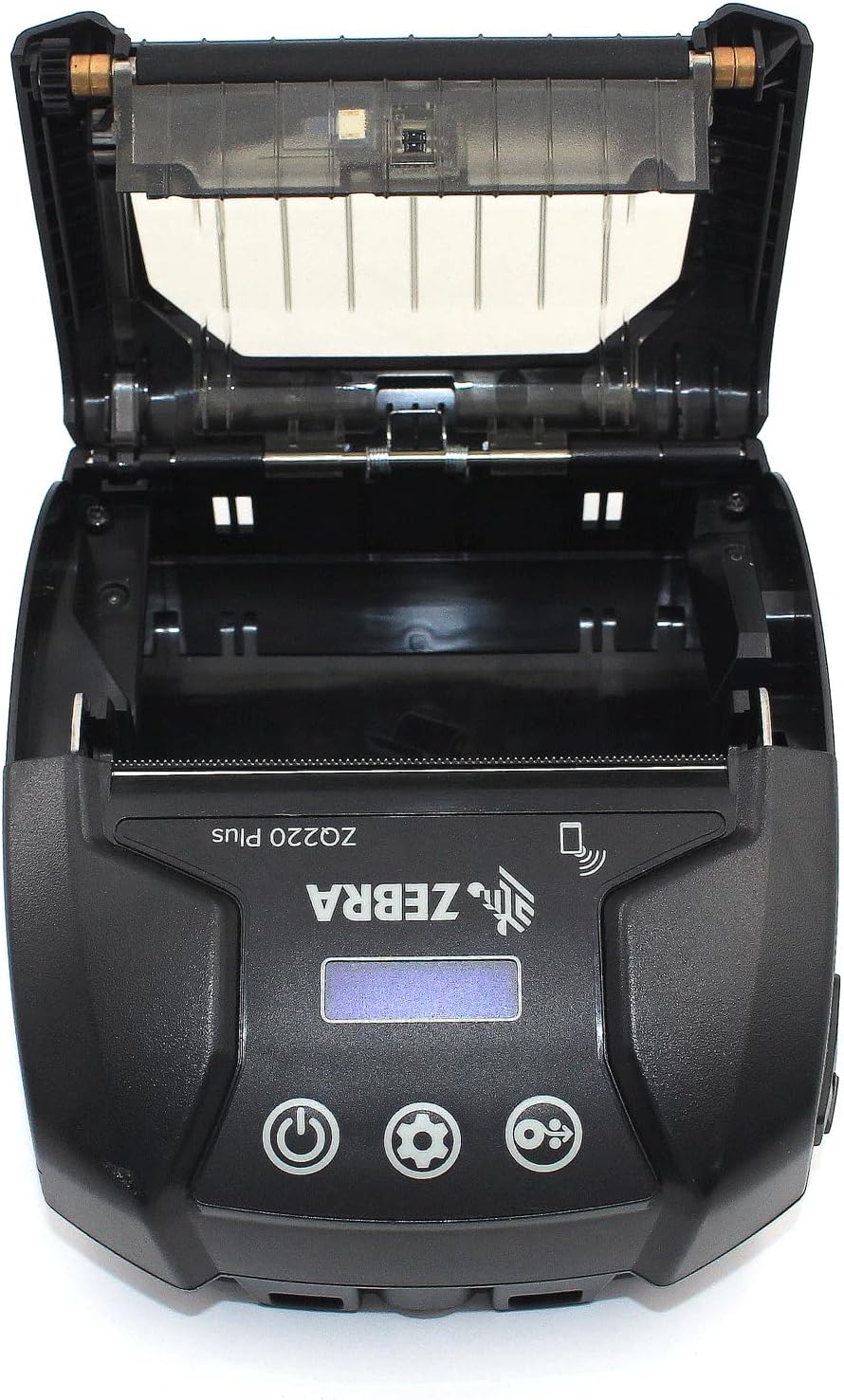
Figure 4.2: Media Compartment Open
This image shows the printer with its top cover open, providing access to the media compartment. The thermal printhead is visible, along with the spindle for loading paper rolls. This view is essential for understanding how to load printing media.

Figure 4.3: Media Roll Insertion
This image demonstrates the media loading process. The side view with the cover open clearly shows how a roll of thermal paper is placed into the printer's media bay, ensuring correct alignment for printing.
5. Nastavení
5.1. Instalace baterie
- Ujistěte se, že je tiskárna vypnutá.
- Locate the battery compartment cover on the back or bottom of the printer.
- Open the cover and insert the rechargeable battery, ensuring the contacts align correctly.
- Bezpečně zavřete kryt bateriového prostoru.
5.2. Vkládání tiskových médií
- Open the media compartment cover (refer to Figure 4.2).
- Place the thermal paper roll into the compartment with the leading edge feeding from the bottom of the roll.
- Pull a small amount of paper past the printhead.
- Close the media compartment cover firmly until it latches.
5.3. První zapnutí a nabíjení
- Connect the USB charging cable to the printer and a power source (e.g., USB wall adapter, vehicle USB port).
- Allow the battery to fully charge before first use. The charging indicator light will show the status.
- Press and hold the Power button until the printer powers on. The LCD display will illuminate.
6. Obsluha tiskárny
6.1. Párování Bluetooth
- Ensure the printer is powered on and within range of your host device (smartphone, tablet, etc.).
- On your host device, navigate to the Bluetooth settings and enable Bluetooth.
- Hledat available devices. The printer will appear as 'ZQ220 Plus' or a similar identifier.
- Select the printer from the list to initiate pairing. If prompted, enter the default PIN (usually '0000' or '1234').
- Once paired, the Bluetooth icon on the printer's display will indicate a successful connection.
6.2. Tisk
- Ensure the printer is paired with your host device and has sufficient media loaded.
- Open your printing application (e.g., ZLabel Designer Mobile App for Android or iOS, or other compatible software).
- Select the ZQ220 Plus as your target printer within the application.
- Initiate the print command from your application. The printer will begin printing the document or label.
6.3. USB nabíjení
The ZQ220 Plus supports simple USB charging. Connect the printer to any standard USB power source using the provided USB cable. This allows for convenient charging in vehicles or from portable power banks.
7. Údržba
7.1. Čištění tiskárny
- Vnější: Otřete vnější povrch tiskárny měkkým,amp tkanina. Nepoužívejte agresivní chemikálie nebo abrazivní čisticí prostředky.
- Tisková hlava: Periodically clean the thermal printhead using a printhead cleaning pen or a cotton swab lightly dampened with isopropyl alcohol. Ensure the printer is off and cool before cleaning. Allow to dry completely before use.
- Přítlačný válec: Očistěte přítlačný válec hadříkem, který nepouští vlákna dampened with isopropyl alcohol to remove paper dust or adhesive residue.
7.2. Skladování
When not in use for extended periods, store the printer in a cool, dry place, away from direct sunlight and extreme temperatures. Remove the battery if storing for several months to prevent discharge or damage.
8. Řešení problémů
| Problém | Možná příčina | Řešení |
|---|---|---|
| Tiskárna se nezapne | Nízká nebo vybitá baterie Improperly installed battery | Nabijte baterii Vložte zpět baterii správně |
| Žádný tiskový výstup | No paper loaded Papír je vložen nesprávně Printhead dirty or damaged | Load thermal paper Správně vložte papír Clean the printhead |
| Špatná kvalita tisku | Dirty printhead Slabá baterie Nesprávný typ média | Clean the printhead Nabijte baterii Ensure correct thermal media is used |
| Nelze se připojit přes Bluetooth | Bluetooth není v zařízení povoleno Printer not in pairing mode Mimo dosah | Enable Bluetooth on host device Ensure printer is discoverable Move device closer to printer |
| Printer stops during operation | Slabá baterie Zaseknutý papír Přehřívání | Nabijte baterii Clear any paper jam Allow printer to cool down |
9. Specifikace
| Funkce | Specifikace |
|---|---|
| Název modelu | ZQ220 PLUS |
| Technologie tisku | Přímé tepelné |
| Rozlišení tisku | 203 DPI (bodů na palec) |
| Maximální rychlost tisku (černobíle) | 20 ppm |
| Supported Media Widths | 80 mm (3.14 in), 76.2 mm (3 in), 58 mm (2.28 in) |
| Konektivita | Bluetooth 5.0, USB |
| Kapacita baterie | 2500 XNUMX mAh |
| Paměť | 8 MB |
| Hodnocení trvanlivosti | IP54 (resistance to dust and liquids) |
| Rozměry produktu (D x Š x V) | 3.15 cm x 2.25 cm x 3 cm |
| Hmotnost položky | 4 unce (0.25 lb) |
| Zahrnuté komponenty | Printer, Battery, USB Cable |
10. Záruka a podpora
10.1. Informace o záruce
The Zebra ZQ220 Plus Mobile Thermal Printer comes with a Omezená záruka výrobce. Please refer to the warranty card included with your product or visit the official Zebra webpodrobné podmínky týkající se krytí, doby trvání a postupu při reklamaci naleznete na webových stránkách.
10.2. Technická podpora
For technical assistance, troubleshooting beyond this manual, or service inquiries, please contact Zebra customer support. Contact information can typically be found on the official Zebra webwebu nebo v dokumentaci k produktu.