
Zavedení
This manual provides detailed instructions for the Saitake Wireless Arcade Fight Stick Joystick. It covers product features, setup, operation, connection methods, and troubleshooting to ensure optimal performance across various platforms including PC, Android, iOS, Nintendo Switch, PS3, and PS4.
Konec produktuview
Video: Overview of the Saitake Arcade Fight Stick, showcasing its design, joystick, buttons, and key features.
Klíčové vlastnosti
- Kompatibilita s více platformami: Compatible with Windows PC, Android, iOS, Nintendo Switch 1/2, PS3, and PS4.
- Three Connection Methods: Supports Bluetooth, 2.4GHz wireless (with included receiver), and wired (Type-C) connections.
- Integrovaný displej: A 1.9-inch functional display screen shows function options, volume, lighting effects, brightness, and language settings.
- 3.5mm konektor pro sluchátka: For audio output and communication.
- Funkce TURBO: Equipped with standard turbo and upgraded auto turbo modes for rapid input execution.
- Funkce makra: Customize button mappings and create macro commands with up to 18 keystrokes, including trigger timestamps.
- Vysoce přesný joystick: Features an adjustable RGB light ring with 4 modes and 7 colors.
- Low-Profile Červené přepínače: Buttons utilize low-profile red switches for light pressure and quick response.
- Ergonomický design: Designed for comfortable and extended gaming sessions.
Product Layout and Button Functions
Familiarize yourself with the layout and functions of the arcade fight stick's buttons and controls.

Image: Detailed diagram of the Saitake Arcade Fight Stick showing the location and labels of all buttons and features.
- A: Možnost nabídky
- B: Joystick Function Option
- C: Joystick
- D: Zobrazení na obrazovce
- E: Tlačítko Turbo
- F: Tlačítko SELECT
- G: Tlačítko START
- H: Tlačítko HOME
- I: Možnost připojení
- J: Touch Panel (for PS4 platform)
- K: Earphone & Microphone Option
- L: LSB Button
- M: RSB Button
- N: Tlačítko LB
- O: Tlačítko LT
- P: Zásuvka na sluchátka
- Q: MACRO Button
- R: Tlačítko
- S: Tlačítko X
- T: Tlačítko B.
- U: Tlačítko Y
- V: Tlačítko RT
- W: Tlačítko RB
Nastavení a připojení
Nabíjení zařízení
The arcade stick has a built-in 1000mAh rechargeable lithium battery. Connect the included USB Type-C cable to the device and a power source (e.g., computer USB port, USB wall adapter) to charge. The display screen will indicate charging status.
Způsoby připojení
The Saitake Arcade Fight Stick supports three primary connection methods:

Image: Visual representation of the Bluetooth switch, 2.4G receiver, and Type-C wired connection port.
- Připojení Bluetooth:
- Ensure the arcade stick is powered on and in Bluetooth pairing mode (refer to the display screen for status).
- On your device (Android, iOS, Switch, PS3, PS4, PC with Bluetooth), search for available Bluetooth devices.
- Select "Saitake Arcade Stick" to pair.
- Bezdrátové připojení 2.4 GHz:
- Locate the 2.4GHz receiver in the hidden compartment on the back of the arcade stick.
- Plug the 2.4GHz receiver into a USB port on your PC, Switch dock, or PS3/PS4 console.
- The arcade stick should automatically connect to the receiver.
- Kabelové připojení:
- Connect the USB Type-C cable from the arcade stick to a USB port on your PC, Switch dock, or PS3/PS4 console.
- The device will automatically detect the wired connection.
Kompatibilita s více platformami
The Saitake Arcade Fight Stick is designed for broad compatibility. The image below illustrates the supported systems.

Image: Icons representing Android, iOS, PC, Nintendo Switch, PS3, and PS4, indicating multi-system support.
Návod k obsluze
Obecné použití
Once connected, the arcade stick functions as a standard controller for compatible games. Use the joystick for directional input and the action buttons for in-game commands. The 1.9-inch display screen provides real-time information and allows for various adjustments.
Funkce TURBO
The TURBO function allows for rapid, repeated input of a button press. This can be useful in games requiring fast button mashing.
- Standard Turbo: Stiskněte tlačítko TURBO button and the desired action button simultaneously to activate. The button will now rapidly repeat its input when held down.
- Auto Turbo: Some modes may offer an auto-turbo feature where the button repeats without needing to be held. Refer to the on-screen display for specific settings.
- Nastavení rychlosti: The display screen and encoder allow for adjusting the turbo speed settings.
- Deaktivace Turba: Stiskněte tlačítko TURBO button and the action button again to deactivate.
Funkce makra
The MACRO function allows you to record a sequence of up to 18 keystrokes and assign them to a single button for complex command execution.
- Záznam makra:
- Stiskněte tlačítko MAKRO button to enter recording mode. The display screen will indicate recording status.
- Perform the desired sequence of button presses and joystick movements.
- Stiskněte tlačítko MAKRO dalším tlačítkem nahrávání zastavíte.
- Assign the recorded macro to a specific button by pressing that button.
- Executing a Macro: Press the assigned button to execute the recorded sequence.
- Vymazání makra: Refer to the display screen options or the full manual for instructions on clearing recorded macros.

Image: Visual explanation of the Turbo and Macro functions, highlighting their benefits for efficient gaming.
Display Screen and Audio Jack
- 1.9-inch Functional Display Screen: Use the encoder and buttons near the screen to navigate menus and adjust settings such as volume, lighting effects, brightness, and language. The screen also provides status updates.
- 3.5mm konektor pro sluchátka: Located on the side of the unit, this jack allows you to connect headphones or a headset for in-game audio and voice chat (if supported by the connected platform).
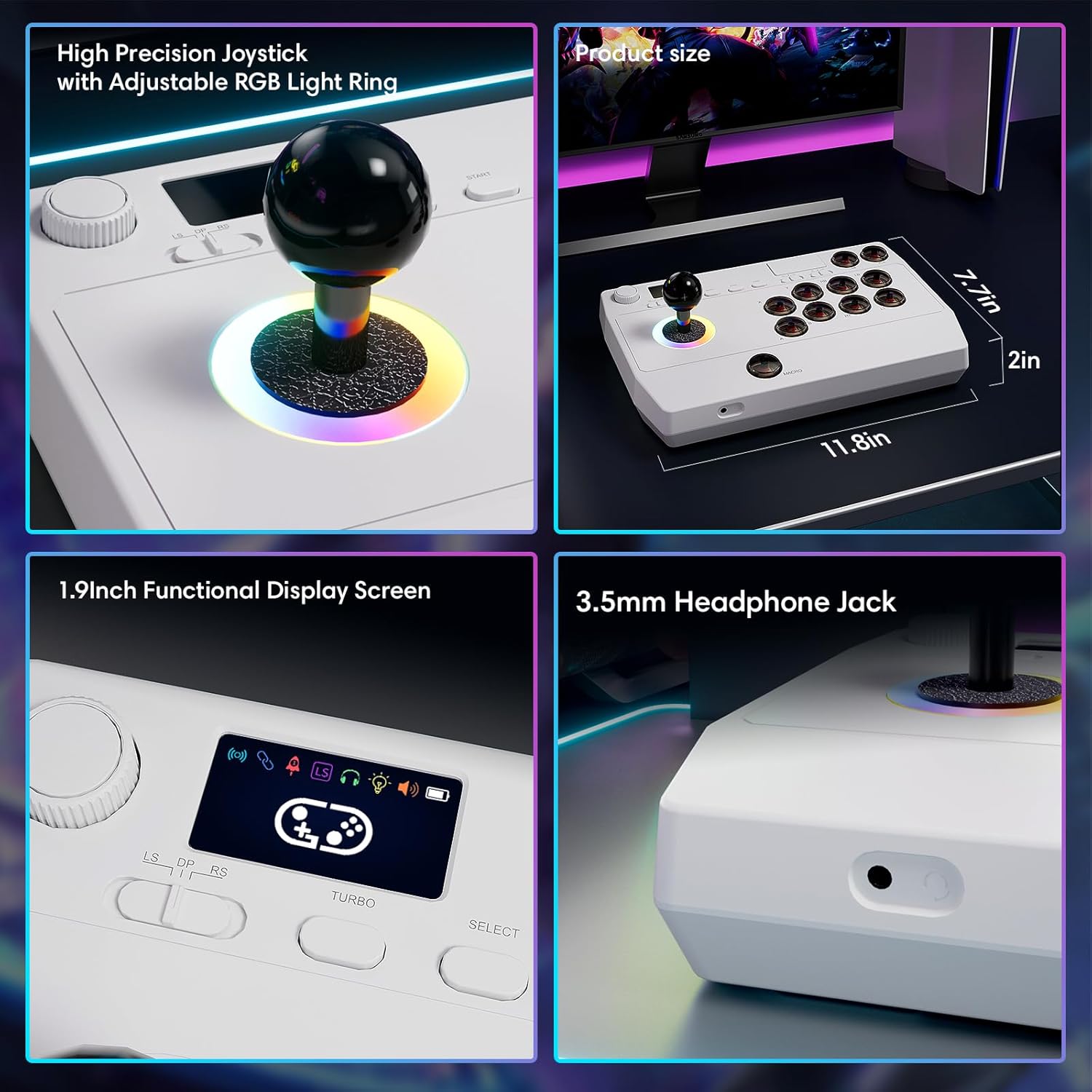
Obrázek: Detail views of the high-precision joystick with RGB lighting, the 1.9-inch functional display screen, and the 3.5mm headphone jack.
Údržba
- Udržujte zařízení čisté otíráním měkkým suchým hadříkem.
- Nevystavujte zařízení extrémním teplotám, vlhkosti nebo přímému slunečnímu záření.
- Do not attempt to disassemble the device, as this may void the warranty.
- Store the 2.4GHz receiver in its designated compartment when not in use to prevent loss.
Odstraňování problémů
- Zařízení se nezapne:
- Ujistěte se, že je zařízení plně nabité. Připojte jej ke zdroji napájení pomocí kabelu USB typu C.
- Nelze se bezdrátově připojit:
- For Bluetooth, ensure the device is in pairing mode and your host device's Bluetooth is enabled.
- For 2.4GHz, ensure the receiver is securely plugged into a USB port and the arcade stick is in 2.4GHz mode.
- Try restarting both the arcade stick and the host device.
- Buttons or joystick are unresponsive:
- Ensure the device is properly connected (wired or wireless).
- Test the device on a different game or platform to rule out software issues.
- Check for any physical obstructions or damage to the buttons or joystick.
- Audio issues with 3.5mm jack:
- Ujistěte se, že jsou sluchátka zcela zasunutá.
- Check the volume settings on both the arcade stick's display and the host device.
- Vyzkoušejte to s jiným párem sluchátek.
Specifikace
| Název modelu | Arkádová hůl |
| Značka | Saitake |
| Kompatibilní zařízení | Android, iOS, Nintendo Switch 1/2, PC, PlayStation 3/4 |
| Typ ovladače | Joystick |
| Technologie připojení | Bluetooth, USB (2.4GHz wireless, Wired Type-C) |
| Další funkce | Ergonomic, Headphone Jack, Portable, Wireless, 1.9-inch Display Screen, TURBO Function, Macro Function, RGB Lighting |
| Hardwarová platforma | Desktop, Gaming Console, Laptop, Smartphone, Tablet, Television |
| Zdroj napájení | Napájení z baterie (vestavěná lithiová baterie 1000 mAh) |
| Rozměry položky | 11.61 x 0.71 x 7.68 palce |
| Barva | Bílý |
Záruka a podpora
The Saitake Wireless Arcade Fight Stick Joystick comes with a 1-letá záruka od data nákupu.
For technical support, troubleshooting assistance, or warranty claims, please contact Saitake customer service through their official website or the retailer where the product was purchased. Please have your purchase receipt and product model information ready.