
Zavedení
Thank you for choosing the Ulanzi SK26 Selfie Stick Tripod. This device combines a selfie stick and a tripod into one compact unit, offering MagSafe compatibility and a remote control for versatile photography and videography. This manual provides detailed instructions for setup, operation, maintenance, and troubleshooting to ensure you get the most out of your product.
Konec produktuview
Klíčové vlastnosti
- One-Touch Deployment: Quickly switch to tripod mode with a single button press.
- Kompatibilita MagSafe: Securely attach your iPhone 12 series and newer directly. For older iPhones (11/10/9/8/7) and Android phones, a MagSafe ring sticker (sold separately) is required.
- 8-Stage Rozšíření: Adjustable height from 20.5 cm (folded) up to 113 cm (extended).
- Nastavení úhlu: The phone holder allows for 200° tilt adjustment and 360° rotation for both horizontal and vertical shooting.
- Dálkové ovládání: Capture photos and videos from a distance of up to 10 meters using the detachable Bluetooth remote.
- Kompaktní a lehký design: Folds down to 20.5 cm and weighs only 265g, making it highly portable for travel and daily use.
- Odolná konstrukce: Made from aviation-grade aluminum alloy for enhanced stability and longevity.
Komponenty
The Ulanzi SK26 includes the main selfie stick tripod unit and a detachable Bluetooth remote control.
Pokyny pro nastavení
1. Rozložení stativu
Locate the push button at the base of the selfie stick. Press this button to quickly deploy the tripod legs. Ensure the legs are fully extended for maximum stability.

Image: One-touch button at the base for quick tripod deployment.
2. Připojení smartphonu
The Ulanzi SK26 features a powerful N52 magnet for MagSafe-compatible devices. Simply align your iPhone (12 series or newer) with the magnetic holder for a secure attachment.
For older iPhone models (11/10/9/8/7) or Android smartphones, a separate MagSafe-compatible ring sticker is required to enable magnetic attachment. Apply the sticker to the back of your phone or phone case according to the sticker's instructions.

Image: The dual-sided magnetic phone holder securely attaches your smartphone.
3. Spárování dálkového ovladače
- Ensure the remote control is charged (if rechargeable) or has a working battery.
- Turn on the remote control (usually by pressing and holding a button until an indicator light flashes).
- Na smartphonu přejděte do nastavení Bluetooth a vyhledejte dostupná zařízení.
- Select 'Ulanzi Remote' or a similar name from the list to pair. The indicator light on the remote will typically stop flashing or turn solid once paired.
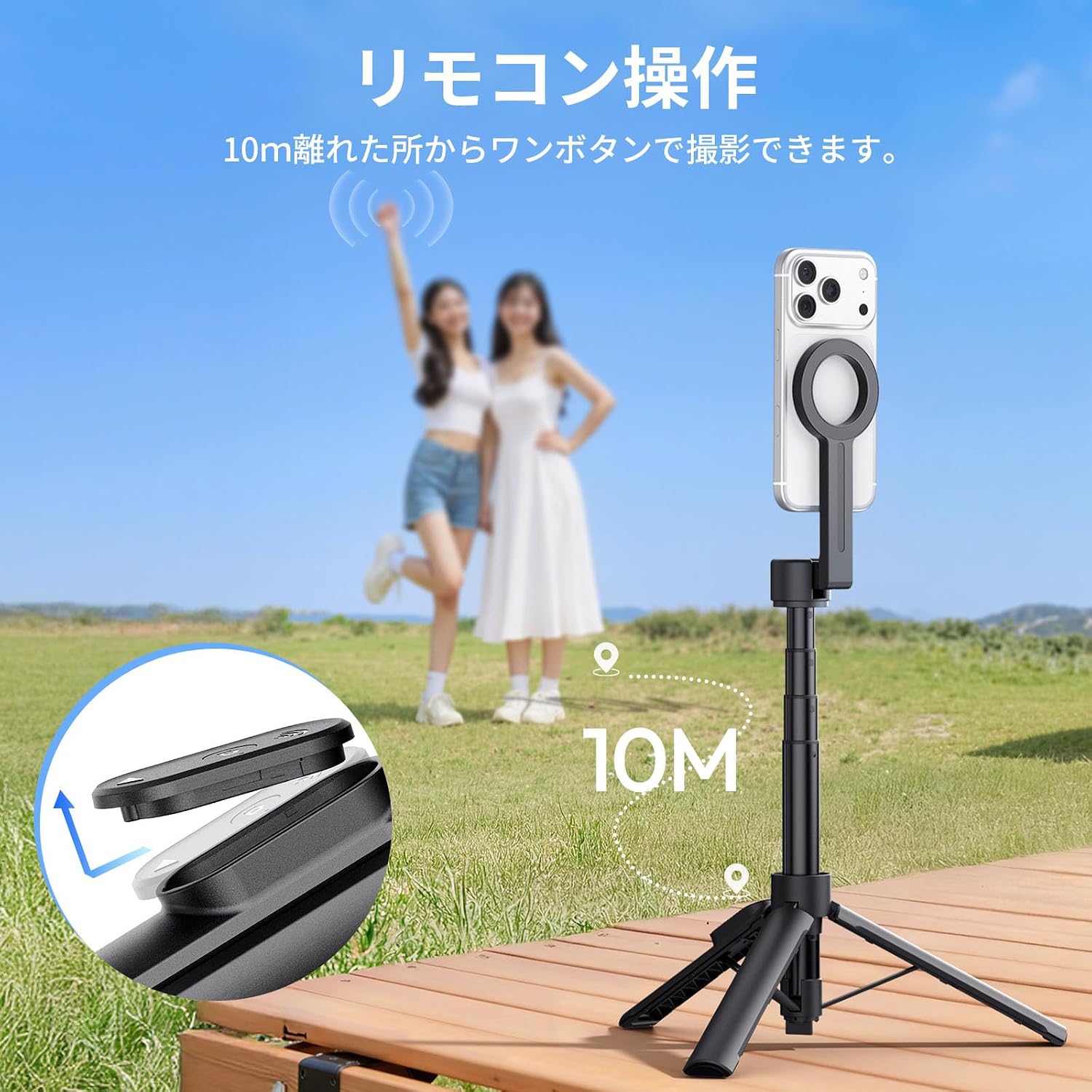
Image: Detachable Bluetooth remote control for convenient shooting.
Návod k obsluze
1. Extending and Retracting the Stick
To extend the selfie stick, gently pull the top section upwards. The stick has 8 adjustable stages, allowing you to reach a maximum height of 113 cm. To retract, push the sections back down until fully collapsed.

Image: The selfie stick extends up to 113 cm with 8 adjustable stages.
2. Adjusting the Phone Angle
The phone holder can be tilted up to 200 degrees and rotated 360 degrees. Loosen the adjustment knob or joint if present, set your desired angle (e.g., for overhead or low-angle shots), and then tighten to secure. This flexibility supports various shooting perspectives, including portrait and landscape modes.

Image: The phone holder offers 200° tilt and 360° rotation for flexible shooting angles.
3. Pomocí dálkového ovládání
Once paired, use the remote control to trigger your smartphone's camera shutter. This allows for hands-free photography and videography, ideal for group photos, vlogging, or live streaming.

Image: The Ulanzi SK26 supports various shooting scenarios, including group photos, individual shots, vlogging, and live streaming.
Údržba
- Čištění: Wipe the selfie stick tripod with a soft, dry cloth. Avoid using harsh chemicals or abrasive materials.
- Skladování: Přístroj skladujte na chladném a suchém místě mimo dosah přímého slunečního záření a extrémních teplot. Pro kompaktní skladování se ujistěte, že je zcela zasunutý a nohy stativu jsou složené.
- Baterie dálkového ovládání: If the remote control uses a replaceable battery, refer to its specific instructions for battery replacement. If it is rechargeable, ensure it is charged periodically to maintain functionality.
Odstraňování problémů
- Dálkové ovládání se nepřipojuje:
- Ensure the remote control is powered on and within range (up to 10m).
- Check your smartphone's Bluetooth settings to confirm it's enabled and the remote is paired. If not, unpair and re-pair the device.
- Verify the remote's battery level. - Phone Not Attaching Securely (MagSafe):
- Ensure your phone is MagSafe compatible (iPhone 12 series or newer).
- If using an older iPhone or Android, confirm that a MagSafe ring sticker is correctly applied and aligned.
- Remove any thick or non-MagSafe compatible phone cases that might interfere with the magnetic connection. - Nestabilita stativu:
- Ensure the tripod legs are fully deployed and locked into position.
- Avoid placing the tripod on uneven surfaces.
- Do not overload the tripod with accessories beyond its intended capacity. - Extension Mechanism Sticking:
- Gently extend and retract the stick to ensure no debris is caught in the sections.
- Avoid forcing the extension if it feels stiff. - Funkce dálkového tlačítka:
- Some smartphone cameras may interpret the remote's shutter button as a volume button. Check your camera app settings for options to assign volume buttons as shutter controls.
Specifikace
| Značka | Ulanzi |
| Model | 26 SK |
| Barva | Černý |
| Hmotnost produktu | 265 gramů |
| Maximální výška | 113 cm |
| Složená velikost | 20.5 cm |
| Rozšíření Stages | 8 |
| Typ stativové hlavy | Ball Head (for angle adjustment) |
| Vlastnosti | Remote Control, MagSafe Compatible |
| Materiál | Hliníková slitina letecké třídy |
| Vodotěsný | Žádný |
Záruka a podpora
Ulanzi offers a Záruka kvality 12 měsíců for this product. If you encounter any issues or have questions regarding your Ulanzi SK26 Selfie Stick Tripod, please contact our customer support team. We aim to respond within 24 hours to assist you.
For support, please refer to the contact information provided on the Ulanzi official webweb nebo vaše nákupní platforma.