
1. Úvod
This manual provides detailed instructions for the IINE Retro Pocket Game Controller, Model L1241. This wireless gamepad is designed for multi-platform compatibility, offering precise control and a compact form factor for gaming on the go. Please read this manual thoroughly before using the product to ensure proper operation and to maximize your gaming experience.
2. Konec produktuview a funkce
The IINE Retro Pocket Game Controller combines classic design with modern technology, featuring Hall Effect joysticks for drift-free precision and a high 1000Hz response rate. Its mini portable design makes it ideal for travel and various gaming setups.
Klíčové vlastnosti:
- Retro, Pocket-Sized & Drift-Free Design: Enjoy classic gaming with a compact, mini controller. Recessed Hall Effect joysticks prevent drift, ensuring precise control.
- Široká kompatibilita: Supports Switch (1 & 2), Steam Deck, PC, Android, iOS, tablets, and in-car gaming setups.
- Immersive Gaming Features: Built-in 6-axis gyroscope for motion control, adjustable vibration for tactile feedback, and a wake-up function for Switch consoles.
- Customizable D-Pad & Controls: Easily switch between 4-direction and 8-direction D-Pad modes. Customize button mapping to suit your play style.
- Compact, Lightweight & Long Battery Life: Measures 12.4×6.5×2cm (4.88×2.56×0.79 in) and weighs 83g (0.18 lbs). Powered by a 600mAh rechargeable battery, offering up to 15 hours of playtime.

Obrázek: Overview of the IINE Retro Pocket Game Controller's main features, highlighting its compact design, Hall Effect joysticks, battery capacity, customizable buttons, and broad platform compatibility.
3. Nastavení a párování
3.1 Počáteční párování
To pair the controller with your device:
- Ujistěte se, že je ovladač nabitý.
- Zapněte ovladač stisknutím tlačítka Domů.
- Activate Bluetooth pairing mode on your device (e.g., Switch, PC, phone).
- On the controller, press and hold the pairing button (often located on the top edge or indicated by a small icon) until the indicator lights flash rapidly.
- Select "IINE Controller" or similar from your device's Bluetooth list to complete pairing.
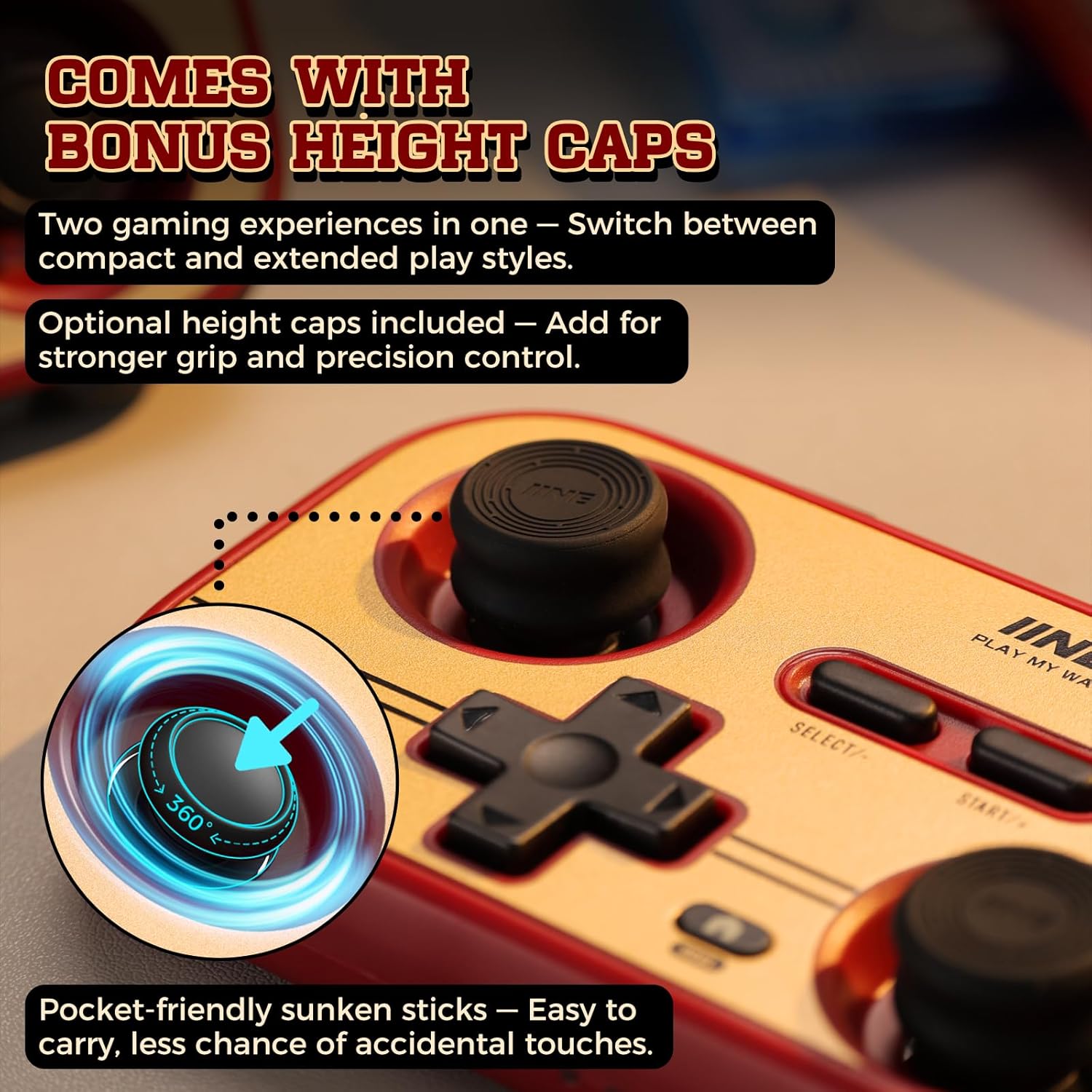
Image: The controller with optional height caps for joysticks, demonstrating the recessed design for portability and precision.
3.2 Wake-Up Function for Nintendo Switch
The controller supports waking up your Nintendo Switch (NS1/NS2) console remotely:
- Ensure the controller is already paired with your Switch.
- Press the Home button on the controller to wake up the console.
- For initial setup of the wake-up function on NS2, you may need to connect the controller via USB-C cable to the Switch dock, then remove and reinsert a Joy-Con. This process typically only needs to be done once per console.

Image: Demonstrating the one-button wake-up function for the Nintendo Switch console using the IINE controller.
Video: This video demonstrates the IINE Pocket Controller in Retro Brick Red, showcasing its recessed Hall Effect joysticks, compatibility with extended thumbstick caps, one-button wake-up for NS1/NS2, 6-axis gyro motion control, easy pairing with mobile devices, and ultra-slim portable design. (Source: IINE Brand Store)
4. Návod k obsluze
4.1 Základní ovládací prvky
- Joysticky: Use the left and right Hall Effect joysticks for precise analog movement and camera control.
- D-Pad: Pro směrové zadávání ve hrách.
- Akční tlačítka (A, B, X, Y): Provádějte herní akce.
- Shoulder Buttons (L, R, ZL, ZR): Additional action inputs.
- SELECT/- and START/+: Menu navigation and in-game functions.
- Tlačítko Domů: Access system menus or wake up the console.
4.2 6-Axis Gyro Motion Control
The controller features a built-in 6-axis gyroscope for motion-sensitive games. Tilt and rotate the controller to control in-game movements where supported.

Image: A user engaging in a racing game, utilizing the 6-axis gyro motion control feature of the IINE controller for immersive gameplay.
4.3 Funkce Turbo
The Turbo function allows for rapid, repeated button presses without continuous manual input. This can be configured for manual, auto, or clean turbo modes, with adjustable speeds (5, 12, or 20 times per second).
Video: This video highlights the Retro Brick Red Multi-Platform Pocket Controller, demonstrating its 6-axis motion control, recessed joysticks for smooth handling, and the Turbo mode feature to reduce finger fatigue during gameplay. (Source: IINE Brand Store)
5. Přizpůsobení
5.1 D-Pad Modes and Button Mapping
The controller allows you to switch between 4-direction and 8-direction D-Pad modes. You can also customize button mapping to reassign functions to different buttons, adapting the controller to your preferred play style or specific game requirements.
5.2 Adjustable Vibration and Dead Zone
Adjust the intensity of the controller's vibration feedback for a personalized immersive experience. The dead zone of the joysticks can also be adjusted to fine-tune responsiveness and prevent unintended inputs.

Obrázek: Podrobný view of the controller's advanced customization options, such as adjustable rumble, dead zone settings, and the ability to swap joystick and D-pad functions.
5.3 IINE App Customization
Further customization options are available through the official IINE app, compatible with both mobile (iOS/Android) and PC platforms. Hledat "IINE controller" or "IINE gamepad" in your device's app store to download and access advanced settings.

Image: Screenshots illustrating the IINE app's interface for customizing controller settings on mobile and PC, including button remapping and dead zone adjustments.
6. Kompatibilita
The IINE Retro Pocket Game Controller is designed for broad compatibility across multiple platforms:
- Nintendo Switch (including Switch 1, Switch 2, and Switch Lite)
- Steam Deck
- PC (Windows)
- iOS devices (iPhone, iPad)
- Android devices (smartphones, tablets)
- Supports in-car gaming setups

Image: Demonstrating various use scenarios for the controller, including mobile gaming, use with PS Remote Play, and as a page-flipping device for reading.
7. Baterie a nabíjení
The controller is equipped with a 600mAh rechargeable battery, providing up to 15 hours of playtime on a single charge. To charge the controller, connect it to a power source using a USB-C cable (included). The indicator lights will show charging status and battery level.
8. Údržba
- Udržujte ovladač čistý otíráním měkkým, suchým hadříkem.
- Nevystavujte ovladač extrémním teplotám, vlhkosti nebo přímému slunečnímu záření.
- Do not disassemble the controller, as this may void the warranty and cause damage.
- Store the controller in a safe place when not in use to prevent physical damage.
9. Řešení problémů
9.1 Problémy s připojením
- Ovladač se nespáruje: Ensure the controller is in pairing mode (indicator lights flashing rapidly) and your device's Bluetooth is enabled and searching. Try restarting both the controller and your device.
- Přerušované připojení: Ensure there are no obstructions between the controller and your device. Move closer to the device. Check for other wireless interference.
9.2 Input Issues (e.g., Drift)
- Posun joysticku: The controller features Hall Effect joysticks designed to prevent drift. If you experience drift, try recalibrating the joysticks through the IINE app or your device's controller settings.
- Tlačítka nereagují: Ensure the controller is fully charged. If the issue persists, try resetting the controller (refer to the IINE app or manufacturer's webstránky s konkrétními pokyny k resetování).
9.3 Problémy s napájením
- Ovladač se nezapíná: Ensure the battery is charged. Connect the controller to a power source and allow it to charge for at least 30 minutes before attempting to turn it on again.
- Baterie neudrží nabití: If the battery life significantly decreases over time, it may indicate battery degradation. Contact customer support for assistance.
10. Specifikace
| Číslo modelu | L1241 |
| Rozměry | 12.4 x 6.5 x 2 cm (4.88 x 2.56 x 0.79 palce) |
| Hmotnost | 83 g (3.2 uncí) |
| Kapacita baterie | 600 XNUMX mAh |
| Rychlost odezvy | 1000 Hz |
| Konektivita | Bezdrátové (Bluetooth) |
| Kompatibilita | Switch (1/2/Lite), Steam Deck, PC, iOS, Android |
11. Záruka a podpora
For warranty information, technical support, or further assistance, please refer to the official IINE website or contact their customer service directly. Details can typically be found on the product packaging or the manufacturer's official online channels.