
1. Úvod
This manual provides detailed instructions for the installation, operation, and maintenance of your SIXTOP 4G+64G Android Car Stereo for Honda Odyssey 2011-2017. Please read this manual thoroughly before using the product to ensure proper functionality and safety.
Obsah balení
- Autorádio s Androidem
- Záložní kamera
- Hlavní napájecí kabel
- GPS anténa
- LVDS Wiring Harness
- AUX Audio Adapter Cable
- Microphone Extension Cable (for specific models)
- Double-sided Tape (for module fixing)
- Installation Guide & Troubleshooting Guide
2. Nastavení a instalace
The SIXTOP Android Car Stereo is designed for plug-and-play installation in Honda Odyssey models from 2011 to 2017 (left-hand drive, basic version). Confirm your original car's center console before proceeding.
2.1 Kontrola kompatibility
Ensure your vehicle's dashboard matches the compatible configurations shown below. This unit is specifically designed for Honda Odyssey 2011-2017 models.
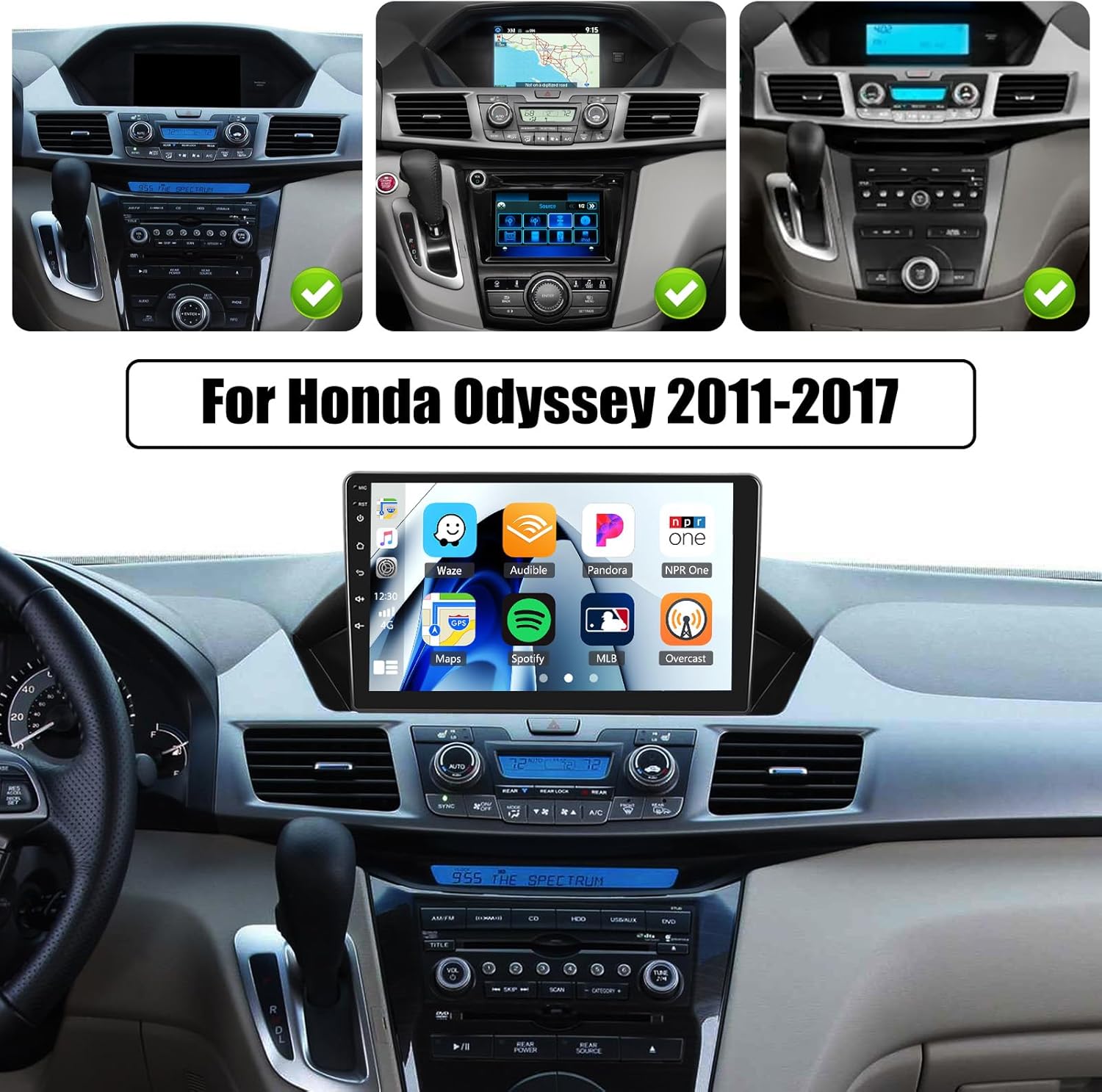
The image above illustrates various Honda Odyssey 2011-2017 dashboard configurations that are compatible with the SIXTOP Android Car Stereo. Please compare your vehicle's dashboard to ensure a proper fit.
2.2 Zapojení kabeláže
Refer to the provided installation guide for detailed wiring diagrams. The primary connections involve the LVDS plug, AUX plug, main power plug, and microphone plug. Ensure all connections are secure.

This image demonstrates the aesthetic integration of the stereo into the vehicle's interior, highlighting the transformation from the original setup to the new Android unit.
2.3 Module Unboxing and Connection Guidance
The following video provides a detailed unboxing and connection guide for the CarPlay module, which is part of the installation process. It covers the components and how to connect them to your vehicle's existing system.
This video details the unboxing of the CarPlay module, including the main power cord, GPS antenna, LVDS wiring harness, AUX audio adapter cable, and microphone extension cable. It also shows how to set the DIP switches on the module based on your car model.
The next video provides an introduction to the installation process, focusing on connecting the module to the original car's CD player ports.
This video guides you through connecting the necessary plugs (LVDS, AUX, power, microphone) to the corresponding ports on your vehicle's original CD player, simplifying the installation steps.
3. Návod k obsluze
Your SIXTOP Android Car Stereo offers a wide range of features for an enhanced driving experience. This section covers the primary functions and how to use them.
3.1 Core Features Overview
The unit features a 9-inch HD in-cell touchscreen with 1280x720 resolution, providing vivid colors and responsive operation. It runs on Android with 4GB RAM and 64GB ROM for fast performance and ampúložiště.

This image highlights the advanced display technology and internal memory specifications, along with the Mirror Link feature for phone screen synchronization.
3.2 Bezdrátové CarPlay a Android Auto
Seamlessly integrate your smartphone with Wireless CarPlay and Android Auto for voice control, navigation, music, and messaging. Mirror Link functionality is also available for both Android and iOS devices.

This image demonstrates the intuitive interface of CarPlay and Android Auto, allowing access to phone contacts, GPS navigation, music, and other applications directly from the car stereo.
3.3 Navigation, Connectivity, and Audio
The unit includes GPS navigation with support for online and offline maps. Connect to Wi-Fi for online functions, streaming, and app downloads. Bluetooth 5.0 ensures stable hands-free calling and wireless audio streaming. The FM/RDS radio offers 18 preset stations.

This image visually represents the various connectivity options and entertainment features available on the stereo, such as internet access, navigation, and radio functions.
3.4 EQ Audio and Steering Wheel Control
Customize your audio experience with the built-in 32-band EQ system. The unit also supports steering wheel controls for convenient volume adjustment, track switching, and call management.

This image details the internal processing power, audio equalization capabilities, the included AHD backup camera, and the integration with existing steering wheel controls for ease of use.
3.5 Split Screen and UI Themes
Utilize the split-screen function to run two applications simultaneously. Personalize your stereo's appearance with multiple UI themes.

This image showcases the multitasking capability of the stereo with its split-screen feature and the option to customize the visual theme of the interface.
3.6 Main Function Display Video
Watch this video for a demonstration of the main functions and user interface of the SIXTOP Android Car Stereo.
This video provides a visual guide to the stereo's capabilities, including UI themes, CarPlay/Android Auto for music and navigation, hands-free calling, split-screen multitasking, FM/RDS radio, weather updates, network radio, Bluetooth connectivity, 32-band EQ DSP, GPS navigation, and the rear view displej fotoaparátu.
3.7 Android Car Stereo with Incell Screen Video
This video provides a detailed look at the Incell screen and various settings and features of the Android Car Stereo.
This video covers a wide array of settings and functionalities, from basic language and time adjustments to advanced features like touch calibration, button learning, CAN settings, split-screen management, speed unit conversion, memory optimization, steering wheel control setup, UI theme customization, radio and EQ settings, and seamless integration with Bluetooth, CarPlay, and Android Auto.
4. Specifikace
| Funkce | Detail |
|---|---|
| Značka | SIXTOP |
| Typ služby vozidla | For Honda Odyssey 2011-2017 |
| Velikost obrazovky | 9 palce |
| Typ zobrazení | LCD, In-Cell Touchscreen |
| Rozlišení obrazovky | 1280x720 HD |
| Operační systém | Android |
| BERAN | 4 GB |
| ROM (Memory Storage Capacity) | 64 GB |
| Technologie připojení | Bluetooth 5.0, Wi-Fi, Wireless |
| Speciální funkce | Wireless CarPlay & Android Auto, Mirror Link, Split Screen, 32-Band EQ Audio, FM/RDS Radio, Steering Wheel Control, AHD Rear Camera Support |
| Typ mapy | North America, Worldwide (supports online and offline maps) |
| Podporovaný satelitní navigační systém | GPS |
| Zahrnuté komponenty | Android Car Stereo, Backup Camera |
| Kontrolní metoda | Dotek |
| Rozměry položky D x Š x V | 1"L x 1"W x 1"H (Note: This is a placeholder, actual dimensions may vary) |
5. Údržba
5.1 Obecná péče
- Udržujte obrazovku čistou měkkým hadříkem, který nepouští vlákna. Nepoužívejte abrazivní čisticí prostředky.
- Protect the unit from extreme temperatures and direct sunlight for prolonged periods.
- Ujistěte se, že jsou všechny kabely bezpečně připojeny, abyste předešli občasným problémům.
5.2 Aktualizace softwaru
Pravidelně kontrolujte aktualizace softwaru v nastavení systému, abyste zajistili optimální výkon a přístup k novým funkcím. Postupujte podle pokynů na obrazovce, kde najdete všechny dostupné aktualizace.
5.3 Čištění jednotky
Use a dry, soft cloth to wipe the exterior of the unit. For stubborn marks, slightly dampOpláchněte hadřík vodou. Nepoužívejte agresivní chemikálie ani rozpouštědla.
6. Řešení problémů
This section addresses common issues you might encounter with your SIXTOP Android Car Stereo.
6.1 No Power / Unit Not Turning On
- Zkontrolujte připojení napájení: Ensure the main power plug is securely connected to the vehicle's harness and the stereo unit.
- Vehicle's Fuse: Verify the vehicle's fuse related to the car stereo is intact. Replace if blown.
- Zapalování: Confirm the vehicle's ignition is on.
6.2 Žádný zvukový výstup
- Úroveň hlasitosti: Check if the volume is turned up on both the stereo and the vehicle's audio system.
- Připojení AUX: Ensure the AUX audio adapter cable is correctly connected and the vehicle's audio source is set to AUX.
- Funkce ztlumení: Verify the stereo is not muted.
- Zapojení reproduktorů: Check speaker connections if sound issues persist.
6.3 Touchscreen Unresponsive / Inaccurate
- Restartujte jednotku: Turn off the vehicle and restart the stereo.
- Touch Calibration: Perform a touch calibration from the "Factory Setup" menu (password 1234). Refer to Video 3.7.1 for guidance.
6.4 CarPlay / Android Auto Not Connecting
- Bluetooth/Wi-Fi: Ensure Bluetooth and Wi-Fi are enabled on both your phone and the stereo.
- Kompatibilita telefonů: Confirm your smartphone is compatible with Wireless CarPlay or Android Auto.
- Cable Connection (if wired): If using a wired connection, ensure the USB cable is functional and properly connected.
6.5 Nezobrazuje se obraz ze zadní kamery
- Připojení fotoaparátu: Verify the AHD backup camera is correctly connected to the stereo.
- Backcar Source Settings: Check the "Backcar Source Settings" in "Factory Setup" (password 1234) to ensure the correct camera type (e.g., AHD 720P) is selected. Refer to Video 3.7.1 for guidance.
- Zpátečka: Ensure the vehicle is in reverse gear to trigger the camera display.
7. Záruka a podpora
7.1 Informace o záruce
The SIXTOP Android Car Stereo comes with a 1-letá záruka od data nákupu. Tato záruka se vztahuje na výrobní vady a poruchy při běžném používání. Uschovejte si prosím doklad o koupi pro případ uplatnění záruky.
For detailed warranty terms and conditions, please refer to the official SIXTOP webwebu nebo kontaktujte zákaznickou podporu.
7.2 Zákaznická podpora
If you encounter any issues or have questions regarding your product, please contact SIXTOP customer support. We offer:
- 24 Hours/7 Days Quick Response
- 1-Year Replacement for eligible issues
- Doživotní technická podpora
You can reach customer support via:
- E-mail: SIXTOP123@163.com
- Stránka prodejce na Amazonu: Visit the "xinshunhang" store on Amazon and click "Ask a question".

This image provides a visual guide on how to access online support and contact the seller for assistance.