
1. Úvod
This manual provides comprehensive instructions for the installation, operation, and maintenance of your LiTime 500A Battery Monitor with Shunt and 300A Bus Bar. This system is designed to accurately monitor your battery's status and efficiently manage power distribution in various applications, including automotive, solar, and RV systems. Please read this manual thoroughly before installation and use to ensure proper function and safety.
2. Komponenty produktu
The LiTime 500A Battery Monitor and 300A Bus Bar bundle includes the following main components:
- LiTime 500A Battery Monitor: A display unit that provides real-time battery data.
- 500A Shunt: A precision resistor used with the battery monitor to measure current flow.
- LiTime 300A Bus Bar: A power distribution block for consolidating and distributing electrical connections.
- Propojovací kabely: Necessary cables for wiring the monitor and shunt.
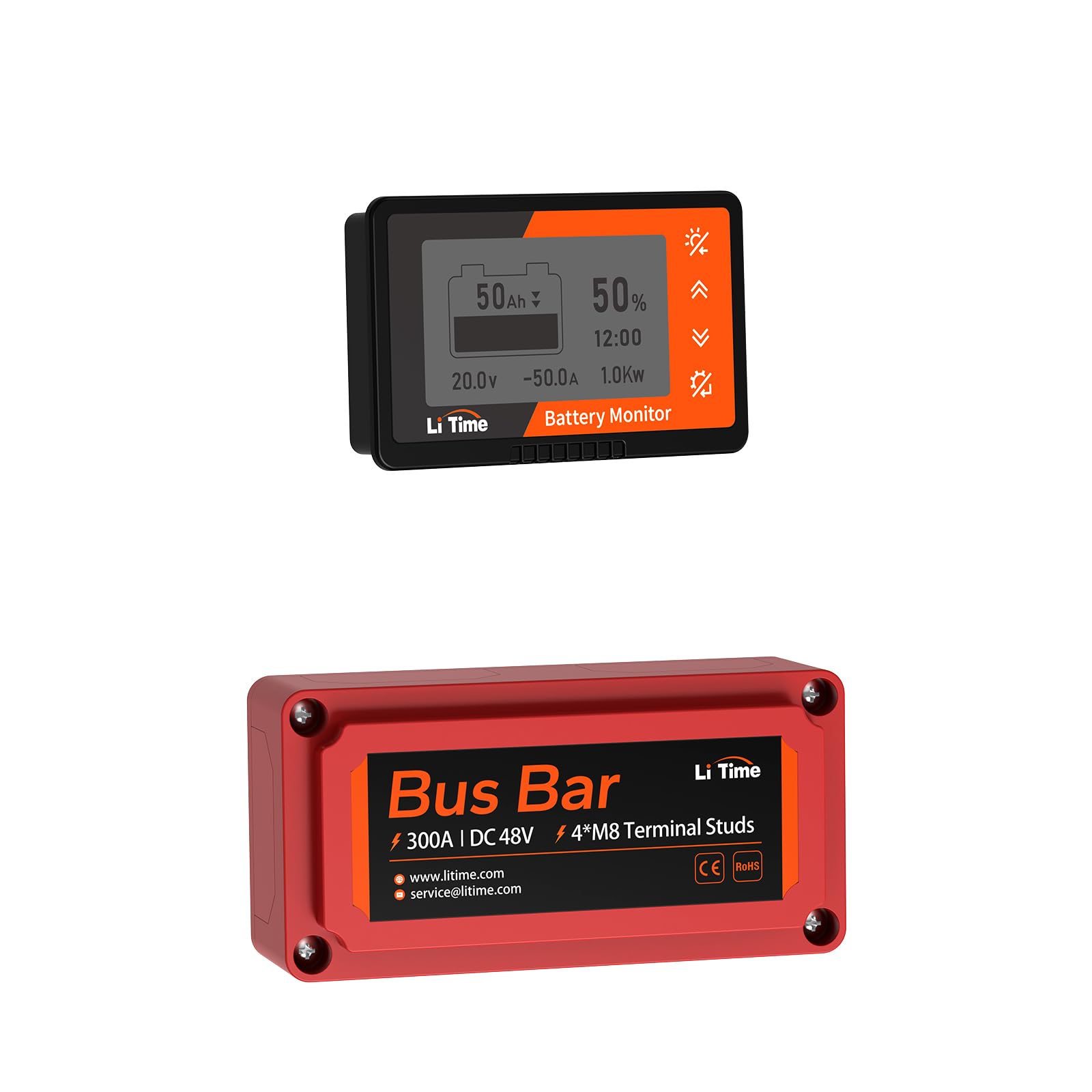
Figure 2.1: LiTime 500A Battery Monitor Display Unit.

Figure 2.2: LiTime 300A Bus Bar.
3. Instalace
3.1 Battery Monitor and Shunt Installation
The battery monitor and shunt are designed for straightforward installation. The shunt should be connected in series with the negative circuit of your battery system. The monitor display can be mounted on a flat surface using its integrated tabs.
- Mount the Shunt: Securely place or mount the shunt using the provided shunt holder. Ensure it is in a location with good ventilation.
- Wire the Shunt: Connect the negative terminal of your battery to the B- terminal of the shunt. Connect the P- terminal of the shunt to the negative input of your load/inverter. Důležité: The shunt must be connected to the negative circuit only. Do NOT connect it to the positive circuit.
- Connect Monitor to Shunt: Use the shielded wire to connect the battery monitor display unit to the shunt.
- Montáž displeje: Install the battery monitor display unit in a convenient location where it can be easily viewvyd.

Figure 3.1: Connection diagram for the Shunt and Battery Monitor. Ensure the shunt is connected to the negative circuit.
3.2 Bus Bar Installation
The 300A Bus Bar facilitates organized power distribution. Follow these steps for installation:
- Remove Insulating Cover: Carefully remove the top insulating cover from the bus bar.
- Mount the Bus Bar (Optional): If desired, mount the bus bar to a secure surface using appropriate fasteners.
- Connect M8 Wire Lugs: Attach your M8 wire lugs to the terminal studs on the bus bar. Ensure all connections are tight and secure.
- Remove Removable Windows: If necessary, remove the removable windows on the insulating cover to accommodate larger cables or specific wiring configurations.
- Fix the Insulating Cover: Once all connections are made, replace the insulating cover to protect the terminals and reduce electric shock risk.
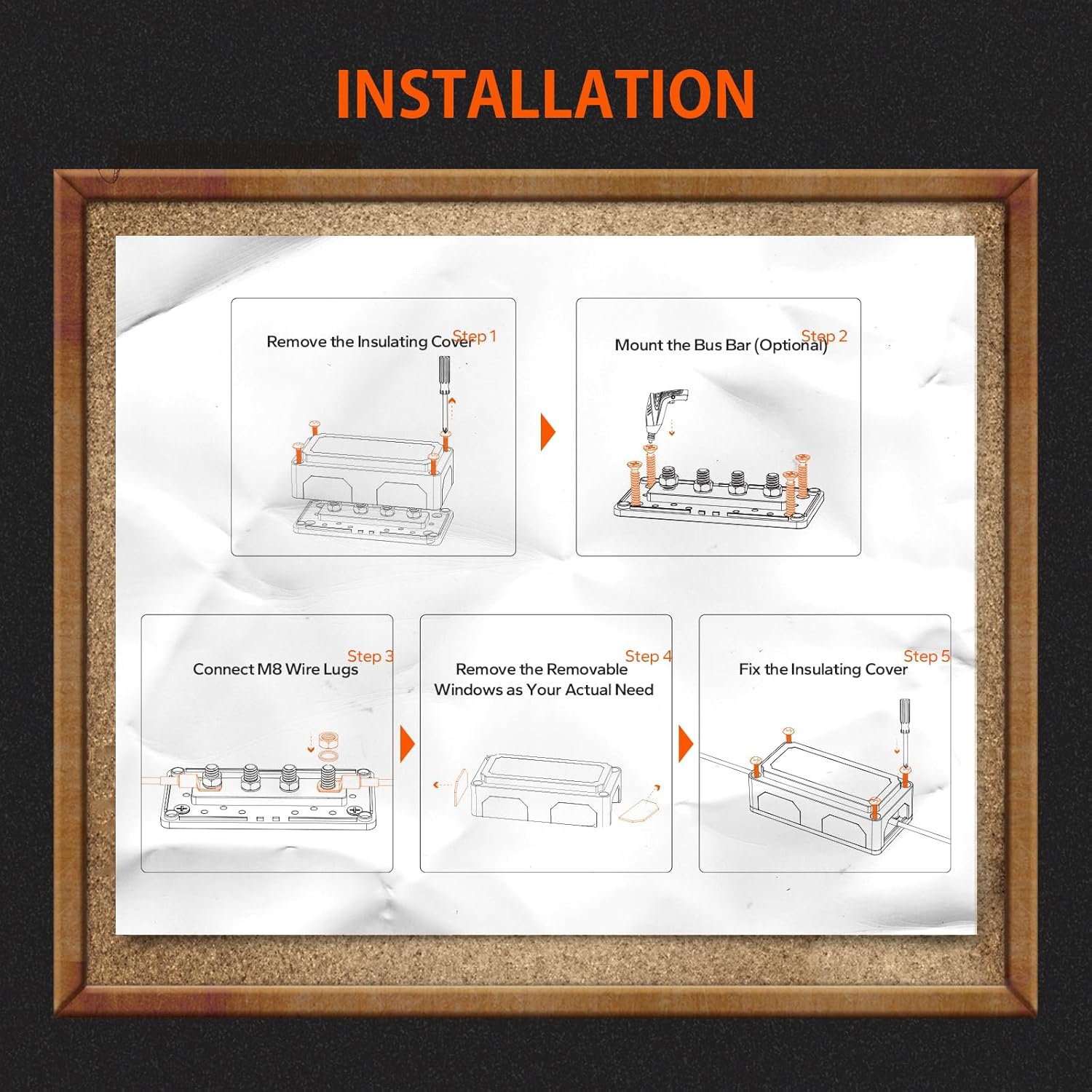
Figure 3.2: Step-by-step installation guide for the LiTime 300A Bus Bar.

Figure 3.3: The bus bar features an insulated structure made of Nylon and Glass Fiber Reinforced material to enhance safety.
4. Provoz
4.1 Battery Monitor Display
The LiTime Battery Monitor provides precise data on your battery's status, including:
- Baterie Voltage (V)
- proud (A)
- Výkon (kW)
- Kapacita (Ah)
- Zbývající doba nabíjení/vybíjení
- Indikátor nabití/vybití
- Kapacita procenttage (%)
The monitor features a backlight for improved visibility, especially in low-light conditions.
4.2 Operační klávesy
The battery monitor is operated using a set of keys, each with specific functions:

Obrázek 4.1: Přesview of the Battery Monitor's operation keys and their functions.
- Light Bulb Icon Key:
- Stiskněte a podržte: Turns the backlight on or off.
- Šipka nahoru:
- Krátký tisk: Zvyšuje jas podsvícení.
- Stiskněte a podržte: Sets the current capacity to full capacity.
- Šipka dolů:
- Krátký tisk: Reduces backlight brightness.
- Stiskněte a podržte: Sets the current capacity to zero capacity.
- Gear Icon Key:
- Stiskněte a podržte: Enters the setting interface for advanced configurations.
4.3 svtage & Capacity Alarm
The battery monitor includes an alarm function to alert you when battery levels fall below a set threshold. If the voltage or capacity drops below the pre-set value, the LCD display will flash, and an audible buzzer will sound every 10 seconds to indicate a low battery condition.
5. Údržba
To ensure the longevity and accurate performance of your LiTime Battery Monitor and Bus Bar, follow these maintenance guidelines:
- Pravidelný úklid: Keep the display unit and bus bar free from dust and debris. Use a soft, dry cloth for cleaning. Avoid abrasive cleaners or solvents.
- Kontroly připojení: Periodically inspect all electrical connections to the shunt and bus bar. Ensure they are tight and free from corrosion. Loose connections can lead to inaccurate readings or power loss.
- Podmínky prostředí: Ensure the devices are operated within their specified temperature and humidity ranges. Avoid exposure to extreme conditions or direct water spray.
- Shunt Ventilation: Confirm that the shunt has adequate ventilation to prevent overheating, especially during high current draw.
6. Řešení problémů
If you encounter issues with your LiTime Battery Monitor or Bus Bar, refer to the following common problems and solutions:
- Bez displeje/napájení:
- Check all power connections to the battery monitor.
- Ensure the battery itself has sufficient charge.
- Nepřesná čtení:
- Verify that the shunt is correctly wired in the negative circuit only.
- Check for loose or corroded connections at the shunt and battery terminals.
- Ensure the battery capacity setting in the monitor matches your actual battery capacity. Refer to the operation section for setting adjustments.
- Neustálé spouštění alarmu:
- Check the battery's actual voltage and capacity. It may genuinely be low.
- Review the alarm threshold settings in the monitor's configuration menu. Adjust if necessary.
- Bus Bar Overheating:
- Ensure the total current flowing through the bus bar does not exceed its 300A continuous rating.
- Check for loose connections, which can cause resistance and heat buildup.
- Verify that the wire gauges connected to the bus bar are appropriate for the current they carry.
If problems persist, contact LiTime customer support for further assistance.
7. Specifikace
7.1 LiTime 500A Battery Monitor
- Aktuální hodnocení: 500A (with included shunt)
- Parametry zobrazení: svtage, Current, Power, Capacity (Ah), Remaining Time, Charge/Discharge Indicator, Capacity Percentage
- Vlastnosti: Backlight, Voltage & Capacity Alarm
7.2 LiTime 300A Bus Bar
- Maximální provozní objtage: DC 48V
- Maximální trvalý proud: 300A
- Koncové svorníky: 4 x M8 (5/16")
- Materiál: High-quality copper (conductors), Nylon, Glass Fiber Reinforced (insulated structure)
- Rozměry: Přibližně 5.43 cm (D) x 2.72 cm (Š) x 1.75 cm (V)
8. Záruka a podpora
For warranty information, technical support, or any questions regarding your LiTime 500A Battery Monitor and 300A Bus Bar, please contact LiTime customer service through their official webna webu nebo u prodejce, kde byl produkt zakoupen.
LiTime Official Webmísto: www.litime.com
E-mail zákaznického servisu: service@litime.com