
1. Úvod
This manual provides comprehensive instructions for the installation, operation, and maintenance of your SIXTOP 4 Channel Dash Cam. This device is designed to record video footage from multiple perspectives around and within your vehicle, enhancing driving safety and providing evidence in case of incidents.
Před použitím produktu si prosím pečlivě přečtěte tento návod, abyste zajistili jeho správný provoz a předešli poškození.
2. Obsah balení
Ověřte, zda jsou v balení přítomny všechny níže uvedené položky:
- SIXTOP 4 Channel Dash Camera (Main Unit)
- Zadní kamera
- Napájecí kabel (3.4 m)
- Extension Cord (5.5m) for Rear Camera
- Držák přísavky
- Anti-Slip Mats
- Uživatelská příručka

Figure 2.1: Package Contents and Main Unit Overview
This image displays the complete set of items included with your SIXTOP 4 Channel Dash Cam. It shows the main dash camera unit with its multiple lenses, the separate rear camera, the power cable for connecting to the vehicle's power source, an extension cord for the rear camera, a suction cup mount for windshield attachment, anti-slip mats, and the user manual. The main unit also highlights key components like HD lenses, display screen, night vision lights, reset button, menu button, power button, flip up/down buttons, OK button, microphone, AV-IN port, TF card slot, holes for bracket, Type-C port, speaker, and brackets.
3. Nastavení a instalace
Follow these steps for proper installation of your dash cam:
- Připravte montážní povrch: Očistěte oblast na čelním skle, kam bude namontována palubní kamera. Pro optimální přilnutí se ujistěte, že je bez prachu a mastnoty.
- Namontujte Dash Cam: Attach the suction cup mount to the main dash cam unit. Press the suction cup firmly onto the cleaned windshield surface, ensuring a secure fit. Position the camera to provide a clear view vozovky před vámi, aniž byste při řízení překáželi ve výhledu.
- Připojte napájení: Route the power cable from the dash cam to your vehicle's 12V power outlet (cigarette lighter socket). Secure the cable along the windshield trim to avoid interference with driving controls.
- Instalace zadní kamery: Mount the rear camera on the rear windshield or license plate area. Connect the rear camera to the main dash cam unit using the provided extension cord. For reversing assist functionality, connect the red wire of the rear camera's power cable to your vehicle's reverse light power supply.
- Vložte Micro SD kartu: Insert a Class 10 or higher speed Micro SD card (up to 128GB, not included) into the designated TF card slot on the dash cam. Ensure the card is inserted correctly.
- Úprava úhlů kamery: Power on the dash cam and adjust the angles of the front, inside, and rear cameras to ensure desired coverage. The 3-inch IPS screen will display the camera views.
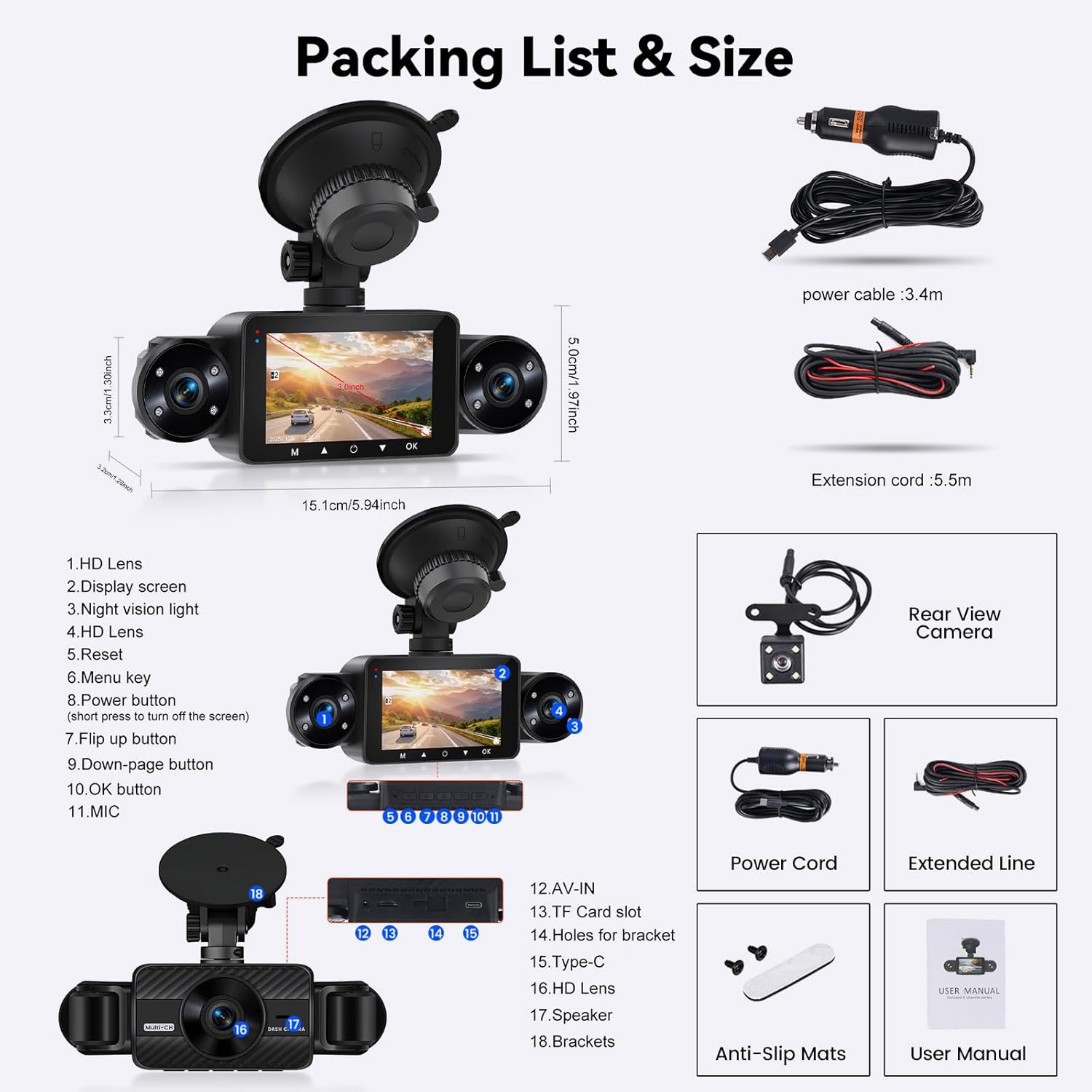
Figure 3.1: Dash Cam Installation Diagram
This diagram illustrates the recommended installation process for the dash cam. It shows the main logger display unit mounted on the front windshield, with the power cable routed to the vehicle's power supply. The rear camera is shown installed at the back of the vehicle, connected to the main unit via an extension cable, with a specific note to connect it to the reverse light anode for reversing assistance. The image also includes six smaller steps detailing how to clean the glass, mount the bracket, remove dust, connect the rear camera, connect the power supply, and adjust the angle.
4. Návod k obsluze
4.1 Základní obsluha
- Zapnutí/vypnutí: The dash cam will automatically power on and begin recording when the vehicle's ignition is turned on. To manually power off, press and hold the Power button.
- Záznam: Once powered on, the dash cam automatically starts loop recording. A red indicator light or icon on the screen typically confirms recording is active.
- Screen Display Modes: The 3-inch IPS screen supports various display modes including full screen, front and rear split, 3-split screen, and 4-split screen. Use the menu buttons to cycle through these display options.
- Přehrávání: Na view zaznamenané footage, stop recording (if active), then navigate to the playback menu using the menu buttons. Select the desired video file pro přehrávání.
4.2 Key Features Operation
- Nahrávání ve smyčce: Autokamera nepřetržitě nahrává a přepisuje nejstarší odemčené files when the memory card is full. This ensures continuous recording without manual intervention.
- G-senzor (nouzové zamknutí): V případě náhlého nárazu nebo kolize vestavěný G-senzor automaticky detekuje událost a uzamkne aktuální video. file, preventing it from being overwritten by loop recording. This footage is saved as important evidence.
- 24hodinový monitoring parkování: With an optional ACC hardwire kit (sold separately), the dash cam can monitor your vehicle even when parked. If an impact is detected, it will automatically record and save the footage. This feature helps protect your vehicle from vandalism or hit-and-runs.
- Asistent couvání: When the rear camera is correctly wired to the vehicle's reverse light, the dash cam screen will automatically display the rear view with parking guidelines when the vehicle is put into reverse gear, aiding in safe parking.
- Night Vision & Exposure Compensation: Equipped with 8 IR night vision lights and exposure adjustment, the dash cam captures clear video in low-light conditions and prevents overexposure in bright light, ensuring optimal recording quality day and night.

Figure 4.1: Parking Monitoring, G-Sensor, and Loop Recording
This image illustrates three key operational features: 24H monitorování parkování, which requires an additional hardwire kit for continuous surveillance when the car is parked; the Vestavěný G-Sensor, which automatically locks video footage upon detecting a collision; and Nahrávání ve smyčce, which ensures continuous recording by overwriting the oldest files, když je paměťová karta plná.

Figure 4.2: Reversing Assistance
This image shows the Reversing Assistance feature in action. When the vehicle is in reverse, the dash cam's screen displays the rear camera feed with clear, colored parking guidelines, helping the driver to park safely and accurately.

Obrázek 4.3: Vylepšené noční vidění
This image highlights the enhanced night vision capabilities of the dash cam. It contrasts a view without IR LEDs (Infrared) and a view with 8 IR LEDs, showing a clearer 720P image. It also compares a generic 2.1-inch screen product with the SIXTOP's 3-inch IPS Night Vision, demonstrating the superior full-color 1080P clarity provided by the SIXTOP dash cam in low-light conditions.
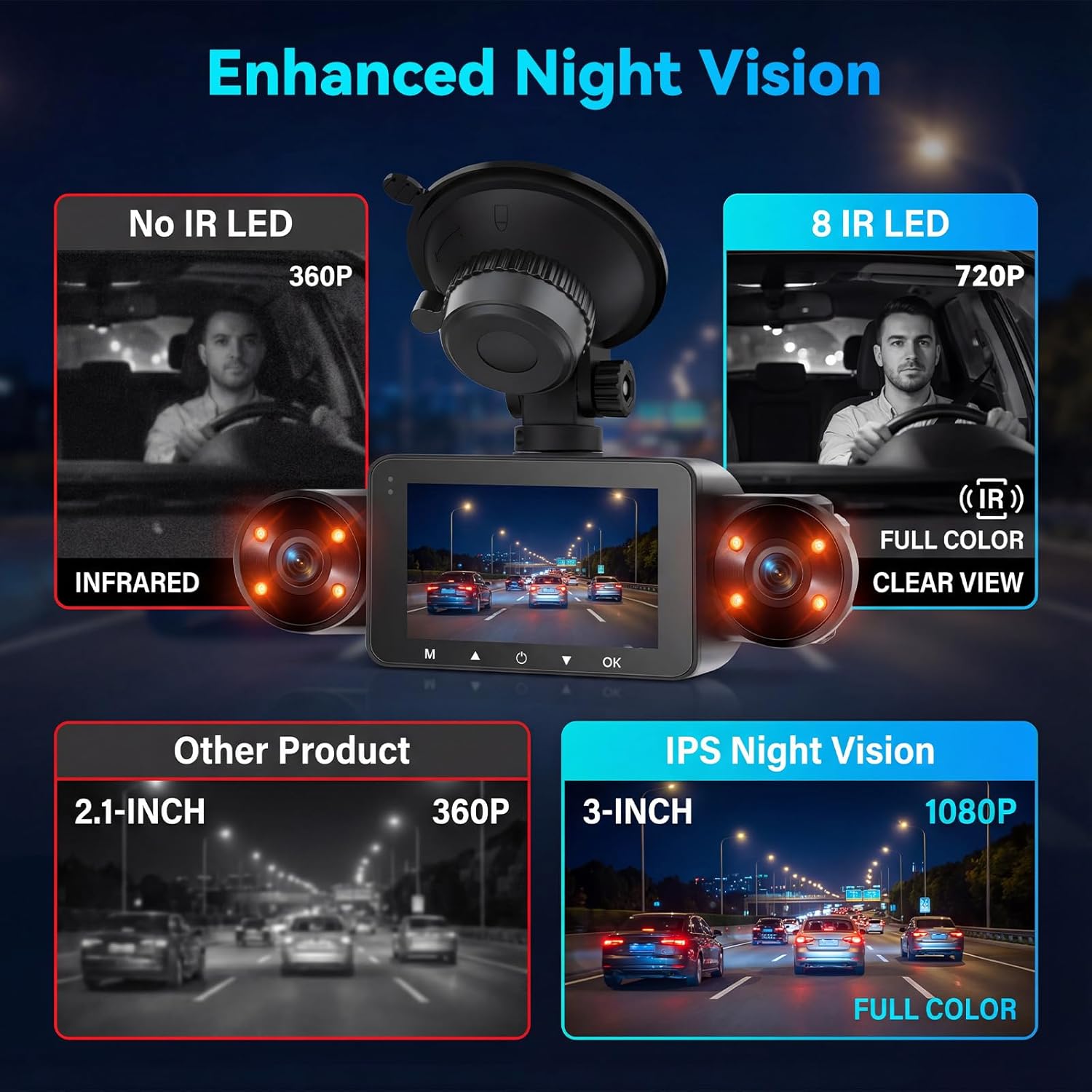
Figure 4.4: 4 Channel 360° View
This image illustrates the comprehensive 360-degree coverage provided by the 4-channel dash cam. It shows the individual fields of view for each camera: Front (150°), Rear (120°), Cabin Left (120°), and Cabin Right (120°). This multi-camera setup ensures all-around vehicle safety and recording from various angles simultaneously.
5. Údržba
- Micro SD karta: Format the Micro SD card regularly (e.g., once a month) to ensure optimal performance and prevent data corruption. Use the format function in the dash cam's menu.
- Čištění: Use a soft, dry cloth to clean the camera lenses and the display screen. Avoid using abrasive cleaners or solvents.
- Teplota: Nevystavujte palubní kameru extrémním teplotám po delší dobu.
- Aktualizace firmwaru: Zkontrolujte výrobce webPravidelně navštěvujte web, kde najdete aktualizace firmwaru, abyste zajistili, že vaše palubní kamera bude mít nejnovější funkce a opravy chyb.
6. Řešení problémů
| Problém | Možná příčina | Řešení |
|---|---|---|
| Palubní kamera se nezapne. | Chybí napájení; vadný kabel; uvolněné připojení. | Check power cable connection to the vehicle's 12V outlet and the dash cam. Ensure the vehicle's ignition is on. Test the power cable in another outlet if possible. |
| Nahrávání se zastaví nebo zamrzne. | SD card full; slow SD card; SD card error. | Format the Micro SD card. Ensure you are using a Class 10 or higher speed card. Replace the SD card if the issue persists. |
| Špatná kvalita videa. | Dirty lens; protective film on lens; incorrect settings. | Vyčistěte čočky fotoaparátu. Odstraňte ochrannou fólii. Zkontrolujte nastavení rozlišení videa v nabídce. |
| Zadní kamera se nezobrazuje. | Loose connection; faulty cable. | Ensure the rear camera cable is securely connected to the main unit. Check the cable for any damage. |
| Parkovací monitor nefunguje. | Hardwire kit not installed; feature disabled. | Verify that the ACC hardwire kit is correctly installed and connected. Check the dash cam settings to ensure parking monitoring is enabled. |
7. Specifikace
| Funkce | Detail |
|---|---|
| Model | B0FXR327SM |
| Obrazovka displeje | 3palcový IPS displej |
| Rozlišení záznamu videa | Front: 1080P, In-car (Left & Right): 720P, Rear: 480P |
| Pole View | Front: 150°, Rear: 120°, Cabin Left: 120°, Cabin Right: 120° (360° total coverage) |
| Noční vidění | HD 8 IR Night Vision with Exposure Compensation |
| Speciální funkce | G-Sensor, Loop Recording, 24H Parking Monitoring (requires hardwire kit), Reversing Assistance |
| Skladování | Supports Micro SD card up to 128GB (Class 10 or higher, not included) |
| Konektivita | USB |
| Typ montáže | Držák na čelní sklo |
| Rozměry produktu | 1 x 1 x 1 palce |
| Hmotnost položky | 1.1 libry |
8. Záruka a podpora
SIXTOP products are designed for reliability and performance. For warranty information and technical support, please refer to the following:
- Záruka: The product typically comes with a standard manufacturer's warranty. Please refer to the warranty card included in your package or contact customer support for specific details regarding coverage and duration.
- Technická podpora: If you encounter any issues or have questions regarding your SIXTOP 4 Channel Dash Cam, please contact SIXTOP customer support.
- Kontaktní údaje: For online support, you may reach out to SIXTOP via the seller's contact information on the purchase platform or through the email provided in the product documentation.

Figure 8.1: SIXTOP Brand Commitment
This image highlights SIXTOP's dedication to integrating R&D, manufacturing, and sales, ensuring expert support and seamless partnerships. It emphasizes the brand's commitment to delivering driving pleasure.

Figure 8.2: Online Support Contact
This image provides an email address for online support: SIXTOP123@163.com. Users can contact this address for assistance with their product.