
Zavedení
Welcome to the FOSSIBOT F106 PRO Rugged Cell Phone user manual. This guide provides essential information for setting up, operating, maintaining, and troubleshooting your device. The FOSSIBOT F106 PRO is designed for durability and performance in challenging environments, featuring a large battery, advanced camera system, and robust construction.

Image: The FOSSIBOT F106 PRO rugged smartphone, showcasing jeho odolný design.
Obsah balení
Ověřte, zda jsou v balení produktu přítomny všechny položky:
- 1 x FOSSIBOT F106 PRO Rugged Smartphone
- 1 x USB Type-C Cable (3A)
- 1 x Power Adapter (20V1.5A)
- 1 x PIN SIM karty
- 1 x Uživatelská příručka a záruční list
Video: An unboxing of the FOSSIBOT F106 PRO, showing the phone, charging accessories, SIM ejector tool, and user manual included in the package.
Nastavení
1. Instalace SIM karty a paměťové karty
The FOSSIBOT F106 PRO supports dual Nano SIM cards or one Nano SIM card and one TF (microSD) card for expandable storage.
- Vyhledejte držák SIM karty na boku telefonu.
- Vložte dodaný kolík SIM karty do malého otvoru vedle přihrádky, abyste ji vysunuli.
- Opatrně vložte kartu (karty) Nano SIM a/nebo kartu TF do určených slotů v držáku. Dbejte na správnou orientaci.
- Jemně zatlačte zásobník zpět do telefonu, dokud nebude v jedné rovině s tělem zařízení.

Image: A hand inserting a dual Nano SIM card tray into the FOSSIBOT F106 PRO. The tray can hold two Nano SIM cards or one Nano SIM and one TF card.
2. Počáteční zapnutí
To power on your device, press and hold the Power button located on the side of the phone until the FOSSIBOT logo appears on the screen.
Follow the on-screen instructions to complete the initial setup, including language selection, network connection, and account setup.
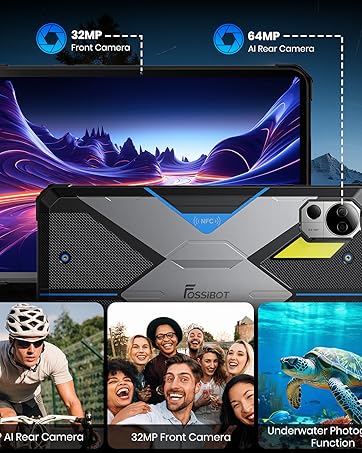
Image: The FOSSIBOT F106 PRO displaying the Android 14 operating system interface with various app icons.
Obsluha vašeho zařízení
1. Základní navigace
The FOSSIBOT F106 PRO runs on Android 14, offering a user-friendly interface.
- Gesta na dotykové obrazovce: Use taps, swipes, and pinches to navigate menus, open apps, and interact with content.
- Tlačítko napájení: Press to wake/sleep the screen. Press and hold to power off or restart the device.
- Tlačítka hlasitosti: Adjust media volume, call volume, and notification volume.
- Vlastní klíč: The F106 PRO features a customizable side key. This key can be configured for various functions such as SOS, flashlight, screenshot, game mode, voice recording, or underwater camera. Refer to the phone settings to customize its function.
2. Funkce fotoaparátu
The F106 PRO is equipped with a versatile camera system:
- Zadní kamera: 48MP main camera for high-resolution photos.
- Kamera pro noční vidění: 20MP IR night vision camera for capturing images and videos in low-light or dark environments.
- Přední kamera: 16MP front camera for selfies and video calls.
To use the camera, open the Camera application. Select between photo, video, and night vision modes. Tap the screen to focus and press the shutter button to capture.

Image: The rear camera module of the FOSSIBOT F106 PRO, highlighting the 48MP main camera, 20MP night vision camera, and LED flash.

Obrázek: Přamples of images captured using the 20MP IR night vision camera in dark environments, demonstrating its capability to capture clear photos in low light.
3. Camp Světlo
Integrovaný c-výbojkový systém s jasem 512 lumenůamp light provides powerful illumination with multiple modes:
- 1/4 Light
- 1/2 Light
- Plné světlo
- SOS (Emergency signal)
- Explosion Flash
Activate and cycle through the modes via the custom key or a dedicated app.

Image: The FOSSIBOT F106 PRO with its 512-lumen camp light illuminated, providing bright light in an outdoor campnastavení.
4. Hlasitý reproduktor
The F106 PRO features a 110dB loud speaker for clear audio output in noisy environments.
Adjust the volume using the side volume buttons.

Image: A close-up of the FOSSIBOT F106 PRO's rear speaker grille, indicating its 110dB loud speaker capability.
5. GPS navigace
The device supports multiple global navigation satellite systems (GNSS) including GPS, GLONASS, Galileo, BEIDOU, and QZSS, ensuring reliable positioning in remote areas.
Use pre-installed or downloaded navigation applications for route guidance.

Image: A person using the FOSSIBOT F106 PRO for GPS navigation in an outdoor, rugged environment, illustrating its multi-GNSS support.
6. Funkce NFC
The F106 PRO supports Near Field Communication (NFC) for convenient mobile payments, data transfer, and quick pairing with compatible devices.
Ensure NFC is enabled in your phone settings to use this feature.

Image: A hand holding the FOSSIBOT F106 PRO near a payment terminal, demonstrating the use of NFC for contactless transactions.
Klíčové vlastnosti
1. Baterie
The FOSSIBOT F106 PRO is equipped with a 12000mAh battery, providing extended usage times:
- Standby Time: Over 842 hours
- Talk Time: Over 60 hours
- HD Video Playback: Over 45 hours
- Music Playback: Over 58 hours
- Camp Light Usage: Over 10.5 hours
The device supports 30W fast charging via its USB Type-C port.

Obrázek: Interní view of the FOSSIBOT F106 PRO highlighting its 12000mAh battery and indicating 30W fast charging capability.
2. Úložiště a výkon
The F106 PRO offers 15GB RAM (8GB physical + 7GB virtual) and 256GB internal storage, expandable up to 512GB with a TF card.
An octa-core MediaTek Helio G85 processor ensures smooth multitasking and app performance.

Image: A diagram illustrating the FOSSIBOT F106 PRO's 15GB RAM (8GB + 7GB virtual), 256GB ROM (expandable to 512GB), and Octa-core 2.0GHz MediaTek Helio G85 processor.
3. Robustní konstrukce
The F106 PRO is built to withstand harsh environments, certified with IP68/IP69K and MIL-STD-810H standards.
- Vodotěsný: Submersible in water.
- Prachotěsný: Fully protected against dust ingress.
- nárazuvzdorný: Designed to resist drops from up to 1.5 meters. Features strengthened corners for enhanced durability.

Image: The FOSSIBOT F106 PRO being submerged in water, covered in dust, and dropped, demonstrating its IP68/IP69K and MIL-STD-810H certifications for water, dust, and shock resistance.
Údržba
1. Obecná péče
- Udržujte zařízení čisté a bez prachu a nečistot.
- Avoid exposing the phone to extreme temperatures for prolonged periods.
- Ensure all port covers are securely closed when the phone is exposed to water or dust.
2. Čištění
- K čištění obrazovky a těla používejte měkký hadřík, který nepouští vlákna.
- Pro odolnou špínu lehceampOpláchněte hadřík vodou. Vyhněte se agresivním chemikáliím.
Odstraňování problémů
1. Zařízení se nezapíná
- Ujistěte se, že je baterie nabitá. Připojte telefon k nabíječce a před opětovným zapnutím počkejte několik minut.
- Stiskněte a podržte tlačítko napájení po dobu alespoň 10–15 sekund, abyste provedli nucený restart.
2. Špatné síťové připojení
- Zkontrolujte, zda je vaše SIM karta správně vložena.
- Verify that your mobile data or Wi-Fi is enabled.
- Ujistěte se, že jste v dosahu sítě.
- Restartujte zařízení.
3. Aplikace padá nebo zamrzávají
- Zavřete a znovu otevřete aplikaci.
- Clear the app's cache and data in the phone settings.
- Ujistěte se, že je aplikace aktualizována na nejnovější verzi.
- Restartujte telefon.
Specifikace
Key technical specifications of the FOSSIBOT F106 PRO:
| Funkce | Specifikace |
|---|---|
| Značka | FOSSIBOT |
| Název modelu | F106Pro |
| Operační systém | Android 14 |
| BERAN | 15 GB (8 GB fyzického + 7 GB virtuálního) |
| Interní úložiště | 256 GB |
| Rozšiřitelné úložiště | Up to 512 GB (TF Card) |
| Procesor | Osmijádrový procesor MediaTek Helio G85 |
| Velikost obrazovky | 6.58 palců |
| Rezoluce | 2400 x 1080 pixelů |
| Obnovovací frekvence | 120 Hz |
| Zadní kamera | 48 MP |
| Kamera pro noční vidění | 20 MP |
| Přední kamera | 16 MP |
| Kapacita baterie | 12000 XNUMX mAh |
| Nabíjení | 30W rychlé nabíjení, USB typu C |
| Trvanlivost | IP68/IP69K, MIL-STD-810H (Waterproof, Dustproof, Shockproof) |
| Konektivita | 4G, Dual SIM, Wi-Fi, Bluetooth, NFC |
| Navigace | GPS, GLONASS, Galileo, BEIDOU, QZSS |
| Speciální funkce | 512-Lumen Camp Light, 110dB Loud Speaker, Face Recognition, Fingerprint Unlock, Custom Key |
Záruka a podpora
1. Informace o záruce
The FOSSIBOT F106 PRO comes with a 2-year warranty. Please refer to the included Warranty Card for detailed terms and conditions.
2. Zákaznická podpora
For technical assistance or support, please contact FOSSIBOT customer service. 24/7 online after-sales support is available.
Visit the official FOSSIBOT webstránky s kontaktními informacemi a dalšími zdroji: www.fossibot.com