
DWVO MADWVJ0Wtz
DWVO Computer Desk with Drawers & Hutch Instruction Manual
Model: MADWVJ0Wtz
1. Důležité bezpečnostní informace
Před montáží a použitím si pečlivě přečtěte všechny pokyny. Uschovejte si tento návod pro budoucí použití.
- Ensure the desk is properly assembled and placed on a stable surface to prevent tipping.
- Adjustable foot pads are included to stabilize the desk on uneven ground.
- Always use the included anti-tip kit to secure the desk to a wall, especially if children are present.

Obrázek 1.1: Illustration of potential injury from tipping and the use of an anti-tip strap to prevent falling danger.
2. Konec produktuview
The DWVO Computer Desk with Drawers & Hutch is designed for home office and gaming environments, offering ample storage and integrated features for enhanced productivity and convenience.
Klíčové vlastnosti:
- LED světelné pásy: Customizable RGB LED lighting controlled via phone app or switch, with music sync and timer functions.
- Pohodlná nabíjecí stanice: Integrated with 2 USB ports and 4 power outlets, featuring a 6.56ft power cord.
- Detachable Top Hutch & Monitor Shelf: Maximizes desktop space and provides elevated display options.
- Velká skladovací kapacita: Includes 3 drawers (one with lock), side storage shelves, and a full monitor stand.
- Robustní a odolná konstrukce: Made from 0.79" metal frame and 0.59" high-grade P2 particle board with adjustable foot pads.
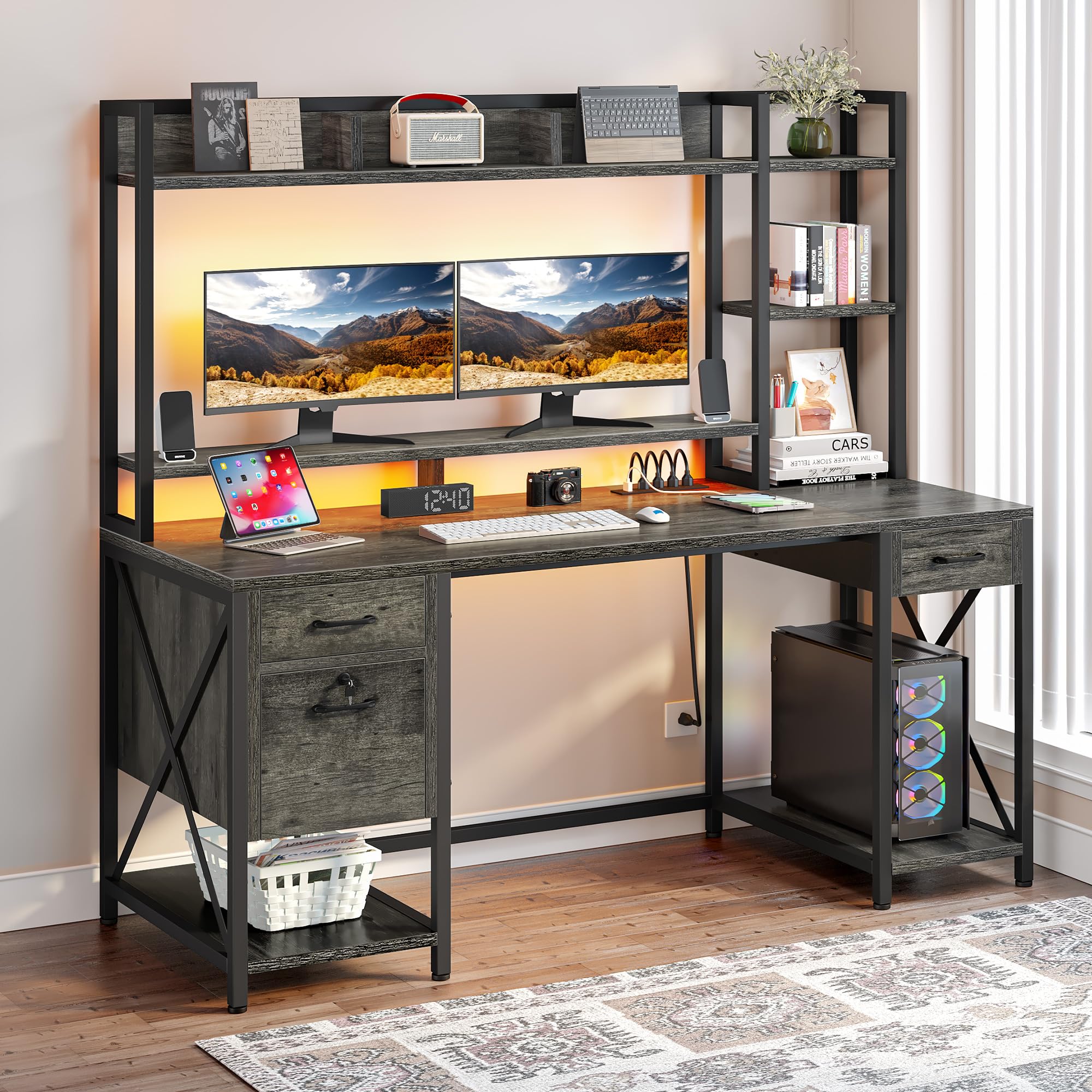
Obrázek 2.1: The DWVO Computer Desk with Drawers & Hutch.

Obrázek 2.2: Product dimensions for planning your space.
2.1 video: Úředník nadview of the DWVO Computer Desk with Drawers & Hutch, showcasinjeho vlastnosti a design.
3. Obsah balení
Před zahájením montáže ověřte, zda jsou přítomny všechny součásti. Pokud některé součásti chybí nebo jsou poškozené, kontaktujte zákaznickou podporu.
- 1 x Computer Desk (all desk panels and frame components)
- 1 x Packet of Fittings (screws, bolts, connectors, anti-tip kit)
- 1 x Návod k obsluze (tento dokument)
- 1 x LED Light Strip with controller
- 1 x Power Outlet & USB Hub
4. Nastavení a montáž
Assembly is required for this product. It is recommended that two people assemble the desk to ensure stability and ease of construction. All necessary tools for assembly are included.
Postup generálního shromáždění:
- Rozbalení a identifikace součástí: Carefully unpack all components and lay them out. Refer to the included parts list to identify each piece.
- Sestavte rám: Begin by connecting the metal frame components according to the diagrams in the separate assembly manual. Ensure all screws are tightened securely but do not overtighten until the entire frame is assembled.
- Připevnění panelů stolu: Secure the main desktop and hutch panels to the assembled frame.
- Instalace zásuvek: Assemble the drawer boxes and install the drawer slides onto both the drawers and the desk frame. Ensure the slides are aligned correctly for smooth operation.
- Integrate Power Outlets and LED Lights: Install the power outlet strip into its designated slot. Attach the LED light strip to the underside of the hutch or monitor stand as indicated in the assembly manual.
- Konečné úpravy: Once fully assembled, tighten all screws. Adjust the foot pads to level the desk on uneven surfaces.
- Instalace sady proti převrácení: Secure the desk to a wall using the provided anti-tip kit to prevent accidental tipping.
For detailed, step-by-step instructions and diagrams, please refer to the separate assembly manual included in your package.
5. Návod k obsluze
5.1. LED Light Strips
Stůl je vybaven RGB LED světelným páskem pro přizpůsobení atmosféry.
- Řízení: LED světla lze ovládat pomocí speciálního vypínače pro světelné pásky nebo aplikací v chytrém telefonu.
- Přizpůsobení: Use the app to select any color, adjust brightness, and choose from various dynamic modes.
- Synchronizace hudby: The lights can synchronize with music played through a built-in microphone.
- Funkce časovače: Nastavte si časové plány pro automatické zapínání a vypínání světel.

Obrázek 5.1: LED light strip in operation, showing color customization.
5.2. Nabíjecí stanice
Integrovaná nabíjecí stanice poskytuje pohodlný přístup k energii.
- Napájecí zásuvky: Use the 4 AC outlets to power your computer, monitors, and other devices.
- USB porty: The 2 USB ports (5V/2A) are suitable for charging smartphones, tablets, and other USB-powered accessories.
- Napájecí kabel: The charging station is connected via a 6.56ft power cord. Plug it into a standard wall outlet.

Obrázek 5.2: Integrated power outlets and USB ports.
5.3. Drawers and Storage
Utilize the various storage options to keep your workspace organized.
- Zásuvky: The desk includes three drawers. The bottom drawer is designed as a file drawer, accommodating A4/Letter-sized documents and features a lock for security.
- Přístřešek a police: Use the top hutch and side shelves for displaying items, storing books, or organizing office supplies.
- Stojan na monitor: The elevated monitor stand provides ergonomic viewing and additional storage underneath.

Obrázek 5.3: File drawer with lock and adjustable file stojany.
6. Údržba
Pravidelná údržba zajistí dlouhou životnost a optimální výkon vašeho stolu.
- Čištění: Otřete povrchy měkkým, damp hadříkem. Nepoužívejte agresivní chemikálie ani abrazivní čisticí prostředky, které by mohly poškodit povrchovou úpravu.
- Kontrola hardwaru: Pravidelně kontrolujte všechny šrouby a upevňovací prvky, zda jsou pevně utažené. V případě potřeby je dotáhněte pro zachování stability.
- LED Strip Adhesion: If the LED light strip begins to detach, re-secure it using additional adhesive tape or a suitable wood glue for a more permanent fix.
- Posuvy zásuvek: Keep drawer slides free of dust and debris for smooth operation. Lubricate with a silicone-based spray if needed.
7. Řešení problémů
Tato část se zabývá běžnými problémy, se kterými se můžete setkat.
| Problém | Možná příčina | Řešení |
|---|---|---|
| LED light strip does not stick or falls down. | Original adhesive may be insufficient or surface not clean. | Clean the surface thoroughly. Apply additional strong adhesive tape or a small amount of wood glue to secure the strip. |
| Drawers do not align or close completely. | Screws on drawer tracks are not flush, or tracks are misaligned. | Ensure all screws securing the drawer tracks are tightened completely and are flush with the surface. Recheck track alignment according to the assembly manual. |
| Missing or mismatched parts during assembly. | Packaging error or manufacturing defect. | Double-check all packaging for small parts. Contact DWVO customer service with your model number and a description of the missing/mismatched parts. |
| Desk feels unstable or wobbly. | Uvolněné upevňovací prvky nebo nerovná podlaha. | Tighten all assembly screws. Adjust the leveling foot pads at the bottom of the desk legs to compensate for uneven flooring. |
8. Specifikace
Detailed specifications for the DWVO Computer Desk with Drawers & Hutch.
| Funkce | Detail |
|---|---|
| Značka | DWVO |
| Číslo modelu | MADWVJ0Wtz |
| Rozměry produktu (D x Š x V) | 19.68 cm x 59.1 cm x 59.1 cm |
| Hmotnost položky | 92.9 libry |
| Barva | Šedá |
| Typ materiálu | Umělé dřevo, kov |
| Počet zásuvek | 3 |
| Počet polic | Multi-shelves |
| Speciální funkce | Power Outlets, USB Outlets, LED Lights, Drawers, Lock, Hutch |
| Požadovaná montáž | Ano |
| Doporučení lidé pro montáž | 2 |
| Dodávané montážní nástroje | Ano |
| GTIN | 199449407010 |
9. Záruka a podpora
This DWVO product comes with a limited warranty.
- Typ záruky: Limited Warranty. Specific terms and duration may vary. Please refer to your purchase documentation or contact DWVO customer service for details.
- Zákaznická podpora: For assembly assistance, missing parts, or any product-related inquiries, please contact DWVO customer service. Refer to the contact information provided with your purchase or visit the official DWVO webmísto.
Ask a question about this manual
Ask about setup, troubleshooting, compatibility, parts, safety, or missing instructions. Manuals+ will review the question and use this page’s manual context to help answer it.