
GOOLOO GT6000 Jump Starter & DS200 OBD2 Scanner User Manual
Model: GT6000 & DS200
1. Úvod
This manual provides detailed instructions for the safe and effective use of your GOOLOO GT6000 6000A Jump Starter and GOOLOO DEEPSCAN DS200 OBD2 Diagnostic Scanner. Please read this manual thoroughly before operating the devices and retain it for future reference.
The GOOLOO GT6000 is a powerful portable jump starter designed to start vehicles with dead batteries, while also serving as a portable power bank. The GOOLOO DEEPSCAN DS200 is a compact OBD2 scanner that connects wirelessly to your smartphone, providing comprehensive vehicle diagnostics and maintenance functions.

Image 1.1: The GOOLOO GT6000 Jump Starter and GOOLOO DEEPSCAN DS200 OBD2 Scanner.
2. Důležité bezpečnostní informace
Always observe the following safety precautions when using the GOOLOO GT6000 Jump Starter and DS200 OBD2 Scanner to prevent injury or damage to the devices or your vehicle.
- Před použitím si přečtěte všechny pokyny.
- Uchovávejte mimo dosah dětí.
- Do not expose the devices to rain or extreme temperatures.
- Zařízení nerozebírejte ani neupravujte.
- Během používání a nabíjení zajistěte dostatečné větrání.
- Wear eye protection when working with vehicle batteries.
- Zabraňte zkratu startovacího kabeluamps.
- Use the jump starter only for 12V lead-acid batteries.

Image 2.1: The GT6000 Jump Starter features multiple safety protections including over-charge, short-circuit, and reverse-polarity protection.
3. GOOLOO GT6000 Jump Starter
3.1. Konec produktuview
The GT6000 is a high-capacity jump starter with a 6000A peak current, capable of starting all gas engines and diesel engines up to 12L. It also functions as a portable power bank with 100W bi-directional fast charging.

Image 3.1: Diagram showing the ports and controls of the GT6000 Jump Starter, including the BOOST button, jump cable socket, DC port, USB output ports, and IN/OUT PD100W port.

Image 3.2: The 3.2-inch LED display on the GT6000 shows battery level, charging power, low current mode, 'Ready to Start' status, low temperature reminder, and battery clips reversed warning.
3.2. Charging the GT6000
Before first use, fully charge the GT6000. It supports 100W bi-directional fast charging. A full charge from 0-100% takes approximately 1.4 hours.
- Connect the provided USB-C cable to the IN/OUT PD100W port on the GT6000.
- Connect the other end of the cable to a compatible 100W USB-C power adapter (a 100W car charger is included).
- LED displej zobrazuje stav nabíjení a procenta baterietage.

Image 3.3: The GT6000 charging, indicating 100W super fast charging capabilities.
3.3. Operating the Jump Starter
Follow these steps to jump-start a vehicle with a dead battery:
- Vložit: Insert the smart jumper cable plug into the jump cable socket on the GT6000. Ensure a secure connection.
- Připojit: Připojte červenou třamp ke kladnému (+) pólu baterie vozidla a černému clamp to the negative (-) terminal. Ensure the clamps are firmly attached. If the LED display shows "Battery Clips Reversed", recheck the connections.
- Start: Once the GT6000 display shows "READY", start your car engine. If the engine does not start immediately, wait 20-30 seconds and try again. Do not attempt more than 3 consecutive jump starts.
- Odstranit: Jakmile vozidlo nastartuje, odpojte kl.amps from the car battery first, then remove the jumper cable from the GT6000.

Image 3.4: Visual guide for the three steps to jump start your vehicle using the GT6000.
3.4. Použití jako powerbanky
The GT6000 can charge various electronic devices via its USB output ports and the bi-directional USB-C port.
- Connect your device's charging cable to one of the GT6000's output ports (5V/2.4A, 5V/9V/12V, or IN/OUT PD100W USB-C).
- The GT6000 will automatically begin charging your device.

Image 3.5: The GT6000 functioning as a portable power bank, charging a laptop and smartphone.
3.5. LED Flashlight Functions
The GT6000 includes an integrated LED flashlight with multiple modes:
- Normální světlo: Press and hold the power button for 3 seconds to turn on the flashlight.
- Blikající světlo: Short press the power button again to switch to strobe mode.
- Signál SOS: Short press the power button a third time to activate the SOS signal mode.
- Vypnout: Short press the power button a fourth time or press and hold for 3 seconds to turn off the flashlight.
3.6. GT6000 Specifications
| Funkce | Detail |
|---|---|
| Špičkový proud | 6000A |
| Kompatibilita motoru | All Gas, up to 12.0L Diesel |
| Kapacita baterie | 27000 mAh (99.9Wh) |
| Rychlé nabíjení | 100W Bi-directional (USB-C) |
| Zobrazit | 3.2palcová LED |
| Ochrany | 10 SuperSafe Protections (Over-Charge, Short-Circuit, Reverse-Polarity, etc.) |
| LED světlo | 400 Lumens (Flashlight, Strobe, SOS) |
| Pohotovostní doba | Až 24 měsíců |
4. GOOLOO DEEPSCAN DS200 OBD2 Scanner
4.1. Konec produktuview
The DS200 is a wireless Bluetooth OBD2 scanner designed for comprehensive vehicle diagnostics. It connects to your smartphone via an app and supports full system diagnostics, bidirectional control, and various maintenance services.
4.2. Setup & App Installation
To begin using your DS200 scanner, you need to download and install the GOOLOO DEEPSCAN app on your smartphone.
- Stáhnout aplikaci: Hledat "GOOLOO DEEPSCAN" in the Apple App Store (for iOS devices) or Google Play Store (for Android devices).
- Nainstalovat aplikaci: Stáhněte a nainstalujte aplikaci.
- Registrace/Přihlášení: Follow the in-app instructions to register an account or log in if you already have one.

Image 4.1: The DS200 scanner and instructions for downloading the GOOLOO DEEPSCAN app from app stores.
4.3. Připojení k vašemu vozidlu
The DS200 connects to your vehicle's OBD2 port, typically located under the dashboard on the driver's side.
- Locate your vehicle's 16-pin OBD2 port.
- Plug the DS200 scanner firmly into the OBD2 port. The scanner will power on automatically.
- Turn on your vehicle's ignition (engine off or running, depending on the diagnostic task).
- Open the GOOLOO DEEPSCAN app on your smartphone and follow the prompts to connect to the DS200 via Bluetooth.

Image 4.2: The DS200 scanner connected to a vehicle's OBD2 port, displaying diagnostic information on a smartphone.
4.4 Základní diagnostické funkce
Once connected, the DS200 app provides access to standard OBD2 functions:
- Číst kódy: Retrieve Diagnostic Trouble Codes (DTCs) from the vehicle's Engine Control Unit (ECU).
- Vymazat kódy: Po opravě vymažte kódy DTC a zhasněte kontrolku motoru (MIL).
- Živá data: View real-time sensor data, such as engine RPM, vehicle speed, coolant temperature, and fuel system status.
- Připravenost I/M: Zkontrolujte stav monitorů emisí, abyste se ujistili, že je vozidlo připraveno k emisní zkoušce.
- Data zmrazeného snímku: View a snapshot of sensor data recorded when an emission-related fault occurred.
- Informace o vozidle: Retrieve vehicle identification number (VIN), calibration ID, and calibration verification numbers (CVN).
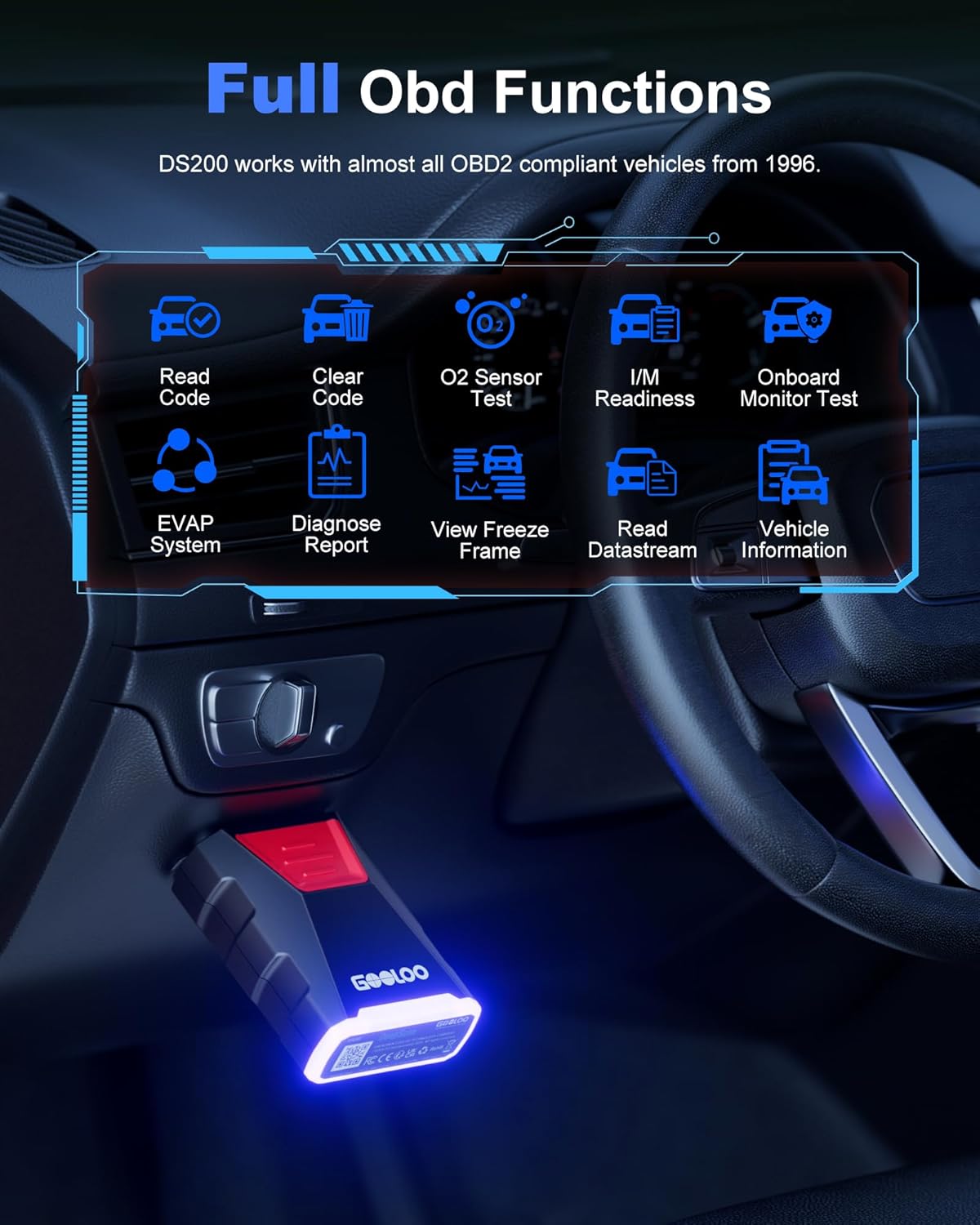
Image 4.3: The DS200 app interface displaying various full OBD functions like Read Code, Clear Code, O2 Sensor Test, and Live Data.
4.5. Advanced Diagnostic Functions
The DS200 offers advanced features for in-depth vehicle analysis:
- Kompletní diagnostika systému: Scan all available electronic control units (ECUs) in the vehicle, including Engine, Transmission, ABS, SRS, BCM, etc., to read and clear fault codes.
- Obousměrné ovládání: Perform active tests to control various vehicle components (e.g., turn on/off wipers, headlights, fuel pump) to verify their functionality.
- Maintenance Services: Access common maintenance functions such as Oil Reset, Throttle Adaptation, EPB Reset, Steering Angle Resets, DPF Regeneration, ABS Bleeding, BMS Reset, and Airbag Reset.
- Vehicle Performance Test: Conduct tests to evaluate vehicle performance metrics like acceleration time, top speed, and engine load.

Image 4.4: The DS200 app interface listing 8 common maintenance services available for various vehicle systems.

Image 4.5: The DS200 app demonstrating bidirectional control, allowing users to troubleshoot faults by controlling components like wipers, mirrors, and headlights.
4.6. DS200 Specifications
| Funkce | Detail |
|---|---|
| Konektivita | Bluetooth 5.0 |
| Podporovaná zařízení | iOS and Android smartphones/tablets |
| Protokoly OBD2 | All standard OBD2 protocols, including FCA & CAN-FD |
| Funkce | Full System Diagnostics, Bidirectional Control, 8 Maintenance Services, Full OBD Functions, Real-time Data Monitoring, Vehicle Performance Test |
| Pokrytí vozidla | Most OBD2 compliant vehicles from 1996 onwards |
5. Péče a údržba
Proper care ensures the longevity and optimal performance of your GOOLOO devices.
- Čištění: Use a soft, dry cloth to clean the exterior of both devices. Do not use abrasive cleaners or solvents.
- Skladování: Store the devices in a cool, dry place away from direct sunlight and extreme temperatures. For the GT6000, ensure it is charged to at least 50% before long-term storage and recharge every 3-6 months.
- Zacházení: Zabraňte pádu zařízení na zem nebo jejich vystavení silným nárazům.
- Kabely: Inspect jumper cables and OBD2 connector for any damage before each use. Replace if frayed or damaged.
6. Řešení problémů
6.1. GT6000 Jump Starter Issues
- Zařízení se nezapne: Ujistěte se, že je zařízení nabité. Stiskněte a několik sekund podržte tlačítko napájení.
- Vozidlo nestartuje:
- Zkontrolujte, zda je třampjsou bezpečně připojeny ke správným svorkám baterie.
- Ujistěte se, že je GT6000 dostatečně nabitý.
- If the battery is severely discharged, press the BOOST button on the GT6000 (if available and safe to do so, refer to specific product instructions for boost mode).
- The vehicle battery might be completely dead or damaged and require replacement.
- "Battery Clips Reversed" error: Odpojit třamps and reconnect them to the correct positive (+) and negative (-) terminals.
6.2. DS200 OBD2 Scanner Issues
- Skener se nezapíná: Ensure the DS200 is fully plugged into the vehicle's OBD2 port and the vehicle's ignition is on.
- Nelze se připojit přes Bluetooth:
- Ujistěte se, že je na vašem smartphonu povoleno Bluetooth.
- Restart the GOOLOO DEEPSCAN app.
- Unplug and re-plug the DS200 from the OBD2 port.
- Check if the app requires location permissions, as some Bluetooth functions do.
- No communication with ECU:
- Ověřte, zda je zapnuté zapalování vozidla.
- Ensure the DS200 is securely connected to the OBD2 port.
- Confirm your vehicle is OBD2 compliant (most vehicles from 1996 onwards).
- Try scanning a different vehicle to rule out scanner malfunction.
7. Záruka a zákaznická podpora
GOOLOO products are designed for reliability and performance. For warranty information, technical support, or any questions regarding your GT6000 Jump Starter or DS200 OBD2 Scanner, please refer to the official GOOLOO webwebu nebo se přímo obraťte na jejich zákaznický servis.
Please have your product model number (GT6000, DS200) and purchase information ready when contacting support.