
Zavedení
This manual provides essential information for setting up, operating, maintaining, and troubleshooting your HP 15.6-inch FHD IPS Touchscreen Laptop. Please read this guide thoroughly to ensure optimal performance and longevity of your device. This laptop features an AMD Ryzen 7 7730U processor, 64GB DDR4 RAM, 2.28TB storage (2TB SSD + 288GB Docking Station Set), AMD Radeon Graphics, and runs on Windows 11 Pro.
Nastavení
Vybalení a první zapnutí
Carefully remove all components from the packaging. Connect the power adapter to the laptop and a power outlet. Press the power button to turn on the laptop. Follow the on-screen instructions to complete the initial Windows 11 Pro setup.
Zahrnuté příslušenství
Your laptop package includes the following accessories:
- 1x 7-in-1 Docking Station with 256GB Storage
- 1x 32GB MicroSD karta s adaptérem
- 1x datový kabel typu C
- 1x nabíjecí kabel 3 v 1
- 1x Čisticí hadřík na semiš
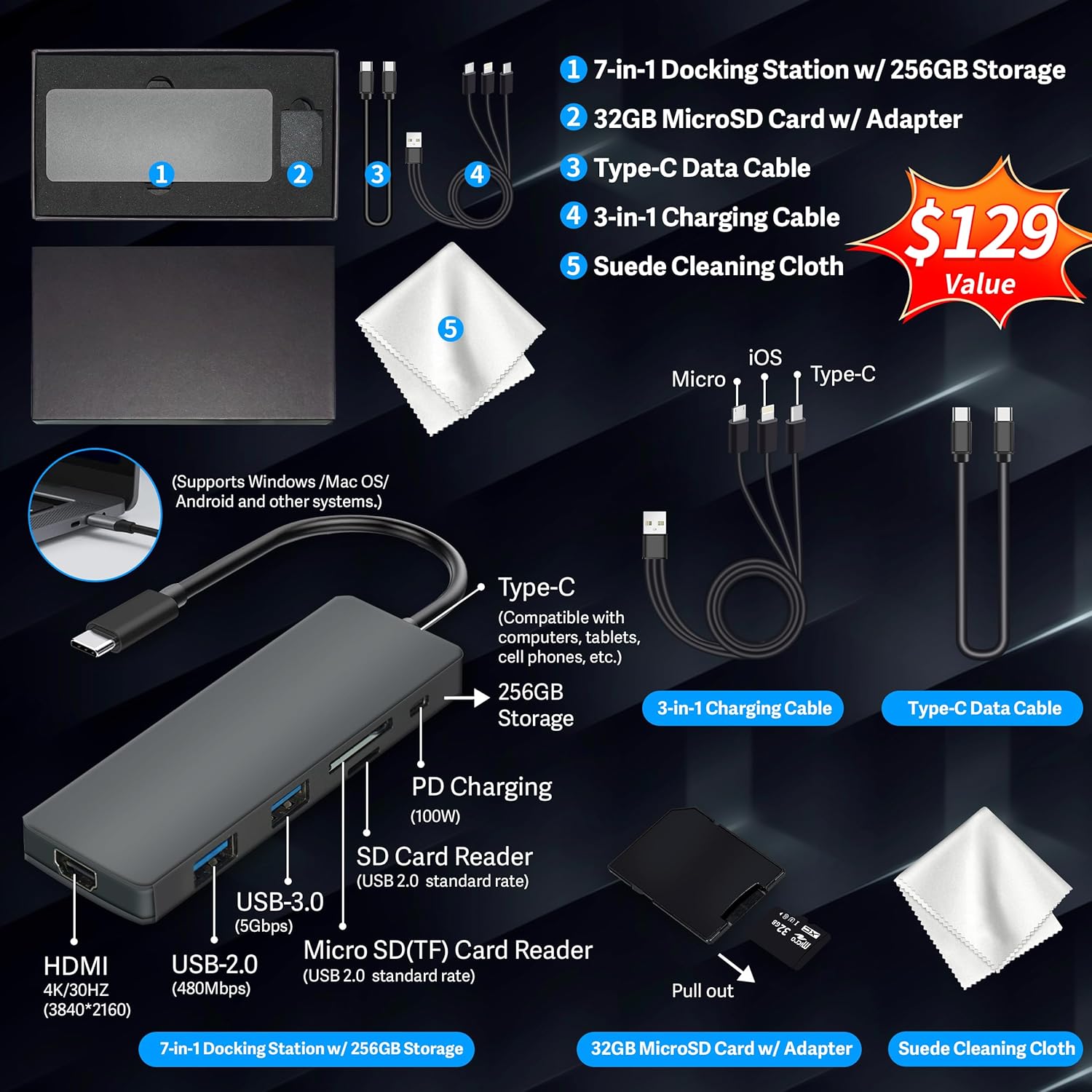
Figure 1: Included accessories, including the 7-in-1 docking station, various cables, and a cleaning cloth.
Ovládání notebooku
Funkce displeje
The HP 15.6-inch laptop features an FHD IPS touchscreen display with a resolution of 1920 x 1080 pixels and an anti-glare coating. This display provides clear and vibrant visuals from various viewing úhly.

Figure 2: The 15.6-inch FHD IPS display offers crisp and vivid details.
Konektivita a periferie
Your laptop is equipped with various connectivity options and integrated features to enhance your user experience.
- 720p HD Camera: For video calls and online meetings.
- Wi-Fi 6: Pro vysokorychlostní bezdrátové připojení k internetu.
- Bluetooth: Pro připojení bezdrátových periferií, jako jsou myši, klávesnice a sluchátka.
- Numerická klávesnice: A full numeric keypad is integrated for efficient data entry and calculations.

Figure 3: Key features for staying connected and productive, including the numeric keypad.
The laptop includes multiple ports for connecting external devices:
- 2x porty USB typu A
- 1x port USB typu C
- 1x HDMI port
- 1x kombinovaný konektor pro sluchátka/mikrofon

Figure 4: Multi-port configuration on the laptop for various connections.
Výkon a multitasking
Equipped with an AMD Ryzen 7 7730U processor, 64GB DDR4 RAM, and AMD Radeon Graphics, this laptop is designed for efficient multitasking and demanding applications. The 2.28TB storage (2TB SSD + 288GB Docking Station Set) provides ample space and fast access to your files.

Figure 5: Core specifications for performance and storage.

Figure 6: Laptop demonstrating effortless multitasking with several applications running simultaneously.
The laptop is designed for extended use, offering reliable battery life to support your daily tasks.

Figure 7: The laptop supports continuous work throughout the day with its battery performance.
Údržba
To ensure the longevity and optimal performance of your HP laptop, follow these maintenance guidelines:
- Čištění: Use the provided suede cleaning cloth or a soft, lint-free cloth to clean the screen and exterior. Avoid harsh chemicals.
- Aktualizace softwaru: Regularly update your Windows 11 Pro operating system and drivers to ensure security and performance.
- Péče o baterie: Vyhněte se častému úplnému vybíjení baterie. Pro dlouhodobé skladování nabijte baterii na přibližně 50–70 %.
- Větrání: Ujistěte se, že větrací otvory notebooku nejsou zakryty, aby nedošlo k jeho přehřátí. Používejte notebook na tvrdém a rovném povrchu.
- Skladování: Notebook skladujte na chladném a suchém místě mimo dosah přímého slunečního záření a extrémních teplot.
Odstraňování problémů
Tato část se zabývá běžnými problémy, se kterými se můžete setkat při používání notebooku.
Notebook se nezapne
- Ujistěte se, že je napájecí adaptér bezpečně připojen k notebooku i k funkční zásuvce.
- Ověřte funkčnost elektrické zásuvky zapojením jiného zařízení.
- Pokud je baterie zcela vybitá, nechte ji nabíjet alespoň 15–30 minut, než se ji pokusíte zapnout.
Screen Remains Blank
- Zkontrolujte, zda je notebook zapnutý (svítí kontrolka napájení).
- Try connecting an external monitor to see if display output is available.
- Jas obrazovky upravte pomocí funkčních kláves.
Problémy s připojením k Wi-Fi
- Ujistěte se, že je v nastavení systému Windows povolena Wi-Fi.
- Restartujte router a modem.
- Update your Wi-Fi drivers through Device Manager.
- Zkontrolujte, zda se nevyskytují nějaké fyzické překážky nebo rušení.
Pomalý výkon
- Zavřete nepotřebné aplikace běžící na pozadí.
- Zkontrolujte Správce úloh, zda neobsahuje procesy spotřebovávající vysokou kapacitu procesoru nebo paměti RAM.
- Ujistěte se, že máte aktuální operační systém a ovladače.
- Spusťte čištění a defragmentaci disku (pro pevné disky, pro SSD disky není nutné).
- Prohledejte systém, zda neobsahuje malware nebo viry.
Specifikace
Below are the detailed technical specifications for your HP 15.6-inch FHD IPS Touchscreen Laptop.

Figure 8: Laptop dimensions and weight for portability.
| Funkce | Detail |
|---|---|
| Značka | HP |
| Název modelu | HP 15.6" FHD IPS Touchscreen Laptop |
| Velikost obrazovky | 15.6 palce |
| Rozlišení displeje | 1920 x 1080 pixelů (FHD) |
| Typ zobrazení | LED IPS Touchscreen |
| Procesor | AMD Ryzen 7 7730U (8 Cores, 2 GHz base) |
| Grafický koprocesor | Grafická karta AMD Radeon (integrovaná) |
| Paměť RAM | 64 GB DDR4 (3200 MHz) |
| Skladování | 2 TB SSD + 288 GB Docking Station Set (Total 2.28 TB) |
| Operační systém | Windows 11 Pro |
| Konektivita | Wi-Fi 6 (802.11ax), Bluetooth, HDMI, USB |
| Porty | 2x USB Type-A, 1x USB Type-C, 1x HDMI, 1x Headphone/Microphone Combo |
| Webvačka | 720p HD kamera |
| Klávesnice | Plnohodnotná s numerickou klávesnicí |
| Rozměry (D x Š x T) | 14.17 cm x 9.29 cm x 0.73 cm |
| Hmotnost položky | 3.52 libry (přibližně 1.6 kg) |
| Barva | Stříbro |
| UPC | 196188514924 |
| ASIN | B0FX2NR2WN |
Informace o záruce
Your HP laptop comes with a manufacturer's warranty. For upgraded components (RAM/SSD), a 1-year warranty is provided by SnowBell. The original 1-year manufacturer warranty applies to all other components of the laptop. Please retain your proof of purchase for warranty claims. For detailed terms and conditions, refer to the warranty documentation included with your product or visit the official HP support webmísto.
Podpora
Pro další pomoc, technickou podporu nebo servisní dotazy se prosím obraťte na následující zdroje:
- Oficiální podpora HP Webmísto: Návštěva support.hp.com pro ovladače, manuály a průvodce řešením problémů.
- Online nápověda: Utilize the built-in Windows 11 Pro help features for software-related questions.
- Contact Retailer: For issues related to upgraded components or purchase, contact SnowBell or your point of purchase.