
1. Úvod
Thank you for choosing the Angrox Backlit Universal Remote Control for LG Smart TVs. This remote is designed to provide a seamless and enhanced television viewing experience, especially in low-light conditions. It serves as a direct replacement for your original LG TV remote, offering broad compatibility and ease of use without requiring complex setup procedures. This manual provides detailed instructions for setting up, operating, maintaining, and troubleshooting your new remote control.
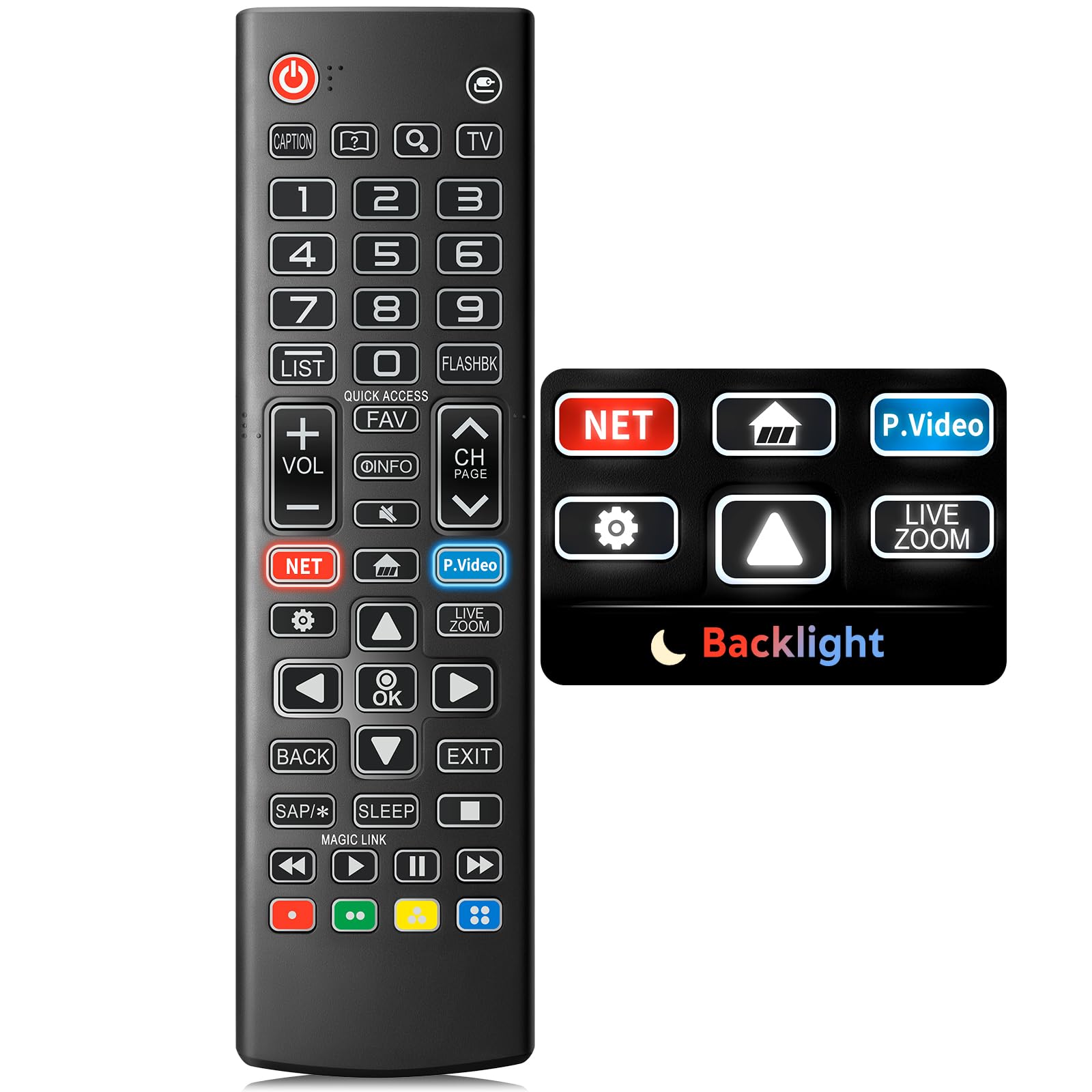
Image: The Angrox Backlit Universal Remote Control, a sleek black remote with clearly labeled buttons.
2. Klíčové vlastnosti
- Easy Nighttime Operation: Features soft glow buttons that illuminate, allowing for clear visibility and use in dark environments without causing glare. The backlight activates with any button press and automatically turns off after 10 seconds of inactivity.
- Univerzální kompatibilita: Designed as a direct replacement for LG TV remotes, compatible with all LG TV models. No programming or complex pairing is required; it works immediately out of the box.
- High-Quality Performance: Equipped with sensitive buttons and stable signal transmission for smooth and responsive operation.
- Ergonomický design: Shaped to fit comfortably in the hand, reducing fatigue during extended use. The button layout is intuitive for users of all ages.
- Odolné a spolehlivé: Constructed from high-quality, sturdy materials to withstand daily use and accidental drops, ensuring a long lifespan.

Image: A comparison showing the remote control with its backlight off and then with its buttons illuminated, highlighting the easy nighttime operation feature.

Image: The remote control displayed alongside various LG TV models (OLED, UHD, QNED, NanoCell), illustrating its broad compatibility.
3. Pokyny k nastavení
3.1 Instalace baterie
- Najděte kryt prostoru pro baterie na zadní straně dálkového ovladače.
- Posuňte kryt dolů nebo stiskněte západku pro otevření přihrádky.
- Vložte dvě (2) baterie typu AAA a ujistěte se, že kladný (+) a záporný (-) pól správně směřují k indikátorům uvnitř přihrádky.
- Nasaďte kryt přihrádky na baterie tak, že jej zasunete zpět na místo, dokud bezpečně nezacvakne.
Poznámka: Batteries are not included with the remote control. Please use new AAA alkaline batteries for optimal performance.

Image: A visual guide demonstrating the correct insertion of two AAA batteries into the remote control's battery compartment.
3.2 Initial Use (No Pairing Required)
The Angrox Backlit Universal Remote Control is designed for immediate use with LG Smart TVs. No pairing or programming steps are necessary. Once batteries are installed, the remote is ready to control your LG television.
4. Návod k obsluze
This section details the functions of the buttons on your Angrox remote control.

Image: A comprehensive layout of the remote control, with labels pointing to each button and describing its primary function.
4.1 Základní funkce
- Moc (
 ): Zapíná nebo vypíná televizor.
 - Vstup (): Changes the input source (e.g., HDMI 1, HDMI 2).
- Zvýšení/snížení hlasitosti (VOL +/-): Nastavuje úroveň hlasitosti.
- Kanál nahoru/dolů (CH Page): Změní televizní kanál.
- Ztlumit (): Ztlumí nebo zruší ztlumení zvuku televizoru.
- Číselná tlačítka (0-9): Přímé zadávání čísel kanálů nebo jiných číselných vstupů.
- Navigační tlačítka (nahoru/dolů/vlevo/vpravo): Používá se k procházení nabídek a možností.
- Tlačítko OK: Selects menu items or confirms your input.
4.2 Speciální funkční tlačítka
- Tlačítko Netflix: Spouští aplikaci Netflix přímo.
- Amazon Prime Video Button: Spouští aplikaci Amazon Prime Video přímo.
- Rychlý přístup: A feature that allows you to enter a specified app or Live TV directly by pressing and holding the number buttons.
- Seznam: Otevře seznam uložených programů.
- Flashback: Vrátí se k předchozímu viewed channel or input.
- Info: Displays information on the current program.
- Oblíbené: Přístup k seznamu oblíbených kanálů.
- Nastavení (): Accesses the Quick Settings menu.
- Zadní: Vymaže zobrazení na obrazovce a vrátí se do TV viewIng.
- Výstup: Opustí aktuální nabídku.
- Spát: Accesses the sleep timer.
- Media Control Buttons (Play, Pause, Stop, Fast Forward, Rewind): Controls media content playback.
4.3 Funkce podsvícení
The remote control features a soft backlight for easy use in the dark. Simply press any button, and the backlight will turn on. It will automatically turn off after 10 seconds of inactivity to conserve battery life.
Video: A demonstration of the Angrox Backlit Remote for LG Smart TV, showcasing its easy nighttime use and responsive buttons. This video highlights the convenience of the backlit feature in dark environments.
5. Specifikace
| Značka | Angrox |
| Název modelu | AKB75095307 |
| Číslo modelu | AKB75095307 |
| Speciální funkce | Backlit, Ergonomic, Lightweight, No Programming Required, Universal |
| Kompatibilní zařízení | Television (All LG TV models) |
| Maximální počet podporovaných zařízení | 1 |
| Technologie připojení | Infračervený |
| Množství tlačítek | 30 |
| Typ ovladače | Ovládání tlačítkem |
| Maximální dosah | 10 metru (přibližně 33 stopy) |
| Počet požadovaných baterií | 2 AAA baterie |
| Typ baterie | Alkalický |
| Rozměry položky (D x Š x V) | 9.25 cm D x 1.89 cm Š x 0.73 cm V |
6. Řešení problémů
Pokud narazíte na problémy s dálkovým ovladačem, podívejte se na následující běžná řešení:
- Dálkové ovládání nereaguje:
- Ujistěte se, že jsou baterie vloženy správně se správnou polaritou (+/-).
- Vyměňte staré baterie za nové alkalické baterie typu AAA.
- Zkontrolujte, zda se mezi dálkovým ovladačem a infračerveným přijímačem televizoru nenacházejí nějaké překážky.
- Ensure you are within the maximum operating range (10 meters) of the TV.
- Podsvícení nefunguje:
- Verify battery power. Low batteries may affect backlight functionality.
- The backlight is designed to turn off after 10 seconds of inactivity. Press any button to reactivate it.
- Specific buttons not working (e.g., Netflix, Amazon Prime):
- Ensure your LG Smart TV is connected to the internet and the respective applications are installed and updated.
- Some smart TV features or app shortcuts may vary slightly depending on your TV's model and region.
- Remote feels sluggish or unresponsive:
- Vyměňte baterie za nové.
- Clean the remote's infrared emitter (at the top) and the TV's IR receiver with a soft, dry cloth to ensure a clear signal path.
7. Údržba
To ensure the longevity and optimal performance of your Angrox remote control, follow these maintenance guidelines:
- Čištění: Use a soft, dry cloth to clean the remote's surface. Avoid using liquid cleaners, aerosols, or harsh chemicals, as they may damage the remote.
- Výměna baterie: Replace batteries promptly when the remote's performance declines or if the backlight becomes dim. Remove batteries if the remote will not be used for an extended period to prevent leakage.
- Skladování: Dálkový ovladač skladujte na chladném a suchém místě mimo dosah přímého slunečního záření, extrémních teplot a vysoké vlhkosti.
- Vyhněte se kapkám: While durable, repeated drops can damage internal components. Handle the remote with care.
8. Záruka a podpora
8.1 Informace o záruce
The Angrox Backlit Universal Remote Control (Model AKB75095307) is covered by a 90denní záruka from the date of purchase. This warranty covers manufacturing defects and ensures the product functions as described under normal use. It does not cover damage caused by misuse, accidents, unauthorized modifications, or normal wear and tear.
8.2 Zákaznická podpora
For any questions, technical assistance, or warranty claims, please contact Angrox customer support through the retailer where you purchased the product or visit the official Angrox store online. Please have your purchase receipt and product model number available when contacting support.