
1. Úvod
Welcome to the Motorola Edge 70 user manual. This guide provides essential information to help you get started with your new smartphone, understand its features, and maintain its optimal performance. The Motorola Edge 70 combines an ultra-thin design with powerful features, including a triple 50MP camera system, Moto AI, and a vibrant 6.7-inch AMOLED display.
For additional support and information, please visit the official Motorola webmísto.
2. Co je v krabici
Balení telefonu Motorola Edge 70 obsahuje následující položky:
- Motorola Edge 70 Smartphone
- USB kabel
- Pouzdro na telefon
- Nástroj pro vysunutí SIM karty
3. Zařízení skončiloview
The Motorola Edge 70 features a sleek, ultra-thin design and robust construction. Familiarize yourself with the key components of your device.

Obrázek 1: Přední a zadní strana View of Motorola Edge 70. This image displays the phone's overall design, including the display, camera module, and the Motorola logo on the back.

Obrázek 2: Side Profile of Motorola Edge 70. This image highlights the phone's ultra-thin 5.99mm profile, showcasing its sleek construction.
4. Nastavení
4.1. Vložení SIM karty
- Vyhledejte držák SIM karty na boku zařízení.
- Vložte nástroj pro vysunutí SIM karty do malého otvoru vedle zásobníku a pevně zatlačte, dokud zásobník nevyskočí.
- Place your nano-SIM card(s) into the tray with the gold contacts facing down. Ensure the card is correctly oriented. The Motorola Edge 70 supports Dual SIM and eSIM.
- Opatrně zatlačte zásobník zpět do slotu, dokud nebude v jedné rovině se zařízením.
4.2. Počáteční zapnutí a nastavení
- Stiskněte a podržte tlačítko Napájení, dokud se nezobrazí logo Motorola.
- Postupujte podle pokynů na obrazovce a vyberte jazyk, připojte se k síti Wi-Fi a nastavte si účet Google.
- You can transfer data from an old device during this process or set up as a new device.
- Configure biometric identification (fingerprint recognition) for enhanced security.
4.3. Nabíjení baterie
Before first use, it is recommended to fully charge your device. The Motorola Edge 70 supports fast TurboPower 68W charging and 15W wireless charging.
- Connect the USB cable to the USB-C port on your phone and to a compatible power adapter.
- Zapojte napájecí adaptér do elektrické zásuvky.
- Ikona baterie na obrazovce ukazuje stav nabíjení.

Figure 3: Battery Life Indication. This graphic illustrates the extended battery life of up to 50 hours on the Motorola Edge 70.
5. Obsluha vašeho zařízení
5.1. Navigace a rozhraní
The Motorola Edge 70 runs on Android 16 and features a responsive touchscreen interface. Navigate using gestures or on-screen buttons.
- Domovská obrazovka: Přístup k aplikacím, widgetům a oznámením.
- Panel oznámení: Přejeďte prstem dolů z horní části obrazovky na view oznámení a rychlé nastavení.
- Zásuvka aplikace: Přejetím prstem od spodní části obrazovky nahoru zobrazíte všechny nainstalované aplikace.
5.2. Moto AI Features
Moto AI enhances your daily interactions, making tasks simpler and more intuitive. Features include:
- Smart Photo Capture: AI-powered enhancements for optimal photo quality.
- Notification Organization: Intelligent management of your alerts.
- Personalizované zážitky: Adapts to your usage patterns for a tailored experience.

Figure 4: Moto AI Interface. This image shows the phone's screen with various Moto AI features, including smart notifications and content suggestions.
6. Funkce fotoaparátu
The Motorola Edge 70 is equipped with a versatile triple 50MP rear camera system and a 50MP front camera, designed to capture stunning photos and videos.
6.1. Systém zadní kamery
- Hlavní fotoaparát: 50 MP sensor with flicker sensor, optimized for low-light conditions and optical image stabilization (OIS).
- Ultra-Wide/Macro Camera: Capture expansive landscapes or detailed close-ups.
- Hloubkový senzor: For enhanced portrait mode effects.

Figure 5: Triple 50MP Camera System. A detailed view of the rear camera setup, highlighting the three lenses.
6.2. Přední kamera
- 50MP selfie fotoaparát: High-resolution front camera for sharp selfies and video calls.
- Podporuje nahrávání videa v rozlišení 4K.
6.3. Camera Features and Modes
- Pantone Validated Technology: Ensures accurate colors and skin tones in your photos.
- Umělá inteligence Moto: Optimizes details, contrast, and sharpness for professional-looking photos.
- Automatic Shooting Mode: Simplifies photo capture for everyday use.
- Nahrávání videa: Supports 1080p video capture at 120 fps.

Figure 6: Clarity with Every Detail. This image demonstrates the camera's ability to capture sharp and detailed images.
7. Displej a zvuk
Experience stunning visuals and immersive audio with your Motorola Edge 70.
7.1. Displej
- Typ: 6.7-inch AMOLED Extreme Display.
- Rezoluce: 2712 x 1220 pixelů.
- Obnovovací frekvence: 120 Hz pro plynulé rolování a hraní her.
- Jas: High peak brightness for excellent visibility even in direct sunlight.
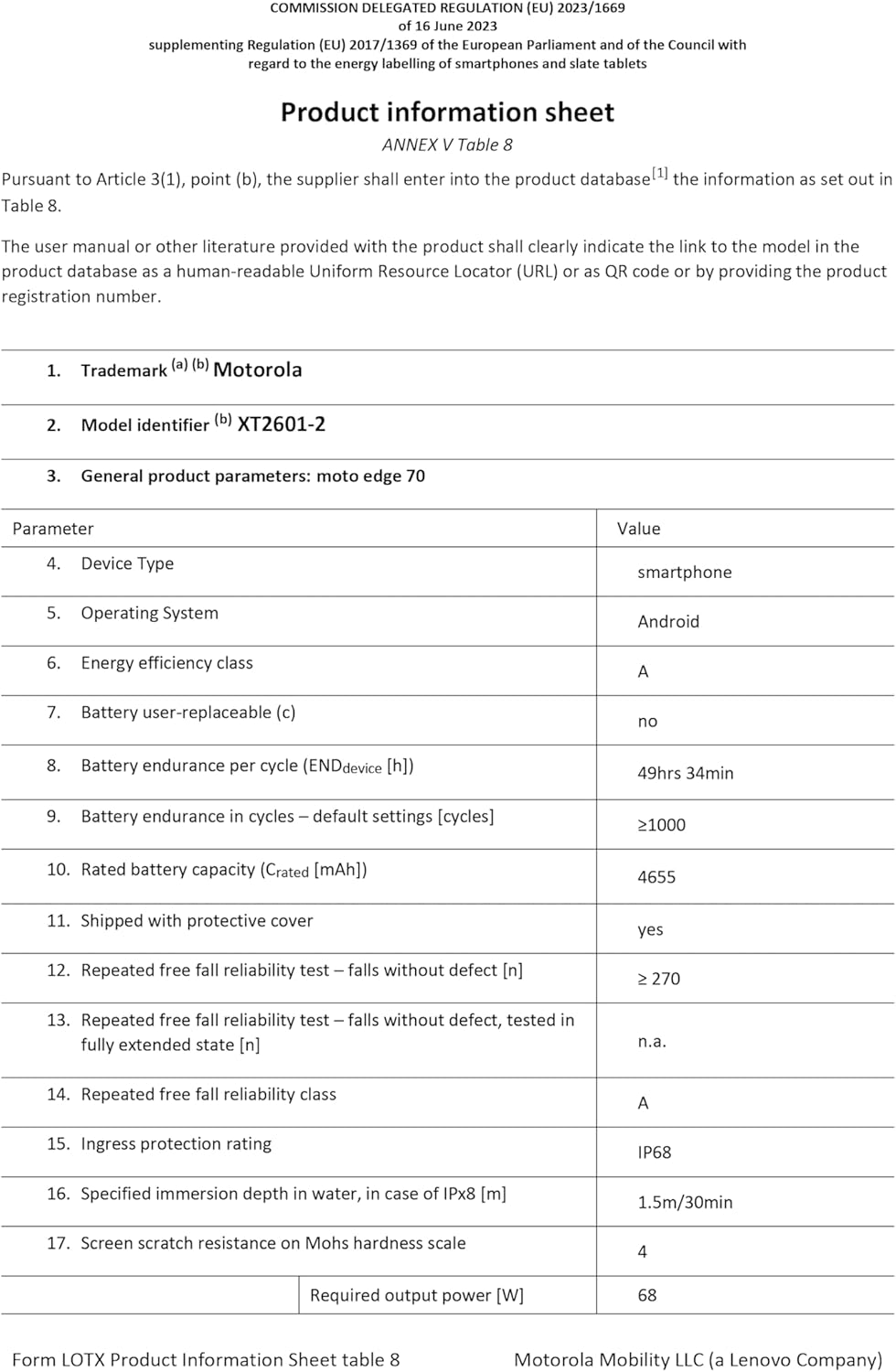
Figure 7: Vibrant Display. This image showcases the phone's display quality with vivid colors.
7.2. Audio
The device features enhanced audio capabilities for an immersive listening experience.
- Dolby Atmos support for rich, clear sound.
- Note: The Motorola Edge 70 does not include a 3.5mm headphone jack. Audio output is via USB-C or wireless connectivity.
8. Výkon a baterie
The Motorola Edge 70 is designed for fast and efficient performance, powered by a robust processor and long-lasting battery.
8.1. Procesor a paměť
- Procesor: Snapdragon® 7 Gen 4 for quick and efficient operations.
- BERAN: 12 GB (with RAM extension up to 24 GB).
- Interní úložiště: 512 GB, které poskytují ampprostor pro aplikace, fotografie a média.

Obrázek 8: Výkon v průběhuview. This graphic details the Snapdragon processor, RAM, and internal storage.
8.2. Životnost baterie a nabíjení
- Kapacita baterie: 4800 mAh Silicon-Carbon battery.
- Nabíjení: Supports TurboPower 68W fast charging and 15W wireless charging.
- Provides up to 50 hours of usage on a single charge.
9. Údržba
9.1. Čištění zařízení
- K čištění obrazovky a těla telefonu používejte měkký hadřík, který nepouští vlákna.
- Vyhněte se používání agresivních chemikálií nebo abrazivních materiálů.
- Na odolné šmouhy lehceampa hadřík s vodou.
9.2. Odolnost proti vodě a prachu
The Motorola Edge 70 is certified with IP68 and IP69 resistance, meaning it is protected against dust ingress and immersion in water up to 1.5 meters for 30 minutes. It is also resistant to high-pressure water jets.
- While resistant, avoid intentional submersion or exposure to saltwater.
- If the device gets wet, dry it thoroughly before charging or using ports.

Figure 9: Durability Features. This image highlights the phone's IP68/IP69 water resistance and Military Standard certification.
9.3. Aktualizace softwaru
Pravidelně kontrolujte a instalujte aktualizace softwaru, abyste zajistili, že vaše zařízení má nejnovější funkce, bezpečnostní záplaty a vylepšení výkonu. Tuto možnost obvykle najdete v Nastavení> Systém> Aktualizace systému.
10. Řešení problémů
If you encounter issues with your Motorola Edge 70, try the following common troubleshooting steps:
| Problém | Řešení |
|---|---|
| Zařízení se nezapíná | Ujistěte se, že je baterie nabitá. Stiskněte a podržte tlačítko napájení po dobu alespoň 10–15 sekund, abyste vynutili restart. |
| Aplikace padá nebo zamrzávají | Vymažte mezipaměť aplikace (Nastavení > Aplikace > [Název aplikace] > Úložiště > Vymazat mezipaměť). Pokud problém přetrvává, odinstalujte a znovu nainstalujte aplikaci. |
| Slabá výdrž baterie | Check battery usage in Settings to identify power-hungry apps. Reduce screen brightness, disable unnecessary features (GPS, Bluetooth, Wi-Fi when not in use). |
| Problémy s připojením k síti | Toggle Airplane Mode on and off. Restart the device. Check SIM card insertion. Contact your wireless service provider if the issue persists. |
| Snímač otisků prstů nefunguje | Ujistěte se, že máte prst čistý a suchý. Znovu zaregistrujte své otisky prstů v Nastavení > Zabezpečení. |
Pokud tyto kroky váš problém nevyřeší, přečtěte si prosím další pomoc v části Záruka a podpora.
11. Specifikace
Detailed technical specifications for the Motorola Edge 70 (Model: XT2601-2):
| Funkce | Detail |
|---|---|
| Značka | Motorola |
| Název modelu | Edge 70 (XT2601-2) |
| Operační systém | Android 16 |
| Rychlost procesoru | 2800 MHz |
| Velikost RAM | 12 GB (rozšiřitelná) |
| Interní úložiště | 512 GB |
| Velikost obrazovky | 6.67 palce |
| Typ obrazovky | AMOLED Extreme |
| Maximální rozlišení obrazovky | 2712 x 1220 pixelů |
| Obnovovací frekvence | 120 Hz |
| Rozlišení zadní kamery | 50 MP (Triple Camera System) |
| Rozlišení předního fotoaparátu | 50 MP |
| Rozlišení záznamu videa | 1080p při 120 fps |
| Kapacita baterie | 4800 XNUMX mAh |
| Nabíjení | 68W TurboPower (wired), 15W Wireless Charging |
| SIM Card Format | eSIM, Dual SIM |
| Technologie připojení | 5G, GSM, LTE |
| Bezdrátová technologie | GSM, LTE |
| Biometric Features | Rozpoznávání otisků prstů |
| Úroveň odolnosti proti vodě | IP68, IP69 (Waterproof) |
| Jack pro sluchátka | Chybí |
| Typ nabíjecího portu | USB-C |
| Hmotnost položky | 159 gramů |
| Rozměry položky | 15.9 x 7.4 x 0.6 cm |
| Modelový rok | 2025 |
| GTIN | 840493603360 |
| Odkaz EPREL | View Informace o produktu EPREL |
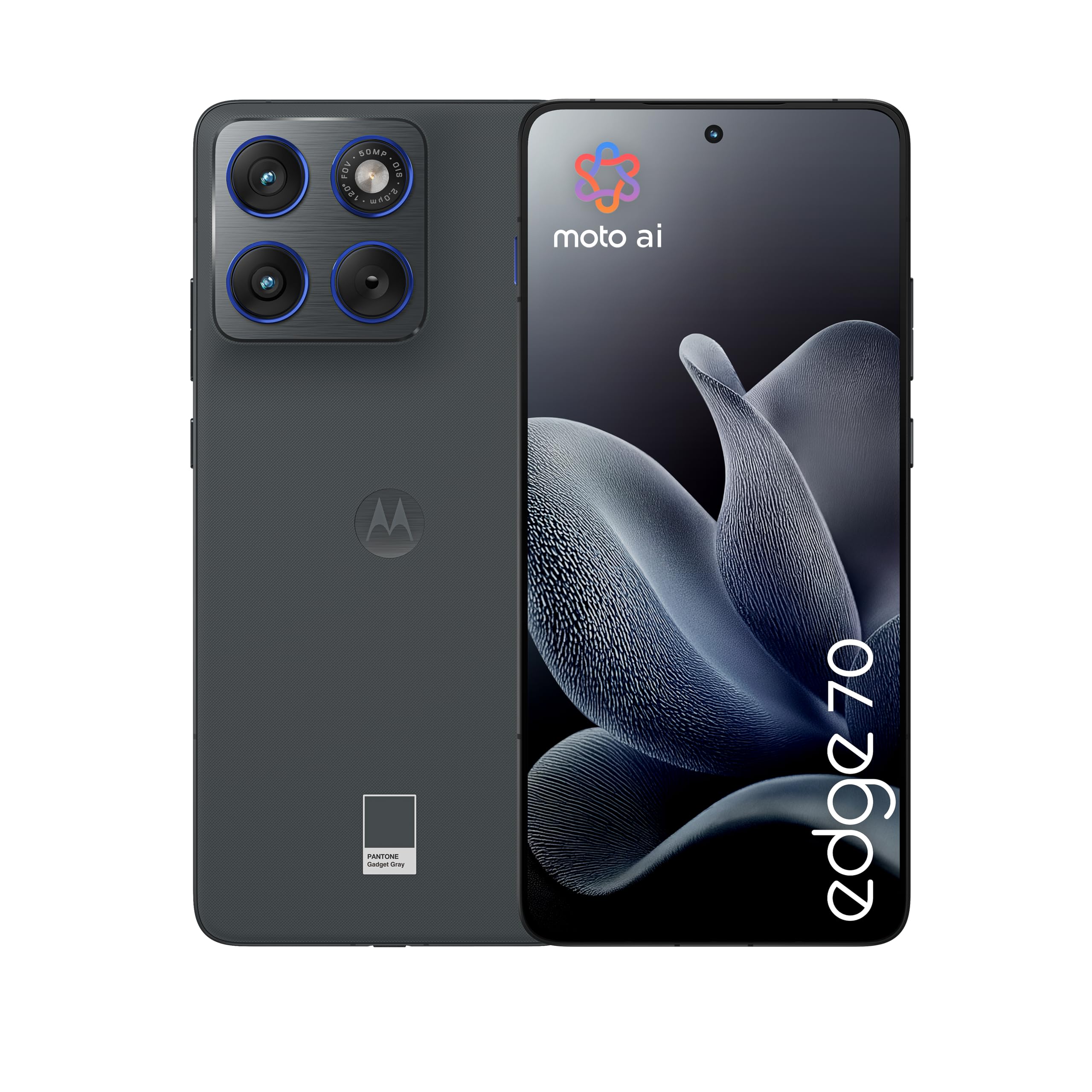
Figure 10: Energy Label and Product Information Sheet. This image displays the energy efficiency rating and key product data for the Motorola Edge 70.
12. Záruka a podpora
12.1. Záruka na produkt
Your Motorola Edge 70 comes with a 2letá záruka výrobceTato záruka se vztahuje na vady materiálu a zpracování při běžném používání. Uschovejte si prosím doklad o koupi pro případ uplatnění záruky.
For detailed warranty terms and conditions, please refer to the documentation provided with your device or visit the official Motorola support webmísto.
12.2. Zákaznická podpora
For technical assistance, troubleshooting, or service requests, please contact Motorola customer support. You can find contact information and additional resources on the official Motorola webmísto:
Podpora společnosti Motorola Webmísto
Můžete se také odvolat na Data Transparency Declaration (PDF) pro další informace.