
Zavedení
Thank you for choosing Nakamichi Wireless Earphones, Model My Music Hue. These earphones are designed to provide a superior audio experience with advanced features such as Bluetooth 5.4 connectivity, multiple EQ modes, clear hands-free calling, and an immersive 360° spatial game mode. This manual will guide you through the setup, operation, and maintenance of your new earphones to ensure optimal performance and enjoyment.
Obsah balení
- Nakamichi Wireless Earbuds (Left & Right)
- Nabíjecí pouzdro
- Ušní nástavce (velikosti S, M, L)
- USB nabíjecí kabel
- Uživatelská příručka
Konec produktuview

Image: Nakamichi Wireless Earbuds and their charging case.
The Nakamichi Wireless Earphones consist of two earbuds and a portable charging case. Each earbud features a touch control area, a microphone, and charging contacts. The charging case has a USB-C port for charging and LED indicators for battery status.
Nastavení
1. Nabíjení sluchátek

Image: Earbuds placed inside the charging case, illustrating battery life.
- Počáteční poplatek: Před prvním použitím plně nabijte sluchátka i nabíjecí pouzdro.
- Nabíjecí sluchátka: Place the earbuds into the charging case. Ensure the charging contacts align. The earbuds will automatically begin charging.
- Nabíjecí pouzdro: Connect the USB charging cable to the charging case's USB-C port and a power source. The LED indicators on the case will show the charging status.
A single full charge provides up to 5 hours of playback for the earbuds. The charging case extends the total playback time to approximately 28 hours.
2. Párování Bluetooth

Image: Diagram illustrating Bluetooth 5.4 connectivity with various devices like smartphones, tablets, and PCs.
- Zapnutí: Otevřete nabíjecí pouzdro. Sluchátka se automaticky zapnou a přejdou do režimu párování (což bude signalizováno blikajícími LED diodami na sluchátkách).
- Povolit Bluetooth: Na svém zařízení (chytrý telefon, tablet, počítač) povolte Bluetooth.
- Select Earphones: In your device's Bluetooth settings, search for 'Nakamichi My Music Hue' (or similar) and select it to pair.
- Potvrzení: Once paired, the earbud LEDs will stop flashing, and you will hear an audible confirmation.
The earphones utilize Bluetooth 5.4 technology for a stable, high-speed, and uninterrupted connection.
Návod k obsluze
1. Nošení sluchátek do uší
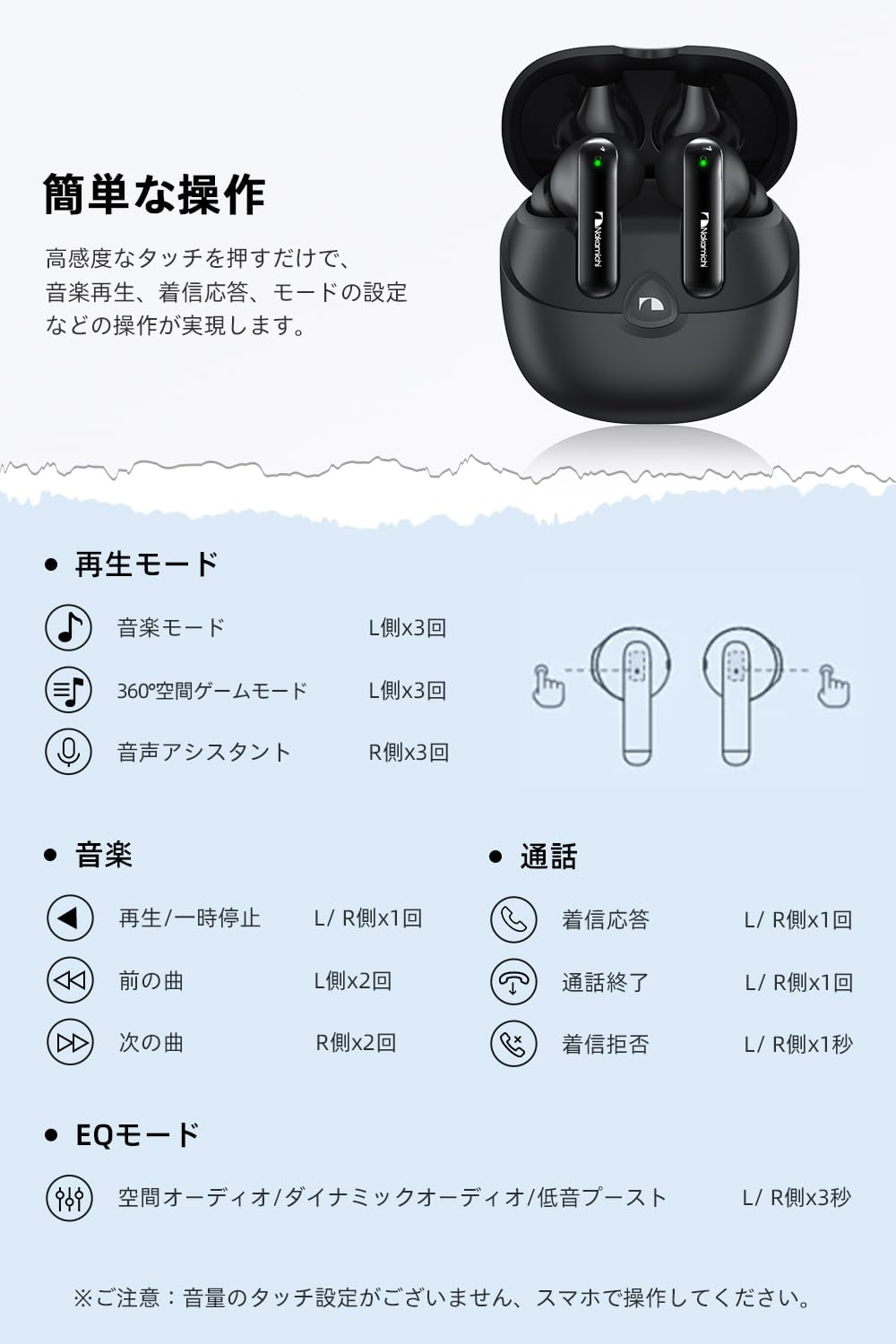
Image: Diagram showing the ergonomic fit of the earbud in an ear, along with different sized eartips (S, M, L).
Choose the eartip size (S, M, L) that provides the most comfortable and secure fit for your ears. A proper fit is crucial for optimal sound quality and comfort during extended use. Insert the earbuds gently into your ear canal and twist slightly to secure them.
2. Stiskněte Ovládací prvky

Image: Visual guide to touch controls on the earbuds for various functions.
| Funkce | Akce | Sluchátko |
|---|---|---|
| Přehrát/Pozastavit hudbu | Jedno klepnutí | L/R |
| Další stopa | Dvojité klepnutí | R |
| Předchozí stopa | Dvojité klepnutí | L |
| Přijmout/ukončit hovor | Jedno klepnutí | L/R |
| Odmítnout hovor | Dlouhé stisknutí (1 sekundy) | L/R |
| Přepněte režim EQ | Dlouhé stisknutí (3 sekundy) | L/R |
| Activate 360° Spatial Game Mode | Trojité klepnutí | L |
| Aktivujte hlasového asistenta | Trojité klepnutí | R |
Note: Volume control is managed exclusively via your connected smartphone or device.
3. Režimy ekvalizéru

Image: Visual representation of the three EQ modes: Spatial Audio, Dynamic Audio, and Bass Boost.
Your earphones feature three distinct EQ modes to optimize your listening experience:
- Prostorový zvuk: Provides an immersive 360-degree sound experience, ideal for movies and games where a sense of space is desired.
- Dynamický zvuk: Offers a balanced sound profile, adjusting the overall sound balance for clear and natural reproduction across a wide frequency range.
- Zesílení basů: Emphasizes powerful low frequencies, perfect for genres like electronic, rock, and hip-hop.
Switch between these modes by long-pressing either the left or right earbud for 3 seconds.
4. Hands-free volání

Image: A woman using the Nakamichi wireless earbuds for a hands-free call.
Each earbud is equipped with a built-in microphone that actively suppresses ambient noise, ensuring your voice is transmitted clearly to the other party. This feature is highly beneficial for calls, online meetings, and voice chats during gaming.
- Stereo/mono režim: The earphones support both stereo (using both earbuds) and mono (using a single earbud) playback.
- Použití jednoho sluchátka: You can use one earbud for calls while the other is charging in the case.
5. 360° Spatial Game Mode

Image: A smartphone displaying a game, with the Nakamichi earbuds and charging case nearby, illustrating the gaming experience.
Activate the 360° Spatial Game Mode by triple-tapping the left earbud. This mode provides a deeply immersive gaming experience by rendering in-game environmental and effect sounds with greater realism. The lightweight design (3.6g per earbud) ensures comfort for extended gaming sessions without ear fatigue.
Údržba
1. Čištění
- Pravidelně čistěte sluchátka, zejména náušníky a nabíjecí kontakty, měkkým, suchým hadříkem, který nepouští vlákna.
- Nepoužívejte abrazivní čisticí prostředky, alkohol ani chemická rozpouštědla.
- Dbejte na to, aby se do otvorů pro sluchátka nedostala vlhkost.
2. Skladování
- Pokud sluchátka nepoužíváte, vždy je ukládejte do nabíjecího pouzdra, abyste je chránili a udrželi je nabité.
- Nabíjecí pouzdro a sluchátka skladujte na chladném a suchém místě, mimo dosah extrémních teplot a přímého slunečního záření.
Odstraňování problémů
| Problém | Možné řešení |
|---|---|
| Sluchátka se nezapínají. | Ensure earbuds are charged. Place them in the charging case and close the lid, then open it again. |
| Nelze spárovat se zařízením. | Make sure Bluetooth is enabled on your device. Ensure earbuds are in pairing mode. Forget the device in your Bluetooth settings and try pairing again. |
| Žádný zvuk nebo nízká hlasitost. | Check volume levels on both your device and the earbuds (via your device). Ensure earbuds are properly connected. Clean any debris from the earbud speakers. |
| Přerušované připojení. | Ensure no obstacles are between the earbuds and your device. Move closer to your device. Avoid environments with strong Wi-Fi or other wireless interference. |
| Nabíjecí pouzdro se nenabíjí. | Check the USB cable and power adapter. Ensure the charging cable is securely connected to both the case and the power source. |
Specifikace
| Funkce | Detail |
|---|---|
| Číslo modelu | My Music Hue |
| Verze Bluetooth | 5.4 |
| Umístění uší | In-Ear |
| Styl sluchátek | In-Ear |
| Velikost ovladače | Dynamický 10mm |
| Frekvenční odezva | 20Hz - 20kHz (Inferred from 20KHz upper limit) |
| Citlivost | 102 dB |
| Impedance | 32 Ohmy |
| Hmotnost sluchátek (každé) | 3.6g (Inferred from feature bullets) |
| Rozměry produktu | 6 x 5.4 x 3 cm |
| Celková hmotnost produktu | 40 g |
| Doba přehrávání (sluchátka) | Až 5 hodin |
| Celková doba přehrávání (s pouzdrem) | Až 28 hodin |
| Typ ovládání | Dotykové ovládání |
| Zahrnuté komponenty | Eartips, USB Charging Cable, User Manual |
| Kompatibilní zařízení | Game Consoles, Tablets, Desktop PCs, Laptops, Smartphones |
Záruka a podpora
Nakamichi Wireless Earphones, Model My Music Hue, come with a 1letá záruka výrobce od data nákupu. Tato záruka se vztahuje na vady materiálu a zpracování při běžném používání.
For any product-related inquiries, technical support, or warranty claims, please contact Nakamichi customer service through the retailer where you purchased the product or visit our official webstránky pro možnosti podpory.
Uschovejte si prosím doklad o koupi pro ověření záruky.