
1. Úvod
This manual provides essential information for the safe and efficient use of your Haier H55C95EUX 55-inch OLED 4K HDR Smart TV. Please read these instructions thoroughly before operating your television and retain them for future reference.
The Haier H55C95EUX features a 55-inch OLED display for deep blacks and vibrant colors, 4K HDR resolution, a 144Hz refresh rate for smooth motion, integrated Harman Kardon sound, and the Google TV operating system for smart functionality and voice control.

Obrázek 1.1: Konecview of Haier C95 Series OLED TV features, highlighting Harman Kardon audio, 144Hz gaming, Dolby Vision IQ, Dolby Atmos, HDR10+, Google TV, and 3GB RAM with 32GB storage.
2. Bezpečnostní informace
Při používání tohoto televizoru vždy dodržujte základní bezpečnostní opatření, abyste snížili riziko požáru, úrazu elektrickým proudem a zranění.
- Zdroj napájení: Televizor připojujte pouze k napájení střídavým proudem 220–240 V, 50/60 Hz.
- Větrání: Zajistěte dostatečné větrání kolem televizoru. Neblokujte větrací otvory.
- Voda a vlhkost: Nevystavujte televizor dešti ani vlhkosti. Nepokládejte na televizor předměty naplněné tekutinami, například vázy.
- Čištění: Před čištěním odpojte televizor ze zásuvky. Použijte měkký, suchý hadřík. Nepoužívejte tekuté ani aerosolové čisticí prostředky.
- Montáž: If wall-mounting, ensure the wall mount is compatible with the VESA standard (100 x 100 mm) and can support the TV's weight.
- Děti: Supervise children to ensure they do not play with the television.
3. Co je v krabici
Opatrně vybalte krabici a ujistěte se, že jsou všechny položky přítomny a nepoškozené.
- Haier H55C95EUX 55-inch OLED 4K HDR Smart TV
- Dálkové ovládání
- Uživatelská příručka (tento dokument)
- Napájecí kabel
- Součásti televizního stolku (pokud existují)
4. Nastavení
4.1 Fyzická instalace
Before installation, consider the TV's dimensions to ensure proper placement.

Obrázek 4.1: Přední strana view dimensions of the 55-inch Haier TV, indicating a width of 1225mm and a height of 749mm.

Image 4.2: Detailed dimensions of the Haier 55-inch TV, showing measurements with and without the stand.
Instalace stojanu
- Umístěte televizor displejem dolů na měkký, rovný povrch, abyste zabránili poškození obrazovky.
- Připevněte komponenty stojanu k určeným otvorům na spodní straně televizoru pomocí dodaných šroubů.
- Před postavením televizoru do svislé polohy se ujistěte, že je stojan bezpečně upevněn.
Montáž na stěnu
If wall-mounting, use a VESA-compatible mount (100 x 100 mm) and follow the mount manufacturer's instructions. Ensure the wall can support the TV's weight.
4.2 Připojení zařízení
Váš televizor je vybaven několika porty pro připojení externích zařízení.
- HDMI: Connect Blu-ray players, game consoles, or set-top boxes to the HDMI 2.1 ports for high-quality audio and video.
- USB: Připojte paměťová zařízení USB pro přehrávání médií.
- Ethernet: Pro stabilní kabelové připojení k internetu.
- Bluetooth: Připojte bezdrátová sluchátka nebo jiná zařízení Bluetooth.
4.3 Počáteční zapnutí a nastavení
- Připojte napájecí kabel k televizoru a do zásuvky ve zdi.
- Stiskněte tlačítko napájení na dálkovém ovladači nebo na televizoru.
- Follow the on-screen instructions to complete the initial setup, including language selection, network connection (Wi-Fi or Ethernet), and Google TV account login.
5. Ovládání vašeho televizoru
5.1 Dálkové ovládání
The included remote control allows you to navigate the TV's features. It may feature a solar cell for eco-friendly charging and USB-C for backup charging.

Image 5.1: The Haier TV remote control, featuring navigation, volume, and app access buttons.
5.2 Rozhraní Google TV
Your TV runs on Google TV, providing access to a wide range of streaming services, apps, and personalized content.

Image 5.2: The Google TV home screen, showcasinrůzné streamovací aplikace a doporučení obsahu.
Hlasové ovládání
Use the built-in voice control feature to search for content, launch apps, and control your TV hands-free. Simply say "Hey Google" or press the voice assistant button on your remote.

Image 5.3: Demonstrating voice control functionality with the Haier TV and Google TV.
5.3 Nastavení obrazu a zvuku
Technologie OLED
The OLED display provides absolute blacks and infinite contrast for a lifelike viewzkušenosti.

Image 5.4: Visual representation of OLED technology, showcasing deep blacks and vibrant colors.
Harman Kardon Sound
Experience immersive audio with clear dialogues and cinematic depth, delivered by the integrated Harman Kardon sound system.

Image 5.5: Depiction of the Harman Kardon sound system, emphasizing clear and powerful audio.
Dolby Atmos
Enjoy three-dimensional, immersive sound that moves around you, enhancing your audio experience.
Obnovovací frekvence 144 Hz
The 144Hz refresh rate ensures smooth and fluid motion, ideal for fast-paced content like gaming and sports.

Image 5.6: Visual comparison illustrating the fluidity of 144Hz motion compared to 60Hz, particularly beneficial for gaming.
6. Údržba
6.1 Čištění televizoru
- Před čištěním vždy odpojte televizor ze zásuvky.
- K otření obrazovky a skříně použijte měkký, suchý hadřík, který nepouští vlákna.
- Na odolné skvrny lehceamphadřík vodou nebo specializovaným čističem obrazovek. Nikdy nestříkejte čistič přímo na obrazovku.
- Nepoužívejte abrazivní čisticí prostředky, vosky nebo rozpouštědla.
6.2 Aktualizace softwaru
Your Haier TV may receive software updates to improve performance and add new features. Ensure your TV is connected to the internet to receive these updates automatically or check for them manually through the settings menu.
7. Řešení problémů
Pokud narazíte na problémy s televizorem, podívejte se na následující běžná řešení:
| Problém | Možné řešení |
|---|---|
| Žádná síla | Check if the power cable is securely connected to the TV and the wall outlet. Ensure the outlet is functioning. Try pressing the power button on the TV itself. |
| Žádný obraz, ale zvuk je přítomen | Check the input source. Ensure the connected device is powered on and functioning correctly. Try a different HDMI cable or port. |
| Žádný zvuk, ale obraz je přítomen | Check the volume level. Ensure the TV is not muted. Verify audio output settings (e.g., internal speakers, external sound system). Check audio cables if using external speakers. |
| Dálkové ovládání nefunguje | Check the remote control's battery level. Ensure there are no obstructions between the remote and the TV's IR sensor. If it's a solar remote, ensure it has sufficient light exposure. |
| Problémy s připojením k síti | Restart your router and modem. Check Wi-Fi password. If using Ethernet, ensure the cable is connected properly. Try connecting to a different network if available. |
8. Specifikace
| Funkce | Detail |
|---|---|
| Název modelu | H55C95EUX |
| Velikost obrazovky | 55 palce |
| Technologie displeje | OLED |
| Rezoluce | 4K (3840 x 2160) |
| Obnovovací frekvence | 120 Hz (Motion Enhancement: 144Hz) |
| Podporovaný formát HDR | Dolby Vision |
| Operační systém | Google TV |
| Interní úložiště | 32 GB |
| Audio systém | Harman Kardon 2.1 Sound System |
| Surround Sound Format | Dolby Atmos |
| Konektivita | Bluetooth, Ethernet, HDMI (x4), USB (x1) |
| Bezdrátová technologie | Bluetooth, WiFi |
| Kontrolní metoda | Dálkové ovládání, hlasové ovládání |
| Rozměry produktu (DxŠxV) | 29.5P x 122.5l x 76.8H cm (with stand) |
| Standardní montáž VESA | 100 x 100 mm |
| Třída energetické účinnosti (SDR) | F (77 kWh/1000h) |
| Třída energetické účinnosti (HDR) | G (70 kWh/1000h) |
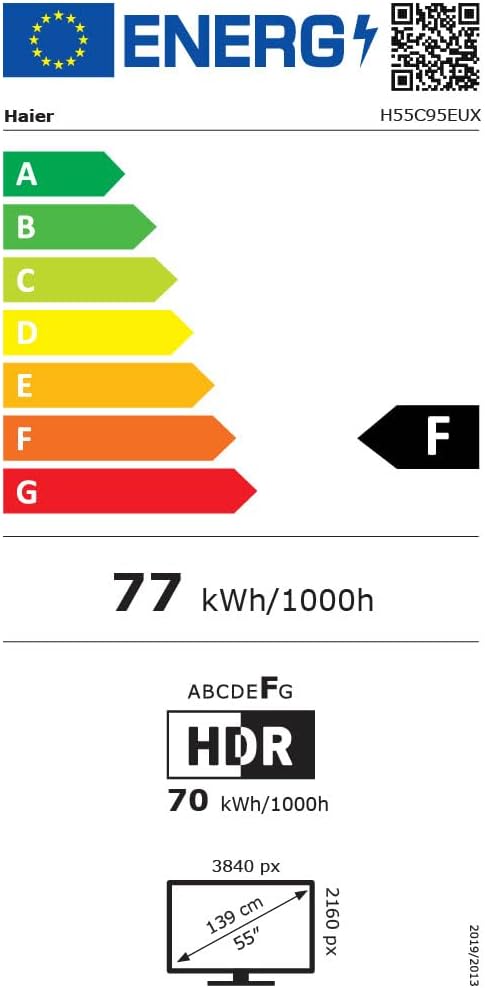
Image 8.1: EU Energy Label for the Haier H55C95EUX TV. For more details, visit the Databáze EPREL.
9. Záruka a podpora
Your Haier H55C95EUX television comes with a 2letá záruka výrobceUschovejte si prosím doklad o koupi pro případ reklamace.
For technical support, service, or further inquiries, please refer to the contact information provided on the official Haier webnebo v místním autorizovaném servisním středisku.


