
1. Úvod
Thank you for choosing the EcoFlow RAPID Mag 3-in-1 Foldable Wireless Charging Station. This device is designed to provide convenient and efficient wireless charging for your iPhone, Apple Watch, and AirPods simultaneously. Featuring Qi2.2 rapid charging technology and a highly portable, adjustable design, it is an ideal solution for both home and travel use. Please read this manual carefully before use to ensure proper operation and to maximize the product's lifespan.
2. Konec produktuview
The EcoFlow RAPID Mag 3-in-1 charging station combines a smartphone charging stand, an Apple Watch charger, and an AirPods charging pad into a single, compact unit. Its foldable design makes it highly portable, fitting easily into bags or pockets. The stand offers flexible angle and height adjustments for optimal viewing and interaction during charging.

Image: The EcoFlow RAPID Mag 3-in-1 charging station in use, showcasing its ability to charge an iPhone, Apple Watch, and AirPods simultaneously.
3. Nastavení
3.1 Unfolding the Charging Station
- Place the folded charging station on a flat, stable surface.
- Gently unfold the main smartphone charging stand upwards.
- Extend the Apple Watch charging module from the base.
- Ensure all components are securely locked into their open positions before placing devices.

Image: Step-by-step guide on unfolding the charging station.
3.2 Připojení k napájení
- Connect the provided USB-C cable to the charging station's input port.
- Plug the other end of the USB-C cable into the included 45W AC charger.
- Insert the AC charger into a wall outlet. The indicator light on the charging station will illuminate, indicating it is ready for use.
4. Návod k obsluze
4.1 Nabíjení vašich zařízení
- For iPhone (MagSafe compatible): Place your iPhone onto the magnetic charging stand. Ensure it snaps securely into place for optimal charging.
- Pro Apple Watch: Place your Apple Watch onto the dedicated charging module. The magnetic connection will align it correctly.
- For AirPods (Wireless Charging Case): Place your AirPods case onto the flat charging pad at the base.
The charging station supports simultaneous charging of all three devices. Charging will begin automatically upon proper placement.
4.2 Qi2.2 Rapid Wireless Charging
This charging station is Qi2.2 compliant, offering up to 25W rapid wireless charging for compatible iPhones. This technology provides significantly faster charging speeds compared to older Qi standards, comparable to wired fast charging.

Image: Charging speed comparison for iPhone 17 Pro (0%-50%) across different Qi standards.
4.3 Smart Charging Mode
The integrated light sensor automatically adjusts the charging speed based on ambient brightness. In bright environments, it provides powerful rapid charging (up to 25W). In dark environments, such as during sleep, it switches to a safer, quieter charging mode (up to 7.5W) to prevent overheating and extend battery life, keeping the device temperature below 37°C. This mode can be manually toggled on/off using the button on the device.
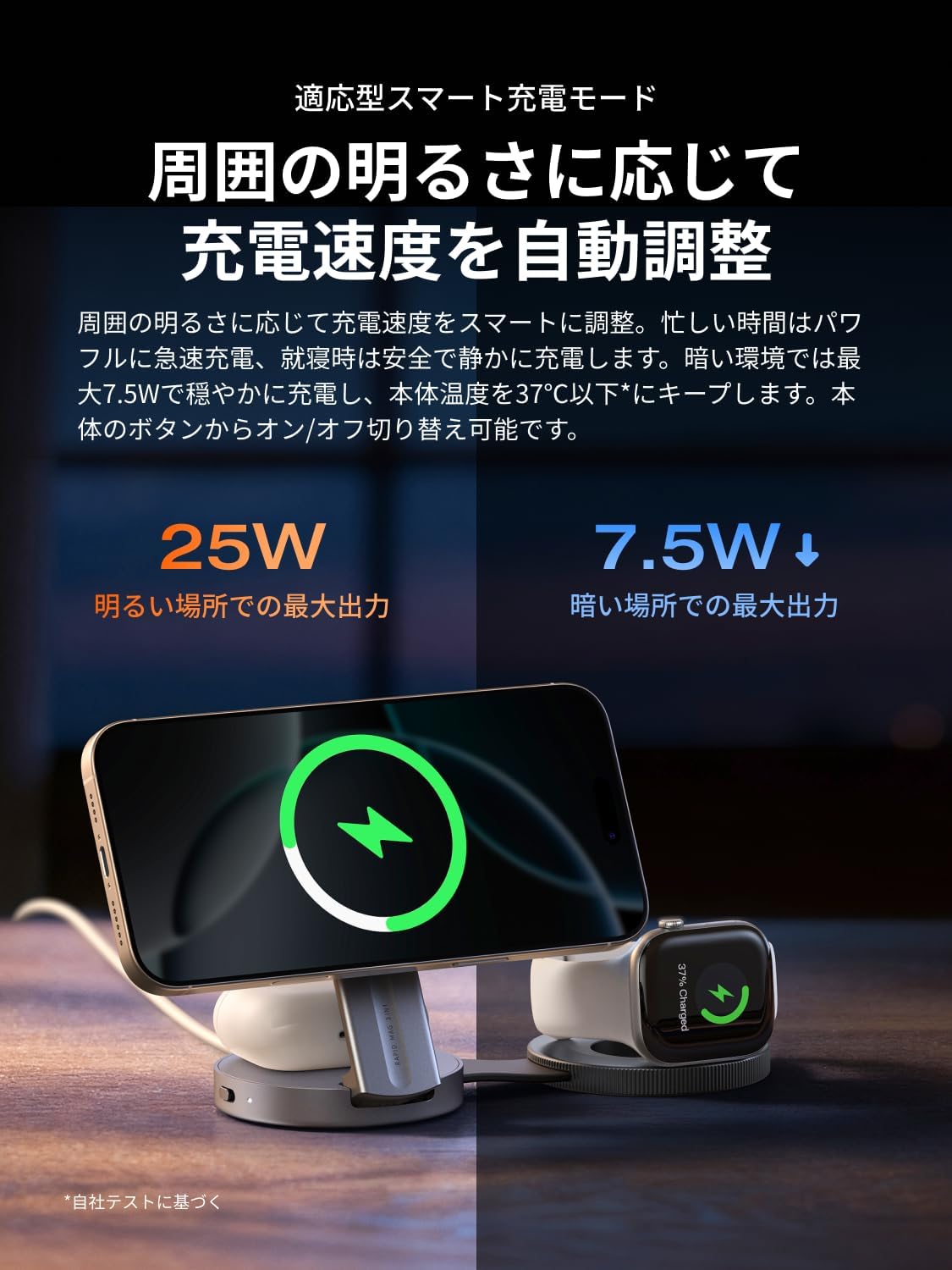
Image: Smart Charging Mode adjusting power output based on ambient light.
4.4 Nastavitelný stojan
The smartphone charging stand can be adjusted from 0° to 65° for optimal viewing angles. It also features up to 10cm of height adjustment, allowing you to customize the position for comfortable video viewing or video calls. The Apple Watch charging stand can also be used in both horizontal and vertical orientations.

Image: The adjustable stand allows for flexible viewing úhly.
5. Kompatibilita zařízení
This charging station is compatible with a wide range of devices:
- iPhony: iPhone 12 series and later (Max 25W)
- Apple Watch: Apple Watch Ultra series, Apple Watch Series 1-11, Apple Watch SE series (Max 5W)
- AirPods: AirPods Pro (1/2/3), AirPods 4/3/2 (with wireless charging case) (Max 5W)
- Other Qi2.2 compatible smartphones: Samsung S25 series (with magnetic case), Google Pixel 10 series (Max 25W)
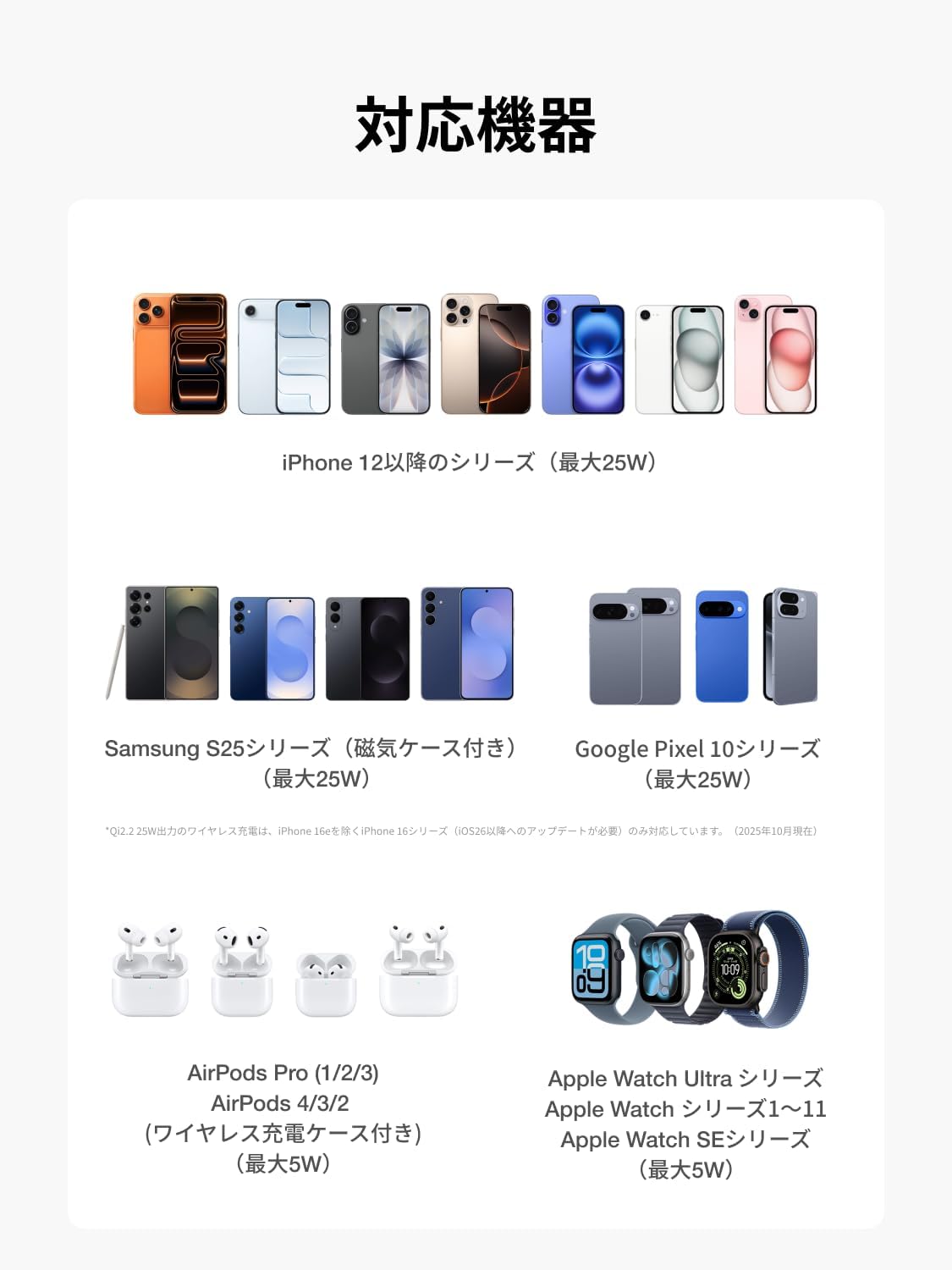
Image: Visual representation of compatible devices.
6. Údržba
- Čištění: Před čištěním odpojte nabíječku od napájení. K otření povrchu použijte měkký, suchý hadřík. Nepoužívejte abrazivní čisticí prostředky ani rozpouštědla.
- Skladování: When not in use, fold the charging station into its compact form and store it in a cool, dry place away from direct sunlight and extreme temperatures.
- Zacházení: Avoid dropping the device or subjecting it to strong impacts. Do not attempt to disassemble or repair the unit yourself.
7. Řešení problémů
- Zařízení se nenabíjí:
- Ujistěte se, že je nabíjecí stanice správně připojena ke zdroji napájení.
- Verify that your device is correctly aligned on the charging pad/stand.
- Check if your device's case is too thick or contains metal, which can interfere with wireless charging.
- Restart the charging station by unplugging and re-plugging it.
- Pomalé nabíjení:
- Ensure you are using the provided 45W AC adapter and USB-C cable.
- Check if the Smart Charging Mode is active in a dark environment, which reduces charging speed. You can manually override this using the device button.
- High ambient temperatures can cause the charger to reduce output to prevent overheating.
- Indicator light not on:
- Confirm the power cable is securely connected to both the charger and the wall outlet.
- Zkuste jinou zásuvku.
Pokud narazíte na problémy, které zde nejsou uvedeny, kontaktujte prosím zákaznickou podporu.
8. Specifikace

Obrázek: Podrobné specifikace produktu.
| Funkce | Detail |
|---|---|
| Značka | EF ECOFLOW |
| Číslo modelu | 3IN1FOLDABLE |
| Barva | Černý |
| Hmotnost | Přibl. 182 g |
| Rozměry (složené) | 70 x 70 x 32.95 mm |
| Výstupní porty | Wireless Output x3 (iPhone / Apple Watch / AirPods) |
| Maximální celkový výkon | 35W Max (iPhone: 25W Max / Apple Watch: 5W Max / AirPods: 5W Max) |
| Vstupní port | USB-C (5V/9V/12V/15V=3A, 45W Max) x1 |
| Nastavitelná délka | Ano |
| Záruka | 2 roky |
| Země původu | Čína |
9. Záruka a podpora
9.1 Informace o záruce
The EcoFlow RAPID Mag 3-in-1 Foldable Wireless Charging Station comes with a 2-letá záruka od data nákupu. Tato záruka se vztahuje na výrobní vady a poruchy při běžném používání. Uschovejte si prosím doklad o koupi pro případ uplatnění záruky.
9.2 Zákaznická podpora
For technical assistance, troubleshooting, or warranty inquiries, please contact EcoFlow customer support through the official website or your retailer. Have your product model number (3IN1FOLDABLE) and proof of purchase ready when contacting support.
Online podpora: Visit the official EcoFlow webweb s nejčastějšími dotazy, uživatelskými příručkami a kontaktními informacemi.
E-mailová podpora: [Insert EcoFlow Support Email Address Here, if available]
Telefonická podpora: [Insert EcoFlow Support Phone Number Here, if available]