
1. Úvod
This manual provides instructions for the RETROSUN Replacement AC Remote Control, Model B0FVV62DXG. This remote is designed to replace original equipment manufacturer (OEM) remote controls for various portable air conditioner models, including:
- BLACK+DECKER BPACT14HWT
- DuraComfort DP08CWV, DP14CM, DP10CWV, DP14CV
- GarveeTech TAC-10CPD/DM7, DSM12KLLLMX
- Danby UYKQ-100B
- Euker QCG23RW4NDYC8-2ITEM
It features infrared 3.0 technology, an ergonomic design, and a large LCD screen for ease of use. No programming or pairing is required for operation.
2. Nastavení
To begin using your RETROSUN Replacement AC Remote Control, follow these simple steps:
- Najděte přihrádku na baterie na zadní straně dálkového ovladače.
- Otevřete kryt bateriového prostoru.
- Vložte dvě (2) alkalické baterie typu AAA a dbejte na správnou polaritu (+/-).
- Bezpečně zavřete kryt bateriového prostoru.
The remote control is now ready for use. No additional programming or pairing is necessary.
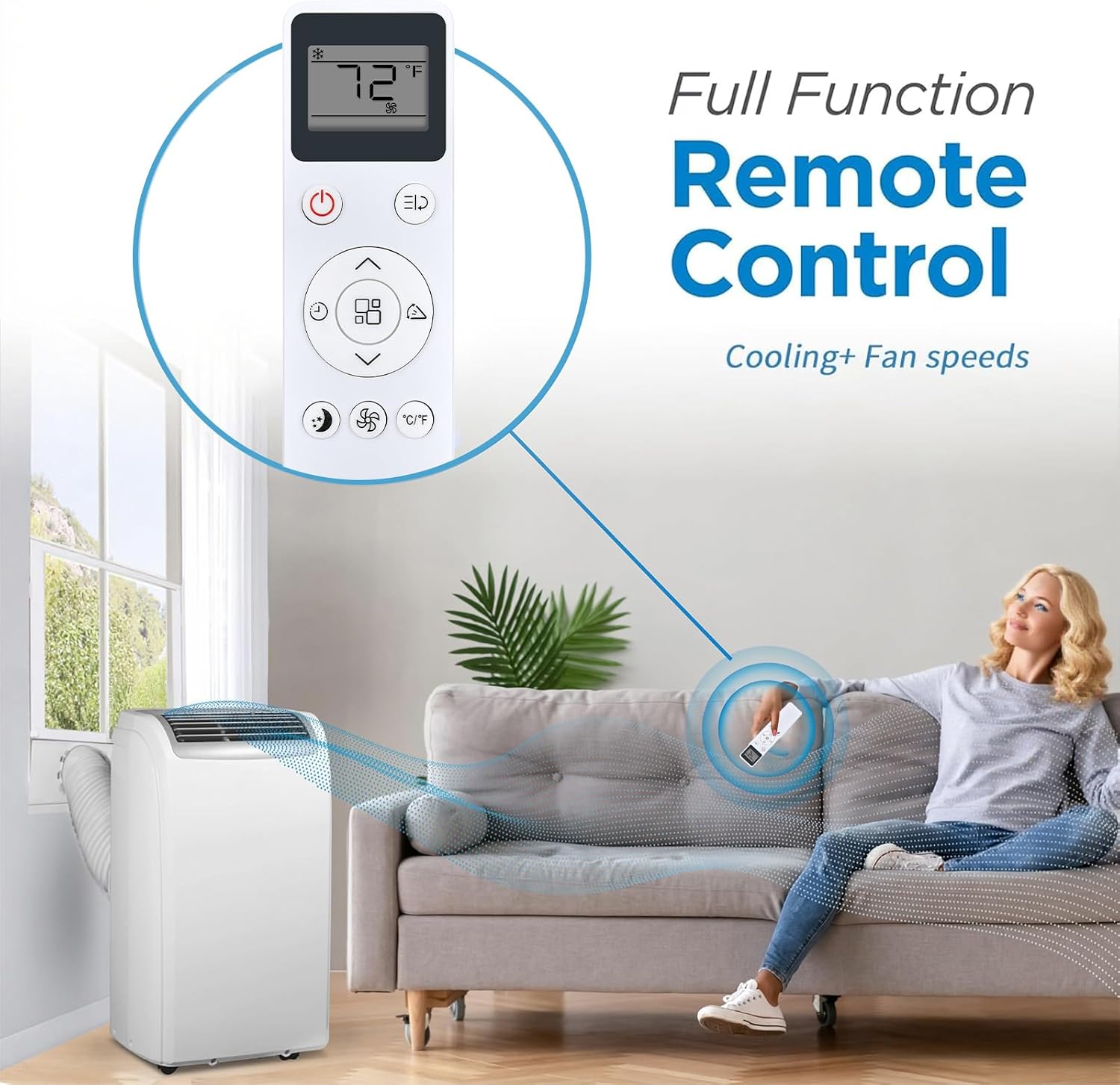
Image: The RETROSUN AC Remote Control in use, demonstrating its full functionality for cooling and fan speeds with a portable air conditioner.
3. Návod k obsluze
The RETROSUN Replacement AC Remote Control provides comprehensive control over your compatible air conditioner. It operates using infrared signals with a reliable range of up to 8 meters (26 feet) and a 120-degree wide-angle design for flexible positioning.
Funkce tlačítek:

Obrázek: Podrobný view of the remote control's buttons, including Power, Mode, Speed, Timer, Sleep Mode, and Child Lock, with an indication of its 16.5 ft effective range.
- Tlačítko napájení (⏻): Zapíná nebo vypíná klimatizaci.
- Tlačítko režimu (⌛): Cyklicky provádí provozní režimy (např. Chlazení, Ventilátor, Odvlhčování, Vytápění, Automaticky).
- Nastavení teploty (▲ / ▼): Zvyšuje nebo snižuje požadovanou teplotu.
- Tlačítko rychlosti ventilátoru (☿): Upravuje rychlost ventilátoru (např. Nízká, Střední, Vysoká, Automatická).
- Tlačítko časovače (⏱): Nastaví časovač pro automatické zapnutí nebo vypnutí jednotky.
- Tlačítko režimu spánku (🌛): Aktivuje nebo deaktivuje režim spánku pro tichý provoz a úsporu energie.
- Tlačítko dětské pojistky (🔒): Zablokuje tlačítka dálkového ovladače, aby se zabránilo nechtěným změnám.
- Tlačítko otočení (⇆): Ovládá funkci otáčení lamel (pokud je u vaší klimatizační jednotky k dispozici).
- Tlačítko °C/°F: Přepíná zobrazení teploty mezi stupni Celsia a Fahrenheita.

Image: The remote control illustrating its ability to adjust between cooler and warmer temperature settings, from lowest to highest.
Velký LCD displej:
The remote features a large LCD screen for easy viewing of current settings, including temperature, mode, and fan speed. This ensures clear readability at a glance.

Image: A close-up of the remote control's large LCD screen, highlighting its clear display of temperature and fan settings.
4. Údržba
To ensure the longevity and optimal performance of your remote control, consider the following maintenance tips:
- Výměna baterie: Replace batteries when the remote's response becomes sluggish or the display dims. Always use new AAA alkaline batteries.
- Čištění: Wipe the remote control with a soft, dry cloth. Avoid using liquid cleaners or abrasive materials, as these can damage the surface or internal components.
- Skladování: Pokud dálkový ovladač nebudete delší dobu používat, vyjměte baterie, abyste zabránili jejich vytečení a možnému poškození. Skladujte na chladném a suchém místě.
- Vyhněte se kapkám: Protect the remote from drops and impacts, which can damage its internal circuitry or external casing.
5. Řešení problémů
Pokud narazíte na problémy s dálkovým ovladačem, postupujte podle následujících běžných kroků pro řešení problémů:
| Problém | Řešení |
|---|---|
| Dálkové ovládání nereaguje. |
|
| Tlačítka nefungují. |
|
| Displej je tmavý nebo prázdný. |
|
6. Specifikace
- Značka: RETROSUN
- Název/číslo modelu: B0FVV62DXG
- Speciální funkce: Ergonomický design
- Barva: Bílý
- Kompatibilní zařízení: Klimatizace
- Technologie připojení: Infračervený
- Množství tlačítek: 12
- Maximální rozsah: 8 metrů (26 stop)
- Typ baterie: AAA Alkaline (2 required, not included)
- Typ ovladače: Ovládání tlačítkem
- Výrobce: Oumeite
7. Informace o záruce
This RETROSUN Replacement AC Remote Control comes with a 90denní záruka from the date of purchase. This warranty covers manufacturing defects under normal use. It does not cover damage caused by misuse, accidents, unauthorized modifications, or battery leakage.
8. Podpora
For further assistance or inquiries regarding your RETROSUN Replacement AC Remote Control, please refer to the retailer where the product was purchased. Ensure you have your purchase details and product model number (B0FVV62DXG) available when seeking support.