
1. Úvod
This manual provides comprehensive instructions for the LAXASFIT H6 Smart Watch. It covers setup, operation, maintenance, and troubleshooting to ensure optimal use of your device. The H6 Smart Watch features a 2.01-inch TFT display, Bluetooth 5.0 connectivity, and various health and fitness tracking capabilities.
2. Obsah balení
Než budete pokračovat, ověřte si prosím, zda jsou v balení přítomny všechny položky:
- Chytré hodinky LAXASFIT H6
- Řemínek na hodinky (předpřipevněný nebo samostatný)
- Nabíjecí kabel
- Uživatelská příručka (tento dokument)

Image: The LAXASFIT H6 Smart Watch, its charging cable, and the product packaging.
3. Nastavení
3.1. Nabíjení chytrých hodinek
Before first use, fully charge your LAXASFIT H6 Smart Watch.
- Připojte nabíjecí kabel k nabíjecímu portu na zadní straně hodinek.
- Zapojte USB konec nabíjecího kabelu do standardního USB napájecího adaptéru (není součástí balení) nebo do USB portu počítače.
- Displej hodinek bude ukazovat stav nabíjení. Úplné nabití obvykle trvá přibližně 2 hodiny.
A fully charged battery provides an average life of 1 day, depending on usage.
3.2. Instalace doprovodné aplikace
To unlock the full functionality of your H6 Smart Watch, you need to install the companion application on your smartphone.
- Scan the QR code provided in the quick start guide (if available) or search for "Laxasfit" in your smartphone's app store.
- Download and install the "Laxasfit" app.

Image: Screenshot of the Laxasfit application available on the Google Play Store.

Image: Screenshot of the Laxasfit application available on the Apple App Store.
3.3. Párování s vaším smartphonem
Ujistěte se, že je ve vašem smartphonu zapnutá funkce Bluetooth.
- Open the Laxasfit app on your smartphone.
- Follow the in-app instructions to search for and connect to your H6 Smart Watch.
- Potvrďte požadavek na párování na hodinkách i smartphonu.
4. Ovládání chytrých hodinek
4.1. Základní navigace
The H6 Smart Watch features a touchscreen interface for navigation.
- Přejetí nahoru/dolů: Procházení nabídek a oznámení.
- Přejetí doleva/doprava: Přístup k rychlým funkcím nebo různým obrazovkám.
- Klepněte na: Vyberte položku nebo potvrďte akci.
- Boční tlačítko: Obvykle se používá k návratu na domovskou obrazovku nebo k zapnutí/vypnutí zařízení.
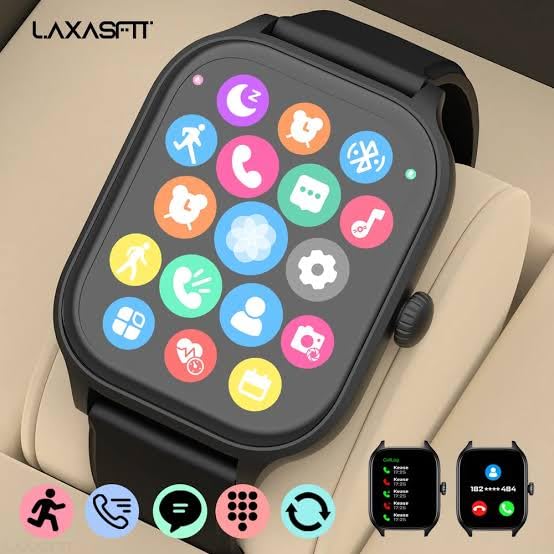
Image: The smartwatch display showing a grid of application icons for various functions.
4.2. Správa hovorů a zpráv
Once paired, your H6 Smart Watch can display incoming calls and messages.
- Příchozí hovory: The watch will display caller ID. You can accept or reject calls directly from the watch.
- Zprávy: View message previews and notifications from various applications.

Image: The smartwatch screen showing an incoming call notification with options to accept or decline.

Image: The smartwatch screen displaying a message notification from a contact.
4.3. Monitorování zdraví
The H6 Smart Watch includes sensors for monitoring various health metrics.
- Monitor srdečního tepu: Sleduje váš tep po celý den.
- Monitor krevního kyslíku: Měří hladinu saturace krve kyslíkem.
- Monitorování spánku: Analyzuje vaše spánkové vzorce.
4.4. Sportovní režimy a GPS
The watch supports over 100 sports modes to track your physical activities. It also features GPS for accurate outdoor activity tracking.

Image: A person running outdoors, wearing the LAXASFIT H6 Smart Watch on their wrist, displaying activity data.
4.5. Další funkce
Chytré hodinky H6 nabízejí řadu dalších funkcí:
- Dial-up Call & Call Record: Initiate calls and view historie hovorů.
- Adresář: Přístup k telefonním kontaktům.
- Oznámení: Receive alerts from various apps.
- Find a Cell Phone: Vyhledejte spárovaný smartphone.
- svítivost: Upravte jas obrazovky.
- Hra: Access simple games.
- Dálkové ovládání kamery: Ovládejte fotoaparát telefonu na dálku.
- Poplach: Nastavte budíky.
- Wireless Music: Ovládejte přehrávání hudby na telefonu.
- Kalkulačky: Základní funkce kalkulačky.
- Počasí: View aktuální informace o počasí.
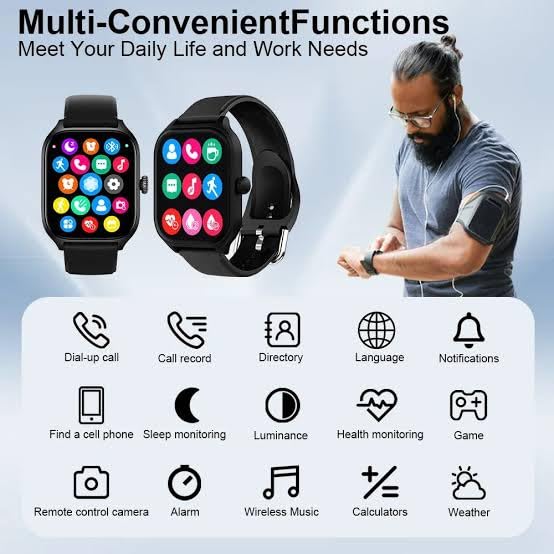
Image: An infographic illustrating multiple convenient functions of the smartwatch, including call, message, health monitoring, and music control.
5. Údržba
5.1. Čištění
Pravidelně čistěte hodinky, aby si zachovaly svůj vzhled a funkčnost.
- Otřete obrazovku a řemínek měkkým hadříkemamp tkanina.
- Vyhněte se používání agresivních chemikálií nebo abrazivních materiálů.
- Před nabíjením se ujistěte, že jsou nabíjecí kontakty čisté a suché.
5.2. Voděodolnost
The LAXASFIT H6 Smart Watch is IP67 waterproof. This means it is protected against dust ingress and can withstand immersion in water up to 1 meter for up to 30 minutes. It is suitable for daily use and light water exposure like hand washing or rain. However, it is nedoporučuje se for swimming, showering with hot water, or diving.
5.3. Péče o baterie
- Vyhněte se častému úplnému vybíjení baterie.
- Pokud hodinky delší dobu nepoužíváte, skladujte je na chladném a suchém místě.
- Používejte pouze dodaný nabíjecí kabel.
6. Řešení problémů
If you encounter issues with your LAXASFIT H6 Smart Watch, refer to the following common solutions:
- Hodinky se nezapínají: Ujistěte se, že jsou hodinky plně nabité. Připojte je k nabíječce alespoň na 30 minut.
- Nelze spárovat s telefonem: Make sure Bluetooth is enabled on your phone and the watch is within range. Restart both the watch and your phone, then try pairing again through the Laxasfit app.
- Nepřesné zdravotní údaje: Ujistěte se, že hodinky máte pevně na zápěstí, ne příliš těsně ani příliš volně. Vyčistěte senzor na zadní straně hodinek.
- Nezobrazují se oznámení: Check app notification settings on your phone and within the Laxasfit app to ensure they are enabled for the watch.
- Obrazovka nereaguje: Try restarting the watch by pressing and holding the side button.
7. Specifikace
| Funkce | Specifikace |
|---|---|
| Značka | LAXASFIT |
| Model | Chytré hodinky H6 |
| Typ zobrazení | AMOLED |
| Velikost obrazovky | 1.9 Inches (2.01" TFT Display mentioned in title) |
| Konektivita | Bluetooth 5.0 |
| Operační systém | WatchOS |
| Kapacita paměti | 500 MB |
| Velikost nainstalované paměti RAM | 0.13 MB |
| Speciální funkce | GPS, Heart Rate Monitor, Blood Oxygen Monitor, 100+ Sports Modes |
| Voděodolnost | IP67 |
| Kapacita baterie | 100 Amp hodiny |
| Průměrná životnost baterie | 1 den |
| Doba nabíjení | 2 hodiny |
| Kompatibilní zařízení | Android & iOS (Iphone listed in specs) |
| Materiál | Silikon (řemínek) |
| Hmotnost položky | 200 g |
8. Záruka a podpora
Informace o záruce a zákaznické podpoře získáte na oficiálních stránkách LAXASFIT. webnebo se obraťte na prodejce. Uschovejte si účtenku jako doklad o koupi.

Image: The LAXASFIT brand logo.