
1. Úvod
This manual provides detailed instructions for the safe and efficient use of your Qubo X232 phone. Please read this manual thoroughly before operating the device and retain it for future reference.
2. Konec produktuview
The Qubo X232 is a 4G mobile phone designed for ease of use, featuring a large 2.3-inch screen, loud audio, and a dedicated SOS emergency button. Its robust 1700mAh battery ensures extended usage, and the unlocked status provides compatibility with various Mexican carriers.
2.1. Obsah balení
- Qubo X232 Phone
- Baterie 1700mAh
- Nabíjecí kabel USB typu C.
- Adaptér USB OTG
- Uživatelská příručka
3. Klíčové vlastnosti
- Clear Display & Simple Operation: Features a 2.3-inch color screen for enhanced readability, large illuminated buttons with voice prompts, and a simplified user interface for straightforward navigation. Includes side buttons for keypad lock/unlock and volume control.
- Funkce SOS pro nouzové situace: A dedicated SOS button allows for automatic dialing to up to 5 pre-set emergency contacts and simultaneous alert message sending.
- Loud Audio & Clear Calls: Equipped with a high-volume speaker for improved audibility in various environments. Supports 3.5mm headphones and Bluetooth accessories.
- Efficient 1700mAh Battery: Offers extended battery life, providing up to 14 days of standby time depending on usage. Features a reversible USB Type-C port for convenient charging.
- Unlocked & Wide Compatibility: Compatible with major Mexican carriers including Telcel, AT&T, Movistar, BAIT, CFE, and Altan. Supports 4G, 3G, and 2G networks, and accepts 5G SIM cards operating on 4G.
- Integrované nástroje: Includes FM radio (usable without headphones), camera, multimedia player, alarm, calendar, calculator, call recorder, SMS, and photo contacts.
- Kompaktní a ergonomický design: Dimensions of 132.1 x 58.2 x 14.1 mm and a weight of approximately 110 grams ensure comfortable handling and portability.
4. Nastavení
4.1. Instalace SIM karty a baterie
- Opatrně sejměte zadní kryt telefonu.
- Insert your Nano SIM card(s) into the designated slot(s). Ensure the gold contacts face downwards and the card is correctly oriented.
- If desired, insert a MicroSD card (up to 64GB) into its dedicated slot for expanded storage.
- Vložte baterii s kapacitou 1700 mAh do přihrádky na baterii a zarovnejte kontakty.
- Nasaďte zadní kryt zpět, dokud bezpečně nezacvakne na místo.
4.2. Počáteční nabíjení
Before first use, fully charge the phone battery. Connect the USB Type-C cable to the phone's charging port and the other end to a compatible USB power adapter. The charging indicator will show the battery status. A full charge typically takes a few hours.

The Qubo X232 features a 1700mAh battery for extended use, with convenient Type-C charging.
4.3. Zapnutí/vypnutí
- Zapnutí: Stiskněte a podržte tlačítko Napájení/Ukončení hovoru (obvykle červené), dokud se obrazovka nerozsvítí.
- Vypnutí: Stiskněte a podržte tlačítko Napájení/Ukončení hovoru, dokud se nezobrazí možnosti vypnutí, poté vyberte možnost „Vypnout“.
5. Návod k obsluze
5.1. Základní navigace
Use the directional keys (up, down, left, right) to navigate through menus. The 'OK' button (center) confirms selections, and the 'Back' button (often the right soft key) returns to the previous screen.

The Qubo X232 features a user-friendly, multi-language menu with voice prompts for keys, enhancing ease of use.
5.2. Uskutečňování a přijímání hovorů
- Vytočit: Zadejte telefonní číslo pomocí klávesnice a stiskněte zelené tlačítko pro volání.
- Odpovědět: Když telefon zvoní, stiskněte zelené tlačítko pro volání.
- Ukončení hovoru: Stiskněte červené tlačítko pro ukončení hovoru.
- Rychlé vytáčení: Assign frequently called numbers to specific keys for quick dialing. Refer to the 'Phone Settings' menu for setup.
- Kontakty na fotografie: Store contacts with associated photos for easy visual identification.
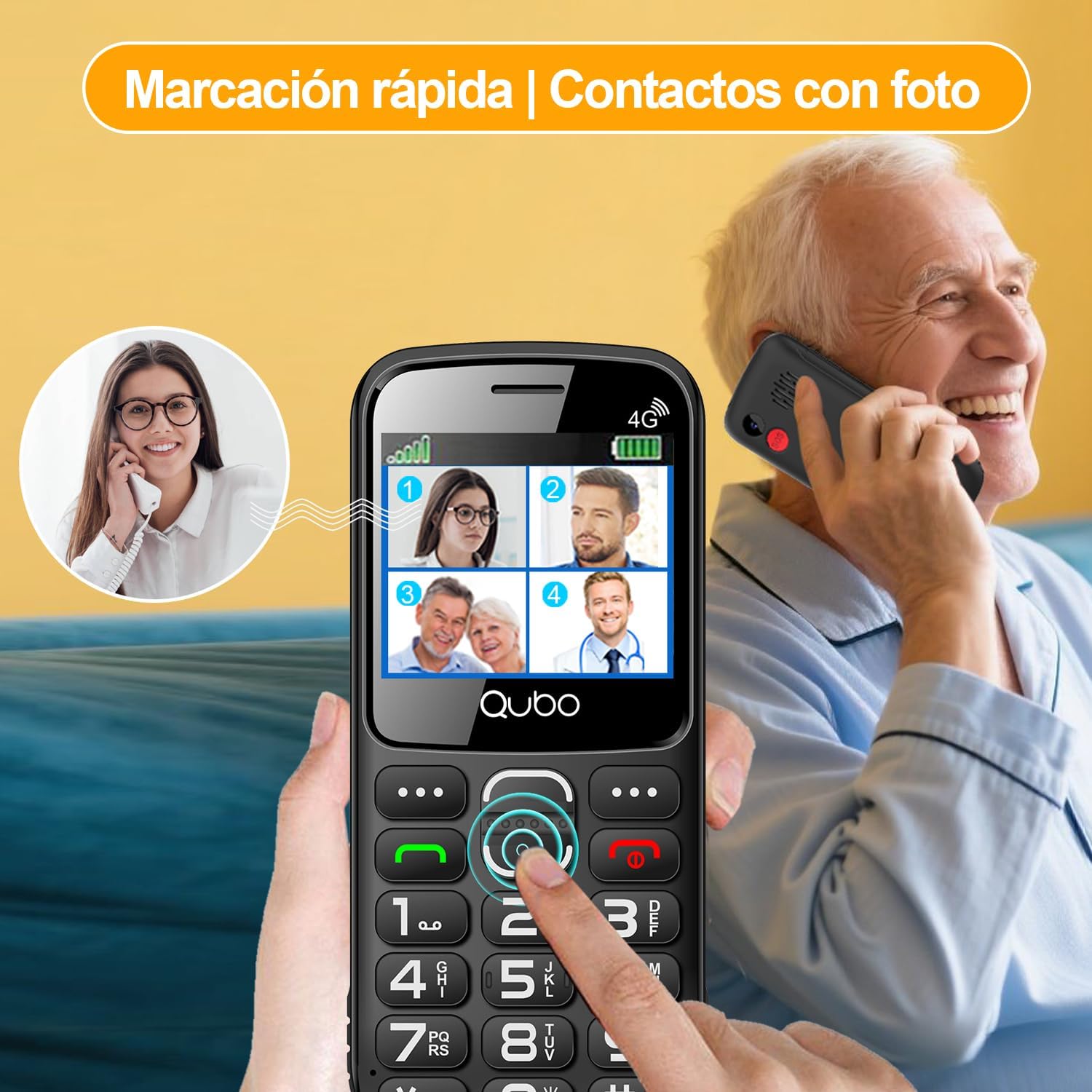
Quick dial and photo contacts on the Qubo X232 simplify calling for users, allowing them to recognize contacts visually.
5.3. Nouzové tlačítko SOS
Tlačítko SOS se nachází na zadní straně telefonu. V případě nouze:
- Press and hold the SOS button for a few seconds.
- The phone will automatically dial up to 5 pre-set emergency contacts in sequence until one answers.
- Simultaneously, an alert message will be sent to these contacts.
To set up SOS contacts: Navigate to Menu > Nastavení SOS and add/edit emergency numbers.
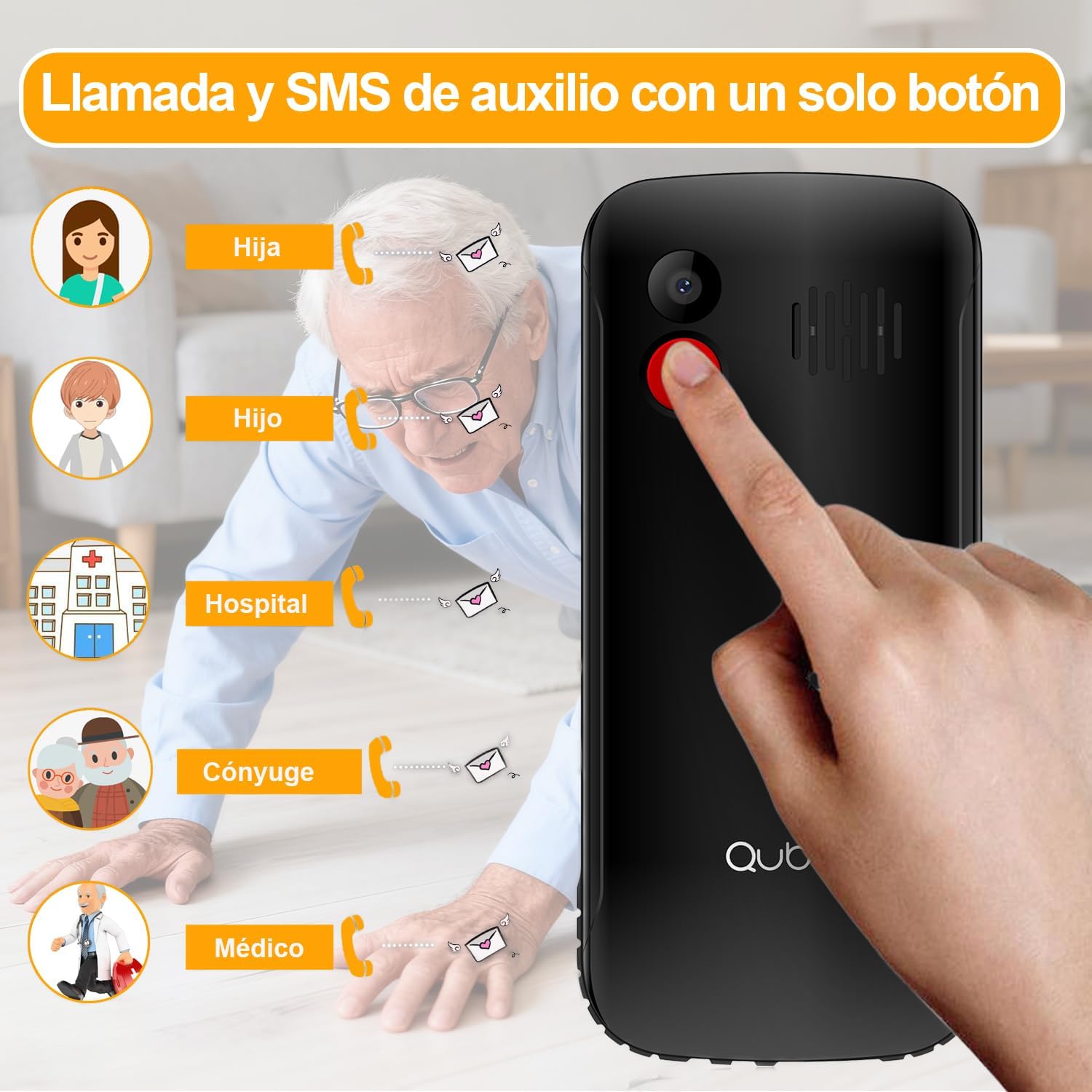
The dedicated SOS button on the Qubo X232 allows for quick emergency calls to up to five pre-selected contacts.
5.4. Zprávy (SMS)
To send or read text messages, navigate to Menu > Messages. The large screen and clear font facilitate easy reading and composing.
5.5. Svítilna
The Qubo X232 includes a built-in LED flashlight. To activate/deactivate, use the dedicated side button or access it via the menu.

The Qubo X232 includes a bright built-in flashlight, easily accessible for use in low-light conditions.
5.6. FM rádio
Access the FM Radio via the Menu. The Qubo X232 allows listening to FM radio without requiring headphones.

Enjoy FM radio on the Qubo X232, which can be used without the need for headphones.
5.7. Other Applications
The phone includes various useful applications:
- Fotoaparát: For taking basic photos.
- Multimediální přehrávač: For playing audio and video fileuloženy v zařízení nebo na kartě MicroSD.
- Poplach: Nastavte si více budíků.
- Kalendář: Sledujte data a události.
- Kalkulačka: Proveďte základní aritmetiku.
- Call Recorder: Record phone conversations (check local laws regarding consent).
- prohlížeč: Basic internet access.

The Qubo X232 offers essential applications such as messaging, FM radio, a camera, and a calculator, along with Bluetooth connectivity.
5.8. Nastavení jazyka
The phone supports multiple languages including Spanish, English, and Portuguese. To change the language, navigate to Menu > Settings > Phone Settings > Languages.
6. Údržba
- Čištění: Use a soft, dry cloth to clean the phone. Avoid liquid cleaners.
- Péče o baterie: Chcete-li prodloužit výdrž baterie, vyhněte se extrémním teplotám a nenechávejte telefon delší dobu zcela vybitý.
- Skladování: Pokud telefon nepoužíváte, skladujte jej na chladném a suchém místě.
7. Řešení problémů
| Problém | Možná příčina | Řešení |
|---|---|---|
| Telefon se nezapne | Baterie je vybitá nebo není správně nainstalována. | Nabíjejte baterii alespoň 30 minut. Ujistěte se, že je baterie správně vložena. |
| Žádný síťový signál | Out of network coverage, SIM card not inserted correctly, or network settings issue. | Move to an area with better coverage. Reinsert the SIM card. Check network settings in the menu. |
| Nelze uskutečňovat/přijímat hovory | No network signal, insufficient balance (prepaid), or call barring activated. | Check network signal. Ensure sufficient balance. Deactivate call barring if active. |
| Tlačítko SOS nefunguje | Nouzové kontakty nejsou nastaveny nebo jsou čísla nesprávná. | Ověřte nastavení SOS a ujistěte se, že jsou nouzové kontakty správně uloženy. |
| Baterie se rychle vybíjí | Heavy usage, poor network signal, or background applications. | Reduce usage. Turn off features like Bluetooth when not needed. Charge regularly. |
8. Specifikace
| Funkce | Detail |
|---|---|
| Značka | Qubo |
| Model | X232 |
| Operační systém | Nucleus OS |
| BERAN | 48 MB |
| Interní úložiště | 1 GB |
| Rozšiřitelné úložiště | MicroSD až 64 GB |
| Velikost obrazovky | 2.31 palce |
| Rezoluce | 320 x 240 pixelů |
| Typ obrazovky | AMOLED |
| Mobilní technologie | 4G (compatible with 5G SIM on 4G network) |
| Sloty pro SIM karty | Duální SIM |
| Velikost SIM karty | Nano |
| Kapacita baterie | 1700 XNUMX mAh |
| Doba hovoru | Až 6 hodin |
| Pohotovostní doba | Až 14 dny |
| Nabíjecí port | USB Type-C |
| Audio Jack | 3.5 mm |
| Rozměry (D x Š x V) | 132.1 x 58.2 x 14.1 mm |
| Hmotnost | Přibl. 110 gramů |
| Původ | Čína |
9. Oficiální produktová videa
9.1. HXEIR 4G Phone Features Overview
Video demonstrating the features of a 4G phone for seniors, including large buttons, SOS function, flashlight, and a simplified user interface.
9.2. artfone 4G Basic Mobile Phone for Seniors
Nadview video of a basic 4G mobile phone for seniors, showcasing features like large buttons, SOS emergency call, charging dock, and built-in flashlight.
9.3. artfone C1+ 4G Mobile Phone for Seniors
Demonstration of the artfone C1+ 4G mobile phone for seniors, highlighting its large buttons, SOS function, charging cradle, and voice dialing capabilities.
10. Záruka a podpora
10.1. Informace o záruce
Your Qubo X232 phone comes with a 30-day product warranty from the date of purchase. This warranty covers manufacturing defects. Please retain your proof of purchase for warranty claims.
10.2. Zákaznická podpora
For technical assistance, troubleshooting, or warranty inquiries, please contact your retailer or the Qubo customer support line. Refer to the packaging or official Qubo webstránky pro kontaktní údaje.