
1. Úvod
Welcome to your new HP OmniDesk M03 AI Desktop PC. This manual provides essential information for setting up, operating, maintaining, and troubleshooting your device. Please read this guide thoroughly to ensure proper use and to maximize the performance of your desktop computer.
2. Obsah balení
Ověřte, zda jsou všechny níže uvedené položky součástí balení. Pokud některé položky chybí nebo jsou poškozené, kontaktujte prosím svého prodejce.

Image: Contents of the HP OmniDesk M03 package, including the desktop PC, wireless keyboard, and wireless mouse.
- HP OmniDesk Desktop PC
- Bezdrátová klávesnice
- Myš
- Stručný návod k obsluze
- Napájecí kabel
3. Fyzický overview
3.1 Přední panel

Image: Front panel of the HP OmniDesk M03, highlighting the power button and various front-facing USB and audio ports.
- Tlačítko napájení
- Kombinovaný konektor pro sluchátka/mikrofon
- 1x USB typu C 5 Gb/s
- 1x USB typu C 10 Gb/s
- 2x USB typu A 5 Gb/s
- 2x USB typu A 10 Gb/s
3.2 Zadní panel

Image: Rear panel of the HP OmniDesk M03, detailing the various connectivity options including video outputs, USB ports, and network port.
- 4x USB 2.0 Type-A
- 1x RJ45 (gigabitový Ethernet)
- 3x DisplayPort 1.4a Output
- 1x HDMI 2.1 výstup
- 1x 1/8" / 3.5 mm Headphone/Microphone Input/Output
- 1x 1/8" / 3.5 mm Line Input
- 1x 1/8" / 3.5 mm Line Output
3.3 Rozměry a hmotnost
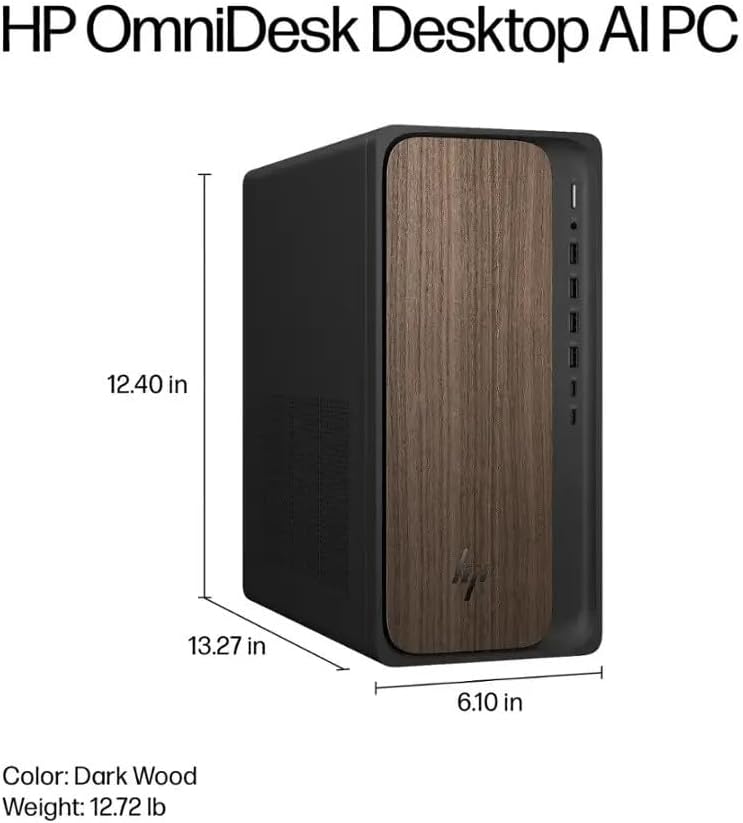
Image: Diagram illustrating the height, width, and depth of the HP OmniDesk M03 desktop PC.
- Rozměry (V x Š x H): 13.3 x 6.1 x 12.4 palce (33.8 x 15.5 x 31.5 cm)
- Hmotnost: Přibližně 12.72 libry (5.77 kg)
4. Nastavení
4.1 Počáteční nastavení
- Rozbalit: Carefully remove the HP OmniDesk M03 PC and all accessories from the packaging.
- Připojení monitoru: Connect your monitor to one of the DisplayPort or HDMI outputs on the rear panel of the PC.
- Připojení periferií: Plug in the wireless keyboard and mouse. Ensure they are powered on and paired according to their respective instructions.
- Připojte napájení: Připojte napájecí kabel k napájení počítače a poté k uzemněné elektrické zásuvce.
- Zapnutí: Stiskněte tlačítko napájení, které se nachází na předním panelu počítače.
- Nastavení systému Windows: Follow the on-screen instructions to complete the initial setup of Windows 11 Home. This may include setting up your user account, network connection, and privacy settings.
5. Návod k obsluze
5.1 Zapnutí/vypnutí
- Zapnutí: Press the power button on the front panel of the PC.
- Vypnout: In Windows 11, click the Start a poté vyberte Moca vyberte si Vypněte.
- Restartovat: In Windows 11, click the Start a poté vyberte Moca vyberte si Restartujte.
5.2 Connecting Peripherals and Network
- Zařízení USB: Use the available USB Type-A and Type-C ports on both the front and rear panels to connect external devices such as external hard drives, printers, or webvačky.
- Bezdrátové připojení: The HP OmniDesk M03 supports Wi-Fi 6 (802.11ax) with MU-MIMO and Bluetooth 5.4 for wireless network and peripheral connections. Access these settings via the Windows Nastavení menu.
- Kabelová síť: Connect an Ethernet cable to the RJ45 port on the rear panel for a wired network connection.
6. Údržba
6.1 Čištění
- Vnější: Use a soft, dry, lint-free cloth to clean the exterior surfaces of the PC. Avoid using liquid cleaners directly on the components.
- Větrání: Ensure that the ventilation openings are clear of dust and obstructions to maintain proper airflow.
6.2 Aktualizace softwaru
- Aktualizace systému Windows: Regularly check for and install Windows updates to ensure your operating system has the latest security patches and features. Go to Nastavení > Aktualizace systému Windows.
- Aktualizace ovladačů: Keep your device drivers, especially for graphics and chipset, updated for optimal performance and compatibility. These can often be found on the HP support website or through Windows Update.
7. Řešení problémů
7.1 Běžné problémy a řešení
- Bez napájení:
Příznak: The PC does not turn on when the power button is pressed.
Řešení: Ensure the power cable is securely connected to both the PC and a functional electrical outlet. Test the outlet with another device. - Bez displeje:
Příznak: The monitor shows no signal or remains black.
Řešení: Verify that the monitor is powered on and the video cable (DisplayPort or HDMI) is securely connected to both the PC and the monitor. Try connecting the monitor to a different video output port on the PC. - Klávesnice/myš nereaguje:
Příznak: The wireless keyboard or mouse does not function.
Řešení: Check the batteries in the keyboard and mouse. Ensure they are properly paired with the PC. For wired peripherals, verify USB connections. - Žádné internetové připojení:
Příznak: Nelze se připojit k internetu.
Řešení: For Wi-Fi, check network settings in Windows and ensure you are connected to the correct network. For wired connections, verify the Ethernet cable is properly connected to both the PC and the router/modem. Restart your router/modem if necessary.
8. Specifikace
8.1 Technické detaily
| Funkce | Detail |
|---|---|
| Model | HP OmniDesk M03 |
| Operační systém | Windows 11 Home (64bitový) |
| Procesor | Intel Core Ultra 7 265 (20-Core, up to 5.30 GHz) with Intel AI Boost |
| BERAN | 16GB DDR5 5600 MHz |
| Skladování | 8TB PCIe NVMe M.2 SSD disk |
| Grafika | NVIDIA GeForce RTX 5060Ti 8GB GDDR7 |
| Bezdrátové připojení | Wi-Fi 6 (802.11ax) with MU-MIMO, Bluetooth 5.4 |
| Kabelové připojení | Gigabitový ethernet (RJ45) |
| Přední porty | 1x USB-C 3.1/3.2 Gen 2, 1x USB-C 3.0 / 3.1/3.2 Gen 1, 2x USB-A 3.1/3.2 Gen 2, 1x Headphone/Microphone Combo |
| Zadní porty | 4x USB 2.0, 2x USB-A 3.0 / 3.1/3.2 Gen 1, 3x DisplayPort 1.4a, 1x HDMI 2.1, 1x RJ45, Audio Line In/Out |
| Rozměry (V x Š x H) | 13.3 x 6.1 x 12.4 palce |
| Hmotnost | 12.72 libry |
| Barva | Tmavé dřevo |
9. Záruka a podpora
9.1 Informace o záruce
This HP OmniDesk M03 AI Desktop PC comes with a 2-letá záruka provided by Techno Intelligence. Please retain your proof of purchase for warranty claims.
9.2 Technická podpora
For technical assistance and support related to your product, please contact Techno Intelligence. Refer to your purchase documentation for specific contact details.
Obecné informace o produktech HP a zdroje podpory naleznete na oficiálních stránkách Podpora HP webmísto.