
1. Úvod
The SofaBaton X2 is a universal remote control designed to consolidate control of your home entertainment and smart home devices. It features a 2.4-inch HD touchscreen, a comprehensive cloud-based code library, and supports various connectivity technologies including Infrared (IR), Bluetooth, RF, and Wi-Fi. This manual provides detailed instructions for setting up, operating, and maintaining your SofaBaton X2.
2. Obsah balení
Ujistěte se, že v balení jsou přítomny všechny položky:
- SofaBaton X2 Universal Remote Control
- SofaBaton Hub
- Nabíjecí dok
- Nabíjecí kabel USB typu C.
- IR Extension Cable (optional)
- Uživatelská příručka

Image: SofaBaton X2 remote, hub, charging base, and infrared transponder.
3. Konec produktuview
The SofaBaton X2 system consists of the remote control, a central hub, and a charging dock. The remote features a touchscreen for intuitive navigation and control, while the hub provides 360-degree IR transmission and extends connectivity options.
Klíčové vlastnosti:
- 2.4palcový HD dotykový displej: For intuitive control and digital keypads.
- Připojení více zařízení: Supports IR, Bluetooth, RF, and Wi-Fi 2.4GHz.
- Rozsáhlá kompatibilita zařízení: Cloud-based library with over 500,000 devices from 6,000+ brands.
- Customizable Activities: Execute multi-device commands with a single press.
- Integrace chytré domácnosti: Compatible with Home Assistant, Alexa, and Google Home.
- SofaBaton Hub: Provides 360-degree IR transmission with a range of up to 40 feet.
- Nabíjecí dok: Convenient Type-C charging dock for the remote.
- Dlouhá výdrž baterie: 1200mAh battery provides 3-4 weeks of working time.
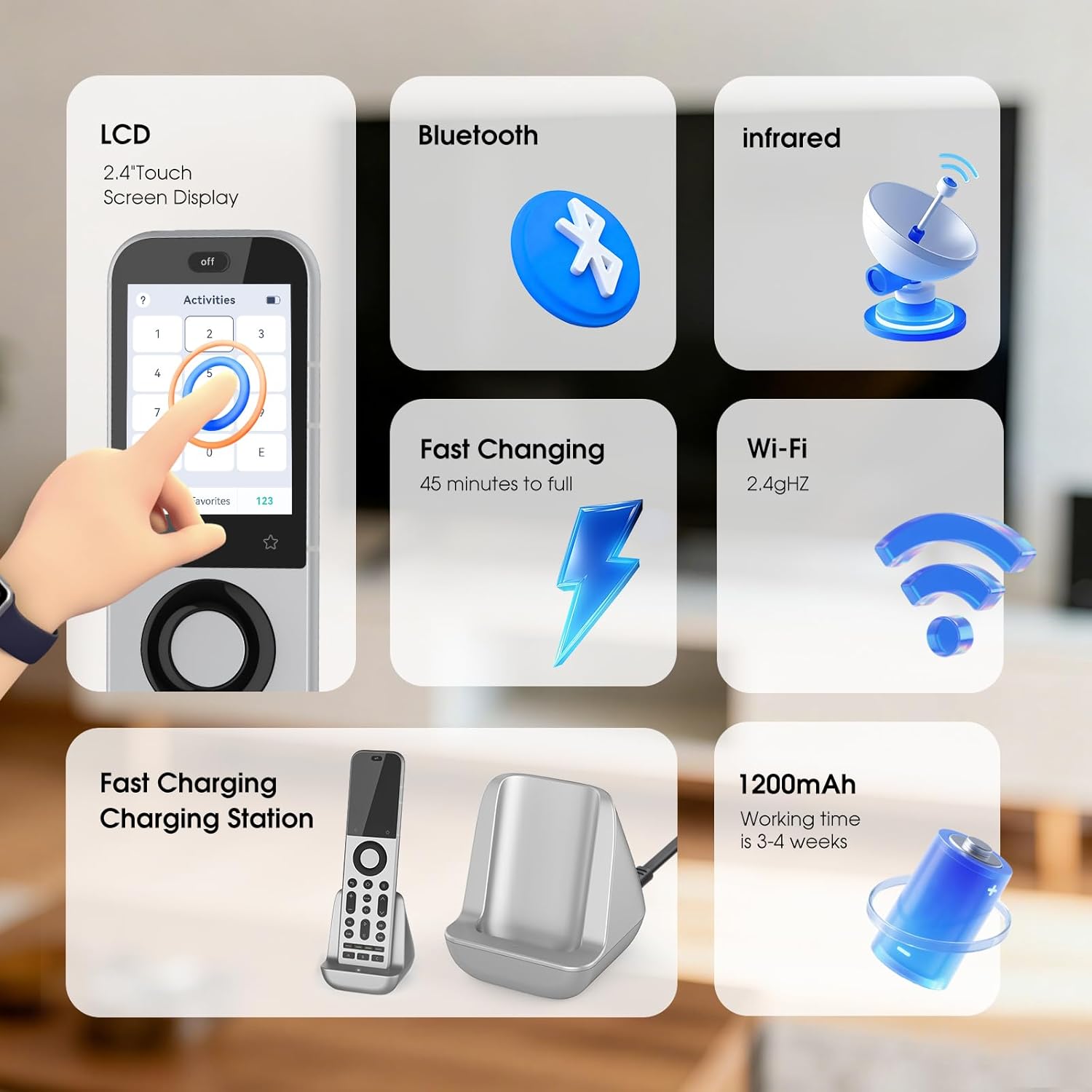
Image: SofaBaton X2 remote control highlighting its LCD touchscreen, Bluetooth, Infrared, Fast Charging capability, Wi-Fi 2.4GHz connectivity, and 1200mAh battery.
4. Nastavení
4.1 Nabíjení dálkového ovladače
- Place the SofaBaton X2 remote into the charging dock.
- Connect the Type-C charging cable to the dock and a power source.
- The remote's screen will indicate charging status. A full charge takes approximately 45 minutes.
4.2 Připojení hubu
- Position the SofaBaton Hub in a central location within your entertainment area, ensuring it has a clear line of sight to the devices you wish to control via IR.
- Connect the hub to power using the provided adapter.
- If devices are obstructed or out of direct line of sight, use the optional IR extension cable by plugging it into the hub and positioning its emitter near the target device's IR receiver.
4.3 Stažení a instalace aplikace
The SofaBaton app is essential for configuring your remote and hub.
- Scan the QR code in the quick start guide or search for "SofaBaton" in your mobile device's app store (Google Play Store for Android, Apple App Store for iOS).
- Download and install the SofaBaton application.
- Otevřete aplikaci a podle pokynů na obrazovce vytvořte účet nebo se přihlaste.

Image: SofaBaton app download screen on a smartphone, showing options for Google Play and Apple App Store.
4.4 Párování zařízení
Use the SofaBaton app to add and pair your devices with the remote and hub.
- In the SofaBaton app, navigate to the "Devices" section.
- Select "Add Device" and choose the type of device you want to add (e.g., TV, Soundbar, Streaming Device).
- Follow the app's instructions to search for your device by brand and model. The app will guide you through the pairing process, which may involve IR, Bluetooth, or Wi-Fi connectivity depending on the device.
- Test the controls to ensure proper functionality after pairing.

Image: Diagram illustrating Bluetooth connectivity between the SofaBaton X2 remote, hub, and various devices throughout a home, emphasizing multi-room control.
5. Návod k obsluze
5.1 Používání rozhraní dotykové obrazovky
The 2.4-inch HD touchscreen provides access to devices, activities, settings, and digital keypads.
- Navigace: Swipe left/right or up/down to navigate through menus and options.
- Výběr: Klepnutím na ikonu nebo možnost ji vyberete.
- Digital Keypads: Access digital keypads (e.g., number pad) for specific devices or functions.

Image: SofaBaton X2 touchscreen displaying a digital keypad for number input, with IR transmitters indicated at the top.
5.2 Creating and Using Activities
Activities allow you to control multiple devices with a single command, such as turning on your TV, soundbar, and streaming device simultaneously for "Movie Night."
- Create Activity: In the SofaBaton app, go to the "Activities" section and select "Add Activity." Follow the prompts to select devices and define the sequence of commands.
- Launch Activity: On the remote's touchscreen, navigate to the "Activities" menu. To launch an activity, slide or swipe the activity icon to the right. This prevents accidental activation.
- Deactivate Activity: To turn off all devices associated with an activity, press the "Off" button located at the top of the remote. This action shuts down all active devices and ends the current mode.

Image: SofaBaton X2 touchscreen showing instructions for launching and deactivating activities by swiping the activity icon and pressing the 'Off' button.
5.3 App-Based Personalization
The SofaBaton app provides extensive customization options:
- Rozložení tlačítek: Customize the function of physical buttons on the remote.
- Programování maker: Create complex sequences of commands (macros) for specific tasks.
- Reassignments: Reassign functions to different buttons or touchscreen areas.
- Cloudové úložiště: Your preferences and configurations are stored in the cloud for easy backup and restoration.

Image: SofaBaton app interface on a smartphone showing device control methods like Infrared, Bluetooth, Wi-Fi, and RF, emphasizing customization.
5.4 Integrace chytré domácnosti
The SofaBaton X2 can integrate with various smart home platforms:
- Domácí asistent: Connect the X2 to Home Assistant for automated activities and cross-platform synchronization via MQTT. This allows direct command subscriptions to automate audio-video gear, lighting, and other smart devices.
- Hlasoví asistenti: Compatible with Alexa and Google Home for voice control of your entertainment system.
5.5 Časovač vypnutí
Set a one-time timer for the current activity:
- On the remote's touchscreen, navigate to the "Sleep Timer" option.
- Select the desired duration (e.g., 0.5 hours, 1 hour, 2 hours, 3 hours).
- The remote will automatically turn off the current activity after the selected time.
5.6 Synchronizace
To ensure your remote has the latest configurations from the app:
- On the remote's touchscreen, navigate to the "Sync" option.
- Tap "Sync Now." The remote will be unavailable during the synchronization process, which typically takes a few minutes.
6. Údržba
6.1 Čištění
- Wipe the remote and hub with a soft, dry cloth.
- Nepoužívejte abrazivní čisticí prostředky, rozpouštědla ani agresivní chemikálie.
6.2 Péče o baterii
- Charge the remote regularly using the provided charging dock.
- Avoid exposing the remote to extreme temperatures.
- The remote uses a nonstandard, non-replaceable battery. When the battery reaches the end of its life, the unit will cease to function.
7. Řešení problémů
| Problém | Možné řešení |
|---|---|
| Dálkový ovladač nereaguje | Ensure the remote is charged. Check if the hub is powered on and connected. Try syncing the remote via the app. |
| Zařízení nereaguje na příkazy | Verify the device is correctly paired in the SofaBaton app. Ensure the hub has a clear line of sight to IR devices. For Bluetooth/Wi-Fi devices, check their network connection. Re-learn IR commands if necessary. |
| Activities not working correctly | Review the activity sequence in the SofaBaton app. Ensure all devices within the activity are powered on and responsive individually. Adjust delays between commands if needed. |
| Problémy s připojením aplikace | Ensure your mobile device and the SofaBaton Hub are connected to the same 2.4GHz Wi-Fi network. Restart the app and the hub. |
| Remote screen unresponsive | Perform a soft reset by pressing and holding the power button (if available) or by navigating to the "Reboot" option in the settings menu. Ensure the remote is adequately charged. |
8. Specifikace
| Funkce | Detail |
|---|---|
| Značka | SofaBaton |
| Název modelu | X2 |
| Technologie připojení | Bluetooth, Infrared, Wi-Fi |
| Typ ovladače | Ovládání tlačítky, Dotykové ovládání |
| Maximální počet podporovaných zařízení | 49 |
| Kompatibilní zařízení | DVD/Blu-ray Player, Home Theater, Set Top Box, Television |
| Maximum Range (Hub IR) | 40 stop |
| Typ baterie | Nestandardní baterie (součástí balení) |
| Kompatibilita Smart Home | Smart Home Compatible (Alexa, Google Home, Home Assistant) |
| Speciální funkce | Backlit, Digital Display, Ergonomic, Rechargeable |
| Barva | Černá/Stříbrná |
9. Záruka a podpora
9.1 Informace o záruce
The SofaBaton X2 Universal Remote Control comes with a 1-letá záruka od data nákupu. Tato záruka se vztahuje na výrobní vady a poruchy při běžném používání. Uschovejte si prosím doklad o koupi pro případ uplatnění záruky.
9.2 Zákaznická podpora
For technical assistance, troubleshooting, or warranty inquiries, please contact SofaBaton customer support through the dedicated SofaBaton app or visit the official SofaBaton website. All-day customer support is provided in the app.