
Zavedení
Thank you for choosing the LIORQUE Wireless Weather Station YGH6208. This device provides accurate indoor and outdoor temperature and humidity readings, weather forecasts, and features a DCF radio-controlled clock with alarm functions. This manual will guide you through the setup, operation, and maintenance of your weather station.
Obsah balení
- 1 x LIORQUE Wireless Weather Station (Main Unit)
- 1 x venkovní senzor
- 3 x AAA Batteries (for Main Unit)
- 2 x AAA Batteries (for Outdoor Sensor)
- 1 x Uživatelská příručka (tento dokument)
Konec produktuview
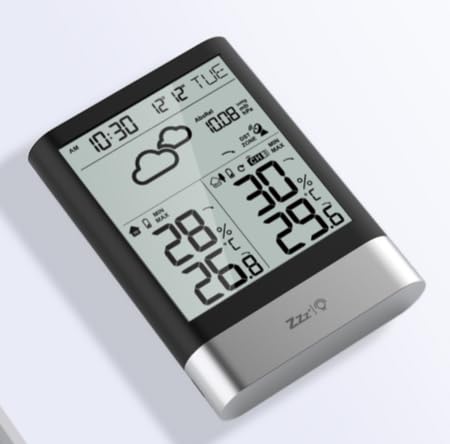
Obrázek 1: LIORQUE Wireless Weather Station Main Unit. This image shows the front view of the main display unit, highlighting its LCD screen and compact design.
Hlavní vlastnosti jednotky:
- 4.3-inch LCD screen with backlight
- Zobrazení vnitřní teploty a vlhkosti
- Zobrazení venkovní teploty a vlhkosti
- Předpověď počasí ikony
- DCF radio-controlled clock with manual setting option
- Double alarm clock with snooze function
- Calendar and day of the week display (7 languages)
- Max/Min temperature and humidity records
- Air pressure display and weather trend
- Zobrazení času 12/24 hodin
Outdoor Sensor Features:
- Wireless transmission up to 100m (open area)
- Měření teploty a vlhkosti
- Supports hanging or standing placement
- Data updated every 30 seconds
- Supports up to 3 sensors (one included)
Nastavení
1. Instalace baterie
- Venkovní senzor: Open the battery compartment cover on the back of the outdoor sensor. Insert 2 x AAA batteries, ensuring correct polarity (+/-). Close the cover.
- Hlavní jednotka: Open the battery compartment cover on the back of the main unit. Insert 3 x AAA batteries, ensuring correct polarity (+/-). Close the cover.
- The main unit will power on and display indoor readings.
2. Párování senzorů
After installing batteries in both units, the main unit will automatically search for the outdoor sensor. The outdoor temperature and humidity should appear on the main unit's display within a few minutes. If the outdoor readings do not appear:
- Ensure both units are within range (up to 100m in open air).
- Press the "TX" button inside the outdoor sensor's battery compartment to manually send a signal.
- On the main unit, press and hold the "CHANNEL" button to initiate a manual search for the sensor.
3. Počáteční nastavení (čas, datum, jednotky)
The weather station will attempt to synchronize with the DCF radio signal for automatic time setting. This may take several hours, especially in areas with weak signals. You can manually set the time and date if needed.
- Manuální nastavení času: Press and hold the "MODE" button to enter time setting mode. Use the "UP" and "DOWN" buttons to adjust values and "MODE" to confirm and move to the next setting (e.g., 12/24 hour format, hour, minute, year, month, day, language for day of week).
- Jednotky teploty: Press the "°C/°F" button to switch between Celsius and Fahrenheit.
- Air Pressure Units: Press the "BARO" button to cycle through air pressure units (e.g., hPa, inHg).
Návod k obsluze
Zobrazení informací
The 4.3-inch LCD screen displays various information:
- Čas a datum: Aktuální čas, datum a den v týdnu.
- Vnitřní měření: Aktuální vnitřní teplota a vlhkost.
- Venkovní čtení: Current outdoor temperature and humidity from the connected sensor.
- Předpověď počasí: Ikony označující předpovězené povětrnostní podmínky (např. slunečno, oblačno, deštivo).
- Tlak vzduchu: Current atmospheric pressure and trend.
- Podsvícení: The screen backlight activates with a light touch and returns to normal brightness after 10 seconds to conserve battery.
Funkce budíku
The weather station features a double alarm clock with snooze.
- Nastavení budíků: Stiskněte tlačítko „ALARM“ pro view Alarm 1. Press "ALARM" again to view Alarm 2. Hold "ALARM" to enter alarm setting mode. Use "UP" and "DOWN" to adjust the hour and minute, and "ALARM" to confirm.
- Aktivace/deaktivace alarmů: Zatímco viewing an alarm, press "UP" to toggle it on or off. An alarm icon will appear when active.
- Funkce odložení: When an alarm sounds, press any button (except "ALARM OFF") to activate snooze. The alarm will sound again after a set interval. Press "ALARM OFF" to stop the alarm completely.
Maximální a minimální záznamy
The weather station records the maximum and minimum indoor/outdoor temperature and humidity values.
- Press the "MAX/MIN" button once to display maximum recorded values.
- Press "MAX/MIN" again to display minimum recorded values.
- Press "MAX/MIN" a third time to return to current readings.
- To clear records, hold the "MAX/MIN" button while viewzáznamů.
Údržba
- Výměna baterie: Vyměňte baterie v hlavní jednotce i venkovním senzoru, když se na displeji zobrazí indikátor slabé baterie. Vždy vyměňujte všechny baterie najednou.
- Čištění: Očistěte povrch displeje a jednotky měkkým hadříkemamp tkanina. Nepoužívejte abrazivní čisticí prostředky nebo rozpouštědla.
- Umístění venkovního senzoru: For optimal performance and longevity, install the outdoor sensor in a shaded area, protected from direct sunlight and rain. Ensure it is within the 100m wireless range of the main unit.
Odstraňování problémů
| Problém | Možné řešení |
|---|---|
| Žádné zobrazení venkovní teploty/vlhkosti. |
|
| Nesprávné zobrazení času. |
|
| Displej je tmavý nebo prázdný. |
|
| Předpověď počasí se zdá být nepřesná. |
|
Specifikace
- Model: YGH6208
- Značka: LIORQUE
- Typ displeje: LCD
- Zdroj napájení (hlavní jednotka): 3 x AAA baterie (součástí balení)
- Zdroj napájení (venkovní senzor): 2 x AAA baterie (součástí balení)
- Bezdrátový dosah: Až 100 m (otevřená plocha)
- Přesnost teploty: ±0.5 °C
- Technologie senzoru: Funk (Wireless)
- Speciální vlastnosti: DCF Radio Clock, Alarm, Snooze, Weather Forecast, Max/Min Records, Backlight
- Zahrnuté komponenty: Weather Station Main Unit, Outdoor Sensor
Záruka a podpora
LIORQUE products are designed for reliability and performance. For warranty information or technical support, please refer to the contact details provided with your purchase or visit the official LIORQUE webstránky. Uschovejte si prosím doklad o koupi pro případ reklamace.