
Bewinner Bewinneryzatpi72xv
Bewinner ARC Adapter Signal HD Interface Multimedia Converter User Manual
Model: Bewinneryzatpi72xv
1. Úvod
This manual provides instructions for the installation, operation, and maintenance of your Bewinner ARC Adapter Signal HD Interface Multimedia Converter. This device is designed to extract audio from an HDMI ARC signal, providing versatile sound output options for an enhanced home audio experience.
2. Konec produktuview
2.1 Obsah balení
- 1 x Bewinner ARC Adapter
- 1 x Napájecí kabel USB
- 1 x Uživatelská příručka
2.2 Vlastnosti
- Versatile Sound Output: Supports multiple audio output interfaces including SPDIF, Coaxial, and RCA (L/R) to connect your TV to external speakers or audio systems.
- Vysoký výkon Ampživější: Equipped with an integrated sound amplifier for clearer and more powerful audio output, suitable for both music and movies.
- Automatic Signal Mute: Features an automatic signal mute function to reduce interference noise and ensure smooth audio reproduction.
- Široká kompatibilita: Supports various audio sampling rates up to 192kHz, ensuring compatibility with a broad range of audio formats.
- Odolná konstrukce: Housed in an aluminum alloy casing for stability and long-lasting performance in diverse operating environments.
2.3 Rozložení zařízení

Obrázek 1: Front and Back Panel Layout. The front panel includes DC 5V power input, SPDIF optical output, Coaxial output, and RCA L/R audio outputs. The back panel features a 3.5mm headphone jack, Power LED, ON/OFF switch, and ARC IN HDMI port.

Obrázek 2: Úhlové view of the adapter, highlighting the SPDIF, Coaxial, and RCA (L/R) output ports.
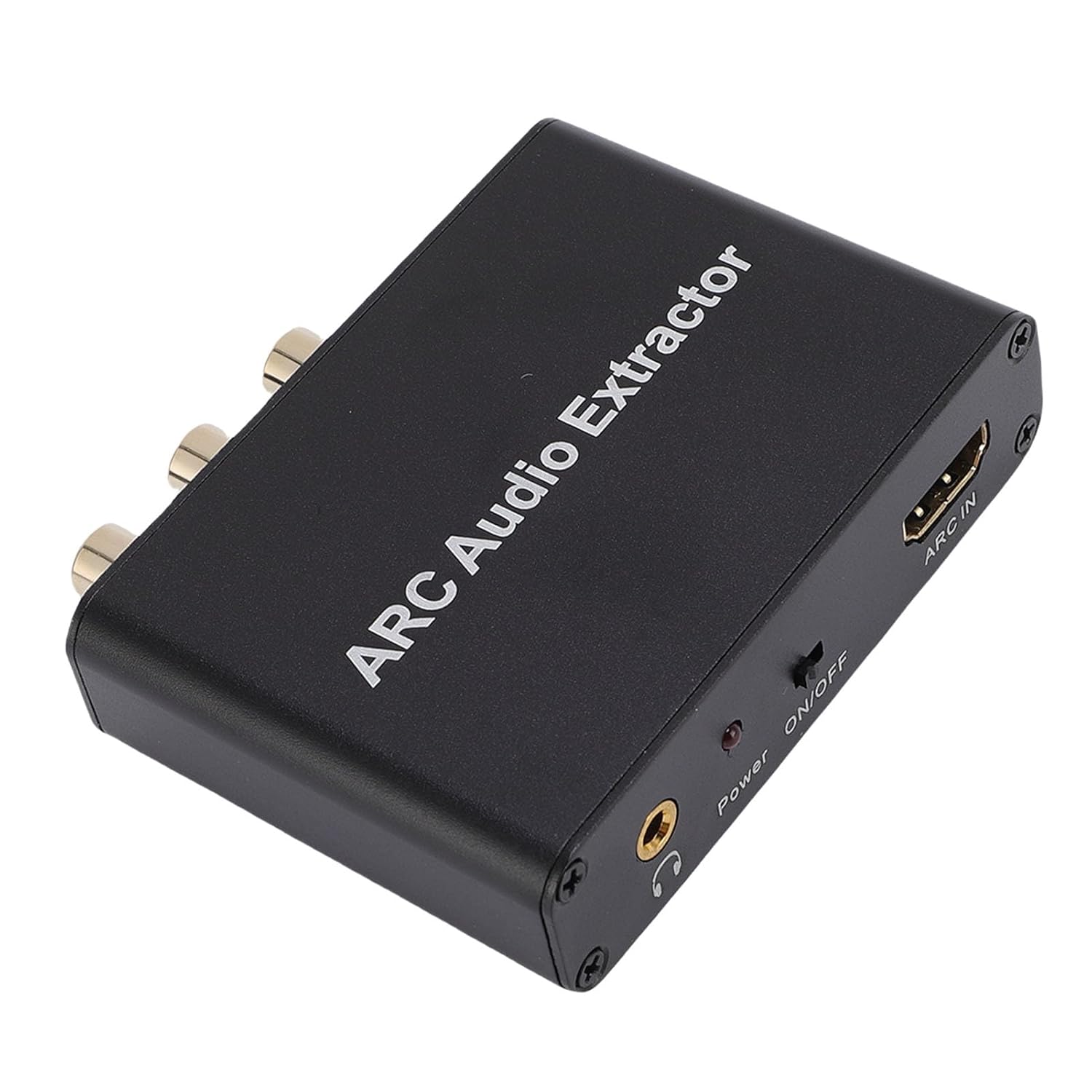
Obrázek 3: Úhlové view of the adapter, showing the ARC IN HDMI port, 3.5mm headphone jack, Power LED, and ON/OFF switch.
3. Nastavení
Follow these steps to set up your ARC Adapter:
- Připojte napájení: Connect the provided USB power cable to the DC 5V port on the adapter and plug the other end into a suitable USB power source (e.g., TV USB port, USB wall adapter).
- Connect TV ARC: Use an HDMI cable (not included) to connect the HDMI ARC output port of your television to the "ARC IN" port on the Bewinner adapter. Ensure your TV's HDMI port supports ARC (Audio Return Channel).
- Připojte zvukový výstup: Choose one of the following audio output options to connect to your external audio system (soundbar, amplifier, speakers, headphones):
- SPDIF Optical: Connect an optical cable from the "SPDIF" port on the adapter to your audio receiver.
- Koaxiální: Connect a coaxial cable from the "Coaxial" port on the adapter to your audio receiver.
- RCA (L/P): Connect RCA cables from the "L" (white) and "R" (red) ports on the adapter to the corresponding analog audio inputs on your amplifier nebo aktivní reproduktory.
- 3.5mm konektor pro sluchátka: Connect headphones or a 3.5mm audio cable to the headphone jack for direct audio output.
- Zapnutí: Flip the ON/OFF switch to the "ON" position. The Power LED indicator will illuminate.
- Konfigurace zvuku televizoru: Access your TV's audio settings and ensure that the audio output is set to the HDMI ARC port you are using and that ARC functionality is enabled. You may also need to select the appropriate audio format (e.g., PCM, Bitstream) depending on your audio system's capabilities.
4. Návod k obsluze
Once the adapter is properly connected and powered on, it operates automatically. Audio from your TV's ARC channel will be extracted and output through the selected audio ports.
- Automatic Signal Mute: The adapter features an automatic signal mute function. If no audio signal is detected from the TV's ARC port, the output will automatically mute to prevent unwanted noise. Audio will resume when a signal is present.
- Podpora formátů zvuku: The adapter supports various audio formats and sampling rates up to 192kHz. For optimal performance, ensure your TV's audio output settings are compatible with your connected audio system.
- Řízení výkonu: Use the ON/OFF switch to power the adapter on or off as needed.
5. Údržba
- Čištění: K čištění adaptéru používejte měkký, suchý hadřík. Nepoužívejte tekuté čisticí prostředky ani aerosoly.
- Prostředí: Operate the device within the specified environmental conditions:
- Operating Temperature: -10 to +55 °C (14 to 131 °F)
- Storage Temperature: -20 to +60 °C (-4 to 140 °F)
- Provozní vlhkost: 10-90 % RH (bez kondenzace)
- Skladovací vlhkost: 5-95 % RH (bez kondenzace)
- Umístění: Place the adapter on a stable, flat surface away from direct sunlight, heat sources, and excessive moisture.
6. Řešení problémů
| Problém | Možná příčina | Řešení |
|---|---|---|
| Žádný zvukový výstup. |
|
|
| Zkreslený nebo špatná kvalita zvuku. |
|
|
| Kontrolka LED napájení nesvítí. |
|
|
7. Specifikace
| Funkce | Detail |
|---|---|
| Číslo modelu | Bewinneryzatpi72xv |
| Materiál | Hliníková slitina |
| Vstup | HDMI ARC |
| Výstupní rozhraní | SPDIF (Optical), Coaxial, RCA (L/R), 3.5mm Headphone Jack |
| Max. Provozní proud | 65 mA |
| Podporováno Sampsazby ling | Až 192kHz |
| Provozní teplota | -10 až +55 °C (14 až 131 °F) |
| Skladovací teplota | -20 až +60 °C (-4 až 140 °F) |
| Provozní vlhkost | 10-90 % RH (bez kondenzace) |
| Skladovací vlhkost | 5-95 % RH (bez kondenzace) |
| Rozměry balení | 5.91 x 3.94 x 0.79 palce |
| Hmotnost položky | 4.6 unce |
8. Záruka a podpora
Bewinner products are designed for reliability and performance. For any warranty claims, technical support, or product inquiries, please refer to the contact information provided with your purchase or visit the official Bewinner webstránky. Uschovejte si prosím doklad o koupi pro případ záručního servisu.
Ask a question about this manual
Ask about setup, troubleshooting, compatibility, parts, safety, or missing instructions. Manuals+ will review the question and use this page’s manual context to help answer it.