
1. Úvod
The AJAZZ AKP03 Macro Keypad Stream Controller is a versatile device designed to enhance productivity and streamline workflows for gamers, streamers, and professionals. Featuring six programmable keys with LCD displays, three physical knobs, and three toggle switches, it offers extensive customization options for various tasks.
This manual provides detailed instructions for setting up, operating, and maintaining your AKP03 device, ensuring optimal performance and user experience.
2. Vlastnosti produktu
- Six Programmable Macro Keys: Customizable LCD displays for single or continuous actions.
- Three Physical Knobs: For precise control over various functions.
- Three Toggle Switches: Další možnosti ovládání.
- Ovládání jedním kliknutím: Instant execution of macro commands, text input, application launches, and media control.
- Intuitive Driver Software: Drag-and-drop functionality for easy key assignment and property configuration.
- Široká kompatibilita: Seamless integration with platforms like Streamlabs, Twitch, YouTube, and various software applications on Windows and Mac.
- Removable 40° Stand: Provides an ergonomic viewing angle and stable placement.

Obrázek 2.1: Přesview of the AJAZZ AKP03 Macro Keypad, highlighting its programmable buttons, toggle switches, and scroll wheels.
3. Obsah balení
Ověřte, zda jsou v balení přítomny všechny položky:
- AJAZZ AKP03 Macro Keypad Stream Controller
- Kabel USB-C na USB-A
- Removable 40° Stand
- Uživatelská příručka (tento dokument)
4. Nastavení
4.1 Fyzické připojení
- Attach the removable 40° stand to the bottom of the AKP03 for an ergonomic angle, if desired.
- Connect the provided USB-C cable to the USB-C port on the AKP03.
- Připojte konec kabelu USB-A k volnému portu USB na vašem počítači (PC nebo Mac).
- Zařízení se automaticky zapne.

Figure 4.1: Attaching the removable 40° stand to the AKP03.
4.2 Instalace softwaru
To unlock the full customization capabilities of your AKP03, you must install the dedicated driver software.
- Otevřete svůj web browser and navigate to the official AJAZZ webmísto: www.a-jazz.com.
- Locate the 'Driver Download' section.
- Hledat 'AKP03' or browse for the corresponding driver for your model.
- Download the driver software compatible with your operating system (Windows or macOS).
- Spusťte instalační program a dokončete instalaci podle pokynů na obrazovce.
- Pokud k tomu budete vyzváni, restartujte počítač.
Video 4.1: Demonstrates the software installation process and initial setup for the AJAZZ Macro Keypad.
5. Návod k obsluze
5.1 Customizing Keys and Knobs
The AKP03's driver software provides a user-friendly interface for customization:
- Launch the 'Stream Dock AJAZZ' software from your desktop or applications folder.
- The software will display a visual representation of your AKP03.
- To assign an action, drag and drop a desired function (e.g., launch application, media control, macro command) from the software's library onto one of the six programmable keys.
- For knobs, select the knob in the software and assign functions such as volume control, scrolling, or zooming.
- You can configure properties for each assigned action, including specific file cesty, web URLs, or macro sequences.
- The LCD displays on the keys will update to show the assigned icon or text.
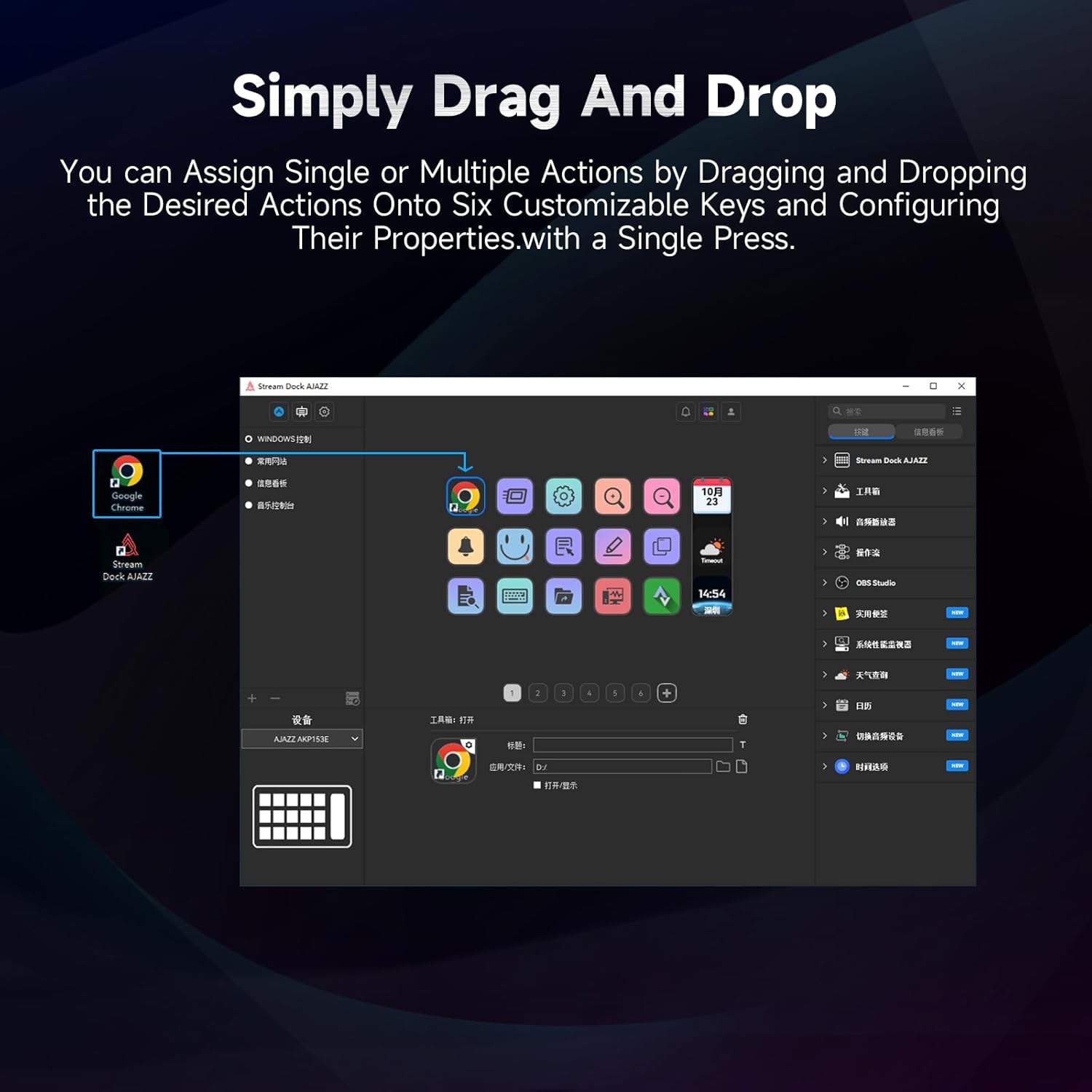
Figure 5.1: Customizing keys using the drag-and-drop interface in the AJAZZ software.
Video 5.1: Demonstration of assigning actions to keys for launching web pages and software with a single click.
5.2 Using Profiles and Pages
The software supports multiple profiles and pages, allowing you to switch between different sets of key assignments for various applications or tasks.
- Vytvořit nového profesionálafiles for specific games, editing software, or streaming setups.
- V rámci každého profíkafile, you can create multiple pages of key assignments, accessible by navigating through the device's buttons or software interface.
- The AKP03 automatically switches to the relevant profile when a linked application is in focus.
Video 5.2: Illustrates the multi-functional capabilities and profile switching of the AKP03 for various tasks.
6. Údržba
To ensure the longevity and optimal performance of your AJAZZ AKP03, follow these maintenance guidelines:
- Čištění: Use a soft, dry cloth to wipe the surface of the device. Avoid abrasive cleaners or solvents.
- Skladování: Přístroj skladujte na chladném a suchém místě mimo dosah přímého slunečního záření a extrémních teplot.
- Péče o kabely: Abyste předešli poškození, vyhněte se nadměrnému ohýbání ani kroucení kabelu USB.
- Aktualizace softwaru: Pravidelně kontrolujte AJAZZ website for software and firmware updates to ensure compatibility and access to new features.
7. Řešení problémů
If you encounter issues with your AKP03, refer to the following common troubleshooting steps:
- Zařízení nebylo rozpoznáno:
- Ujistěte se, že je kabel USB bezpečně připojen k AKP03 i k počítači.
- Zkuste se připojit k jinému portu USB.
- Restartujte počítač.
- Verify that the driver software is correctly installed and up to date.
- Klávesy nereagují:
- Check the software to ensure keys are properly assigned and the correct profile je aktivní.
- Ensure the driver software is running in the background.
- Problémy se softwarem:
- Znovu nainstalujte software ovladače.
- Check for software updates on the AJAZZ webmísto.
8. Specifikace
| Funkce | Detail |
|---|---|
| Značka | AJAZZ |
| Název modelu | AKP03 |
| Kompatibilní zařízení | PC, notebook |
| Typ ovladače | Klávesnice |
| Technologie připojení | USB-C |
| Množství tlačítek | 6 Programmable Keys (with LCD displays), 3 Physical Knobs, 3 Toggle Switches |
| Hmotnost položky | 0.32 kg |
| Rozměry položky (D x Š x V) | 5 x 3 x 2 palce |
| Zdroj napájení | Elektrický kabel |
9. Záruka a podpora
9.1 Informace o záruce
The AJAZZ AKP03 Macro Keypad Stream Controller comes with a 1letá omezená záruka od data nákupu. Tato záruka se vztahuje na výrobní vady a poruchy při běžném používání. Nevztahuje se na škody způsobené nesprávným použitím, nehodami, neoprávněnými úpravami nebo nesprávnou instalací.
Uschovejte si prosím doklad o koupi pro uplatnění záruky.
9.2 Zákaznická podpora
For technical assistance, troubleshooting, or warranty inquiries, please contact AJAZZ customer support:
- Webmísto: www.a-jazz.com (Refer to the 'Support' or 'Contact Us' section)
- E-mail: [Insert Customer Support Email, if available]
- Telefon: [Insert Customer Support Phone Number, if available]
Our support team is available to assist you with any questions or concerns regarding your product.