
1. Úvod
The JIGUUN 1500W Pure Sine Wave Power Inverter converts 12V DC battery power to 110-120V AC household power. This device is designed to provide clean, stable power for various applications, including home use, RVs, camping, cars, and trucks. It features multiple AC outlets, a USB charging port, and an LCD display for monitoring system status.
2. Bezpečnostní informace
VAROVÁNÍ: Nedodržení těchto bezpečnostních pokynů může vést k vážnému zranění nebo poškození majetku.
- Read the entire manual before operating the inverter.
- Ensure proper ventilation around the inverter. Do not block cooling vents.
- Nevystavujte měnič vodě, dešti ani nadměrné vlhkosti.
- Do not operate the inverter near flammable materials or in environments with explosive gases.
- Měnič připojujte pouze ke zdroji napájení 12 V DC. Připojení k jiným zdrojům napětítages může poškodit jednotku.
- Ujistěte se, že všechna připojení jsou pevná a bezpečná, aby se zabránilo přehřátí a jiskření.
- Neotevírejte měnič casing. Uvnitř nejsou žádné součásti, které by mohl uživatel opravit.
- Keep children away from the inverter during operation.
- Always disconnect the inverter from the battery before performing any maintenance or cleaning.
- The inverter generates heat; avoid touching the casing during prolonged operation.
3. Obsah balení
Ověřte, zda jsou v balení přítomny všechny položky:
- 1x JIGUUN 1500W Pure Sine Wave Inverter
- 1x Uživatelská příručka
- 2 Sets of Battery Cables (2x Red, 2x Black)
- 1x Dálkové ovládání
- 10x 30A Spare Fuses (Note: Fuses are pre-installed; these are spares)
- 1x Alligator Clip Safety Ground
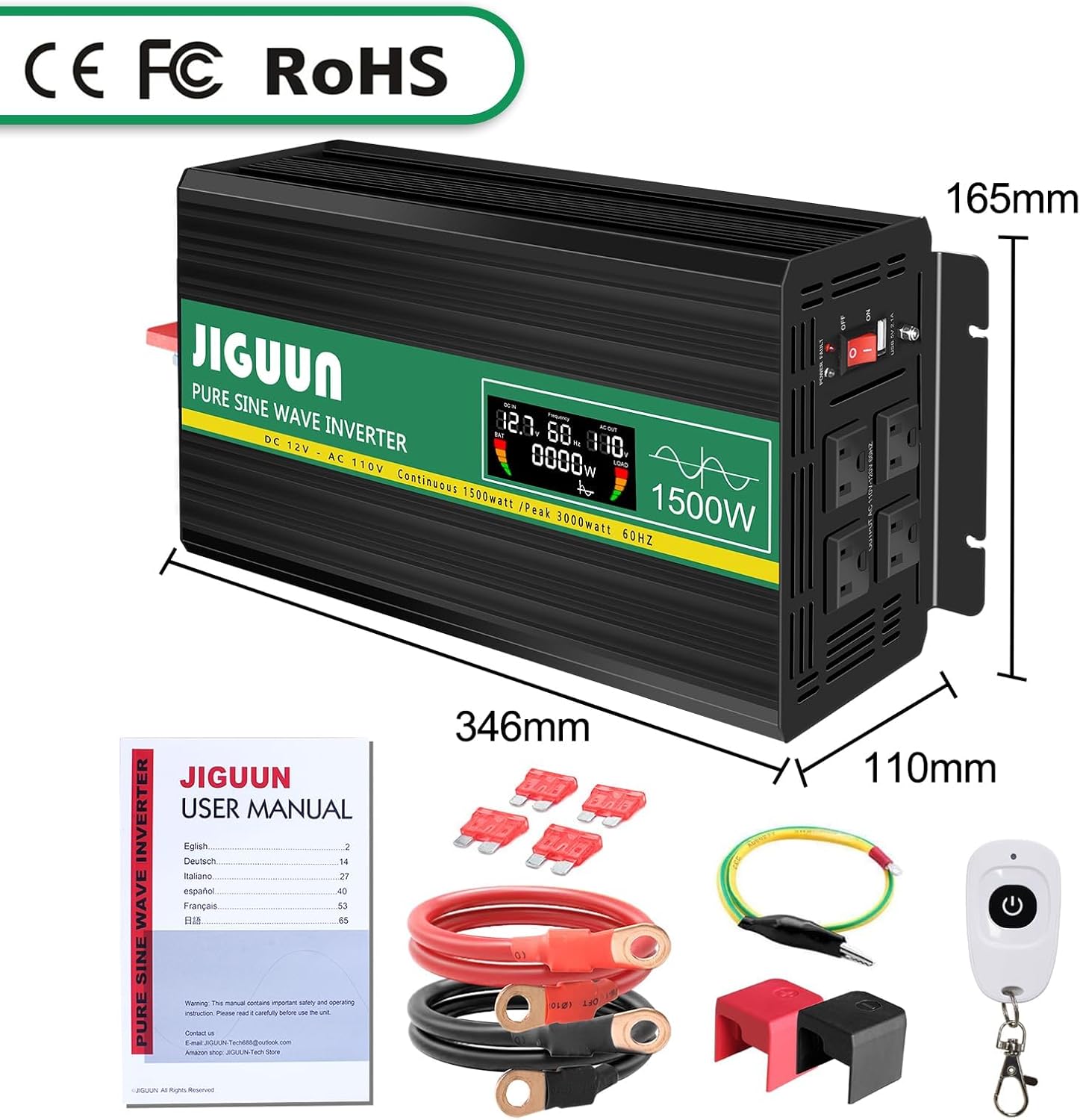
Image: Contents of the JIGUUN 1500W Pure Sine Wave Inverter package.
4. Vlastnosti produktu
- Výstup čisté sinusové vlny: Poskytuje čistý a stabilní výkon vhodný pro citlivou elektroniku.
- Vysoký výstupní výkon: Continuous 1500W, Peak 3000W.
- Vstup/Výstup: 12V DC input to 110-120V AC output.
- Více vývodů: 3 AC outlets and 1x 2.1A USB charging port.
- LCD displej: Zobrazuje vstupní/výstupní hlasitosttage, output frequency, and load power for real-time monitoring.
- Komplexní ochrana: Zahrnuje pod objememtage, přes-voltage, overload, over-temperature, short circuit, AC ground terminal, and reverse connection protection.
- Efektivní chlazení: Equipped with 2 high-speed heat dissipation silent fans that activate when temperature exceeds 45°C.
- Odolný design: Aluminum alloy shell for lasting protection.
- Dálkové ovládání: Pro pohodlné ovládání.
5. Identifikace součásti

Image: Front and Rear Panel Components.
Přední panel:
- AC Receptacles (x3): For connecting AC-powered devices.
- USB Ports (2.1A): Pro nabíjení zařízení napájených přes USB.
- Přepínač ON/OFF: To power the inverter on or off.
- Indikátor napájení: LED light indicating operational status.
- LCD displej: Shows real-time operational data.
Zadní panel:
- Vstupní svorky stejnosměrného proudu: Red for positive (+), Black for negative (-). Connect battery cables here.
- Chladicí ventilátory: Two high-speed fans for heat dissipation.
- Zemnící terminál: Pro bezpečnostní uzemnění.
6. Nastavení a instalace
- Připravte si baterii: Ensure your 12V DC battery has sufficient capacity for the appliances you intend to power. Insufficient battery capacity may prevent high-power appliances from running.
- Zajistěte svtage Shoda: Confirm that the inverter's input voltage (12V DC) matches your battery's voltage.
- Připojení kabelů baterie:
- Připojte červený kabel baterie ke kladnému (+) pólu střídače a ke kladnému (+) pólu vaší 12V baterie.
- Připojte černý kabel baterie k zápornému (-) pólu střídače a k zápornému (-) pólu vaší 12V baterie.
- Ensure connections are tight and secure. Use the provided wrench for the inverter terminals.
- Základy: Connect the alligator clip safety ground to the inverter's ground terminal and to a suitable ground point (e.g., vehicle chassis).
- Počáteční zapnutí: Before connecting any appliances, turn the inverter's ON/OFF switch to the "ON" position. The LCD display should illuminate, showing input voltage a další parametry.
- Připojení spotřebičů: Once the inverter is powered on and stable, connect your AC-powered devices to the AC outlets and USB devices to the USB port. Ensure the total wattage of connected equipment does not exceed the inverter's continuous power rating (1500W).
IMPORTANT: Do not connect the inverter directly to an AC circuit breaker panel or any other AC power source. This inverter is for DC to AC conversion only.
7. Návod k obsluze
Zapnutí/vypnutí:
- To turn on the inverter, press the ON/OFF switch to the "ON" position.
- To turn off the inverter, press the ON/OFF switch to the "OFF" position.
Používání LCD displeje:
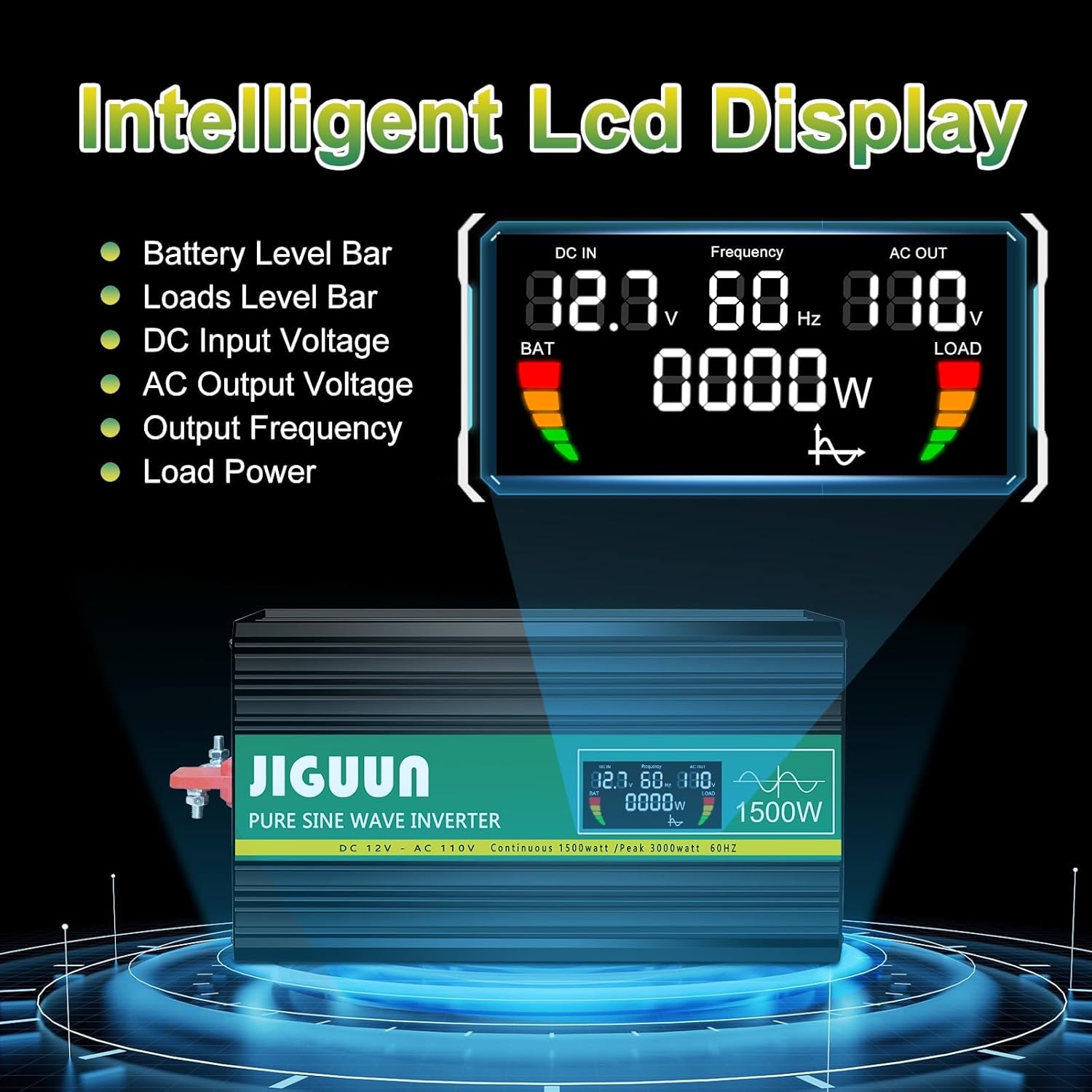
Image: Intelligent LCD Display.
The intelligent LCD display provides real-time information:
- Ukazatel úrovně baterie: Zobrazuje zbývající nabití baterie.
- Load Level Bar: Shows the current power draw from connected devices.
- DC vstupní voltage: Zobrazuje objemtage from your 12V battery.
- Výstupní napětí ACtage: Zobrazuje výstupní objemtage (110-120V AC).
- Výstupní frekvence: Displays the output frequency (60Hz).
- Výkon zátěže: Indicates the current wattage being used by connected appliances.
Použití dálkového ovládání:

Image: Remote Control for convenient operation.
The included remote control allows you to power the inverter on and off from a distance, providing convenience in various setups.
Připojovací zařízení:
- Plug AC appliances into the 3-prong AC outlets.
- Plug USB devices into the 2.1A USB charging port.
- Always ensure the total power consumption of all connected devices does not exceed the inverter's continuous power rating (1500W). Overloading the inverter will trigger protection mechanisms.
8. Protection System

Image: Upgraded BMS System Protection Features.
The JIGUUN inverter incorporates an advanced protection system to ensure safe and reliable operation:
- Pod svtage ochrana: Shuts down the inverter if the input DC voltage drops too low (10.0±0.5V DC) to protect the battery from over-discharge.
- Přes Voltage ochrana: Shuts down the inverter if the input DC voltage exceeds a safe level (15.0±0.5V DC).
- Ochrana proti přetížení: Automatically shuts down if the connected load exceeds the inverter's capacity.
- Ochrana proti přehřátí: Activates cooling fans when the internal temperature exceeds 45°C and shuts down if it becomes too high.
- Ochrana proti zkratu: Protects against short circuits in the output.
- AC Ground Terminal: Provides a safety ground connection.
- Ochrana proti zpětnému připojení: Protects the inverter and battery from damage due to incorrect polarity connection.
If any protection is triggered, the inverter will typically shut down. Disconnect the load, resolve the issue, and then restart the inverter.
9. Údržba
- Čištění: Periodically clean the exterior of the inverter with a dry, soft cloth. Ensure cooling vents are free from dust and debris. Do not use liquid cleaners.
- Spojení: Regularly check all DC input connections to ensure they are tight and free from corrosion. Loose connections can cause overheating.
- Skladování: When not in use for extended periods, store the inverter in a cool, dry place away from direct sunlight and moisture. Disconnect it from the battery.
- Údržba baterie: Ensure your 12V battery is properly maintained and charged according to its manufacturer's instructions. A healthy battery is crucial for optimal inverter performance.
10. Řešení problémů
| Problém | Možná příčina | Řešení |
|---|---|---|
| Měnič se nezapne. | No power from battery; loose connections; low battery voltage. | Zkontrolujte připojení baterie a objtage. Ujistěte se, že je baterie nabitá. |
| Žádný AC výstup. | Overload; short circuit; over-temperature; low/high input voltage. | Reduce load. Check for short circuits. Allow inverter to cool. Check battery voltage. |
| Fans are constantly running or very loud. | High internal temperature due to heavy load or poor ventilation. | Ensure adequate ventilation. Reduce load. Clean vents if blocked. |
| Connected appliance not working correctly. | Appliance power requirement exceeds inverter capacity; appliance not compatible with pure sine wave. | Check appliance wattage. Ensure appliance is suitable for pure sine wave power. |
If troubleshooting steps do not resolve the issue, please contact JIGUUN customer support.
11. Specifikace
| Parametr | Hodnota |
|---|---|
| Výstupní vlna | Čistá sinusová vlna |
| Trvalý výstupní výkon | 1500W |
| Surge Output Power | 3000W |
| Jmenovitý vstupní objemtage | 12-13.2V DC |
| Jmenovitý výstupní objemtage | 110-120V AC |
| Výstupní frekvence | 60 Hz |
| Vstupní přepětítage Vypnutí | 15.0±0.5V DC |
| Input Under-Voltage Alarm | 10.5±0.5V DC |
| Vstup nízký objemtage Vypnutí | 10.0±0.5V DC |
| Aktivace chladicího ventilátoru | 45 °C |
| Účinnost konverze | >90 % |
| Hmotnost položky | 8 libry |
| Rozměry balení | 13 x 11 x 6 palce |
12. Záruka a podpora
The JIGUUN 1500W Pure Sine Wave Power Inverter comes with a 1-letá záruka, including free replacement for manufacturing defects.
For any questions, issues, or support needs during use, please feel free to contact the JIGUUN team. We are committed to assisting you.
Contact information can typically be found on the product packaging or through the retailer's support channels.