
1. Úvod
Thank you for choosing the Fenge G04B211-FR Monitor Stand Riser. This product is designed to elevate your monitor or laptop to an ergonomic viewing height, reducing neck and eye strain. It also provides additional storage space to help organize your workspace. This manual provides detailed instructions for assembly, operation, and maintenance to ensure safe and efficient use of your new monitor stand.
2. Bezpečnostní informace
- Před montáží se ujistěte, že jsou všechny součásti přítomny a nepoškozené. Nepoužívejte, pokud některé součásti chybí nebo jsou poškozené.
- Jednotku sestavte na měkkém a čistém povrchu, abyste zabránili poškrábání.
- Nepřekračujte maximální nosnost 75 kg (165 liber).
- Place the monitor stand on a stable, level surface to prevent tipping.
- Udržujte malé části mimo dosah dětí, aby se zabránilo nebezpečí udušení.
- Abyste předešli poškození, neumísťujte horké předměty přímo na povrch.
3. Obsah balení
Zkontrolujte prosím, zda jsou ve vašem balení obsaženy všechny následující komponenty:
- Main Monitor Stand Sections (L-shaped and straight sections)
- Storage Drawers (if applicable to your configuration)
- Assembly Hardware (screws, connectors, Allen key)
- Návod k použití
4. Montážní návod
The Fenge G04B211-FR monitor stand riser is designed for flexible assembly, allowing for various configurations to suit your workspace. Follow these general steps for assembly:
4.1. Vybalení a příprava
Carefully remove all components from the packaging. Lay them out on a soft, flat surface to prevent damage. Identify each part according to the included parts list (if provided in the physical manual).
4.2. Connecting the Sections
The stand consists of modular sections that can be connected to form different shapes (e.g., straight, L-shape). Align the connecting points of the desired sections and secure them using the provided screws and connectors. Ensure all connections are tight and stable.

Figure 4.2.1: Illustration of connecting the modular sections during assembly.
4.3. Installing Drawers and Shelves
If your configuration includes drawers or additional shelves, slide them into their designated slots. Ensure they move smoothly and are properly seated.
4.4. Final Placement and Stability Check
Once assembled, place the monitor stand on your desk. Gently push down on various parts of the stand to ensure it is stable and does not wobble. Adjust connections if necessary.

Obrázek 4.4.1: Přample of a compact, single-tier assembly style.

Obrázek 4.4.2: Přample of an L-shaped assembly style for corner desks.

Obrázek 4.4.3: Přample of a straight, extended assembly style for multiple devices.
5. Návod k obsluze
Using your Fenge G04B211-FR monitor stand riser is straightforward:
- Umístění: Position your monitor(s) or laptop(s) on the top surface of the stand. Ensure the weight is evenly distributed and does not exceed the maximum capacity.
- Ergonomie: Adjust your seating position so that the top of your screen is at or slightly below eye level. This helps maintain a neutral neck posture.
- Skladování: Utilize the integrated drawers and open shelves for storing office supplies, documents, keyboards, mice, or other small items to keep your desk tidy.

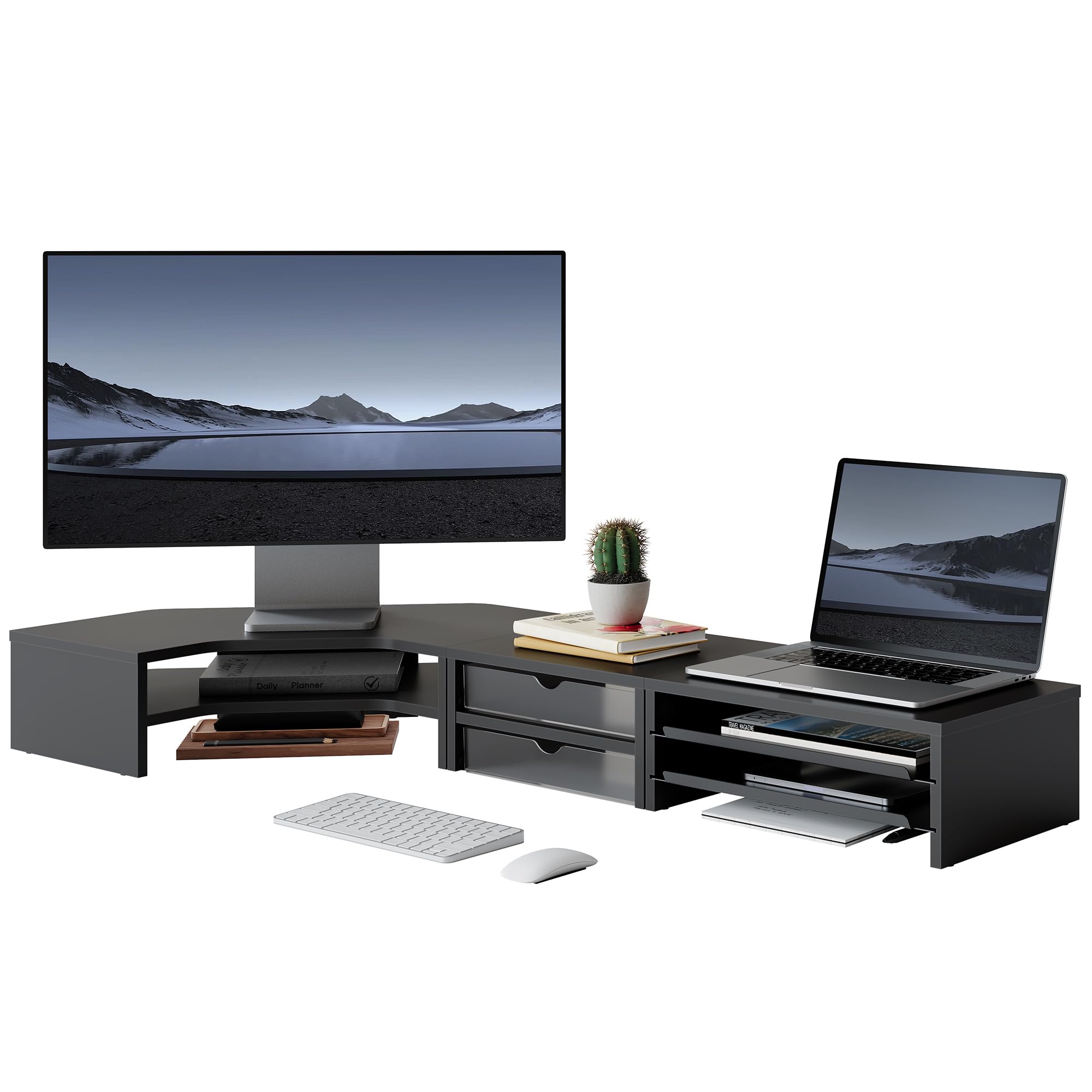
Figure 5.1: Monitor stand in use, supporting a monitor and laptop.

Figure 5.2: Monitor stand configured to support two monitors.

Obrázek 5.3: Detailní view of the storage drawers and shelves.
6. Údržba
To ensure the longevity and appearance of your monitor stand, follow these maintenance guidelines:
- Čištění: Otřete povrchy měkkým, damp hadříkem. Nepoužívejte agresivní chemikálie nebo abrazivní čisticí prostředky, protože by mohly poškodit povrchovou úpravu.
- Utírat prach: Regularly dust the stand to prevent accumulation, especially in the storage compartments.
- Inspekce: Pravidelně kontrolujte všechny šrouby a spoje, zda jsou pevně utažené. V případě potřeby je dotáhněte.
- Vyhněte se vlhkosti: Keep the stand away from excessive moisture or direct sunlight to prevent warping or discoloration.
7. Řešení problémů
If you encounter any issues with your Fenge G04B211-FR monitor stand, refer to the following common solutions:
- Víření/Nestabilita: Ensure all screws are fully tightened. Verify that the stand is placed on a flat, even surface.
- Lepení zásuvek: Check for any obstructions in the drawer slides. Ensure the stand is level.
- Chybějící části: If any parts were missing upon arrival, please contact customer support immediately.
8. Specifikace
Obrázek 8.1: Rozměry a nosnost produktu.
| Funkce | Detail |
|---|---|
| Číslo modelu | G04B211-FR |
| Rozměry (D x Š x V) | 111.3 x 46.2 x 13.4 cm (43.8 x 18.2 x 5.3 palce) |
| Hmotnost položky | 8.4 kilogramů (18.5 liber) |
| Maximální nosnost | 75 kilogramů (165 liber) |
| Barva | Černý |
| Materiál | Not specified, typically wood composite/MDF with metal accents |
| Montáž Vyžadována | Ano |
| Počet úrovní | 2 |
| Tvar | L-Shape (modular for various configurations) |
9. Záruka a podpora
For warranty information, technical support, or to inquire about replacement parts, please contact Fenge customer service through the retailer's platform or the official Fenge website. Please have your model number (G04B211-FR) and purchase date available when contacting support.