
1. Úvod
This manual provides detailed instructions for the safe and effective use of your Moukey MPS5 Portable Karaoke Machine. Please read this manual thoroughly before operating the device and retain it for future reference. The MPS5 is a versatile portable speaker system designed for various audio playback needs, including karaoke, music streaming, and public address, featuring wireless microphones and multiple connectivity options.
2. Co je v krabici
Opatrně vybalte všechny položky z krabice. Ujistěte se, že všechny níže uvedené komponenty jsou přítomny a v dobrém stavu.
- Moukey MPS5 Portable Karaoke Machine (1 unit)
- Bezdrátové mikrofony (2 jednotky)
- USB nabíjecí kabel (1 jednotka)
- 3.5mm AUX Cable (1 unit)
- Ramenní popruh (1 kus)
- Uživatelský manuál (1 jednotka)
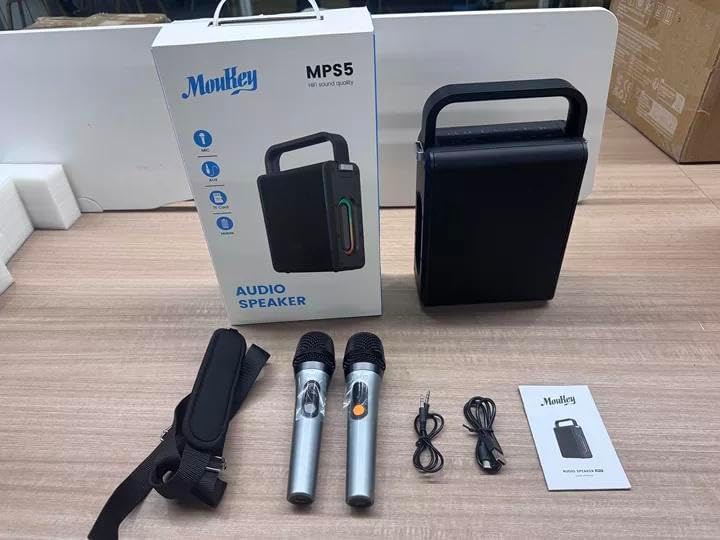
Image: All components included in the Moukey MPS5 package.
3. Konec produktuview
The Moukey MPS5 is a compact yet powerful portable karaoke machine. It features a robust design with integrated LED lighting on the sides, enhancing the user experience. A sturdy handle and an included shoulder strap provide convenient portability.
Obrázek: Přední strana view of the Moukey MPS5 speaker.

Obrázek: Boční view of the Moukey MPS5, showing the LED lighting.
4. Klíčové vlastnosti
- Excellent Sound Output: The MPS5 delivers 200W peak power (RMS 60W) through a 4-inch woofer and two 2-inch tweeters, providing full-range stereo sound with enhanced bass.
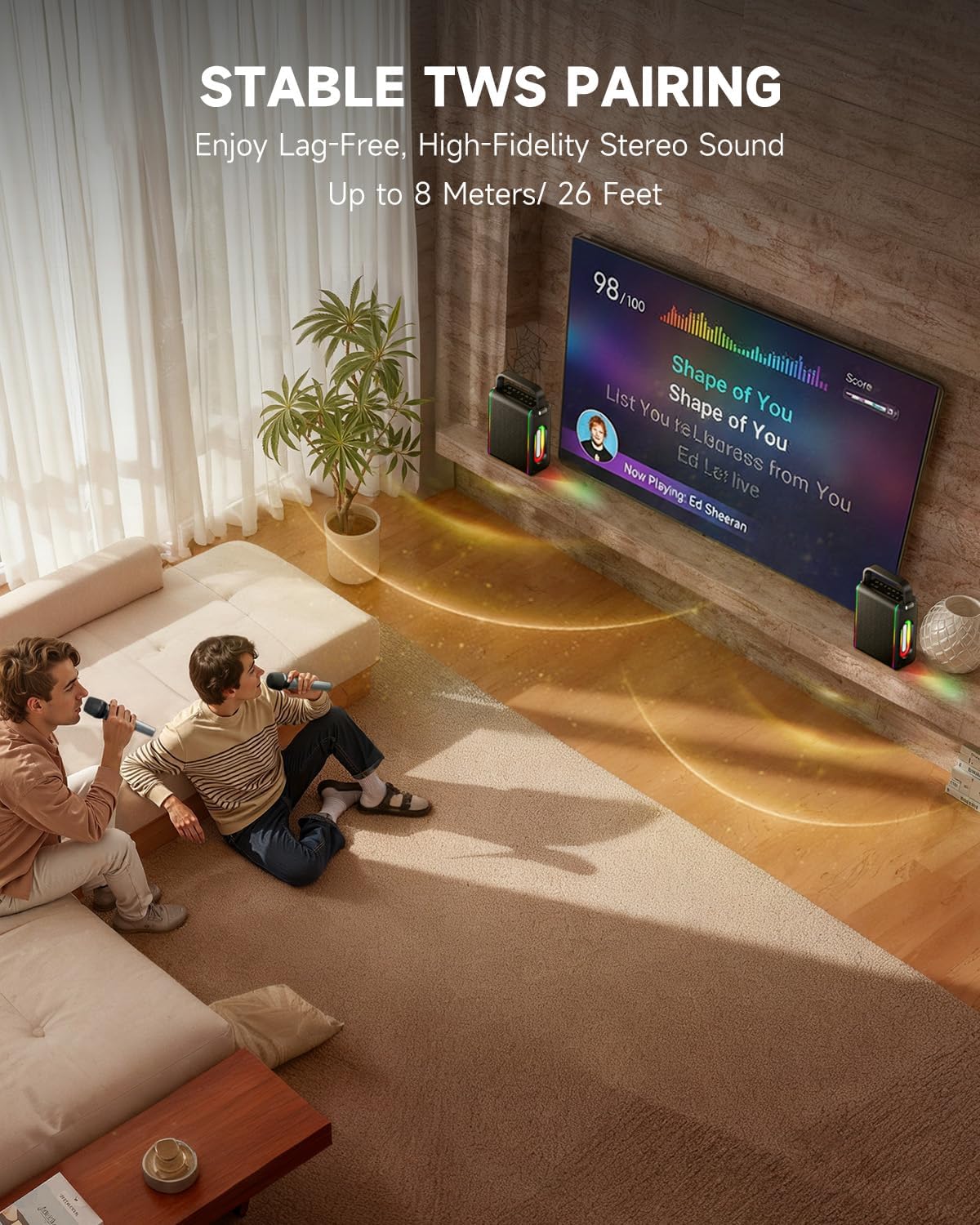
- Powerful Functionality: Supports Bluetooth 5.3 for wireless connection to various devices. Also includes Micro TF card, Flash USB, MP3, and AUX IN playback options. Features stable TWS (True Wireless Stereo) pairing for connecting two MPS5 units for a wider stereo soundstage.
- Ultra dlouhá výdrž baterie: The rechargeable battery provides up to 8 hours of continuous music playback on a 2-hour charge, suitable for extended use indoors or outdoors.
- Lehký a přenosný design: Weighing only 2kg, the MPS5 is designed for easy transport. It can be carried by hand using the integrated handle or with the included shoulder strap.
- Duální bezdrátové mikrofony: Includes two 2.4Ghz rechargeable microphones with a connection range of up to 60 feet and up to 8 hours of use time per charge (2-3 hours charging time). Features one-tap connectivity for effortless pairing.

Image: Internal speaker components of the MPS5.

Image: MPS5 connected to multiple devices via Bluetooth.

Image: Battery life and charging details for the MPS5.

Image: Demonstrating the portability of the MPS5 with hand and shoulder strap options.

Image: The two wireless microphones for the MPS5.
5. Nastavení
5.1 Nabíjení reproduktoru a mikrofonů
Before first use, fully charge the MPS5 speaker and both wireless microphones.
- Reproduktor: Connect the provided USB Type-C cable to the charging port on the speaker and to a compatible USB power adapter (not included). The charging indicator light will show charging status. A full charge takes approximately 2 hours.
- Mikrofony: Each microphone has a charging port. Connect them to a USB power source using the provided USB cable. Charging time for microphones is 2-3 hours.
5.2 Zapnutí/vypnutí
- To power on the speaker, press and hold the power button (U) on the top panel for 2 seconds.
- Chcete-li vypnout, stiskněte a podržte tlačítko napájení (U) znovu na 2 sekundy.
5.3 Párování Bluetooth
- Ensure the MPS5 speaker is powered on and in Bluetooth mode (indicated by a blue LED). If not, press the 'M' (Mode) button to switch to Bluetooth mode.
- Na svém mobilním zařízení (chytrém telefonu, tabletu atd.) povolte Bluetooth a vyhledejte dostupná zařízení.
- Select 'Moukey MPS5' from the list of devices to pair. A voice prompt will confirm successful connection.
5.4 Párování TWS (True Wireless Stereo)
To achieve stereo sound, you can pair two Moukey MPS5 speakers together.
- Ensure both MPS5 speakers are powered on and in Bluetooth mode, but not connected to any other device.
- On one of the speakers, double-press the 'M' (Mode) button. The speaker will enter TWS pairing mode.
- The two speakers will automatically connect to each other. A voice prompt will confirm successful TWS pairing.
- Once TWS is established, connect your mobile device to one of the MPS5 speakers via Bluetooth as described in section 5.3. Both speakers will then play audio in stereo.
Video: Rychlý přehledview of the MPS5 Karaoke Machine, demonstrating TWS pairing and other features.
6. Návod k obsluze
6.1 Ovládací prvky Overview
The top panel of the MPS5 speaker features several buttons for controlling playback, volume, and microphone settings.
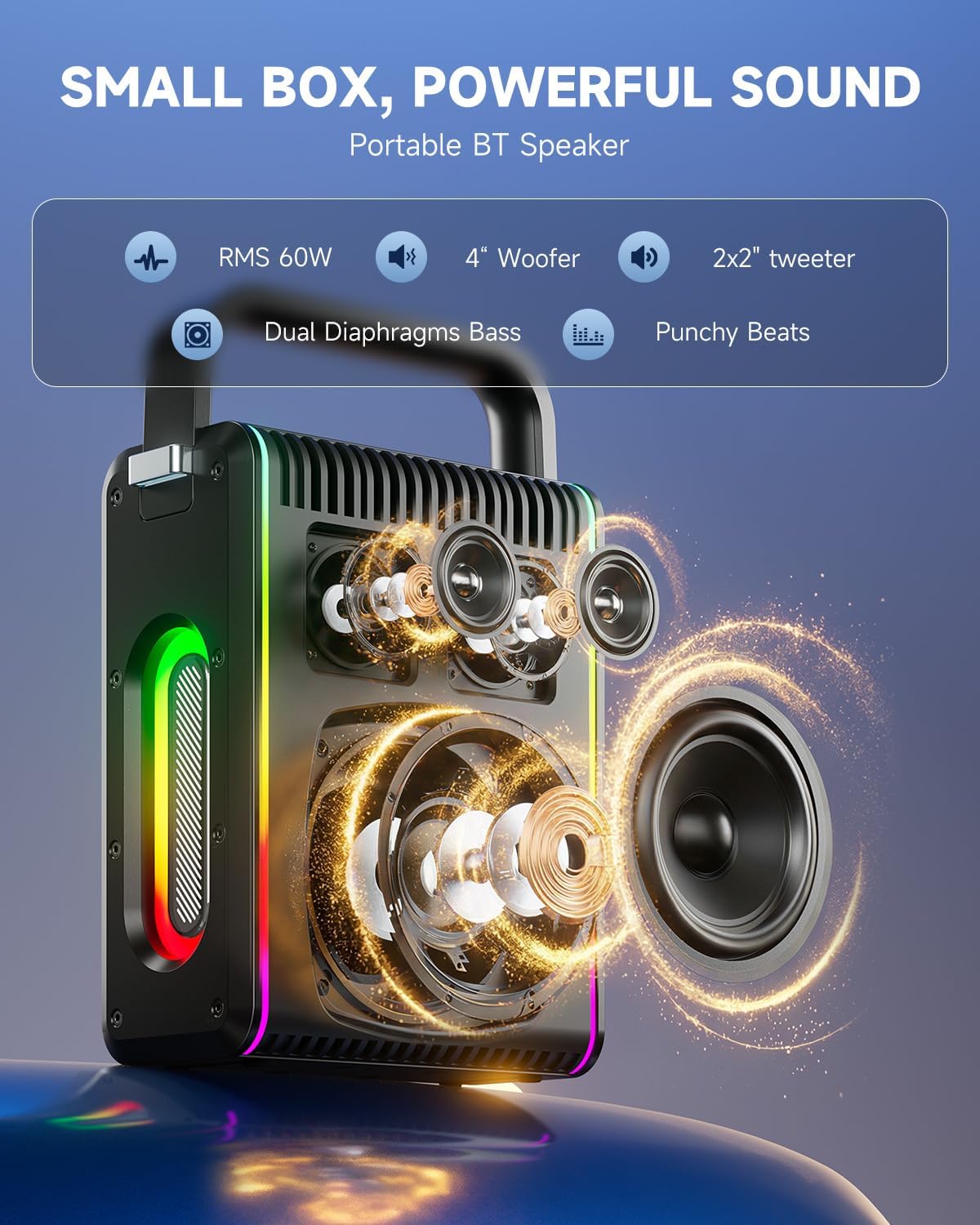
Image: Top control panel of the MPS5.
- Tlačítko napájení (U): Stisknutím a podržením po dobu 2 sekund zapnete/vypnete napájení.
- Tlačítko režimu (M): Short press to cycle through input modes (Bluetooth, AUX, USB, TF Card). Double-press to initiate TWS pairing.
- Microphone Volume (Mic - / Mic +): Upravuje hlasitost připojených mikrofonů.
- Echo Adjustment (R- / R+): Upravuje efekt ozvěny pro mikrofony.
- Přehrát/Pozastavit (▶): Přehraje nebo pozastaví aktuální skladbu.
- Snížení hlasitosti (-): Decreases the main speaker volume.
- Zvýšení hlasitosti (+): Increases the main speaker volume.
- EQ A/E: Short press to switch between EQ modes. Long press to toggle between original sound and accompaniment elimination.
6.2 Použití mikrofonu
The MPS5 comes with two wireless microphones for karaoke and vocal performances.
- Zapnutí/vypnutí: Press and hold the power button on the microphone to turn it on or off.
- Párování: The microphones are pre-paired with the speaker. If re-pairing is needed, ensure the speaker is on, then power on the microphone. They should connect automatically.
- Microphone Disconnect/Reconnect: Press the dedicated microphone button on the speaker's control panel to quickly disconnect or reconnect the microphones.
6.3 Režimy zvukového vstupu
In addition to Bluetooth, the MPS5 supports several wired and local storage input options.

Image: Input ports on the MPS5 speaker.
- Vstup AUX: Connect an external audio device using the 3.5mm AUX cable. Select AUX mode using the 'M' button.
- USB přehrávání: Vložte USB flash disk s audio soubory ve formátu MP3 filedo portu USB. Reproduktor se automaticky přepne do režimu USB a spustí přehrávání.
- Přehrávání TF karty: Insert a Micro TF card containing MP3 audio filedo slotu pro TF kartu. Reproduktor se automaticky přepne do režimu TF karty a spustí přehrávání.
6.4 LED osvětlení
The MPS5 features dynamic LED lighting on its sides. Use the dedicated LED button (if available, or refer to the 'M' button for light control if combined) to cycle through different light modes or turn them off.
7. Údržba
- Čištění: K čištění vnější strany reproduktoru používejte měkký, suchý hadřík. Nepoužívejte tekuté čisticí prostředky ani abrazivní materiály.
- Skladování: Přístroj skladujte na chladném a suchém místě mimo dosah přímého slunečního záření a extrémních teplot.
- Péče o baterie: Chcete-li prodloužit životnost baterie, vyvarujte se častého úplného vybíjení. Zařízení pravidelně nabíjejte, i když jej delší dobu nepoužíváte.
8. Řešení problémů
If you encounter issues with your Moukey MPS5, refer to the following common problems and solutions:
| Problém | Možná příčina | Řešení |
|---|---|---|
| Žádná síla | Baterie je vybitá. | Nabijte reproduktor pomocí dodaného kabelu USB typu C. |
| Žádný zvuk z reproduktoru | Hlasitost je příliš nízká nebo ztlumená. Je vybrán nesprávný režim vstupu. | Increase volume using the '+' button. Press 'M' to cycle through input modes. |
| Párování Bluetooth se nezdařilo | Reproduktor není v režimu párování. Zařízení je příliš daleko. | Ensure speaker is in Bluetooth mode. Move device closer to speaker. Try restarting both devices. |
| Mikrofon nefunguje | Microphone is off or uncharged. Microphone is disconnected. | Ensure microphone is charged and powered on. Press the microphone button on the speaker to reconnect. |
| Párování TWS se nezdařilo | Reproduktory jsou již připojeny k jinému zařízení. | Před zahájením párování TWS se ujistěte, že oba reproduktory nejsou připojeny k žádnému jinému zařízení Bluetooth. |
9. Specifikace
- Značka: Moukey
- Číslo modelu: MPS5
- Výstupní Wattage: 200 XNUMX wattů (špička)
- Technologie připojení: Bluetooth 5.3
- Zvukový vstup: Bluetooth, TF card, USB, MP3, AUX, Wired microphones
- Počet kanálů: 2
- Zdroj napájení: Napájení z baterie
- Typ konektoru: USB typ C
- Rozměry položky (D x Š x V): 2.36 x 6.3 x 12.2 palce
- Hmotnost položky: Přibližně 2 kg
- Kompatibilní zařízení: Smartphone, Tablet, Laptop, MP3 Player, Microphone
- Barva: Černá se stříbrnými akcenty
10. Záruka a podpora
The Moukey MPS5 Portable Karaoke Machine comes with a 1-letá záruka od data nákupu. Tato záruka se vztahuje na výrobní vady a vady zpracování při běžném používání. Uschovejte si prosím doklad o koupi pro případ uplatnění záruky.
For technical support, troubleshooting assistance, or warranty inquiries, please contact Moukey customer service through the retailer where the product was purchased or visit the official Moukey webstránky pro kontaktní informace.