
1. Úvod
This manual provides detailed instructions for the installation, operation, and maintenance of your Tenveo 4K NDI PTZ Camera (Model VX20M-4KN). Please read this manual thoroughly before using the product to ensure proper functionality and to prevent damage.
The Tenveo VX20M-4KN is a professional-grade PTZ camera designed for high-quality video production, live streaming, and conferencing. It features 4K UHD resolution, 20X optical zoom, AI auto-tracking, and multiple output interfaces including NDI, HDMI, 3G-SDI, and USB3.0.
2. Bezpečnostní informace
- Nevystavujte fotoaparát dešti nebo vlhkosti.
- Nerozebírejte kameru. Veškerý servis svěřte kvalifikovanému personálu.
- Ensure the power supply matches the camera's requirements.
- Neumísťujte kameru na přímé sluneční světlo nebo do blízkosti zdrojů tepla.
- Fotoaparát čistěte měkkým, suchým hadříkem. Nepoužívejte agresivní chemikálie.
- Ensure proper ventilation around the camera to prevent overheating.
- For optimal clarity, place the camera at least 2.5 meters (8.2 feet) away from the subject.
3. Obsah balení
Ověřte, zda jsou v balení obsaženy všechny níže uvedené položky:
- Tenveo 4K NDI AI PTZ Live Streaming Camera (VX20M-4KN)
- IR dálkové ovládání
- Napájecí adaptér DC 12V
- USB3.0 kabel
- Wall Mount with Screws
- Uživatelská příručka (tento dokument)
4. Konec produktuview
The Tenveo VX20M-4KN camera offers advanced features for professional video production. Key components and interfaces are detailed below.

Figure 4.1: Key Features and Interfaces of the Tenveo 4K NDI PTZ Camera.
4.1. Hlavní vlastnosti
- 4K UHD Video Quality: Captures crisp 4K@30fps video using an 8.29MP 1/2.8" CMOS sensor.
- 20násobný optický zoom: Provides clear magnification from wide angle to close-up without quality loss. Optimal focusing distance is 2.5m (8.2ft).
- Automatické sledování pomocí umělé inteligence: Features AI Humanoid & Face Auto-Tracking for smooth following of presenters. Supports Presenter Mode and Auto-Framing Mode.
- NDI-Certified: Ensures superior video quality, low latency, and stable IP video streaming with precise PTZ control. Note: NDI output does not support audio transmission.
- Více rozhraní: Simultaneous video output via HDMI (4K 30fps), 3G-SDI (1080P 60fps), USB3.0 (4K 30fps), and IP NDI Streaming (1080P 30fps).
- Napájení přes Ethernet (PoE): Supports IEEE802.3af for combined power and data over a single Ethernet cable.
- Tally Light & Status Display: Professional Tally Light (PGM Red/PVM Green/Other White) and an integrated status indicator screen for IP address, resolution, and frame rate.
- Integrace zvuku: 3.5mm audio Line in and Line out interfaces.
4.2. Camera Dimensions and Movement

Figure 4.2: Camera Pan, Tilt, and Zoom Capabilities.
- Rozsah rozsahu: 350° (±175°) with speeds from 0.1°/s to 100°/s.
- Rozsah náklonu: 180° (±90°) with speeds from 0.1°/s to 80°/s.
- Předvolby: Up to 255 programmable presets for rapid scene switching.
5. Nastavení
5.1. Fyzická instalace
The Tenveo VX20M-4KN camera supports various mounting options:
- Umístění na počítači: Umístěte kameru na stabilní, rovný povrch.
- Montáž monitoru: Securely attach to a monitor using appropriate accessories (not included).
- Montáž na stěnu: Use the provided wall mount and screws for secure installation.
- Montáž na strop: Install using a compatible ceiling mount (not included).
Ensure the camera is placed in a location free from vibrations to maintain stable image quality.
5.2. Připojení
Connect the camera using the appropriate cables for your setup. The camera offers multiple output options.

Obrázek 5.1: Připojení zadního panelu.
- Připojení napájení: Connect the DC 12V power adapter to the camera's power input. Alternatively, if using PoE, connect an Ethernet cable from a PoE-enabled switch to the LAN port.
- Video výstup:
- HDMI: Connect an HDMI cable for 4K 30fps video output.
- 3G-SDI: Connect an SDI cable for 1080P 60fps video output.
- USB 3.0: Connect the provided USB3.0 cable to a computer for 4K 30fps video output.
- LAN (streamování NDI/IP): Connect an Ethernet cable to a network switch for NDI or other IP streaming protocols (1080P 30fps).
- Audio připojení: Use the 3.5mm Line In/Out jacks to connect external audio mixing consoles or microphones.
- Ovládací připojení:
- RS232/RS485: For connecting to a PTZ controller or other control systems.
- LAN: For IP-based control via Web UI or PTZ controller.
5.3. Network Configuration (IP Search Tool)
To configure network settings and access the camera's web interface, use the Tenveo IP Search Tool.
Video 5.1: Instructions on how to use the Tenveo IP Search Tool for network configuration.
- Download and install the Tenveo IP Search Tool (refer to the official Tenveo website for the latest version).
- Ensure your computer and the camera are connected to the same network.
- Launch the IP Search Tool. It will automatically scan and list all Tenveo devices on your network.
- From the tool, you can assign static IP addresses and access the camera's web management interface with a single click.
- Poznámka: This function supports Tenveo Cameras V1.2.02 and Tenveo PTZ Controller V5.4.6 or later versions.
6. Provoz
6.1. Basic Controls (Pan, Tilt, Zoom)
The camera can be controlled via the IR remote, Web UI, or a dedicated PTZ controller.
Video 6.1: Demonstrating PTZ camera control for live streaming applications.
- Pánev: Rotate the camera horizontally (left/right).
- Náklon: Adjust the camera vertically (up/down).
- Lupa: Adjust the optical zoom for wider or tighter shots.
6.2. Automatické sledování pomocí umělé inteligence
The camera's AI auto-tracking feature can automatically follow a presenter or frame multiple participants.
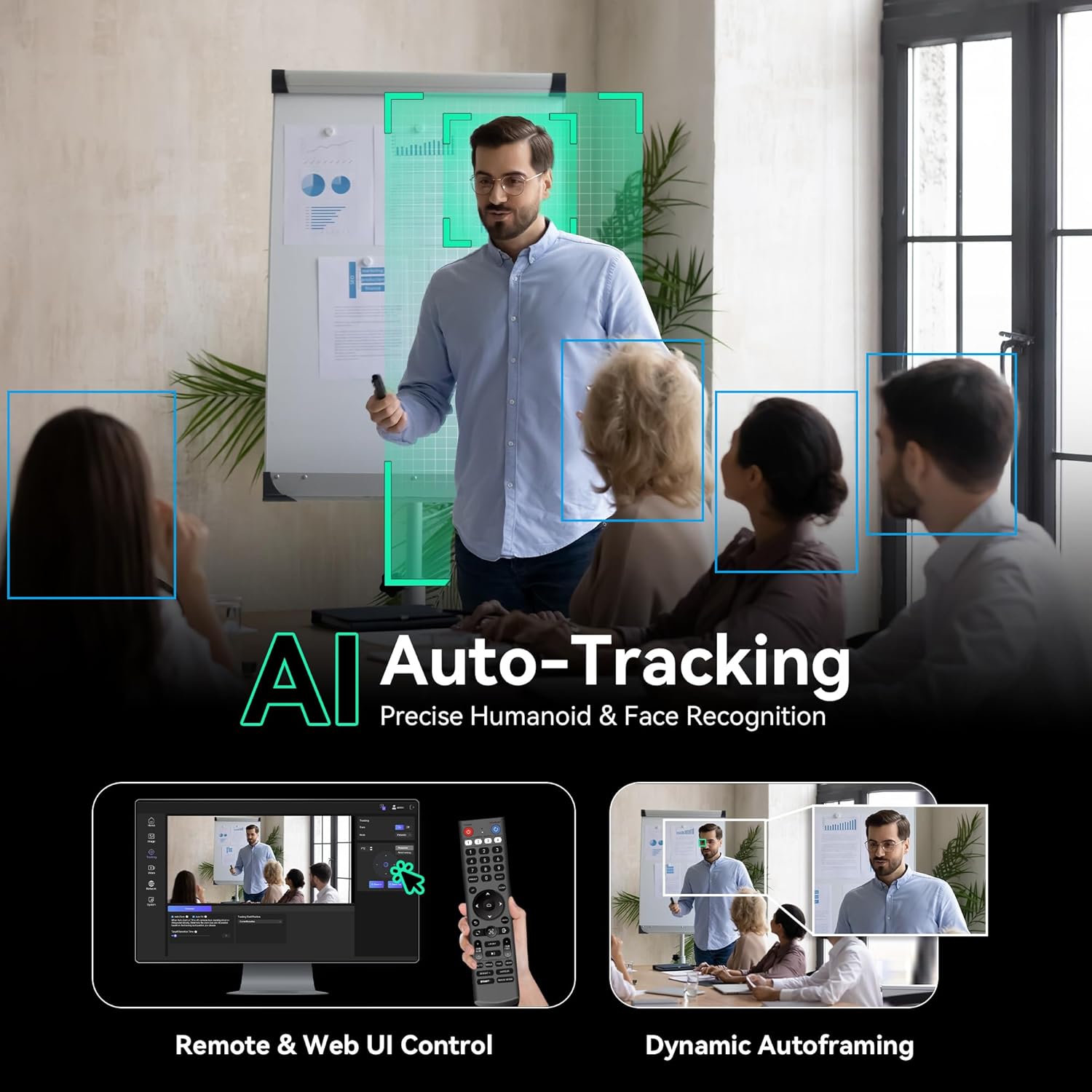
Figure 6.1: AI Auto-Tracking in action, showing presenter tracking and auto-framing.
Video 6.2: Demonstration of Tenveo AI Humanoid & Face Auto-Tracking capabilities.
- Režim prezentujícího: The camera identifies and follows a single presenter. It maintains tracking even if the subject is momentarily obscured.
- Auto-Framing Mode: Keeps all participants within the view, suitable for group discussions.
- Aktivace: Can be enabled/disabled via the IR remote or Web UI.
6.3. Předvolby
Save up to 255 camera positions (pan, tilt, zoom) as presets for quick recall during an event.
- Presets can be managed via the IR remote, Web UI, or a compatible PTZ controller.
- The IR remote supports up to 10 presets.
6.4. Tally Light & Status Indicator
The camera features a professional Tally Light and a status indicator screen for real-time information.

Figure 6.2: Tally Light and Status Indicator Display.
- Tally Light:
- Red (PGM): Camera is live/on-air.
- Green (PVM): Camera is in preview režimu.
- White (Other): Indicates other states or standby.
- Status Indicator Screen: Displays the device's IP address, current resolution, and frame rate, aiding in setup and troubleshooting.
7. Connectivity & Streaming
The Tenveo VX20M-4KN supports various connectivity options and streaming protocols.

Figure 7.1: NDI|HX Integration for Live Production.
- NDI|HX2: Full NDI certification for high-quality, low-latency IP video streaming and control.
- Podporované protokoly: RTSP, RTMP, VISCA over IP, SRT.
- Kompatibilita: Works with popular streaming software such as Zoom, Teams, OBS, vMix, and YouTube.
- UVC Compatible: Plug-and-play functionality on Windows 10/11, MacOS, Android, and Linux.
- Kódování: Supports H.264/H.265 for efficient streaming and recording.

Figure 7.2: Multi-Camera Live Production Connection Diagram.
For detailed instructions on using NDI tools with Tenveo PTZ cameras, refer to the following video:
Video 7.1: Guide on how to use NDI Tools with Tenveo PTZ Cameras.
8. Řešení problémů
This section addresses common issues you might encounter. For more complex problems, please contact Tenveo support.
| Problém | Možná příčina | Řešení |
|---|---|---|
| Žádný video výstup. | Incorrect cable connection, wrong input selected on display, camera not powered on. | Check all cable connections (HDMI, SDI, USB, LAN). Ensure the camera is powered. Select the correct input source on your display device. |
| Camera not responding to control. | IR remote battery low, incorrect control protocol, network issue for IP control. | Replace IR remote batteries. Verify control protocol settings (VISCA, IP). Check network connection and IP address for Web UI/PTZ controller. |
| AI Auto-Tracking not working correctly. | Subject too far/close, poor lighting, multiple subjects confusing AI, outdated firmware. | Ensure subject is within optimal distance (min 2.5m). Improve lighting conditions. Try Presenter Mode for single subjects. Check for firmware updates. |
| Poor image quality (blurry, noisy). | Incorrect focus, low light, dirty lens, camera too close to subject. | Adjust focus (auto/manual). Ensure adequate lighting. Clean the lens with a soft cloth. Maintain optimal focusing distance. |
| NDI output has no audio. | NDI output of this camera model does not support audio transmission. | This is expected behavior. Use the 3.5mm Line Out for audio output and integrate it separately into your streaming workflow. |
9. Specifikace
| Funkce | Detail |
|---|---|
| Značka | Tenveo |
| Číslo modelu | VX20M-4KN |
| Technologie fotosenzoru | CMOS (1/2.8-inch, 8.29 MP) |
| Rozlišení záznamu videa | 4K (3840x2160) při 30 snímcích za sekundu |
| Optický zoom | 20x |
| Minimální ohnisková vzdálenost | 4.95 mm |
| Maximální ohnisková vzdálenost | 99 mm |
| Viewúhel | 63 stupňů |
| Rozsah Pan | 350° (±175°) |
| Rozsah náklonu | 180° (±90°) |
| Technologie připojení | 3G-SDI, HDMI, USB3.0, LAN (NDI/PoE) |
| Zvuková rozhraní | 3.5mm Line In, 3.5mm Line Out |
| Síťové protokoly | RTSP, RTMP, VISCA over IP, SRT, NDI|HX2 |
| Kódování | H.264/H.265 |
| Napájení | DC 12V or PoE (IEEE802.3af) |
| Hmotnost položky | 1.7 kg |
| Stabilizace obrazu | Optický |
| Kompatibilní zařízení | Personal Computer, Smartphone, Tablet, Laptop |
10. Záruka a podpora
Tenveo is committed to providing high-quality products and customer service.
- Záruka: This product comes with an industry-leading 3-Year Manufacturer's Warranty.
- Záruka vrácení peněz: Enjoy a 30-Day No-Questions-Asked Money-Back Guarantee.
- Technická podpora: Lifetime Technical Support is provided.
- Kontakt: For any questions or assistance, please contact Tenveo customer service. Remote setup assistance and free online training are available.