1. Úvod
Thank you for choosing the LOEWE Leo Wireless Headphones. These premium headphones are designed to deliver an exceptional audio experience with advanced features such as Hi-Res Audio, adaptive noise cancellation, and real-time voice translation. This manual provides essential information for setting up, operating, and maintaining your headphones to ensure optimal performance and longevity.
2. Obsah balení
Před použitím se prosím ujistěte, že balení obsahuje všechny položky:
- LOEWE Leo Wireless Headphones
- Nabíjecí kabel USB-C
- AUX to USB-C Audio Cable
- Kožené pouzdro
- Tvrdé přepravní pouzdro
- Cable Pouch
- Uživatelská příručka (tento dokument)
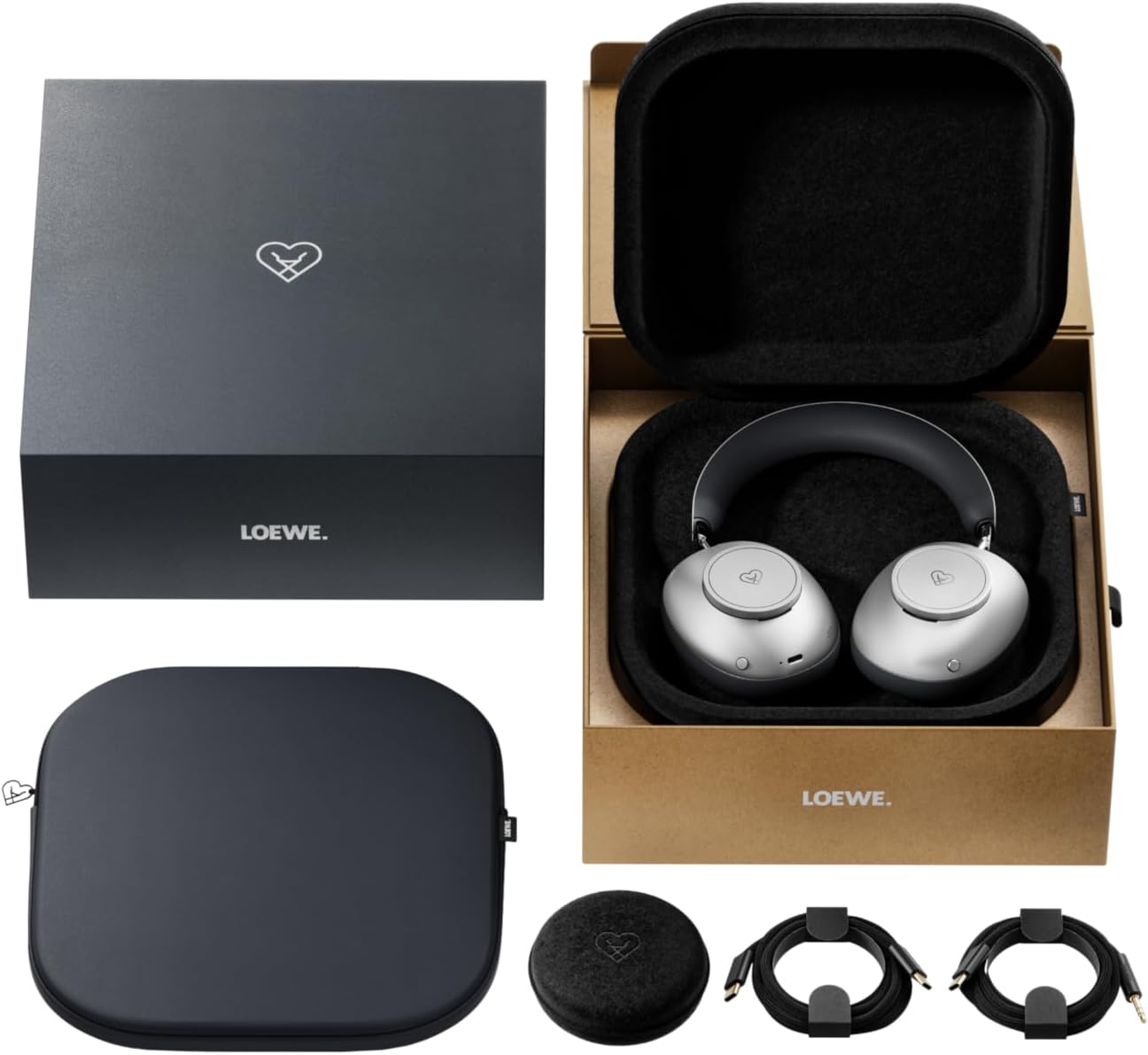
Image: The LOEWE Leo Wireless Headphones package contents, showing the headphones, USB-C cable, AUX cable, leather case, hard case, and cable pouch.
3. Konec produktuview
Familiarize yourself with the physical components and controls of your LOEWE Leo headphones.

Obrázek: Přední strana view of the LOEWE Leo Wireless Headphones, showcasinnáušníky a hlavový most.
3.1. Ovládací prvky a porty
Sluchátka mají intuitivní ovládání pro snadné ovládání:
- Ovládací voliče: Two precision-crafted rotary wheels for volume adjustment and navigation.
- Akční tlačítka: Dedicated buttons for playback control, ANC modes, and voice translation activation.
- Port USB-C: Pro nabíjení a kabelové audio připojení.
- Jack 3.5 mm: For traditional wired audio connection.

Obrázek: Podrobný view of the earcup, highlighting the control dial, USB-C port, and 3.5mm audio jack.
4. Začínáme
4.1. Nabíjení sluchátek
Before first use, fully charge your LOEWE Leo headphones. A full charge provides up to 65 hours of continuous playback.
- Připojte dodaný nabíjecí kabel USB-C k portu USB-C na sluchátkách.
- Druhý konec kabelu připojte ke kompatibilnímu napájecímu adaptéru USB (není součástí balení) nebo k portu USB počítače.
- LED indikátor na sluchátkách bude ukazovat stav nabíjení. Po úplném nabití obvykle zhasne nebo změní barvu.
4.2. Zapnutí/vypnutí
- Zapnutí: Stiskněte a podržte tlačítko napájení přibližně 3 sekundy, dokud se nerozsvítí LED indikátor.
- Vypnutí: Stiskněte a podržte tlačítko napájení přibližně 3 sekund, dokud nezhasne LED indikátor.
4.3. Párování Bluetooth
The LOEWE Leo headphones utilize Bluetooth Low Energy (BLE) for faster pairing and reduced power consumption.
- Ujistěte se, že jsou sluchátka vypnutá.
- Press and hold the Power button for approximately 5 seconds until the LED indicator flashes rapidly, indicating pairing mode.
- Na svém zařízení (chytrý telefon, tablet, počítač) povolte Bluetooth a vyhledejte dostupná zařízení.
- Select "LOEWE Leo" from the list of found devices.
- Po připojení přestane kontrolka LED blikat a zůstane svítit modře.
4.4. Kabelové připojení
For a wired audio experience, use the supplied AUX to USB-C cable.
- Connect the USB-C end of the AUX cable to the headphones.
- Connect the 3.5mm end of the AUX cable to your audio source's 3.5mm jack.
- Sluchátka se automaticky přepnou do kabelového režimu.
5. Ovládání sluchátek
5.1. Přehrávání zvuku a ovládání hlasitosti
Use the control dials and action buttons for managing your audio:
- Zvýšení/Snížení hlasitosti: Rotate the designated control dial.
- Přehrát/pozastavit: Press the central action button once.
- Další skladba: Double-press the central action button.
- Předchozí skladba: Triple-press the central action button.

Image: Close-up of the earcup's control dial, used for volume and navigation.
5.2. Adaptive Noise Cancellation (ANC)
The LOEWE Leo features advanced adaptive noise cancellation that continuously analyzes your environment and adjusts in real-time.
- Aktivace/deaktivace ANC: Press the dedicated ANC button once.
- Režim průhlednosti: Press the ANC button twice to allow ambient sounds to pass through, enhancing situational awareness.

Image: Illustration of the adaptive noise cancellation feature, depicting sound wave management.
5.3. Real-time Voice Translation
Communicate across language barriers with the integrated real-time voice translation feature.
- Ensure your headphones are connected to a device with internet access and the LOEWE companion app installed.
- Activate the translation feature via the dedicated button or the companion app.
- Speak into the headphone's microphone. The translated audio will be played back in real-time.

Image: Earcup detail showing the microphone for voice input and the 'leo' icon, representing the real-time translation function.
5.4. Dolby Atmos and Spatial Audio
Experience immersive sound with Dolby Atmos and spatial audio support. This feature is automatically enabled when compatible content is played through a connected device that supports these audio technologies.
6. Údržba a péče
6.1. Čištění
- Sluchátka otřete měkkým, suchým hadříkem, který nepouští vlákna.
- Nepoužívejte abrazivní čisticí prostředky, alkohol ani chemická rozpouštědla.
- Keep moisture away from openings.
6.2. Péče o baterie
- Vyhněte se častému úplnému vybíjení baterie.
- Store the headphones in a cool, dry place when not in use for extended periods.
- The battery is user-replaceable, contributing to the product's longevity.
6.3. Modular Design
The LOEWE Leo headphones feature a durable modular design with replaceable components, such as ear cushions and headbands. This design allows for easy replacement of worn parts, extending the product's lifespan.

Image: The modular construction of the LOEWE Leo headphones, showing detachable earcups and headband for maintenance or replacement.
7. Řešení problémů
If you encounter issues with your LOEWE Leo headphones, refer to the following common solutions:
- Bez napájení: Ujistěte se, že jsou sluchátka plně nabitá. Připojte je ke zdroji napájení pomocí kabelu USB-C.
- Žádný zvuk:
- Zkontrolujte úroveň hlasitosti na sluchátkách i na připojeném zařízení.
- Ensure the headphones are properly paired via Bluetooth or the AUX cable is securely connected.
- Zkuste restartovat sluchátka i zařízení, které je zdrojem zvuku.
- Odpojení Bluetooth:
- Ensure the headphones are within the Bluetooth range of your device (typically 10 meters).
- Disable and re-enable Bluetooth on your device, then attempt to re-pair.
- Clear the LOEWE Leo from your device's Bluetooth history and pair again.
- ANC nefunguje efektivně:
- Ujistěte se, že náušníky dobře přiléhají k uším. V případě potřeby upravte jejich usazení.
- Verify that ANC is activated.
- Voice Translation Issues:
- Zkontrolujte připojení k internetu na vašem zařízení.
- Ensure the LOEWE companion app is up-to-date and configured correctly.
- Mluvte jasně a mírným tempem.
If problems persist, please contact LOEWE customer support.
8. Specifikace
| Funkce | Popis |
|---|---|
| Název modelu | Lev |
| Číslo modelu | 64641J10 |
| Technologie připojení | Wireless (Bluetooth), Wired |
| Bezdrátová komunikace | Bluetooth s nízkou spotřebou energie (BLE) |
| Zvukové vlastnosti | Hi-Res Audio, Dolby Atmos, Spatial Audio |
| Potlačení hluku | Adaptive Noise Reduction (ANC) |
| Speciální funkce | Real-time Voice Translation, Modular Design with Replaceable Components |
| Životnost baterie | Až 65 hodin (přibližně) |
| Typ ovládání | Button Control, Rotary Dials |
| Kompatibilní zařízení | Cellular Phone, Tablet, Computer, Laptop |
| Hmotnost | 3 Kilograms (product weight as listed, may include packaging) |
9. Záruka a podpora
9.1. Záruka výrobce
The LOEWE Leo Wireless Headphones come with a 2letá záruka výrobceTato záruka se vztahuje na vady materiálu a zpracování při běžném používání. Uschovejte si prosím doklad o koupi pro případ uplatnění záruky.
For specific terms and conditions of the warranty, please refer to the warranty card included in your product packaging or visit the official LOEWE webmísto.
9.2. Zákaznická podpora
For technical assistance, troubleshooting, or warranty inquiries, please contact LOEWE customer support through their official webwebu nebo kontaktních informací uvedených v dokumentaci k produktu.
Online zdroje: Visit the official LOEWE webweb s nejčastějšími dotazy, aktualizacemi softwaru a dalšími zdroji podpory.