
Zavedení
Thank you for choosing the BIWIBON Fingerprint Door Lock BCA-03. This smart door lock offers advanced security and convenience with multiple unlocking options, including biometric fingerprint, passcode, mobile app control, IC cards, and traditional mechanical keys. Designed for ease of use and robust security, it's an ideal solution for homes, offices, apartments, and bedrooms.
This manual provides detailed instructions for installation, operation, and maintenance to ensure optimal performance and security.
Vlastnosti produktu
- Flexible Keyless Entry: Unlock your door using 5 methods: biometric fingerprint, passcode, mobile app, 2 IC cards, and 2 backup mechanical keys. Supports up to 100 fingerprints, 100 codes, and 100 IC cards.
- Smart App & Code Management: Create one-time, timed, or dynamic codes via your phone. Track access history and manage your lock remotely.
- Anti-Peep PIN & Adjustable Auto-Lock: Enhance privacy by entering random digits before or after your real passcode. Customize auto-lock timing and engage the inside lock via the app for added security.
- Snadná instalace svépomocí: Designed to fit most US standard doors (backset 2-3/8" / 60mm or 2-1/8" / 70mm; thickness 1-1/8"–2-1/8" / 30–55mm). Works with both left- and right-handed doors.
- Enhanced Privacy & App Features: Fingerprint and app data are stored locally, ensuring privacy. Add users, share access, manage credentials, enable silent or passage mode, and view protokoly.
Obsah balení
The BIWIBON Fingerprint Door Lock BCA-03 package includes the following items:
- 1x Front Handle
- 1x Rear Handle
- 1x Adjustable Latch
- 1x Strike Plate and Reinforcer
- 2x mechanické klíče
- 2x IC Cards
- 1x Vřeteno
- 2x Threaded Pillars
- Šrouby
- 1x Type-C Cable (for emergency power)
- 1x Uživatelská příručka (tento dokument)
- 1x Drill Template
- 1x Spare Package
Nastavení a instalace
Before you begin, ensure your door meets the following specifications: backset 2-3/8" (60mm) or 2-1/8" (70mm); door thickness 1-1/8" (30mm) to 2-1/8" (55mm). The lock is compatible with both left- and right-handed doors.
Obraz: Door dimensions and latch adjustment for the BIWIBON Fingerprint Door Lock BCA-03. This diagram illustrates how the lock fits standard US doors, showing measurements for backset and door thickness, and how to adjust the latch if needed.
Instalační video průvodce
Video: BIWIBON BCA03 Fingerprint Door Lock Installation. This official video provides a step-by-step visual guide for installing your new fingerprint door lock, covering latch adjustment, handle assembly, and battery insertion.
Instalace krok za krokem
- Adjust Latch (if needed): Hold the latch in front of the door hole. If the latch holes are centered, no adjustment is needed. If not, adjust the latch to 70mm (2-3/4in) by pulling and twisting the latch mechanism.
- Install Latch: Insert the adjusted latch into the door edge. Ensure the square hole on the latch is horizontal. Secure it with screws.
- Install Front Handle: Route the wiring through the square spindle. Insert the square spindle into the square spindle hole on the front handle, ensuring it fits squarely without tilting. Thread the square spindle through the square spindle hole in the lock body, ensuring it remains parallel.
- Install Back Handle: Remove the battery cover from the back handle. Route the wire through the back panel. Fix the back handle with screw B.
- Vložte baterie: Insert 4 AAA alkaline batteries (not included) into the battery compartment. Connect the wire on the battery box and ensure a tight wire connection. Install the battery cover back.
Návod k obsluze
The BIWIBON Fingerprint Door Lock offers multiple convenient ways to unlock your door.

Obraz: Multiple Ways to Unlock the BIWIBON Fingerprint Door Lock. This image visually demonstrates the five available unlocking methods: via the mobile app, fingerprint recognition, IC card, numerical password, and a traditional backup key.
1. Metody odemykání
- Odemknutí otisků prstů: Place your registered finger firmly on the fingerprint sensor. The lock will unlock if the fingerprint is recognized.
- Odemknutí heslem: Enter your registered 6-10 digit passcode on the keypad. The lock will unlock upon correct entry. Utilize the anti-peep feature by entering random digits before or after your actual code to prevent others from guessing it.
- Odemknutí IC karty: Tap your registered IC card against the card reader area on the handle. The lock will unlock.
- Odemknutí mobilní aplikace: Use the Tuya Smart app on your smartphone to unlock the door via Bluetooth when within range. For remote unlocking, a BIWIBON Gateway (sold separately) is required.
- Mechanické odemknutí klíčem: In case of emergency or battery depletion, use the provided mechanical backup keys to unlock the door. The keyhole is discreetly located.
2. Smart App Features (Tuya Smart)
The Tuya Smart app provides comprehensive control and management over your BIWIBON Fingerprint Door Lock. Ensure Bluetooth is enabled on your phone and the lock is within range for direct connection. For remote features, a BIWIBON Gateway is required.
Video: BIWIBON BCA03 Fingerprint Door Lock App Setup. This official video guides you through connecting your lock to the Tuya Smart app, adding fingerprints, passcodes, IC cards, and setting up various smart features.
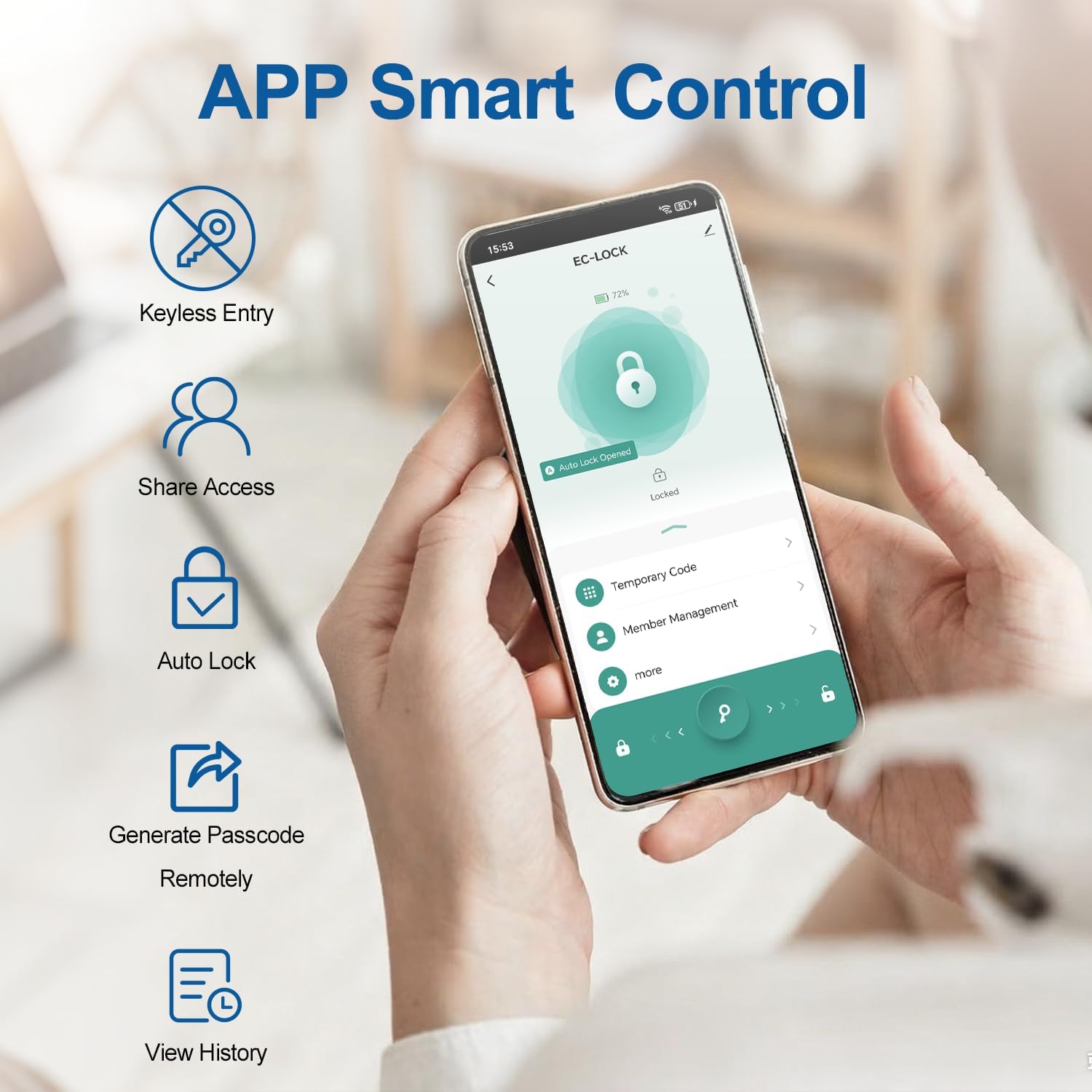
Obraz: APP Smart Control Interface. This screenshot displays the main control screen of the Tuya Smart app, offering quick access to temporary codes, member management, and other advanced settings for your BIWIBON lock.
- Adding Your Lock to the App:
- Zapněte Bluetooth na telefonu.
- Open the "Tuya Smart" app.
- Click on "+" or "Add Device". The app will automatically detect the lock (EC-LOCK).
- Click "Add" and follow the on-screen prompts to complete the pairing.
- Name your lock and click "Finish".
- Správa členů: Add and manage users, including administrators and common members. You can add fingerprints, passcodes, and IC cards for each member.
- Tap "Member Management" > "Me Admin".
- Tap "Fingerprint - Add" or "Code - Add" or "Card - Add".
- Follow the app's instructions to register the new credential. For fingerprints, firmly press your finger on the sensor 5 times from different angles.
- Name the credential and tap "OK". Test immediately to verify.
- Temporary Codes: Generate various types of temporary access codes for guests or service providers.

Obraz: Smart Access for Every Situation. This image highlights the app's capability to generate various types of access codes: custom, timed, one-time, and dynamic, providing flexible access control.
- Time-Limited Codes: Valid only during a specified date and time range.
- Jednorázové kódy: Work just once and are valid for 6 hours after generation.
- Dynamic Codes: Temporary codes valid for 5 minutes, can be used multiple times within that period.
- Adjustable Auto-Lock: Set the lock to automatically re-lock after a specified delay (1 second to 2 minutes 59 seconds). Default is 5 seconds.

Obraz: Auto Lock Feature. This image illustrates the auto-lock function of the BIWIBON Fingerprint Door Lock, showing the mechanism engaging automatically after a set delay, providing peace of mind.
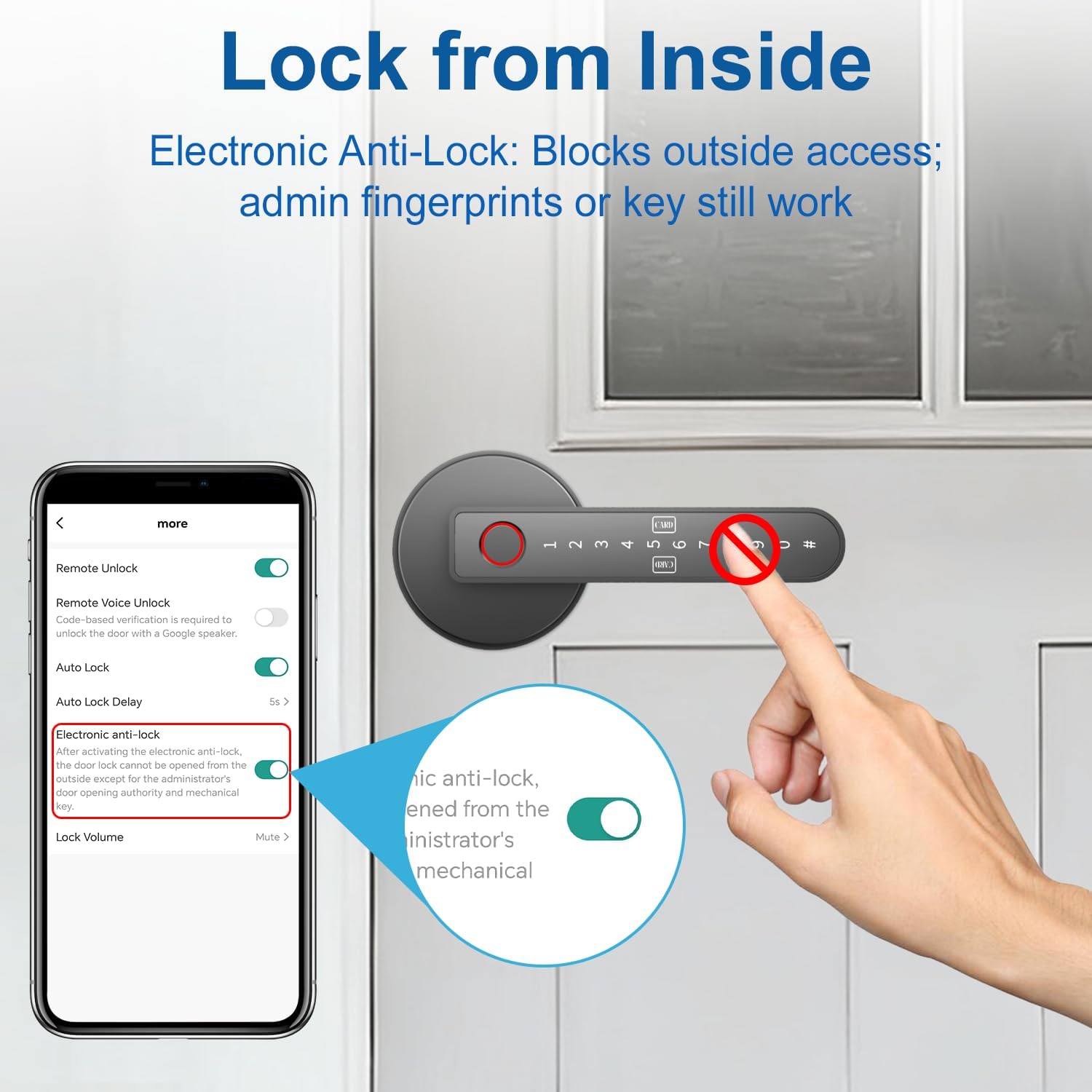
- Electronic Anti-Lock: Enable this feature via the app to block outside access. Only administrator fingerprints or mechanical keys will work. Common member credentials will be temporarily disabled.

Obraz: Lock from Inside (Electronic Anti-Lock). This image demonstrates the Electronic Anti-Lock feature, which blocks outside access while still allowing entry for administrators or via mechanical key, enhancing privacy and security.
- Režim průchodu: Toggle off Auto-Lock and activate Passage Mode with a registered biometric verification. The door will remain unlocked and no verification will be required for access. Activate only in secure areas. Remember to re-enable Auto-Lock when not needed.
- Remote Unlocking & Voice Control (with BIWIBON Gateway): If you have a BIWIBON Gateway (sold separately), you can unlock your door remotely via the app and integrate with smart speakers like Amazon Alexa and Google Assistant for voice commands.

Obraz: Voice Control with Smart Speakers. This image illustrates the integration of the BIWIBON Fingerprint Door Lock with Amazon Alexa and Google Assistant for voice control, requiring a separate BIWIBON Gateway.
Údržba
- Výměna baterie: The lock requires 4 AAA alkaline batteries. For best performance, we recommend using alkaline batteries. If you choose to use rechargeable batteries, do not charge them via the Type-C port, as this may damage the internal components. Replace batteries when the low battery indicator appears or when the lock's performance degrades.
- Čištění: Povrch zámku otřete měkkým, suchým hadříkem. Nepoužívejte abrazivní čisticí prostředky ani rozpouštědla, která by mohla poškodit povrchovou úpravu nebo elektronické součástky.
- Nouzové napájení: In case of complete battery depletion, you can temporarily power the lock using a power bank connected via the Type-C port on the front handle to gain access.
Odstraňování problémů
- Zámek nereaguje: Check battery levels and replace if necessary. Use the Type-C emergency power port with a power bank.
- Otisk prstu nebyl rozpoznán: Ensure your finger is clean and dry. Try different angles or re-register your fingerprint in the app.
- Heslo nefunguje: Double-check the entered code. Ensure the anti-peep feature is not causing confusion.
- Problémy s připojením k aplikaci: Ensure Bluetooth is enabled and you are within range. For remote access, verify the BIWIBON Gateway is online and properly configured.
- Zámek se správně nezapíná/nezapíná: Check for any obstructions in the door frame or latch mechanism. Ensure the latch is installed horizontally.
- Obnovení továrního nastavení: If persistent issues occur, you may need to perform a factory reset. Refer to the app's settings under "Remove Device" and "Disconnect and wipe data". This will delete all registered data.
Specifikace
| Funkce | Specifikace |
|---|---|
| Číslo modelu | BCA-03 |
| Materiál | Hliník |
| Barva | Černý |
| Styl | Fingerprint door knob |
| Rozměry produktu | 5.6"D x 2.75"Š |
| Vnější povrch | Leštěný hliník |
| Typ zámku | Biometric & Digital Lock |
| Orientace rukou | Obouruký |
| Hmotnost položky | 1.78 libry |
| Kompatibilita tloušťky dveří | 1-1/8"–2-1/8" (30–55mm) |
| Kompatibilita zadní části | 2-3/8" (60 mm) nebo 2-1/8" (70 mm) |
Záruka a podpora
BIWIBON is committed to providing excellent customer service and product support.
- Technická podpora: Enjoy lifetime technical support for your BIWIBON Fingerprint Door Lock.
- Služby zákazníkům: Our dedicated customer service team is available 24 hours to assist you with any inquiries or issues.
Pro další pomoc nás prosím kontaktujte na adrese: Support@biwibon.com