
1. Úvod
The Brondi WINDOW 2 is a user-friendly flip mobile phone designed for clear and comfortable communication. It features a larger 2-inch screen for enhanced visibility and ease of use. Key functionalities include active flip to answer/end calls, a dedicated LED torch, and notifications visible when the flip is closed. This device supports Dual SIM functionality, allowing you to manage two numbers simultaneously. The package includes the WINDOW 2 mobile phone, a Type-C charger, battery, and this user manual.
Vlastnosti produktu:
- 2-inch display for clear viewIng.
- Active Flip: Answer and end calls by simply opening or closing the phone.
- LED Torch: Instant illumination with a dedicated button.
- Closed Flip Notifications: Check calls and messages without opening the phone.
- Vibration: Ensures you don't miss calls, even in silent mode.
- Dual SIM: Manage two phone numbers on one device.
- Long Battery Life: Up to 190 minutes talk time and 160 hours standby.
- Type-C Charger: Modern and convenient charging.
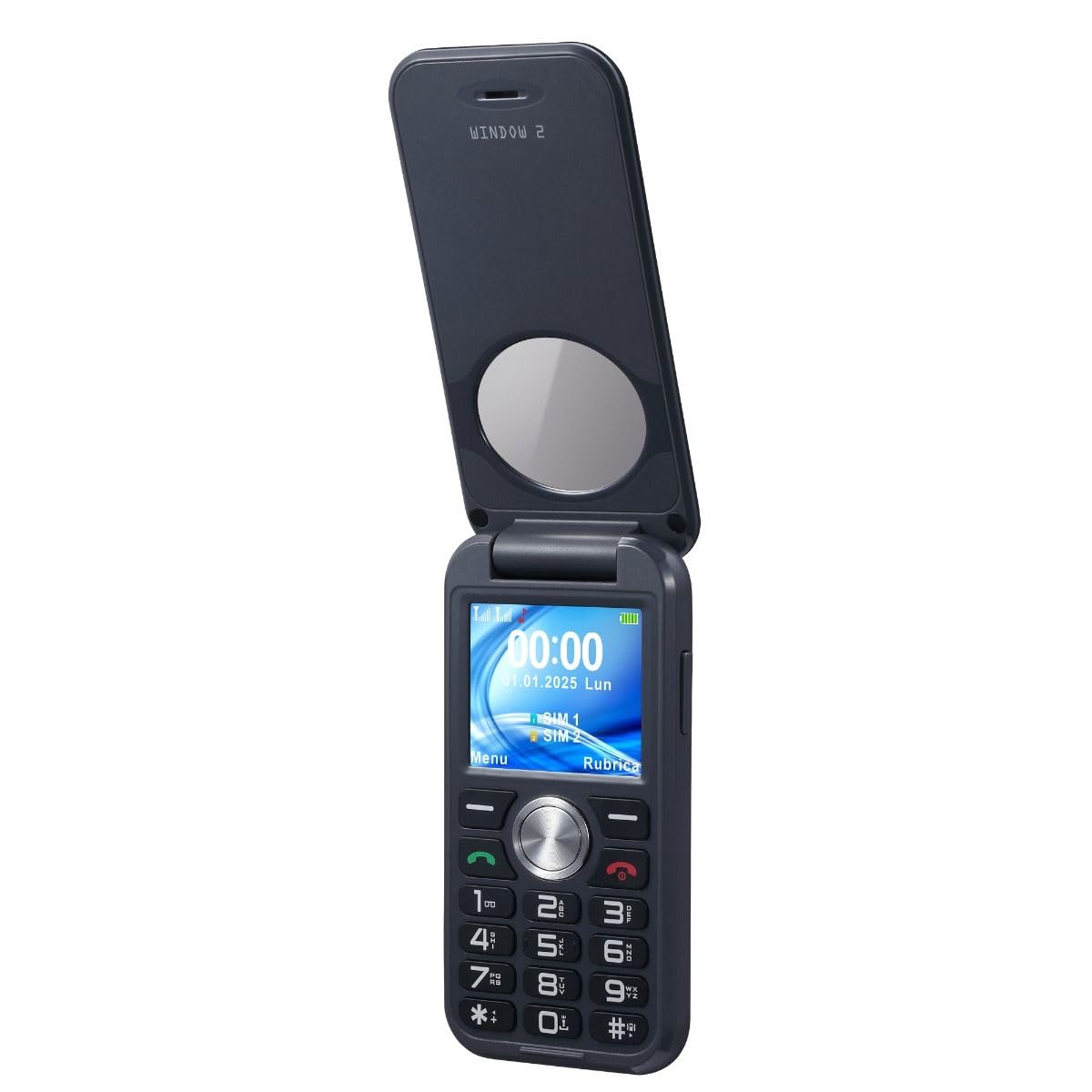

2. Nastavení
2.1. Rozbalení a počáteční kontrola
Opatrně vyjměte všechny součásti z obalu. Zkontrolujte, zda jsou všechny položky uvedené v části „Co je v krabici“ přítomny a nepoškozené.
2.2. Instalace baterie a SIM karty
To install the battery and SIM card(s):
- Odstraňte zadní kryt telefonu.
- Insert your SIM card(s) into the designated slot(s). The Brondi WINDOW 2 supports Dual SIM.
- Place the battery into its compartment, ensuring the contacts align correctly.
- Nasaďte zadní kryt zpět, dokud bezpečně nezacvakne na místo.
2.3. Nabíjení baterie
Connect the Type-C charger to the phone and a power outlet. The charging indicator will illuminate. If the battery is completely drained, the indicator may not respond immediately; wait patiently for a few minutes for the charging process to initiate and the indicator to appear.
3. Návod k obsluze
3.1. Zapnutí/vypnutí
To power on the phone, press and hold the power button until the screen illuminates. To power off, press and hold the power button and select 'Power Off' from the options.
3.2. Uskutečňování a přijímání hovorů
- Uskutečnění hovoru: Zadejte telefonní číslo pomocí klávesnice a stiskněte zelené tlačítko pro volání.
- Receiving a Call (Active Flip): Simply open the flip cover to answer an incoming call. Close the flip cover to end the call.
3.3. SOS Emergency Calls
The phone features an SOS emergency button. Pressing this button will automatically dial up to 5 pre-set family numbers. Ensure emergency contacts are configured in the phone settings.
3.4. Používání LED svítilny
The Brondi WINDOW 2 includes a dedicated LED torch. Press the torch button on the side of the phone to turn it on or off.
3.5. Nastavení hlasitosti
Use the volume control buttons located on the side of the phone to adjust call volume, ringtone volume, and media volume.
3.6. Nastavení jazyka
To change the phone's language:
- Přejít na Nastavení.
- Vybrat Nastavení telefonu.
- Vybrat Jazyky.
- Select your desired language and confirm with OK.
3.7. Setting Ringtones
To customize your phone's ringtones:
- Přejděte na Nastavení.
- Vybrat Profiles, pak Generál.
- Vybrat Přizpůsobit.
- Vybrat SIM1 Ringtone or SIM2 Ringtone to set your preferred ringtone.
3.8. Disabling Keypad Vocals
If you wish to turn off the vocal feedback when pressing keypad buttons:
- Přejít na Nastavení.
- Vybrat Profiles, pak Generál.
- Vybrat Přizpůsobit.
- Nalézt Klávesnice a vyberte Klikněte or Tichý místo Lidský hlas.
4. Údržba
4.1. Péče o baterie
Pro maximalizaci výdrže a výkonu baterie:
- Nevystavujte telefon extrémním teplotám.
- Před prvním použitím baterii plně nabijte.
- If the phone is not used for an extended period, charge it periodically to prevent deep discharge.
- The battery capacity is 800 mAh, providing approximately 3.17 hours of average battery life and 190 minutes of talk time.
4.2. Obecná péče
- Keep the phone dry. This device is není voděodolný.
- Telefon čistěte měkkým, suchým hadříkem. Nepoužívejte agresivní chemikálie.
- Protect the screen from scratches by keeping it away from sharp objects.
5. Řešení problémů
5.1. Běžné problémy a jejich řešení
- Telefon se nezapne: Ensure the battery is correctly inserted and charged. Connect the charger and wait a few minutes if the battery was completely drained.
- Nelze uskutečňovat/přijímat hovory: Check if the SIM card(s) are properly inserted and activated. Verify network signal strength.
- Žádný zvuk nebo nízká hlasitost: Adjust the volume using the side buttons. Check ringtone settings.
- Keypad vocals are active/inactive unexpectedly: Refer to section 3.8 for instructions on disabling/enabling keypad vocals.
6. Specifikace
| Funkce | Detail |
|---|---|
| Značka | Brondi |
| Název modelu | OKNO 2 |
| Operační systém | Proprietární |
| Kapacita paměti | 1 GB |
| Velikost obrazovky | 2 palce |
| Rezoluce | 208 x 156 |
| Bezdrátový nosič | Všichni dopravci |
| Buněčná technologie | 2G |
| Technologie připojení | GSM |
| Barva | Černý |
| Sloty pro SIM karty | Duální SIM |
| Nabíjecí port | USB-C |
| Form Factor | Překlopit |
| User Interface Type | Alfanumerická klávesnice |
| Úroveň odolnosti proti vodě | Není odolný proti vodě |
| Jack pro sluchátka | 3.5 mm |
| Blesk fotoaparátu | LED |
| Kapacita baterie | 800 miliamper-hodina (mAh) |
| Průměrná životnost baterie | 3.17 hodiny |
| Doba hovoru | 190 minut |
| Funkce GPS | Falešný |
| Typ obrazovky | LCD |
7. Záruka a podpora
7.1. Záruka na produkt
The Brondi WINDOW 2 mobile phone comes with a 2letá záruka výrobceUschovejte si prosím doklad o koupi pro případ reklamace.
7.2. Informace výrobce
Manufacturer: Brondi
7.3. Další pomoc
For additional support or inquiries, please refer to the official Brondi webnebo kontaktujte jejich zákaznický servis.