
1. Úvod
This manual provides essential instructions for the setup, operation, and maintenance of your Laxasfit H9 Pro Max Smart Watch. Designed for daily wear, this smartwatch combines modern technology with a user-friendly interface to help you monitor your health and stay connected. Please read this manual thoroughly before using your device to ensure proper functionality and longevity.
2. Obsah balení
Ověřte, zda jsou v balení produktu přítomny všechny níže uvedené položky:
- H9 Pro Max Smart Watch
- USB nabíjecí kabel
- Uživatelská příručka
- Extra Strap (Black Silicone)

Nad hlavou view of the H9 Pro Max Smart Watch package contents, including the watch with a pink strap, an additional black strap, a USB charging cable, and the product box.
3. Začínáme
3.1. Nabíjení chytrých hodinek
Before initial use, fully charge your H9 Pro Max Smart Watch. Connect the provided USB charging cable to the charging dock and align the watch with the magnetic pins on the dock. Connect the USB end to a standard USB power adapter (not included) or a computer USB port. A full charge typically takes approximately 2 hours.
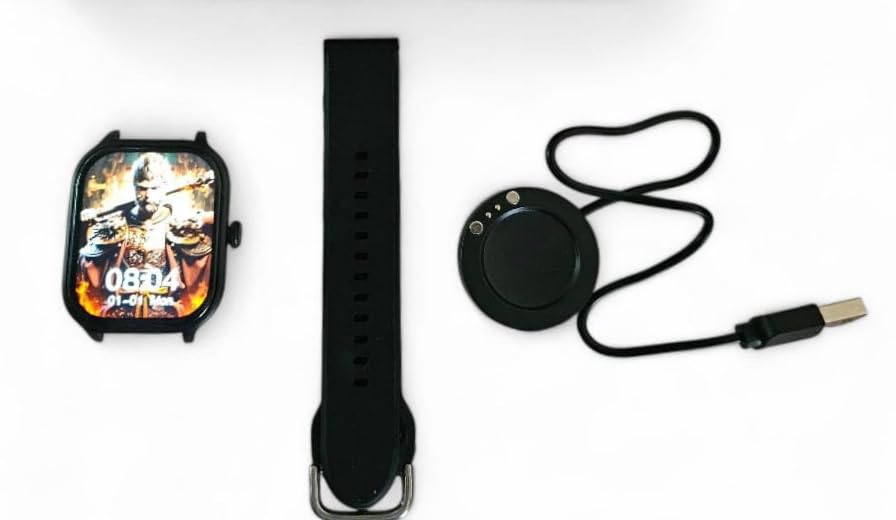
The H9 Pro Max Smart Watch face, a black silicone strap, and the circular USB charging dock laid out separately.
3.2. Zapnutí/vypnutí
- Zapnutí: Stiskněte a podržte boční tlačítko, dokud se obrazovka nerozsvítí.
- Vypnutí: Stiskněte a podržte boční tlačítko a poté na obrazovce vyberte možnost „Vypnout“.
3.3. Instalace popruhu
The H9 Pro Max Smart Watch comes with interchangeable straps. To attach or change a strap, align the spring bar with the lug holes on the watch body and gently push until it clicks into place. Ensure both ends of the spring bar are securely seated.
3.4. Instalace aplikace a párování zařízení
To unlock the full functionality of your smartwatch, download the companion application on your smartphone. The app is compatible with both Android and iOS devices.
- Scan the QR code in the user manual (if provided) or search for the official app in your smartphone's app store.
- Nainstalujte si aplikaci do svého chytrého telefonu.
- Povolte na svém smartphonu Bluetooth.
- Open the app and follow the on-screen instructions to pair your H9 Pro Max Smart Watch. Ensure the watch is powered on and within Bluetooth range of your phone.
4. Ovládání chytrých hodinek
4.1. Základní navigace
The H9 Pro Max Smart Watch features a responsive touchscreen display for navigation:
- Přejetí nahoru/dolů: Procházení nabídek nebo oznámení.
- Přejetí doleva/doprava: Přístup k různým widgetům nebo rychlým nastavením.
- Klepněte na: Vyberte položku nebo potvrďte akci.
- Stiskněte boční tlačítko: Return to the home screen or activate a specific function (configurable in settings).
4.2. Přizpůsobení ciferníků
Personalize your smartwatch by changing the watch face. You can select from various pre-installed designs or download additional options through the companion app. To change the watch face directly on the device, press and hold the current watch face, then swipe left or right to browse available options and tap to select.
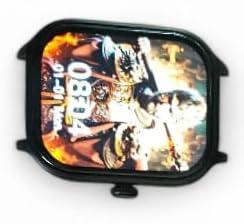
Detailní záběr view of the H9 Pro Max Smart Watch display, showing a customized watch face with time and date.
4.3. Chytré funkce
The H9 Pro Max Smart Watch offers several features to support your daily activities and health monitoring:
- Sledování aktivity: Monitors steps taken, distance covered, and calories burned.
- Monitor srdečního tepu: Provides real-time heart rate readings.
- Monitor spánku: Sleduje spánkové vzorce a kvalitu spánku.
K těmto funkcím se dostanete prostřednictvím nabídky hodinek nebo doprovodné aplikace, kde najdete podrobné informace a historická data.
4.4. Oznámení
Once paired with your smartphone, the H9 Pro Max Smart Watch can display notifications for calls, messages, and app alerts. Ensure notification permissions are enabled in both your phone's settings and the companion app.
5. Údržba
5.1. Čištění
Pro zachování vzhledu a funkčnosti vašich chytrých hodinek:
- Otřete obrazovku a tělo hodinek měkkým hadříkem, který nepouští vlákna.
- Na odolné šmouhy lehce otřeteamphadřík vodou. Nepoužívejte agresivní chemikálie ani abrazivní materiály.
- Pro zajištění efektivního nabíjení pravidelně čistěte nabíjecí kontakty.
5.2. Péče o baterie
Chcete -li prodloužit životnost baterie:
- Vyhněte se extrémním teplotám, protože mohou snížit výkon baterie.
- Hodinky pravidelně nabíjejte, ale nenechávejte je delší dobu zcela vybité.
- Pokud hodinky skladujete delší dobu, nabijte je před uskladněním přibližně na 50 %.
6. Řešení problémů
If you encounter issues with your H9 Pro Max Smart Watch, try the following common troubleshooting steps:
- Hodinky se nezapínají: Ujistěte se, že jsou hodinky plně nabité. Připojte je k nabíječce alespoň na 30 minut.
- Nelze spárovat se smartphonem: Check that Bluetooth is enabled on your phone and the watch. Restart both devices and try pairing again. Ensure the companion app has necessary permissions.
- Nepřesné zdravotní údaje: Ujistěte se, že hodinky máte pevně na zápěstí, ne příliš těsně ani příliš volně. Vyčistěte senzor na zadní straně hodinek.
- Nezobrazují se oznámení: Verify that notifications are enabled in your phone's settings and within the smartwatch companion app. Check that the watch is connected via Bluetooth.
- Obrazovka nereaguje: Zkuste hodinky restartovat stisknutím a podržením bočního tlačítka. Pokud nereagují, nechte baterii zcela vybít a poté ji nabijte.
7. Specifikace produktu
| Funkce | Specifikace |
|---|---|
| Značka | Laxasfit |
| Model | H9 Pro Max |
| Velikost displeje | 1.9 palce |
| Typ zobrazení | Digitální |
| Kompatibilita operačního systému | Android, iOS |
| Kompatibilní zařízení | chytré telefony |
| Speciální funkce | Activity Tracker, Heart Rate Monitor, Sleep Monitor |
| Kapacita paměti | 1 MB |
| Typ baterie | Lithium Metal (Built-in) |
| Průměrná životnost baterie | Až 1 den |
| Doba nabíjení | 2 hodiny |
| Bezdrátové připojení | Bluetooth |
| Typ konektoru | USB |
| Primární rozhraní | Dotyková obrazovka |
| Materiály | Kov, Plast |
| Hmotnost položky | 85 g |
| Rozměry balení | 15 x 12 x 8.5 cm |
8. Záruka a podpora
Your Laxasfit H9 Pro Max Smart Watch comes with a Záruka 3 měsíců od data nákupu. Tato záruka se vztahuje na výrobní vady vzniklé běžným používáním. Pro případné reklamace si prosím uschovejte doklad o koupi.
For technical assistance, troubleshooting beyond this manual, or warranty inquiries, please refer to the contact information provided with your purchase documentation or visit the official Laxasfit support webmísto.