
OHAYO X10 Max
OHAYO X10 Max Bluetooth Speaker Instruction Manual
Welcome to your new OHAYO X10 Max Portable Bluetooth Speaker.
1. Důležité bezpečnostní informace
- Nevystavujte reproduktor extrémním teplotám ani přímému slunečnímu záření po delší dobu.
- Keep the speaker away from heat sources, sharp objects, and corrosive materials.
- Reproduktor sami nerozebírejte, neopravujte ani neupravujte. V případě potřeby se obraťte na kvalifikovaný servisní personál.
- Při používání reproduktoru v blízkosti vody se ujistěte, že je kryt nabíjecího portu bezpečně uzavřen, aby byla zachována vodotěsnost IPX7.
- K nabíjení používejte pouze dodaný nabíjecí kabel nebo certifikovaný kabel USB-C.
2. Obsah balení
- 1 x OHAYO X10 Max Bluetooth Speaker (White)
- 1 x USB-C Charging Cable (charging plug not contained)
- 1 x 3.5 mm AUX kabel
- 1 x Uživatelská příručka
- 1 x šňůrka
3. Konec produktuview
The OHAYO X10 Max is a versatile portable Bluetooth speaker designed for high-quality audio and durability. It features a powerful 25W sound output with active bass, IPX7 waterproofing, and a long-lasting 24-hour battery. Enjoy dynamic sound with colorful RGB lighting effects, dual pairing for stereo sound, and multiple input modes.
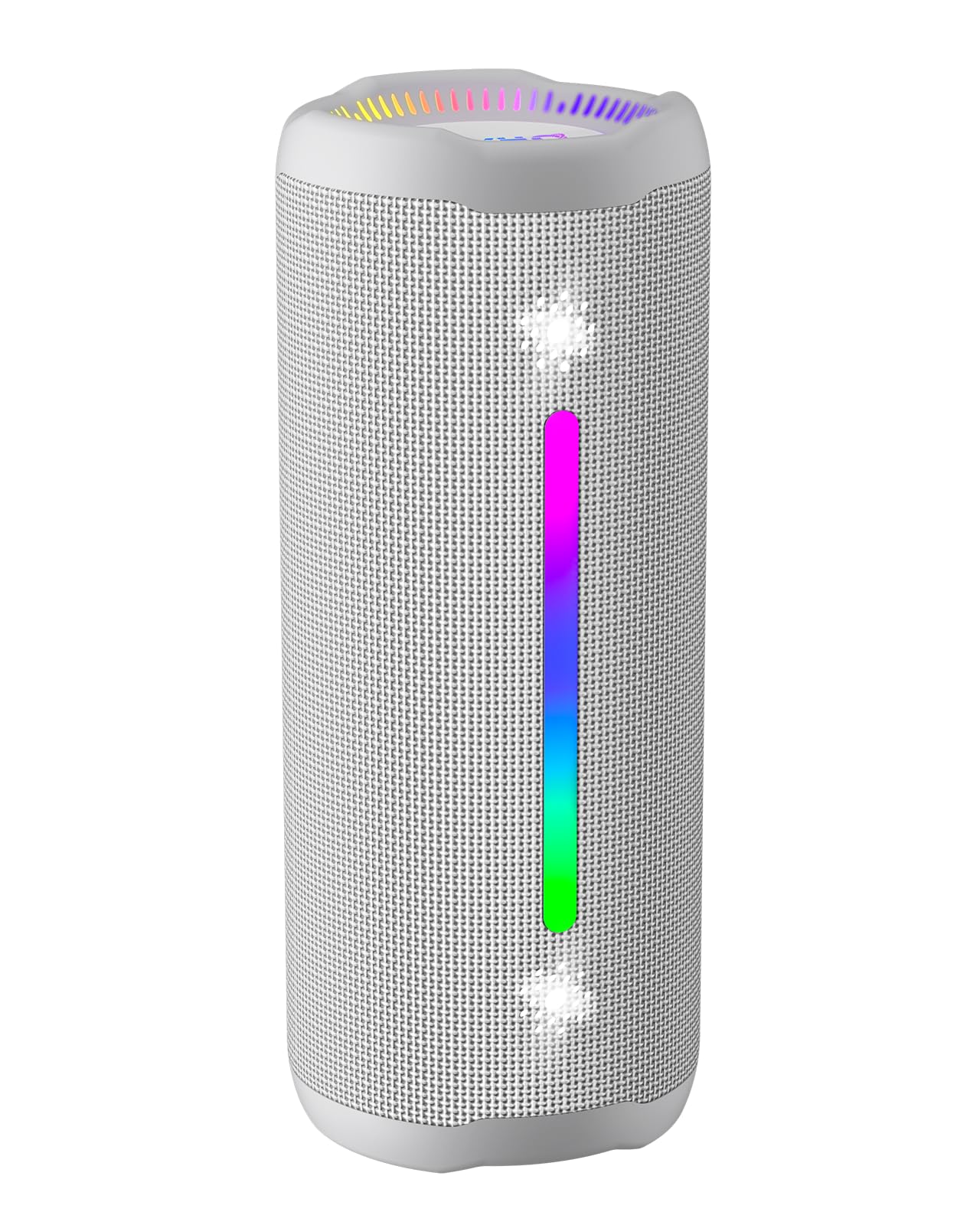
Figure 3.1: OHAYO X10 Max Bluetooth Speaker (White)

Figure 3.2: OHAYO X10 Max Bluetooth Speaker - Fully upgraded from appearance to performance.

Figure 3.3: 25W Deep Bass Sound - Independent channel design for accurate audio performance.

Figure 3.4: 6 Dazzling RGB Light Effects - Syncs with music for an immersive experience.

Figure 3.5: IPX7 Waterproof - Highly sealed design for use in various environments.

Figure 3.6: 24H Ultra-Long Battery Life - 6600mAh battery for extended playback.
4. Ovládací prvky a indikátory
The OHAYO X10 Max features intuitive controls for easy operation.

Obrázek 4.1: Ovládací panel a porty
- Vypínač: Press and hold to power on/off. Short press to switch between input modes (Bluetooth, AUX, TF Card, USB-Audio).
- Zvýšení hlasitosti (>): Krátkým stisknutím zvýšíte hlasitost. Dlouhým stisknutím přejdete na další skladbu.
- Snížení hlasitosti (<): Krátkým stisknutím snížíte hlasitost. Dlouhým stisknutím přejdete na předchozí skladbu.
- Basové tlačítko: Press to activate/deactivate Bass Boost mode.
- Tlačítko Přehrát/Pozastavit/Volat: Krátkým stisknutím přehrajete/pozastavíte hudbu. Krátkým stisknutím přijmete/ukončíte hovory. Dlouhým stisknutím odmítnete hovory. Dvojitým stisknutím aktivujete hlasového asistenta.
- Kontrolky baterie: Four LED lights indicate battery level.
- RGB světelný pásek: Displays various colorful lighting effects.
- Nabíjecí port (USB-C): Pro nabíjení reproduktoru.
- Vstupní port AUX: Pro kabelové audio připojení.
- Slot na kartu TF: Pro přehrávání hudby přímo z karty MicroSD.
5. Nastavení
5.1 Nabíjení reproduktoru
Before first use, fully charge the speaker. Connect the provided USB-C charging cable to the speaker's charging port and the other end to a 5V/2A USB power adapter (not included). The battery indicator lights will blink during charging and remain steady when fully charged.
5.2 Zapnutí/vypnutí
Press and hold the Power button for approximately 3 seconds to turn the speaker on or off. A voice prompt will confirm the action.
5.3 Párování Bluetooth
- Turn on the speaker. It will automatically enter Bluetooth pairing mode, indicated by a blinking blue LED.
- Povolte Bluetooth na svém zařízení (chytrý telefon, tablet atd.).
- Hledat "X10 Max" in your device's Bluetooth list and select it to connect.
- Po připojení hlasový pokyn potvrdí úspěšné spárování.
5.4 Párování s pravým bezdrátovým stereo (TWS) systémem
To achieve a true wireless stereo experience, you can pair two OHAYO X10 Max speakers together.

Obrázek 5.1: Párování bezdrátového stereo systému True Wireless
- Ensure both X10 Max speakers are powered on and not connected to any other Bluetooth device.
- Na jednom reproduktoru (to bude primární reproduktor) dvakrát stiskněte tlačítko napájení. Přepne se do režimu párování TWS.
- The two speakers will automatically connect to each other. A voice prompt will confirm successful TWS pairing.
- Nyní připojte zařízení k primárnímu reproduktoru přes Bluetooth, jak je popsáno v části 5.3.
5.5 Připojení přes AUX
Use the provided 3.5mm AUX cable to connect the speaker to devices without Bluetooth capability.
Figure 5.2: 4 Input Modes - Including AUX, TF, and USB-Audio.
- Connect one end of the AUX cable to the speaker's AUX-in port.
- Druhý konec připojte k audio výstupu vašeho zařízení.
- The speaker will automatically switch to AUX mode. If not, short press the Power button to cycle through modes until AUX mode is activated.
5.6 Používání TF karty
Insert a MicroSD (TF) card with MP3/WAV/FLAC/WMA audio files into the TF card slot. The speaker will automatically switch to TF card mode and begin playback. Short press the Power button to cycle through modes if needed.
5.7 Using USB-Audio
Connect the speaker to a computer using the USB-C cable. The speaker can function as an external audio output device for your computer. Short press the Power button to cycle through modes if needed.
6. Návod k obsluze
6.1 Přehrávání hudby
- Přehrát/pozastavit: Krátce stiskněte tlačítko Přehrát/Pozastavit/Volat.
- Ovládání hlasitosti: Short press the Volume Up (>) or Volume Down (<) buttons.
- Další skladba: Long press the Volume Up (>) button.
- Předchozí skladba: Long press the Volume Down (<) button.
6.2 Funkce zvýraznění basů
Press the 'BASS' button to activate or deactivate the enhanced bass mode. This feature provides deeper and richer low frequencies for a more impactful audio experience.
6.3 světelné režimy RGB
The speaker features dynamic RGB lighting. The lights will automatically sync with the music beat. To turn the lights on/off, refer to the specific control instructions in your quick start guide or experiment with the mode button if available.
6.4 Volání bez použití rukou
Po připojení k chytrému telefonu přes Bluetooth lze reproduktor použít pro handsfree hovory.

Figure 6.1: Hands-Free Calling Feature
- Přijmout/ukončit hovor: Krátce stiskněte tlačítko Přehrát/Pozastavit/Volat.
- Odmítnout hovor: Dlouze stiskněte tlačítko Přehrát/Pozastavit/Volat.
- Aktivovat Voice Assistant: Double press the Play/Pause/Call button.
7. Údržba
- Čištění: Reproduktor otřete měkkým, damp tkanina. Nepoužívejte agresivní chemikálie nebo abrazivní čisticí prostředky.
- Skladování: Pokud reproduktor delší dobu nepoužíváte, skladujte jej na chladném a suchém místě mimo dosah přímého slunečního záření a extrémních teplot.
- Péče o baterie: To prolong battery life, charge the speaker at least once every three months if not used regularly.
8. Řešení problémů
| Problém | Možná příčina | Řešení |
|---|---|---|
| Reproduktor se nezapne. | Slabá baterie. | Plně nabijte reproduktor. |
| Nelze spárovat přes Bluetooth. | Reproduktor není v režimu párování; Bluetooth zařízení je vypnuté; zařízení je příliš daleko. | Ensure speaker is in pairing mode (blinking blue LED). Turn on device Bluetooth. Move device closer to speaker (within 10 meters). |
| Žádný zvuk nebo nízká hlasitost. | Příliš nízká hlasitost reproduktoru nebo zařízení; nesprávný režim vstupu. | Increase volume on both speaker and device. Check if the correct input mode (Bluetooth, AUX, TF) is selected. |
| Párování TWS se nezdařilo. | Reproduktory jsou příliš daleko od sebe; jeden reproduktor je již připojen k jinému zařízení. | Ensure speakers are close to each other. Disconnect any existing Bluetooth connections before TWS pairing. |
| Zkreslení zvuku. | Příliš vysoká hlasitost; slabá baterie. | Snižte hlasitost. Nabijte reproduktor. |
9. Specifikace
| Funkce | Specifikace |
|---|---|
| Název modelu | X10 Max |
| Verze Bluetooth | 5.3 |
| Technologie bezdrátové komunikace | Bluetooth |
| Maximální výstupní výkon reproduktoru | 35 Watts (25W effective) |
| Kapacita baterie | 6600 XNUMX mAh |
| Prázdno | Up to 24 hours (varies with volume and light use) |
| Úroveň odolnosti proti vodě | IPX7 (vodotěsný) |
| Vstupní objemtage | 5 V (DC) |
| Frekvenční odezva | 20 kHz |
| Odstup signálu od šumu | 80 dB |
| Typ zvukového ovladače | Dynamický ovladač |
| Průměr basového reproduktoru | 75 milimetrů |
| Průměr výškového reproduktoru | 26 milimetrů |
| Rozměry produktu | 2.95"H x 2.95"Š x 7.28"V |
| Hmotnost položky | 450 gramů (15.9 unce) |
| Materiál | Akrylonitril-butadien-styren (ABS), hliník |
| Kontrolní metoda | Stiskněte tlačítko |
| Speciální funkce | Bass Boost, AUX, Hi-Res Audio, 24-Hour Playtime, IPX7 Waterproof, TF Card Port, Dual Passive Radiators, Hands-free, True Wireless Stereo Pairing, Shockproof |
10. Záruka a podpora
The OHAYO X10 Max Bluetooth Speaker comes with an extended warranty. For specific warranty details and to register your product, please refer to the information provided in your quick start guide or contact OHAYO customer support.
For technical support or customer service inquiries, please contact OHAYO Direct. Contact information may be found in your product packaging or on the official OHAYO webmísto.
11. Oficiální video produktu
Video 11.1: Official OHAYO Portable Bluetooth Speaker overview by OHAYO Direct. This video highlights key features and design elements of the speaker.
Ask a question about this manual
Ask about setup, troubleshooting, compatibility, parts, safety, or missing instructions. Manuals+ will review the question and use this page’s manual context to help answer it.