
1. Úvod
This manual provides essential instructions for the installation, operation, and maintenance of your Aninerel 3000W Hybrid Solar Inverter, model ANJ-3KW-LV-WIFI. This device is designed to convert 24V DC power to 110V AC pure sine wave power, suitable for various off-grid and backup power applications. Please read this manual thoroughly before installation and use to ensure safe and efficient operation.
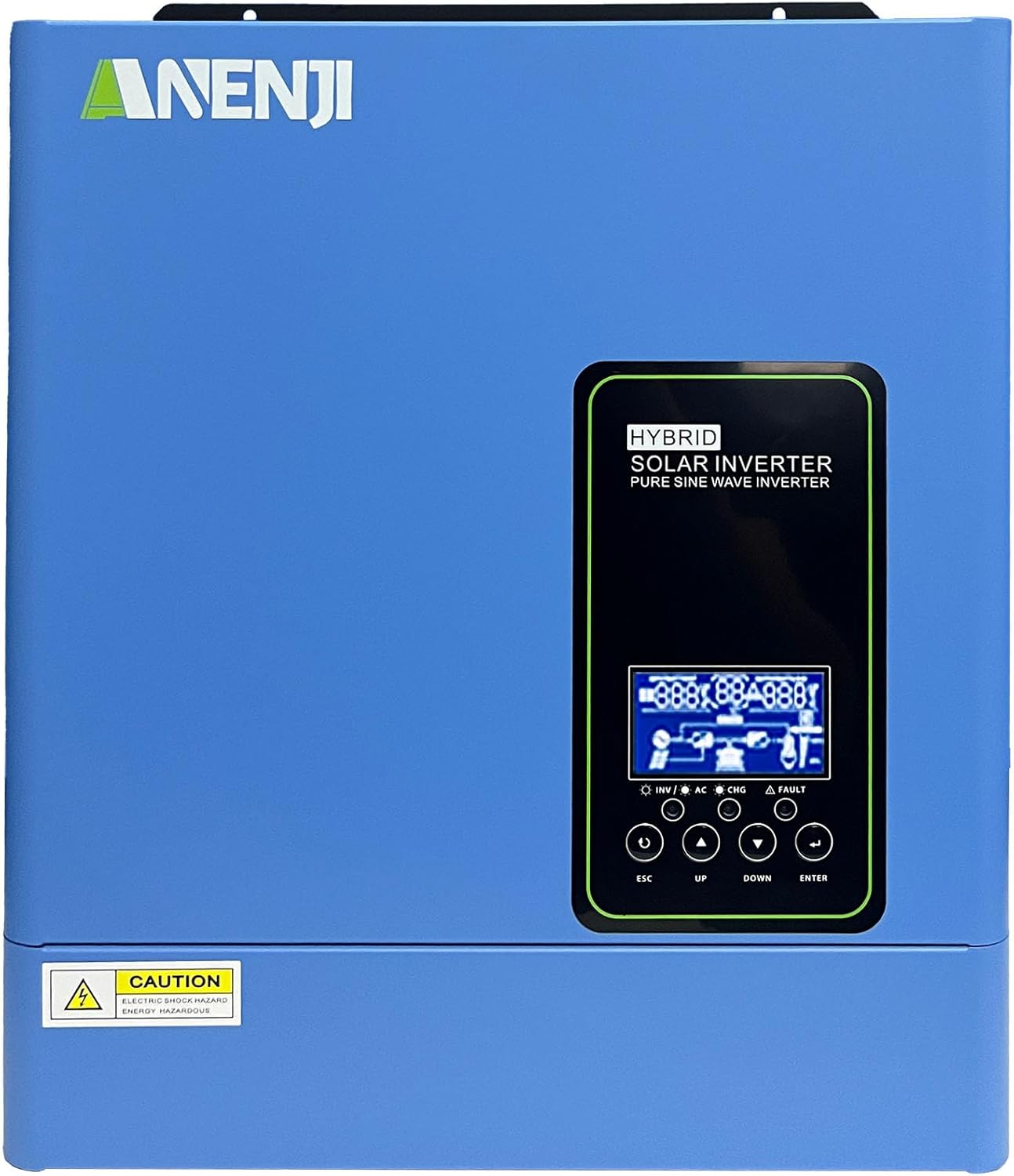
Obrázek 1.1: Přední strana view of the Aninerel 3000W Hybrid Solar Inverter. The inverter features a blue casing with the Aninerel logo and a central LCD display panel with control buttons.
2. Bezpečnostní pokyny
Vždy dodržujte následující bezpečnostní opatření, abyste snížili riziko úrazu elektrickým proudem, požáru nebo zranění:
- Read all instructions and cautionary markings on the unit and in this manual before installation or operation.
- Do not disassemble the inverter. Refer servicing to qualified personnel. Incorrect reassembly may result in electric shock or fire.
- Abyste snížili riziko úrazu elektrickým proudem, odpojte před jakoukoli údržbou nebo čištěním veškeré kabely.
- This inverter is designed for indoor or semi-outdoor use with an IP65 rating. Avoid direct exposure to rain or snow.
- Zajistěte dostatečné větrání kolem střídače, abyste zabránili přehřátí. Neblokujte větrací otvory.
- Use appropriate tools and personal protective equipment during installation.
- Ensure all wiring connections are tight and secure to prevent loose connections that can cause overheating.
- Do not connect the inverter to a public utility grid without proper authorization and safety measures.
3. Konec produktuview
The Aninerel 3000W Hybrid Solar Inverter integrates a pure sine wave inverter, an MPPT solar charge controller, and a battery charger into one compact unit. It is designed to provide uninterrupted power support.
3.1 Klíčové vlastnosti
- Výstupní výkon 3000 W s čistou sinusovou vlnou: Converts 24V DC to 110V AC, providing stable power for sensitive electronics.
- Integrated 100A MPPT Solar Charge Controller: Maximizes solar energy harvesting with up to 500VDC PV input.
- Flexible Charging and Output Modes: Offers multiple modes (Solar Only, AC Priority, Hybrid Charging; Mains Priority, PV Priority, Hybrid Output) for diverse power management.
- Široká kompatibilita baterií: Supports AGM, GEL, Lead-acid, Li-ion, and LiFePO4 24V batteries.
- Inteligentní LCD displej: Provides real-time monitoring and allows for easy configuration of system settings.
- Vestavěné Wi-Fi: Enables remote monitoring of the inverter status (registration required).
- Robustní design: IP65-rated enclosure for durability in various environments, with intelligent cooling.
- Komplexní ochrana: Zahrnuje overvoltage, podpaltage, reverse polarity, and short circuit protection.

Obrázek 3.1: Přední a zadní panelview. This diagram labels the LCD display, indicators, function buttons, RS485 communication port, grounding terminal, battery input, dry contact port, built-in Wi-Fi, AC input, AC output, PV input, and power on/off switch.
3.2 Přední panel a indikátory
- LCD displej: Shows system status, operational data, and configuration settings.
- Indikátor nabíjení: Illuminates to indicate battery charging status.
- Indikátor stavu: Provides general operational status of the inverter.
- Indikátor poruchy: Lights up to signal system errors or warnings.
- Funkční tlačítka (ESC, NAHORU, DOLŮ, ENTER): Used for navigating menus and adjusting settings on the LCD.
3.3 Připojení zadního panelu
- Komunikační port RS485: For external communication and monitoring.
- Uzemňovací terminál: Nezbytné pro bezpečnostní uzemnění.
- Vstup baterie: Connects to the 24V battery bank.
- Suchý kontaktní port: Pro externí ovládání nebo signalizaci.
- Built-in Wi-Fi Module: For wireless monitoring.
- AC vstup: Connects to grid utility or generator AC power.
- AC výstup: Připojuje se k domácím spotřebičům.
- PV vstup: Připojuje se k solárním panelům.
- Vypínač napájení: Řídí hlavní napájení střídače.
4. Instalace a nastavení
Proper installation is crucial for the safe and efficient operation of your hybrid solar inverter. Ensure all connections are made by a qualified electrician and adhere to local electrical codes.
4.1 Montáž střídače
- Vyberte vhodné místo, které je suché, dobře větrané a chráněné před přímým slunečním zářením a vlhkostí.
- Zajistěte dostatečný volný prostor kolem měniče pro správné proudění vzduchu a chlazení.
- Mount the inverter vertically on a sturdy surface using appropriate fasteners.
4.2 Zapojení kabeláže
Follow the wiring diagram carefully. All wiring should be performed with the inverter and all power sources disconnected.
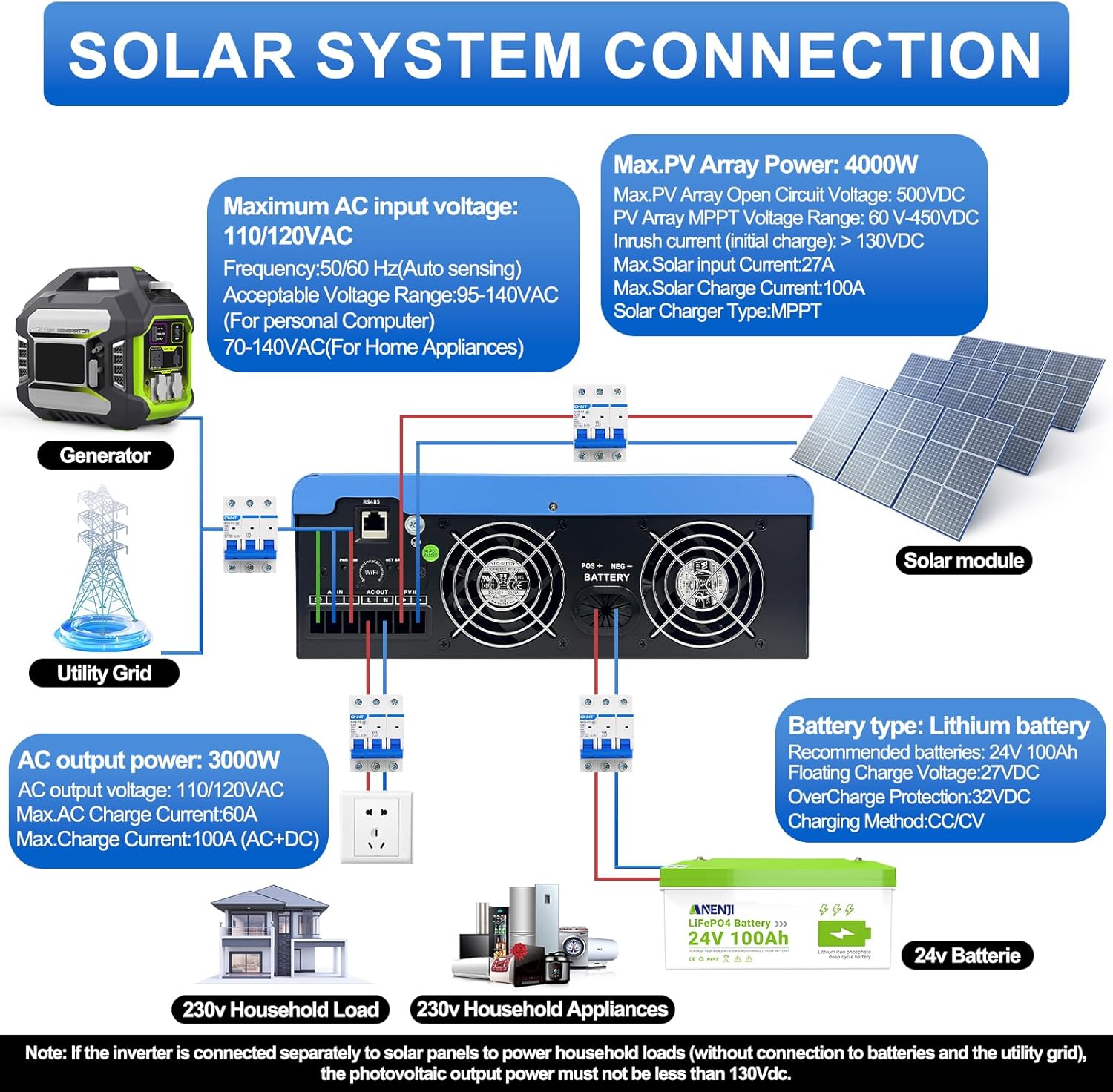
Figure 4.1: Solar System Connection Diagram. This diagram illustrates the connections for solar panels, generator, utility grid, 24V battery, and household loads to the inverter. It shows the PV input, battery input, AC input, and AC output terminals.
4.2.1 Připojení baterie
- Connect the 24V battery bank to the battery input terminals on the inverter. Ensure correct polarity (+ to + and - to -).
- Use appropriate cable gauges for the battery connections to handle the expected current.
- The ANJ-3KW-LV-WIFI model supports a 24-volt DC system and is recommended for use with batteries of at least 100 ampere-hours capacity.

Figure 4.2: Inverter Battery Connection. This diagram shows wiring configurations for both 12-volt and 24-volt battery systems, emphasizing correct series/parallel connections for the desired voltage.
4.2.2 PV (Solar Panel) Connection
- Connect the solar panel array to the PV input terminals. Observe correct polarity.
- Ensure the total open circuit voltage of the PV array does not exceed 500VDC.
- The MPPT voltage range is 60-450VDC. Ensure your PV array voltage falls within this range for optimal charging.
4.2.3 Připojení AC vstupu
- Connect the utility grid or generator AC power to the AC input terminals.
- The inverter supports 110/120VAC input with auto-sensing frequency (50/60Hz).
4.2.4 Připojení AC výstupu
- Connect your household loads or appliances to the AC output terminals.
- The inverter provides 3000W continuous AC output at 110/120VAC.
4.3 Počáteční zapnutí
- Po zajištění všech připojení nejprve zapněte jistič baterie.
- Poté zapněte jistič FV panelu (pokud je k dispozici).
- Finally, switch on the AC input breaker (if applicable) and the inverter's main power switch.
- Observe the LCD display for initial boot-up and status indicators.
5. Provoz
The inverter offers various configurable settings to optimize power management based on your specific needs.
5.1 LCD displej a nastavení
The LCD display provides real-time information and allows you to configure operational parameters using the function buttons.
- Použijte UP a DOLŮ tlačítka pro navigaci v možnostech nabídky.
- Stiskněte ENTER pro výběr možnosti nebo potvrzení nastavení.
- Stiskněte ESC to exit a menu or cancel an action.
5.2 Charging Priority Modes
These settings determine how the battery bank is charged from available power sources.

Figure 5.1: Charger Source Priority. This diagram illustrates three charging priority options: Solar First (solar panels charge first, AC input only if solar is unavailable), Solar and AC Input Simultaneously (both solar and utility charge at the same time), and Solar Only (solar energy is the exclusive charging source).
- Solární energie na prvním místě: Prioritizes solar power for charging. AC input will only charge the battery when solar power is insufficient or unavailable.
- AC Priority (Utility Priority): Prioritizes AC input (utility or generator) for charging. Solar power will supplement or take over if AC input is unavailable.
- Pouze solární: The inverter will only charge the battery bank from solar power. AC input will not be used for charging.
5.3 Output Priority Modes
These settings determine the power source for your connected loads.

Figure 5.2: Output Source Priority. This diagram shows three output priority options: Solar First (power from solar first, AC input supplements if solar is insufficient), AC First (redirects AC input to power loads, uses solar/batteries when AC is unavailable), and DC Priority (prioritizes solar first, then battery, then AC input only when voltage drops to a programmable value).
- Solar First (PV Priority): Prioritizes solar power to supply loads. If solar power is insufficient, the battery bank will supplement, and then AC input will be used.
- AC First (Mains Priority): Prioritizes AC input (utility or generator) to power loads. If AC input is unavailable, the inverter will switch to battery power.
- DC Priority (Battery Priority): Prioritizes solar power first, then battery power. AC input will only engage when the battery voltage drops below a programmable threshold.
5.4 Wi-Fi Monitoring
The built-in Wi-Fi module allows for remote monitoring of your inverter's performance and status via a dedicated application. Registration may be required to access this feature.

Figure 5.3: Wi-Fi Monitoring. This image depicts a user monitoring the hybrid inverter's status wirelessly via a smartphone application, highlighting the convenience of the built-in Wi-Fi feature.
6. Údržba
Regular maintenance helps ensure the longevity and optimal performance of your Aninerel Hybrid Solar Inverter.
- Čištění: Pravidelně čistěte vnější povrch střídače suchým hadříkem. Ujistěte se, že větrací otvory jsou bez prachu a nečistot.
- Spojení: Annually check all electrical connections (battery, PV, AC input/output) for tightness and corrosion. Tighten any loose connections.
- Prostředí: Zajistěte, aby teplota a vlhkost vzduchu v instalačním prostředí zůstaly v rámci specifikovaného rozsahu.
- Firmware: Zkontrolujte výrobce webwebu, kde najdete dostupné aktualizace firmwaru pro lepší výkon nebo nové funkce.
7. Řešení problémů
Tato část obsahuje řešení běžných problémů, se kterými se můžete setkat. Pokud problém přetrvává, kontaktujte zákaznickou podporu.
| Problém | Možná příčina | Řešení |
|---|---|---|
| Měnič se nezapíná | Žádné připojení baterie nebo nízká kapacita baterietage; Power switch off; Loose wiring. | Zkontrolujte připojení baterie a objtage; Ensure power switch is ON; Verify all wiring is secure. |
| Žádný AC výstup | Overload; Short circuit on output; Inverter in fault mode; Output priority setting. | Reduce load; Check for short circuits; Refer to LCD fault codes; Adjust output priority settings. |
| Battery not charging from solar | Low PV voltage; Incorrect PV connection; Solar charging disabled; Faulty solar panels. | Zkontrolujte objem FV panelutage (must be >60VDC); Verify PV polarity; Check charging priority settings; Inspect solar panels. |
| Upozornění na přehřátí | Insufficient ventilation; Excessive ambient temperature; Overload. | Ensure clear airflow around inverter; Relocate to cooler area; Reduce connected load. |
| Monitorování Wi-Fi nefunguje | No Wi-Fi signal; Incorrect app configuration; Registration issue. | Check Wi-Fi signal strength; Reconfigure app settings; Contact support for registration issues. |
8. Specifikace
Technical specifications for the Aninerel 3000W Hybrid Solar Inverter ANJ-3KW-LV-WIFI:
| Funkce | Specifikace |
|---|---|
| Číslo modelu | ANJ-3KW-LV-WIFI |
| Trvalý výkon | 3000W |
| Špičkový výstupní výkon | 6000W |
| DC vstupní voltage | 24V |
| Výstupní napětí ACtage | 110V AC |
| Výstupní průběh | Čistá sinusová vlna |
| Max. FV vstupní výkon | 4000W |
| Proud MPPT regulátoru | 100A |
| Max. PV Open Circuit Voltage | 500V DC |
| PV Array MPPT svtage Dosah | 60-450V DC |
| Max. Vstupní proud AC | 60A |
| Výstupní frekvence | 50/60 Hz (automatické snímání) |
| Kompatibilita baterie | AGM, GEL, Lead-acid, Li-ion, LiFePO4 (24V) |
| Hodnocení ochrany | IP65 |
| Rozměry produktu | 15 x 6.98 x 18 palce |
| Hmotnost položky | 16.5 libry |
9. Záruka a podpora
For warranty information, please refer to the warranty card included with your product or visit the official Aninerel website. For technical support, troubleshooting assistance, or service inquiries, please contact Aninerel customer service through their official channels.
Manufacturer: Shenzhen Anenji Energy Technology Co.,Ltd


