
CINMOORE CM-C2LU
CINMOORE 2.5K Pet/Dog Camera Instruction Manual
Model: CM-C2LU | Brand: CINMOORE
1. Úvod
The CINMOORE 2.5K Pet/Dog Camera is an advanced indoor security and monitoring solution designed to keep you connected to your home, pets, and loved ones. This camera features 2.5K Ultra HD video, Pan-Tilt-Zoom (PTZ) functionality, and AI-powered detection for persons, pets, and baby crying, all without monthly subscription fees. It also includes full-duplex two-way audio, color night vision, and flexible storage options to ensure comprehensive coverage and peace of mind.

Image: The CINMOORE 2.5K Pet/Dog Camera, showcasing its sleek design alongside a smartphone displaying live footage of a baby and a dog.
2. Co je v krabici
Upon unboxing your CINMOORE 2.5K Pet/Dog Camera, please verify that all the following components are included:
- CINMOORE 2.5K Pet/Dog Camera (x1)
- Mounting Screws (x1 set)
- Stručný průvodce (x1)
- Napájecí kabel (x1)

Image: All components included in the CINMOORE 2.5K Pet/Dog Camera package, neatly arranged on a wooden surface.
3. Nastavení
Follow these steps to set up your CINMOORE 2.5K Pet/Dog Camera:
- Zapnutí: Connect the camera to a power source using the provided power cable and adapter. The camera will power on automatically.
- Stáhněte si aplikaci: Download the 'Cinmoore' app from your smartphone's app store (Google Play or Apple App Store).
- Přidat zařízení: Open the app, create an account if you don't have one, and click the '+' icon to add a new device.
- Naskenujte QR kód: Scan the QR code located on the bottom of your camera using the app.
- Reset Camera (if needed): If prompted, reset the camera by pressing the reset button (located under the lens when tilted upwards) for 5 seconds until you hear a prompt, then press it twice.
- Připojení k Wi-Fi: Follow the in-app instructions to connect the camera to your 2.4GHz Wi-Fi network. (Note: 5GHz Wi-Fi is not supported).
- Pojmenujte svůj fotoaparát: Assign a memorable name to your camera within the app.
- Možnosti montáže: The camera can be placed on a tabletop, mounted on a wall, or ceiling. Use the included mounting screws and base if wall or ceiling mounting is desired.
Video: A quick start guide demonstrating the unboxing, power-on, and app connection process for the CINMOORE C2U Indoor Camera, highlighting the 1-minute setup.
4. Funkce Overview
The CINMOORE 2.5K Pet/Dog Camera is equipped with a range of features to enhance your home monitoring experience:
- 2.5K Ultra HD video: Poskytuje jasné a podrobné video footage, ensuring you don't miss any important moments.
- Funkce PTZ: Offers 360° horizontal and 109° vertical rotation, allowing you to remotely adjust the camera's view prostřednictvím aplikace.
- AI Detection (No Monthly Fee): Advanced AI for local detection of persons, pets, and baby crying, providing smart alerts without subscription costs.
- Plně duplexní obousměrný zvuk: Enables real-time, simultaneous two-way communication, allowing you to speak and listen through the camera.
- Color Night Vision 2.0: Ensures clear visibility in low-light conditions without disturbing sleeping babies or pets.
- 2.4GHz WiFi + Bluetooth Connectivity: Offers faster and more stable connection for seamless streaming.
- Flexibilní úložiště: Supports local storage via SD card (up to 256GB, not included) with advanced encryption, and optional AWS cloud storage.
- Režim soukromí: Allows you to physically conceal the camera lens for enhanced privacy when needed.
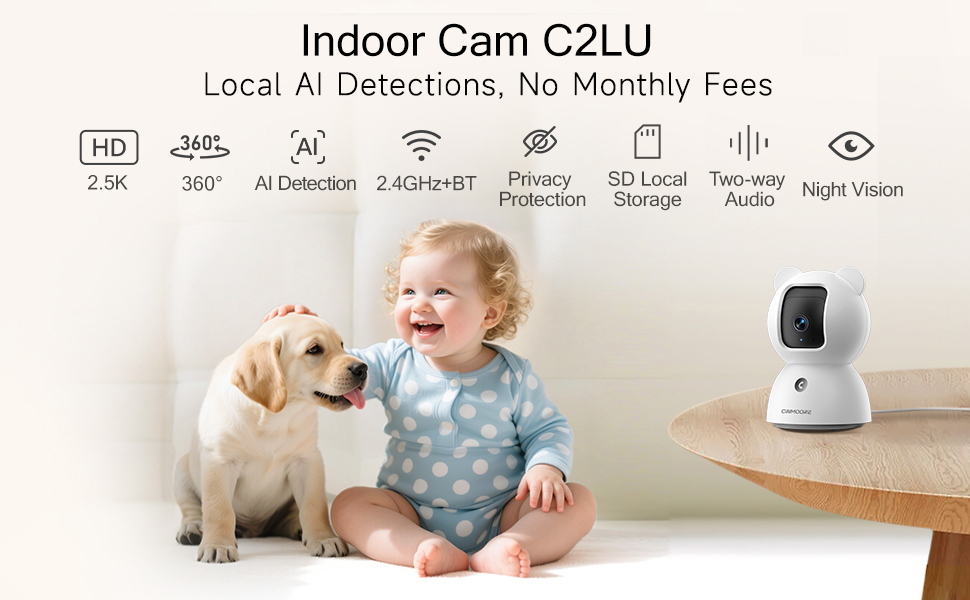
Image: A visual summary of the camera's key features, including its 2.5K resolution, pan-tilt capabilities, and various AI detection modes.
Video: A promotional video highlighting the simplicity and affordability of the CINMOORE camera, emphasizing its features for home monitoring.
5. Návod k obsluze
Utilize the 'Cinmoore' app to control and manage your camera:
- Žít View: Tap the camera image in the app to access the live video feed.
- Pan & Tilt: Use the directional arrows within the live view interface to remotely adjust the camera's horizontal (pan) and vertical (tilt) angles.
- Obousměrný rozhovor: Press and hold the microphone icon to speak through the camera. Release to listen. The camera also features a one-click call button for quick family alerts.
- Záznam: Initiate manual recording or set up continuous 24/7 recording to an SD card. Access recorded footage via the 'Record' tab.
- Inteligentní detekce a upozornění: Configure Person, Pet, and Baby Cry Detection settings. Customize detection zones and sensitivity levels to receive relevant alerts.
- Režim soukromí: Activate privacy mode through the app to physically close the camera lens, ensuring your privacy.
- Zvukový alarm: Utilize the siren feature or customize sound alarms for deterrence.

Image: Demonstrates the full duplex two-way talk feature, allowing seamless communication with pets.
6. Údržba
To ensure optimal performance and longevity of your CINMOORE 2.5K Pet/Dog Camera, follow these maintenance guidelines:
- Čištění: Jemně otřete objektiv a tělo fotoaparátu měkkým, suchým hadříkem. Nepoužívejte agresivní chemikálie ani abrazivní materiály, které by mohly poškodit povrch nebo objektiv.
- Aktualizace softwaru: Regularly check the 'Cinmoore' app for available firmware updates. Keeping your camera's software up-to-date ensures access to the latest features, security enhancements, and bug fixes.
- Umístění: Ujistěte se, že je kamera umístěna na stabilním místě, mimo dosah přímého slunečního záření, extrémních teplot a vysoké vlhkosti.
- Napájení: Abyste předešli poškození, používejte pouze originální napájecí adaptér a kabel dodaný s kamerou.
7. Řešení problémů
If you encounter issues with your CINMOORE 2.5K Pet/Dog Camera, refer to the following common troubleshooting tips:
- Fotoaparát offline:
- Check your Wi-Fi connection and ensure it is 2.4GHz.
- Verify the camera is powered on and the power cable is securely connected.
- Restartujte kameru odpojením a opětovným zapojením.
- Špatná kvalita videa:
- Ensure your Wi-Fi signal is strong where the camera is located.
- Očistěte čočku fotoaparátu měkkým hadříkem.
- Check app settings for video resolution and adjust if necessary.
- Žádná upozornění:
- Verify that detection settings (Person, Pet, Cry) are enabled in the app.
- Check app notification settings on your phone to ensure they are not blocked.
- Adjust detection sensitivity and zones.
- Problémy s obousměrným zvukem:
- Ensure your phone's microphone and speaker are enabled for the app.
- Check the camera's volume settings in the app.
8. Specifikace
| Funkce | Detail |
|---|---|
| Číslo modelu | CM-C2LU |
| Rozlišení záznamu videa | 2.5 tis |
| Vnitřní/venkovní použití | Krytý |
| Protokol připojení | Wi-Fi (pouze 2.4 GHz) |
| Zdroj napájení | Elektrický kabel |
| Typ montáže | Ceiling Mount / Tabletop Mount / Wall Mount |
| Typ upozornění | Person Detection, Pet Detection, Cry Detection |
| Maximální podporovaná velikost paměti Flash | 256 GB (SD card not included) |
| Možnosti audiovizuálního nahrávání | Audio, Video |
| Rozměry produktu | 3 x 3 x 4.5 palce |
| Hmotnost položky | 11.7 unce |
9. Záruka a podpora
The CINMOORE 2.5K Pet/Dog Camera comes with a manufacturer's warranty. For specific warranty details, including coverage period and terms, please refer to the warranty card included in your product packaging or contact CINMOORE customer support directly. For technical assistance, troubleshooting, or any other inquiries, please visit the official CINMOORE webnebo kontaktujte jejich tým zákaznických služeb.
Ask a question about this manual
Ask about setup, troubleshooting, compatibility, parts, safety, or missing instructions. Manuals+ will review the question and use this page’s manual context to help answer it.