
Zavedení
This user manual provides detailed instructions for the installation, operation, maintenance, and troubleshooting of your LongPlus 8MP 4K UHD PoE Wired Security Camera Outdoor, Model LP8MEF8. This camera is designed to deliver high-quality surveillance with advanced features for enhanced security. Please read this manual thoroughly before using the product to ensure proper setup and functionality.
Co je v krabici
Carefully unpack the box and ensure all items are present and in good condition. If any items are missing or damaged, please contact LongPlus customer support.
- 1 x LongPlus Dome Camera
- 1 x barevný box
- 1 x výstražné samolepky
- 1 x Polohovací nálepka
- 1 x Foam Bag/1 x Protective Film
Konec produktuview
Klíčové vlastnosti
- Rozlišení 4K UHD: Captures video at 3840x2160 pixels with a 132° wide viewing angle and HDR for clear, detailed footage.
- Detekce pohybu s umělou inteligencí: Advanced object detection for humans and vehicles, with customizable activity zones and privacy masks to reduce false alerts.
- Triple Night Vision Modes: Offers IR Night Vision, Color Night Vision, and Smart Night Vision for clear visibility up to 100ft (30m) in various lighting conditions.
- Two-Way Audio & Strobe Light Alarm: Communicate with visitors or deter intruders using the built-in speaker and microphone, complemented by an automatic strobe light and siren alarm.
- Odolný design: IP67 weatherproof metal housing ensures reliable operation in extreme weather conditions (-30°C to 60°C / -22°F to 140°F).
- Vzdálený přístup: Sledujte živé footage and recordings via the Longvision app, compatible with iOS, Mac, Windows, and Android devices. Supports up to 32 users.
- Efektivní úložiště: Utilizes H.265 High Efficiency Video Coding to optimize storage space. Supports local storage (via NVR, up to 10TB expandable) and cloud storage options.
- PoE konektivita: Power over Ethernet (PoE) simplifies installation by delivering power, audio, and video through a single Ethernet cable.
Komponenty fotoaparátu
The LongPlus LP8MEF8 camera features a robust dome design with integrated LED spotlights for color night vision, an infrared sensor for IR night vision, a lens, and a microphone/speaker for two-way audio. The durable metal housing provides protection against environmental elements.

Image: The LongPlus LP8MEF8 camera highlighting its IP67 weatherproof rating for all-season security and durable metal housing for efficient heat dissipation.

Image: Illustration of the camera's 132-degree wide field of view, capturing a broad area in 4K UHD resolution.
Nastavení
1. Planning Installation Location
Choose a suitable location for your camera, considering the desired viewing area, proximity to an NVR or PoE switch, and protection from direct impact. The camera is IP67 weatherproof, making it suitable for outdoor use in various conditions.
2. Montáž kamery
- Use the provided positioning sticker to mark the drill holes on the mounting surface.
- Drill holes according to the marks. Insert wall anchors if mounting on masonry.
- Připevněte základnu kamery k montážnímu povrchu pomocí šroubů.
- Upravte úhel kamery tak, aby pokrýval požadovanou oblast.
3. Připojení fotoaparátu
The LP8MEF8 camera uses Power over Ethernet (PoE) for simplified connectivity.
- Připojte jeden konec ethernetového kabelu k portu PoE kamery.
- Connect the other end of the Ethernet cable to a PoE-enabled NVR (Network Video Recorder) or a PoE switch.
- Ensure the NVR/PoE switch is powered on. The camera will receive power and transmit data through this single cable.

Image: Diagram showing the easy plug-and-play PoE connection between the LongPlus camera and an NVR, supporting distances up to 660ft.
4. Initial Configuration (via NVR or App)
Refer to your NVR's manual for specific camera addition procedures. Generally, the NVR will automatically detect PoE cameras. For app-based setup:
- Stáhněte si Longvision aplikaci z App Storu (iOS) nebo Obchodu Google Play (Android).
- Zaregistrujte si účet a přihlaste se.
- Postupujte podle pokynů v aplikaci a přidejte kameru. Obvykle to zahrnuje naskenování QR kódu na kameře nebo ruční zadání ID zařízení.
- Po přidání můžete view živé footaga nakonfigurujte nastavení.
Návod k obsluze
1. Živě View a přehrávání
- Open the Longvision app or access your NVR interface.
- Select the desired camera to view živé footage.
- Použijte funkci přehrávání k opětovnémuview nahrané video.
2. Režimy nočního vidění
Kamera podporuje tři režimy nočního vidění:
- IR noční vidění: Provides black and white video using infrared LEDs in low-light conditions.
- Barevné noční vidění: Využívá vestavěné reflektory pro zajištění plnobarevného videa i za slabého osvětlení.
- Chytré noční vidění: Automatically switches between IR and color modes based on detected motion or light conditions.
You can switch between these modes via the Longvision app or NVR settings.

Image: Visual representation of the three night vision modes (Full-Color, AI, IR) available on the LongPlus camera, adapting to various lighting scenarios.
3. Detekce pohybu a upozornění s umělou inteligencí
- Povolit detekci: In the app/NVR settings, enable AI motion detection for humans and/or vehicles.
- Zóny aktivity: Definujte specifické oblasti v záběru kamery view where motion detection should be active. This helps filter out irrelevant alerts.
- Maska ochrany osobních údajů: Configure privacy zones to block out sensitive areas from being recorded.
- Oznámení: Set up push notifications to receive real-time alerts on your mobile device when motion is detected.

Image: The camera's smart AI motion detection feature, capable of distinguishing between persons and vehicles to provide more accurate alerts.
4. Two-Way Audio and Alarm Functions
- Obousměrný zvuk: Use the microphone and speaker in the Longvision app to communicate with individuals near the camera.
- Strobe Light & Siren Alarm: When motion is detected, the camera can automatically trigger a strobe light and siren to deter intruders. This can also be manually activated via the app.

Image: A scenario depicting the camera's two-way audio and strobe light alarm features, allowing interaction and deterrence.
5. Režimy nahrávání
The camera supports various recording options when connected to a compatible NVR:
- Záznam spouštěný pohybem: Records only when motion is detected (default).
- Scheduled recording: Záznamy v určitých denních dobách.
- 24/7 continuous recording: Records continuously.
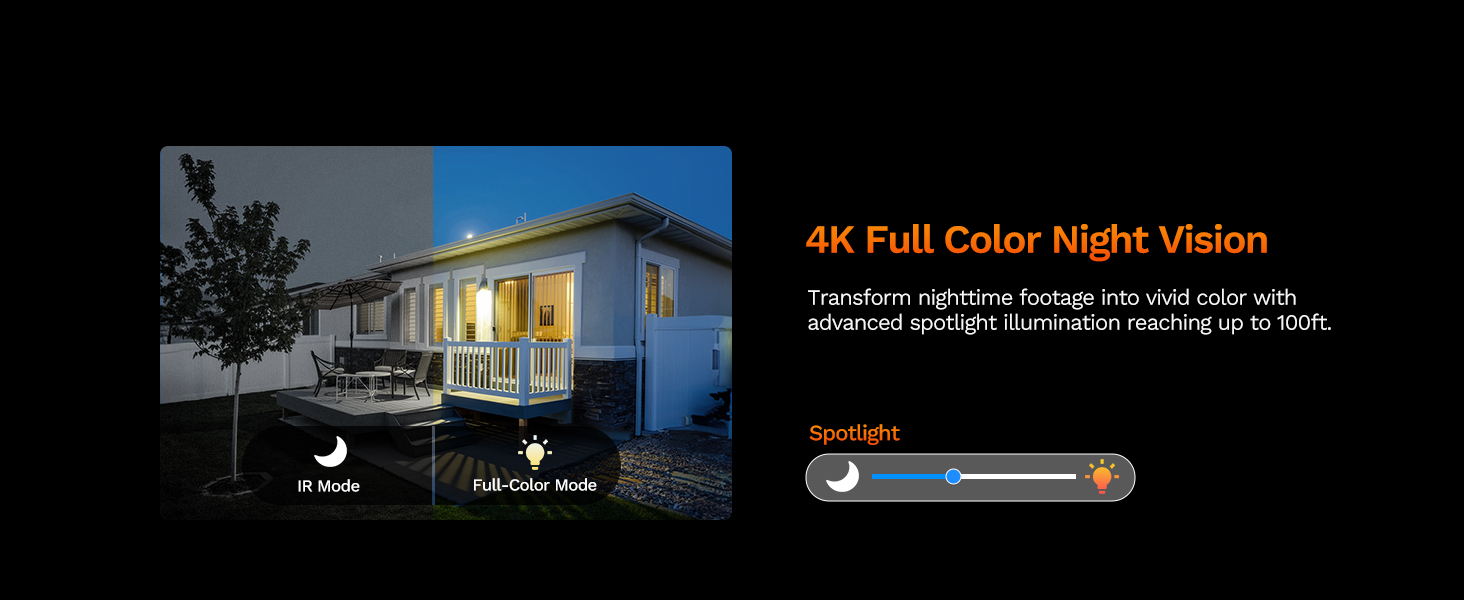
Image: The LongPlus NVR illustrating the benefits of H.265 (HEVC) video compression for saving storage space while maintaining video quality.
Údržba
- Čištění: Pravidelně čistěte objektiv a kryt fotoaparátu měkkým hadříkemamp hadříkem. Nepoužívejte abrazivní čisticí prostředky, které by mohly poškrábat čočku.
- Aktualizace firmwaru: Check the Longvision app or LongPlus website periodically for firmware updates. Keeping your camera's firmware updated ensures optimal performance and security.
- Kontrola kabelů: Periodically inspect the Ethernet cable for any signs of wear or damage, especially in outdoor installations. Ensure connections are secure.
- Kontroly vlivů na životní prostředí: Ujistěte se, že žádné překážky neblokují kameru view or interfering with its sensors.
Odstraňování problémů
If you encounter issues with your LongPlus camera, refer to the following common problems and solutions:
| Problém | Možná příčina | Řešení |
|---|---|---|
| Žádný kanál videa | No power; Loose cable connection; Network issue. | Check PoE connection to NVR/switch. Ensure NVR/switch is powered on. Verify Ethernet cable integrity. |
| Špatná kvalita obrazu | Znečištěný objektiv; Nedostatečné osvětlení; Problémy s šířkou pásma sítě. | Clean the camera lens. Ensure adequate lighting for color night vision or switch to IR mode. Check network speed. |
| Detekce pohybu nefunguje | Detection disabled; Incorrect sensitivity; Activity zone not set correctly. | Enable motion detection in app/NVR settings. Adjust sensitivity. Verify activity zone configuration. |
| Nelze se připojit k aplikaci | Incorrect network settings; App issues; Camera not online. | Ensure camera is connected to the network. Restart camera and router. Re-add camera to the app. Check app permissions. |
| Nefunguje obousměrný zvuk | Microphone/speaker disabled; Volume too low; Network latency. | Check audio settings in the app. Adjust volume levels. Ensure stable network connection. |
If the problem persists after trying these solutions, please contact LongPlus customer support for further assistance.
Specifikace
| Funkce | Popis |
|---|---|
| Značka | LongPlus |
| Číslo modelu | LP8MEF8 |
| Technologie připojení | Wired (Power over Ethernet - PoE) |
| Rozlišení záznamu videa | 4K UHD (3840x2160) |
| Technologie optických senzorů | CMOS |
| Typ objektivu | Opraveno |
| Viewúhel | 132 stupňů |
| Noční vidění | Yes, up to 100 Feet (30m) range (IR, Color, Smart modes) |
| Snímková frekvence | 30 snímků za sekundu |
| Režimy záznamu | Motion-triggered, Scheduled, 24/7 (via NVR) |
| Speciální funkce | H.265 Video Coding, Siren Alarm, Strobe Light Alarm, Two-Way Audio, Vehicle/Person Detection, Activity Zones, Privacy Mask, IP67 Waterproof |
| Zdroj napájení | Kabelové elektrické napájení (PoE) |
| Provozní teplota | -30 °C až 60 °C (-22 °F až 140 °F) |
| Kompatibilní zařízení | Cameras, Laptops, Personal Computers, Smartphones |
| Podpora operačního systému | Android, Mac OS, Windows, iOS |
| Rozměry položky | 3.3 x 3.3 x 3.5 palce |
| Barva | Bílý |
Záruka a podpora
Informace o záruce
LongPlus provides a 2-letá záruka for this product from the date of purchase. This warranty covers manufacturing defects and ensures the product meets its specified performance standards under normal use.
Technická podpora
LongPlus offers doživotní technickou podporu for its customers. If you have any questions, require assistance with setup, operation, or troubleshooting, or encounter any issues not covered in this manual, please do not hesitate to contact our professional technical team. We are committed to responding to your inquiries within 24 hours.
For support, please visit the official LongPlus webwebu nebo se podívejte na kontaktní informace uvedené na obalu produktu.