
1. Úvod
This manual provides detailed instructions for the FULODE X1-16C 16-Channel Audio Mixer. Please read this manual thoroughly before operating the device to ensure proper usage and to maximize its performance and longevity. This professional audio console is designed for various applications including studio recording, live performances, DJ events, and karaoke.

2. Bezpečnostní informace
To prevent electric shock, fire, or damage to the device, please observe the following safety precautions:
- Neotevírejte zařízení casing. Veškerý servis svěřte kvalifikovanému personálu.
- Zajistěte napájení objtage odpovídá požadavkům uvedeným na zařízení.
- Keep the device away from water, moisture, and excessive heat.
- Do not operate the device if the power cord is damaged or frayed.
- Před čištěním nebo údržbou vždy odpojte napájení.
- Používejte pouze nástavce/příslušenství specifikované výrobcem.
3. Obsah balení
Ověřte, zda jsou v balení přítomny všechny položky:
- FULODE X1-16C 16-Channel Audio Mixer
- Power Adapter (AC 90-240V, 50-60Hz)
- Uživatelská příručka
4. Konec produktuview: Ovládací prvky a připojení
The FULODE X1-16C mixer features a comprehensive layout for intuitive control over your audio. Familiarize yourself with the various inputs, outputs, and control elements.

4.1 Ovládací prvky na předním panelu
- Composite Interface: Combination XLR/TRS input for microphones and line-level signals.
- Fantomový spínač: Aktivuje fantomové napájení +48V pro kondenzátorové mikrofony.
- Úprava zisku: Ovládá vstupní citlivost každého kanálu.
- Treble/Midrange/Bass Adjustment (3-Band EQ): Ovládání ekvalizace pro vysoké, střední a nízké frekvence na každém kanálu.
- AUX Adjustment: Controls the auxiliary send level for external effects or monitor mixes.
- Adjustment of Effect: Controls the amount of internal DSP effect applied to the channel.
- Pan Balance: Upravuje stereo pozici signálu kanálu.
- Channel Mute Switch: Ztlumí nebo zapne zvuk jednotlivých kanálů.
- Channel Volume Pusher: Fader to control the output level of each channel.
- Reverberation Effect Selection: Knob to select from 99 built-in DSP effects.
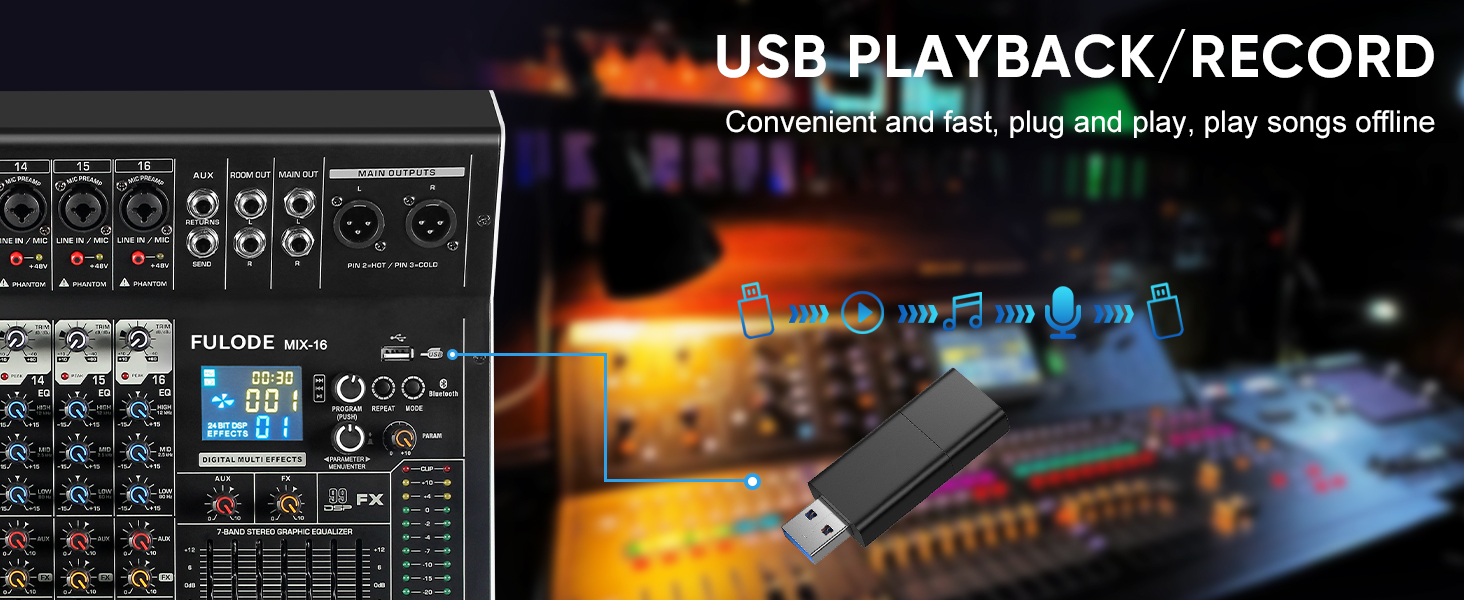
- Přehrávání USB/MP3: Section for USB drive and Bluetooth audio input, with transport controls and digital display.
- Kontrolka hladiny: Visual display of output levels.
- Main Channel Seven Segment Balance: Graphic equalizer for the main stereo output.
- Nastavení hlasitosti monitoru: Ovládá hlasitost sluchátkového výstupu.
- Effect Main Volume Adjustment: Ovládá celkovou úroveň vybraného DSP efektu.
- Left/Right Main Volume Adjustment: Faders for the main stereo output.
- Earphone Monitoring Interface: 1/4" jack for headphone monitoring.
- MP3 Main Volume Adjustment: Controls the output level of the USB/MP3/Bluetooth section.
4.2 Připojení zadního panelu
- Vypínač: Zapíná nebo vypíná mixér.
- Napájecí rozhraní: Připojuje se k dodanému napájecímu adaptéru.
5. Nastavení
Follow these steps for initial setup of your FULODE X1-16C Audio Mixer.
5.1 Připojení napájení
- Ujistěte se, že je vypínač mixéru v poloze VYPNUTO.
- Connect the power adapter to the Power Interface on the rear panel of the mixer.
- Plug the power adapter into a suitable AC power outlet (110V).
- Turn the mixer's power switch to the ON position. The digital display should illuminate.
5.2 Připojení mikrofonů a nástrojů
- For microphones or line-level instruments, connect them to the Composite Interface (XLR or 1/4" TRS) on the desired channel.
- Pokud používáte kondenzátorový mikrofon, stiskněte tlačítko Fantomový spínač (+48V) for that specific channel. An indicator light will confirm activation.
- Upravte Úprava zisku knob for each input channel to achieve an optimal signal level without clipping.

5.3 Připojení výstupních zařízení
- Připojte hlavní reproduktory nebo ampživější k Main Output Interface (XLR or 1/4" TRS) on the top right of the mixer.
- For monitoring, connect headphones to the Earphone Monitoring Interface.
6. Návod k obsluze
6.1 Ovládání kanálů
- Získat: Adjust the input gain for each channel to prevent clipping (indicated by the PEAK LED) and ensure a strong signal.
- 3pásmový EQ: Use the HI, MID, and LOW knobs to shape the tone of each input.
- AUX: Control the amount of signal sent to the auxiliary output for external effects or monitor mixes.
- FX: Adjust the level of the internal DSP effect applied to the channel.
- PÁNEV: Position the channel's signal in the stereo field (left to right).
- Ztlumit: Press the MUTE button to instantly silence a channel.
- Fader kanálu: Use the fader to control the overall volume of the channel in the main mix.
6.2 DSP efekty
The mixer includes 99 built-in 24-bit DSP effects for enhancing your sound.
- Použijte Reverberation Effect Selection knob to browse through the 99 available effects (e.g., Warm Room, Bright Room, Hall, Plate, Chorus, Delay). The digital display will show the selected effect number.
- Stisknutím knoflíku potvrďte svůj výběr.
- Upravte Effect Main Volume Adjustment to control the overall wet/dry mix of the effects.
- Use the individual channel's FX knob to send more or less of that channel's signal to the effects processor.

6.3 USB/MP3/Bluetooth Playback
The mixer supports audio playback from USB drives and Bluetooth-enabled devices.
- USB přehrávání: Vložte USB disk obsahující MP3 files into the USB port. Use the transport controls (Play/Pause, Skip) and the MP3 Main Volume Adjustment pro ovládání přehrávání.
- Připojení Bluetooth: Press the MODE button on the USB/MP3 section until 'BT' appears on the digital display. On your smart device, search for 'MIX-BT' (or similar) and pair. Once connected, you can stream audio wirelessly to the mixer.


6.4 Main Output and Monitoring
- Použijte Left/Right Main Volume Adjustment faders to control the overall output level of the mix.
- The Kontrolka hladiny provides visual feedback on the main output levels. Adjust faders to keep levels within the optimal range (avoiding red/clipping).
- The Main Channel Seven Segment Balance (graphic EQ) allows for fine-tuning the overall frequency response of your main mix.
- Upravte Monitor Volume Adjustment for comfortable listening through headphones.

6.5 Oficiální videoukázka produktu
Watch this video for a visual demonstration of the FULODE mixer's features and operation. Note: The video features a MIX-12 model, which shares many similar functionalities with the X1-16C.
7. Údržba
Správná údržba zajistí dlouhou životnost a optimální výkon vašeho mixéru.
- Čištění: Use a soft, dry cloth to wipe the surface of the mixer. Do not use liquid cleaners or solvents, as they may damage the finish or internal components.
- Skladování: Store the mixer in a cool, dry place away from direct sunlight and extreme temperatures. If storing for extended periods, cover the unit to protect it from dust.
- Větrání: Zajistěte dostatečné větrání kolem mixéru, abyste zabránili přehřátí. Neblokujte větrací otvory.
8. Řešení problémů
If you encounter issues with your FULODE X1-16C mixer, refer to the following common problems and solutions:
| Problém | Možná příčina | Řešení |
|---|---|---|
| Žádná síla | Power cable not connected; Power switch off; Faulty power adapter/outlet | Zkontrolujte připojení napájecího kabelu; Ujistěte se, že je vypínač zapnutý; Zkuste jinou zásuvku nebo adaptér. |
| Z kanálu není žádný zvuk | Channel muted; Gain too low; Cable issue; Phantom power not activated (for condenser mics) | Check MUTE button; Increase Gain; Verify cable connections; Activate +48V phantom power if needed. |
| No sound from main output | Main faders down; Output cables disconnected; Ampvypnutý zvukový signál/reproduktory | Raise Main Volume faders; Check output cable connections; Ensure amplifier/speakers are powered on and connected. |
| Bluetooth se nepřipojuje | Mixer not in Bluetooth mode; Device too far; Already connected to another device | Press MODE until 'BT' appears; Ensure device is within 33 ft; Disconnect from other devices. |
| Zkreslený zvuk | Gain too high (clipping); EQ settings extreme; Faulty cable/microphone | Reduce Gain (ensure PEAK LED is not constantly lit); Adjust EQ to neutral or moderate settings; Test with different cables/microphones. |
9. Specifikace
Technical specifications for the FULODE X1-16C 16-Channel Audio Mixer:
- Model: X1-16C
- Počet kanálů: 16
- DSP efekty: 99 built-in 24-bit effects
- Vyrovnání: 3-band EQ per channel, 7-band graphic EQ on main output
- Fantomová síla: +48V (přepínatelné pro každý kanál)
- Konektivita: USB (playback/recording), Bluetooth, XLR, 1/4" TRS
- Zdroj napájení: Elektrický kabel
- svtage: 110 voltů (AC)
- Rozměry produktu: 15.55"H x 18.9"Š x 4.13"V (39.5 cm H x 48 cm Š x 10.5 cm V)
- Hmotnost položky: 18.16 libry (8.24 kg)
10. Záruka a podpora
For warranty information and technical support, please refer to the documentation included with your purchase or contact FULODE customer service through their official channels. Keep your proof of purchase for any warranty claims.