
Zavedení
This manual provides detailed instructions for the assembly, operation, and maintenance of your Lightdot 47x24 Inches Computer Desk. Please read thoroughly before use to ensure proper setup and safe operation.
Bezpečnostní informace
- Stůl vždy sestavujte na stabilním a rovném povrchu.
- Nepřetěžujte stůl nad jeho nosnost.
- Udržujte pracovní prostor bez překážek, abyste předešli nebezpečí zakopnutí.
- Ensure all electrical connections are secure and comply with local safety standards.
Nastavení a montáž
The Lightdot computer desk is designed for easy assembly. Follow these steps for a quick and secure setup. An assembly video is provided below for visual guidance.
Video: Assembly instructions for the Lightdot 47x24 Inches Computer Desk, demonstrating step-by-step setup including attaching legs, securing the desktop, and installing the power outlet module.
Krok 1: Rozbalení komponent. Carefully remove all parts from the packaging. Verify all components are present against the included parts list. Lay out the parts on a soft, clean surface to prevent scratches.

Image: All desk components, including the desktop, metal frame parts, and hardware, laid out for assembly. Key dimensions are indicated.
Krok 2: Sestavte rám. Attach the metal legs to the crossbars using the provided screws and tools. Ensure all connections are firm and stable. The X-shaped leg design provides enhanced stability.

Obrázek: Podrobný view of a desk leg being secured with a screw, illustrating the assembly process. Also shows the adjustable leveling feet.
Step 3: Attach the Desktop. Carefully place the desktop onto the assembled frame. Align the pre-drilled holes and secure the desktop with the remaining screws. Ensure the baffle is correctly oriented.
Step 4: Install Power Outlets. Insert the power strip module into the designated slot on the desktop. Secure it with the provided screws. Connect the desk's power cord to a functional wall outlet.
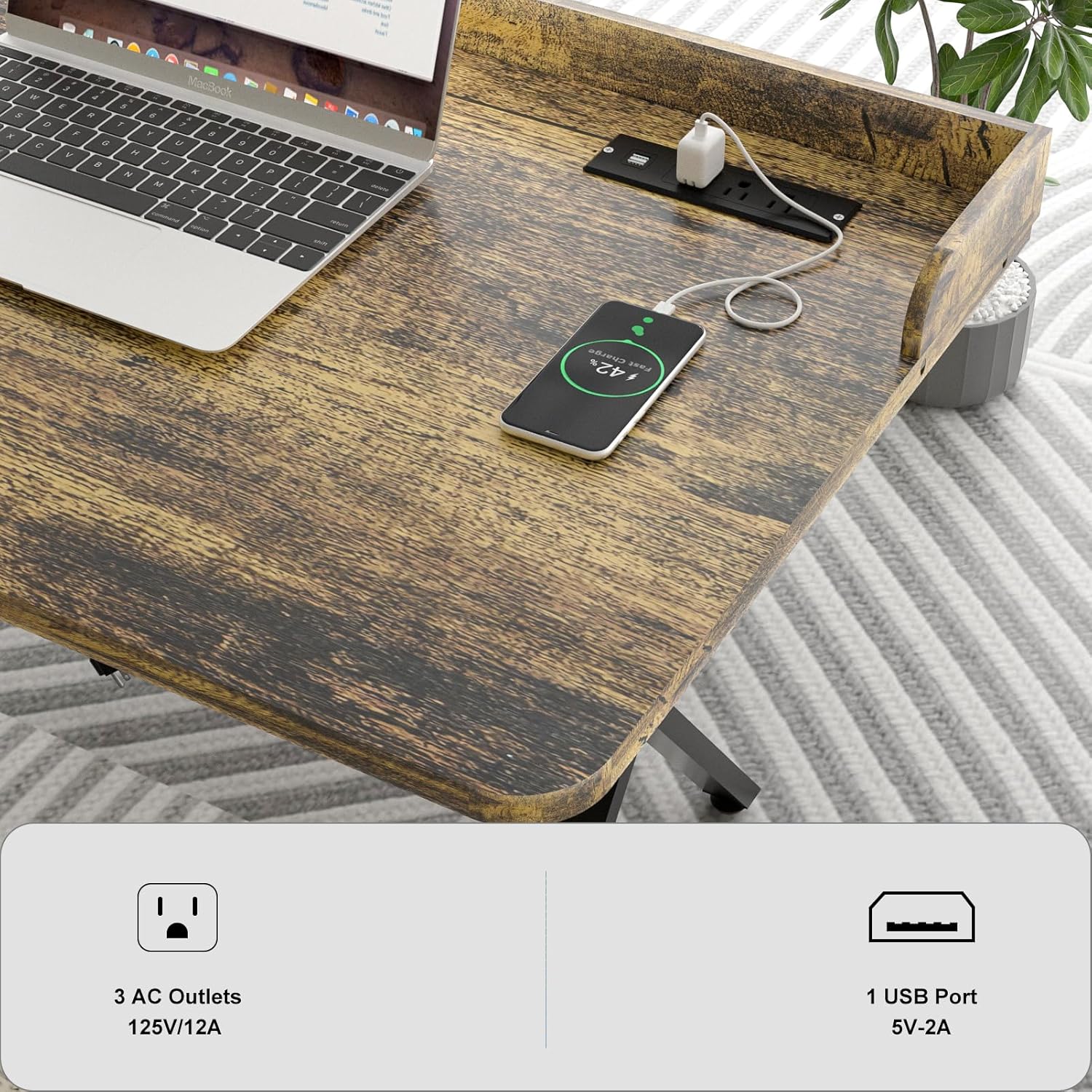
Image: The integrated power strip with 3 AC outlets and 2 USB ports, demonstrating device charging capabilities.
Návod k obsluze
Your Lightdot computer desk is designed for versatile use in various environments, providing a functional and stable workspace.
Zásuvky a USB porty
The integrated power strip provides 3 AC outlets and 2 USB ports for convenient charging of your electronic devices. Simply plug in your devices to power them. The power strip can be easily installed on either the left or right side of the desk to suit your setup preferences.
Všestranné použití
This desk is suitable for various activities and settings:
- Home Office: Ideal for computers, monitors, and essential office supplies, providing an organized workspace.
- Hraní: Offers a stable and spacious surface for gaming setups, including monitors, keyboards, and consoles.
- Studie: Provides a comfortable and focused environment for reading, writing, and academic tasks.
- Ložnice: Functions as a compact workstation, vanity, or personal desk, fitting well into smaller spaces.

Image: The Lightdot desk configured as a home office workstation with a laptop and accessories, showcasing jeho funkční design.

Image: The Lightdot desk used as a gaming station, complete with a monitor, keyboard, mouse, and gaming accessories, highlighting its suitability for entertainment.
Údržba
To maintain the appearance and longevity of your Lightdot computer desk, follow these simple care instructions:
- Wipe the desk surface with a dry, soft cloth to remove dust and debris.
- Nepoužívejte agresivní chemikálie, abrazivní čisticí prostředky nebo leštidla, které by mohly poškodit povrchovou úpravu.
- Protect the surface from excessive moisture, spills, and direct heat sources to prevent warping or discoloration.
- Regularly check and tighten all screws and fasteners to ensure the desk remains stable.
Odstraňování problémů
If you encounter any issues with your Lightdot computer desk, refer to the following common troubleshooting tips:
Stůl se chvěje
If the desk feels unstable or wobbles, first ensure all assembly screws are securely tightened. Then, adjust the leveling feet located at the bottom of each leg. Rotate them clockwise or counter-clockwise until the desk is stable on uneven floors.
Elektrické zásuvky nefungují
Verify that the desk's main power cord is securely plugged into a functional wall outlet. Check if the integrated power strip module is properly seated and connected within its slot on the desktop. If issues persist, ensure the wall outlet itself is receiving power.
Specifikace
Detailed specifications for the Lightdot 47x24 Inches Computer Desk:
| Funkce | Detail |
|---|---|
| Značka | Lightdot |
| Název modelu | 47x24 Inches Computer Desk with Power Outlets & USB |
| Rozměry produktu (D x Š x V) | 24"H x 47"Š x 29.5"V |
| Barva | Rustikální hnědá |
| Typ horního materiálu | Dřevo |
| Typ materiálu rámu | Kov |
| Elektrické zásuvky | 3 zásuvky střídavého proudu (125 V/12 A) |
| USB porty | 2 USB Ports (5V-2A) |
| Montáž Vyžadována | Ano |
Image: Detailed diagram illustrating the dimensions of the desk and its components, including the power cord length.
Informace o záruce
This Lightdot product comes with a limited warranty. For specific details regarding warranty coverage, duration, and terms, please refer to the warranty documentation included with your purchase. Keep your proof of purchase for warranty claims.
Zákaznická podpora
For further assistance, questions, or to report any issues with your Lightdot 47x24 Inches Computer Desk, please contact Lightdot customer support.
Výrobce: Lightdot
Internetový obchod: Visit the Lightdot Store on Amazon