
Zavedení
Welcome to your WESEARY WG1 Wireless Gaming Headset. This manual provides instructions for setup, operation, maintenance, and troubleshooting to ensure optimal performance and enhance your gaming experience across multiple platforms.
Konec produktuview
The WESEARY WG1 is a versatile wireless gaming headset designed for multi-platform compatibility, featuring both 2.4GHz wireless and Bluetooth connectivity. It includes a 50mm dynamic driver for immersive 3D stereo sound, an Environmental Noise Cancellation (ENC) microphone for clear communication, and dynamic LED lighting for a personalized aesthetic.
Obsah balení
- Bezdrátová herní náhlavní souprava WESEARY WG1
- 2.4GHz USB dongle
- Nabíjecí kabel USB-C
- Uživatelská příručka
Nastavení a připojení
Nabíjení náhlavní soupravy
Before initial use, fully charge the headset. Connect the USB-C end of the provided charging cable to the headset's charging port and the USB-A end to a compatible power source (e.g., computer USB port, USB wall adapter). A full charge typically takes approximately 2.5 hours.
2.4GHz Wireless Connection (for Xbox Series X|S, Xbox One, PS5, PS4, PC, Switch, Mac)
- Power on the headset by long-pressing the power button for 3 seconds.
- Insert the 2.4GHz USB dongle into an available USB port on your gaming console or PC.
- The headset should automatically connect to the dongle. The LED indicator on the headset will display a stable light when connected.
- For Xbox consoles: The 2.4GHz dongle must be plugged into an official Xbox controller. It is not compatible with third-party controllers.

Image: Illustration of the 2.4GHz dongle being inserted into an Xbox controller's USB port, ensuring a firm connection for stable audio.
Bluetooth Connection (for PC, Mac, Switch, Mobile Devices, Laptops, Tablets)
- Zapněte náhlavní soupravu.
- Press and hold the microphone button for 2 seconds to switch to Bluetooth mode. The LED indicator will flash, indicating pairing mode.
- On your device, navigate to Bluetooth settings and select "WESEARY WG1" from the list of available devices.
- Once paired, the LED indicator on the headset will display a stable light.
Note: Bluetooth mode is not compatible with PS4, PS5, or any Xbox consoles. The microphone is not compatible with Nintendo Switch in any mode.
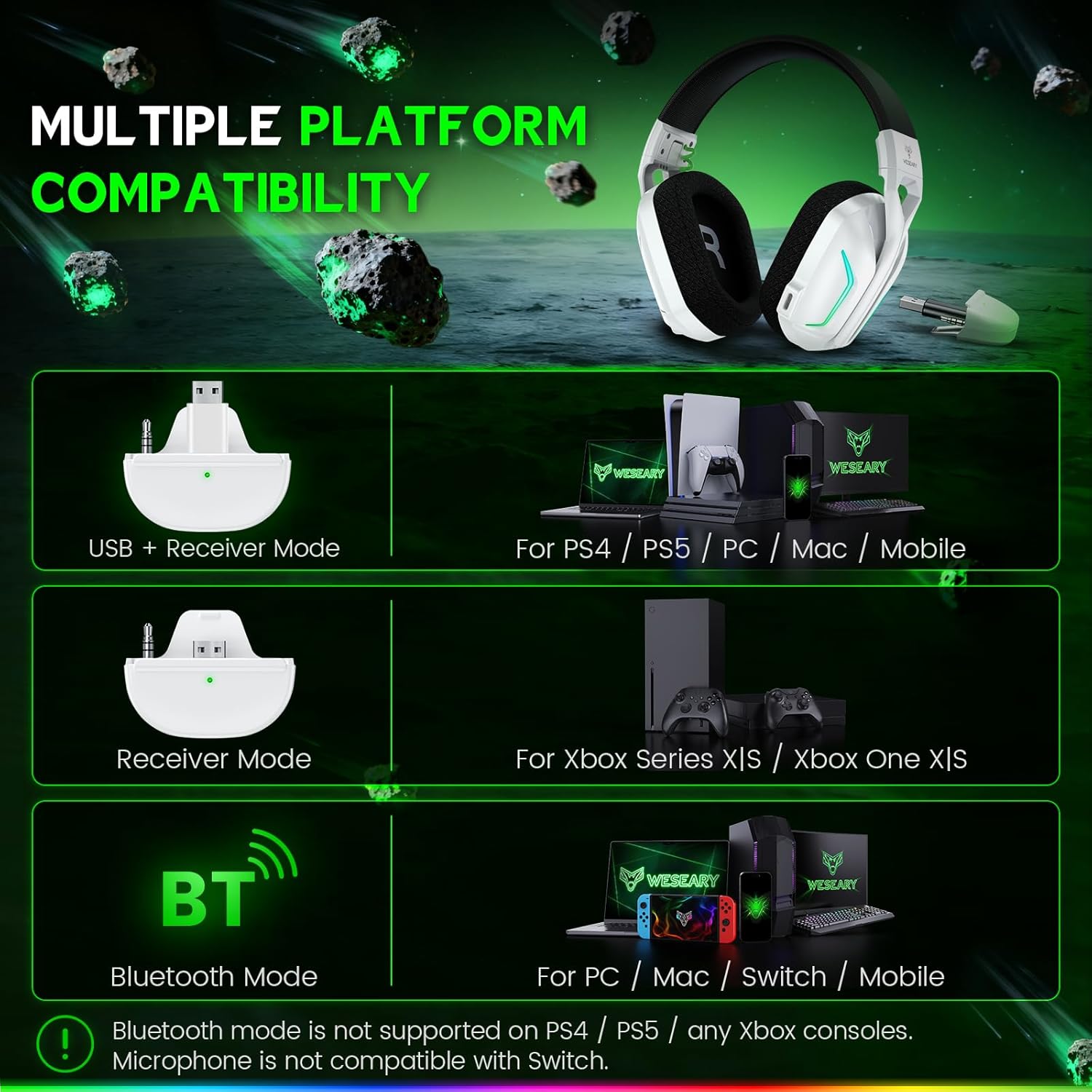
Image: Visual guide detailing the different connection modes (USB+Receiver, Receiver, Bluetooth) and their compatible platforms, including notes on microphone compatibility.
Návod k obsluze
Ovládání je ukončenoview

Image: Detailed diagram highlighting the headset's buttons and their corresponding functions for power, volume, mic, LED, and mode switching.
Vypínač (1)
- Zapnutí/vypnutí: Dlouze stiskněte po dobu 3 sekund.
- Přehrát/pozastavit: Single click.
- Přijmout/zavěsit hovor: Single click.
- Odmítnout hovor: Dlouze stiskněte po dobu 2 sekund.
- Zavolat zpět: Dvojklik.
Volume Down / Previous Track Button (2)
- Snížit hlasitost: Single click.
- Předchozí skladba: Dlouze stiskněte po dobu 2 sekund.
Volume Up / Next Track Button (3)
- Zvýšit hlasitost: Single click.
- Další skladba: Dlouze stiskněte po dobu 2 sekund.
- Clear All Devices: Press Volume Up and Volume Down together for 6 seconds.
Microphone Button (4)
- Mikrofon zapnuto / vypnuto: Single click.
- Bluetooth / 2.4GHz Dongle Mode Switch: Dlouze stiskněte po dobu 2 sekund.
LED / Mode Button (5)
- Turn On/Off LED: Single click.
- Game Mode / Music Mode: Dvojklik.
- Re-pairing (Bluetooth Mode): Dlouze stiskněte po dobu 3 sekund.
Zvukové funkce
The headset features a 50mm dynamic driver for 3D stereo sound, providing an immersive audio experience that allows you to pinpoint in-game sounds with precision.

Image: A gamer experiencing immersive 3D surround sound with the headset, highlighting precise audio positioning.
Vlastnosti mikrofonu
The omnidirectional microphone includes Environmental Noise Cancellation (ENC) technology, designed to suppress up to 95% of background noise for crystal-clear voice communication with teammates.

Image: A user demonstrating clear voice calls with the headset, accompanied by a graph illustrating the microphone's noise reduction performance.
LED osvětlení
The headset features dynamic LED lights that can be turned on or off with a single click of the LED button (5).
Pohodlí a design
Designed for extended gaming sessions, the headset features soft, breathable earcups and an adjustable headband to ensure comfort and a perfect fit for various head sizes.

Obrázek: Explodoval view of the headset emphasizing its lightweight, breathable, and adjustable design for comfort.
Baterie a nabíjení
The headset is equipped with a 1200mAh battery, providing up to 35 hours of average use or up to 50 hours with dynamic lights off. A full charge takes approximately 2.5 hours via the USB-C port.

Obrázek: Interní view of the headset highlighting the 1200mAh battery capacity and estimated usage times per charge.
Údržba
Čištění
Gently wipe the headset with a soft, dry cloth. Do not use abrasive cleaners, solvents, or harsh chemicals. Avoid getting moisture into the earcups or charging port.
Skladování
Sluchátka skladujte na chladném a suchém místě mimo dosah přímého slunečního záření a extrémních teplot. Pokud sluchátka delší dobu nepoužíváte, před uskladněním se ujistěte, že jsou plně nabitá, aby se zachovala jejich životnost.
Odstraňování problémů
Žádný zvuk / Odpojení
- Ujistěte se, že je sluchátko zapnuté a plně nabité.
- For 2.4GHz connection, verify the USB dongle is firmly inserted into the device or controller. Ensure it is an official Xbox controller if connecting to an Xbox console.
- For Bluetooth connection, ensure the headset is in Bluetooth pairing mode and correctly paired with your device. Try re-pairing if necessary (long press LED button for 3 seconds).
- Zkontrolujte úroveň hlasitosti na sluchátkách i na připojeném zařízení.
- If using 2.4GHz, try a different USB port on your console or PC.
Mikrofon nefunguje
- Ensure the microphone is not muted (single click mic button).
- Verify microphone input settings on your connected device (e.g., in-game audio settings, system sound settings).
- Remember the microphone is not compatible with Nintendo Switch.
- For Xbox, ensure the dongle is securely connected to an official Xbox controller.
Sound Latency
- Ensure the headset is within optimal range of the 2.4GHz dongle or Bluetooth device.
- Minimize interference from other wireless devices operating on similar frequencies.
- For Xbox, ensure the dongle is securely connected to an official controller.
Headset Does Not Charge
- Ujistěte se, že je kabel USB-C správně připojen k headsetu i ke zdroji napájení.
- Zkuste jiný kabel USB-C nebo napájecí adaptér.
- Ujistěte se, že nabíjecí port je čistý a bez nečistot.
Specifikace
| Funkce | Detail |
|---|---|
| Značka | WESEARY |
| Číslo modelu | WG1 |
| Umístění uší | Přes ucho |
| Impedance | 32 ohmů |
| Kontrola hluku | Potlačení okolního hluku (ENC) |
| Typ zvukového ovladače | Dynamický měnič (50 mm) |
| Technologie připojení | Wireless (2.4GHz, Bluetooth) |
| Bezdrátová technologie | 2.4 GHz, Bluetooth |
| Kapacita baterie | 1200 XNUMX mAh |
| Doba nabíjení baterie | 2.5 hodiny |
| Průměrná životnost baterie | 35 Hours (up to 50 hours with lights off) |
| Další funkce | Noise Cancellation, LED Lighting |
| Kompatibilní zařízení | Xbox Series X|S, Xbox One, PS5, PS4, Switch, PC, Mac, Mobile Devices |
| Úroveň odolnosti proti vodě | Není odolný vůči vodě |
| UPC | 721820110709 |
Záruka a podpora
WESEARY products come with a standard manufacturer's warranty. For detailed warranty information, technical support, or customer service inquiries, please refer to the contact information provided on the official WESEARY webwebu nebo v dokumentaci k nákupu.
You can also visit the WESEARY store on Amazon for more product information: WESEARY Amazon Store