
Zavedení
This manual provides detailed instructions for the WESEARY WG1 Wireless Gaming Headset. Please read this guide thoroughly to ensure proper setup, operation, and maintenance of your device. The WG1 headset offers dual wireless connectivity (2.4GHz USB/Type-C and Bluetooth), 3D stereo sound, and an omnidirectional noise-canceling microphone for an enhanced gaming experience across multiple platforms.
Co je v krabici
Ověřte, zda jsou v balení přítomny všechny položky:
- Wireless Gaming Headset (1 unit)
- Nabíjecí kabel (1 kus)
- 2.4GHz USB & Type-C Dongle (1 unit)
- Uživatelská příručka (tento dokument)
Vlastnosti produktu
Kvalita zvuku
The WG1 headset is equipped with 50mm dynamic drivers designed to deliver rich, spatial audio. This allows for precise sound localization, enabling users to identify in-game audio cues such as footsteps and gunshots with clarity. The drivers produce profound bass and clear high frequencies for an immersive auditory experience.

Image: The WESEARY WG1 headset illustrating its 3D Stereo Surround Sound feature, showing sound waves emanating from the headset to enhance gaming immersion.
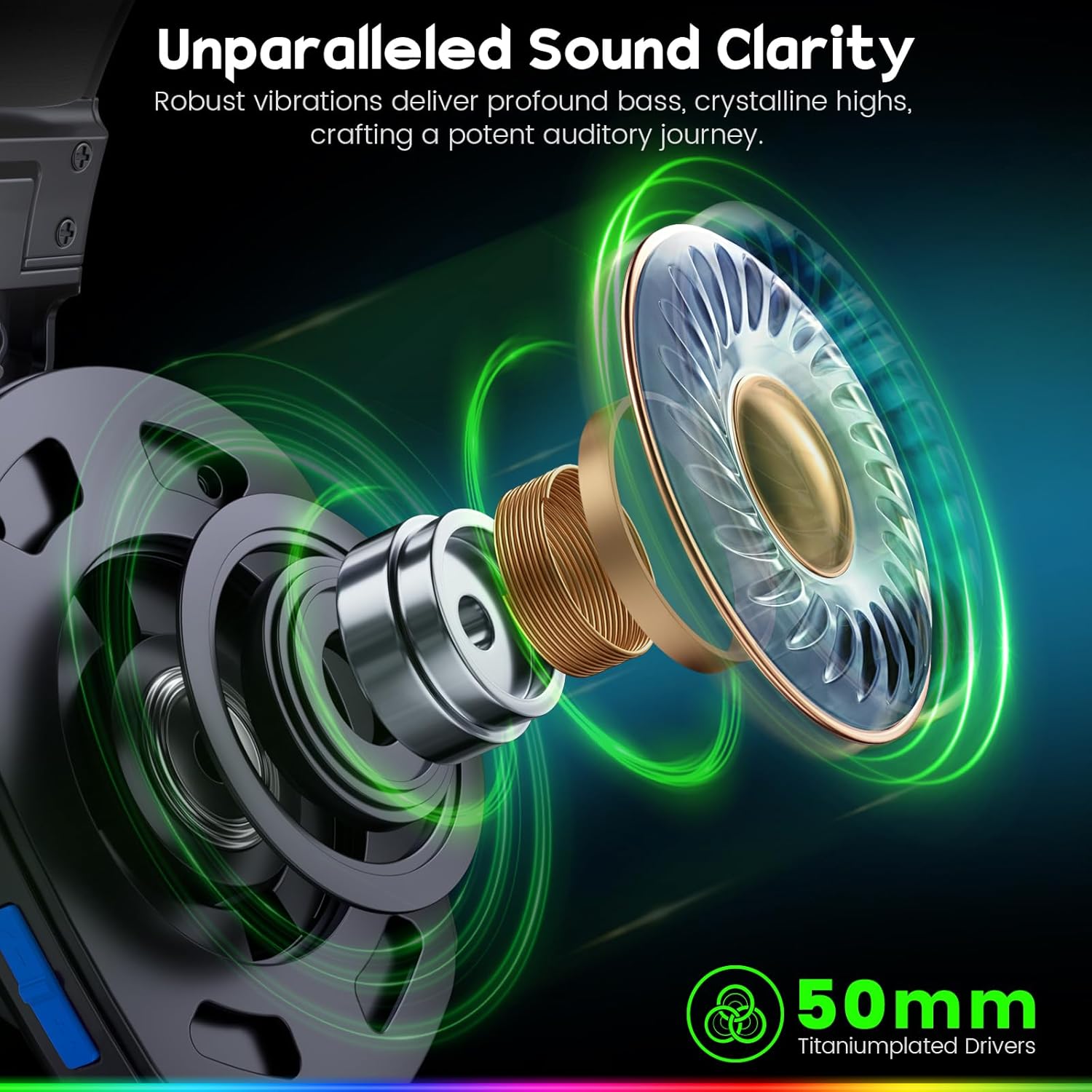
Image: An exploded diagram of the WESEARY WG1 headset's earcup, highlighting the 50mm titanium-plated drivers responsible for sound clarity and powerful bass.
Duální připojení
The headset supports two wireless modes: 2.4GHz and Bluetooth. The 2.4GHz mode is compatible with PS5, PS4, PC, Phone, Laptop, and Switch (audio only). The Bluetooth mode is compatible with PC, Mac, Switch (audio only), Mobile, Laptops, and Tablets. Note that the 2.4GHz USB and Type-C dongles must be used together for PS5/PS4/PC/Laptop/Mac. Neither mode is compatible with Xbox consoles. The microphone is not compatible with Nintendo Switch, and Bluetooth mode is not compatible with PS5/PS4.

Image: The WESEARY WG1 headset highlighting its dual wireless capabilities, featuring both USB-A and Type-C dongles for broad device compatibility.
Ultra nízká latence
For competitive gaming, the 2.4GHz dongle mode provides an audio latency of ≤20ms, ensuring real-time audio synchronization. Bluetooth mode maintains a latency of less than 48ms, offering smooth and responsive audio for general use.

Image: A close-up of the WESEARY WG1 headset and its 2.4GHz dongle, emphasizing the ultra-low latency feature (≤20ms) for swift connectivity.
Pohodlí a design
The headset is designed for extended wear with soft, breathable earcups and an adjustable headband. This ergonomic design aims to provide a pressure-free fit for various head sizes, ensuring comfort during long gaming sessions.

Image: The WESEARY WG1 headset in a cosmic setting, highlighting its lightweight, breathable earcups and adjustable headband for comfortable wear.
Životnost baterie
The WG1 features a 1200mAh battery, providing up to 50 hours of playtime without LED lighting, or up to 35 hours with dynamic LED lighting activated. A full charge via USB-C takes approximately 2.5 hours.
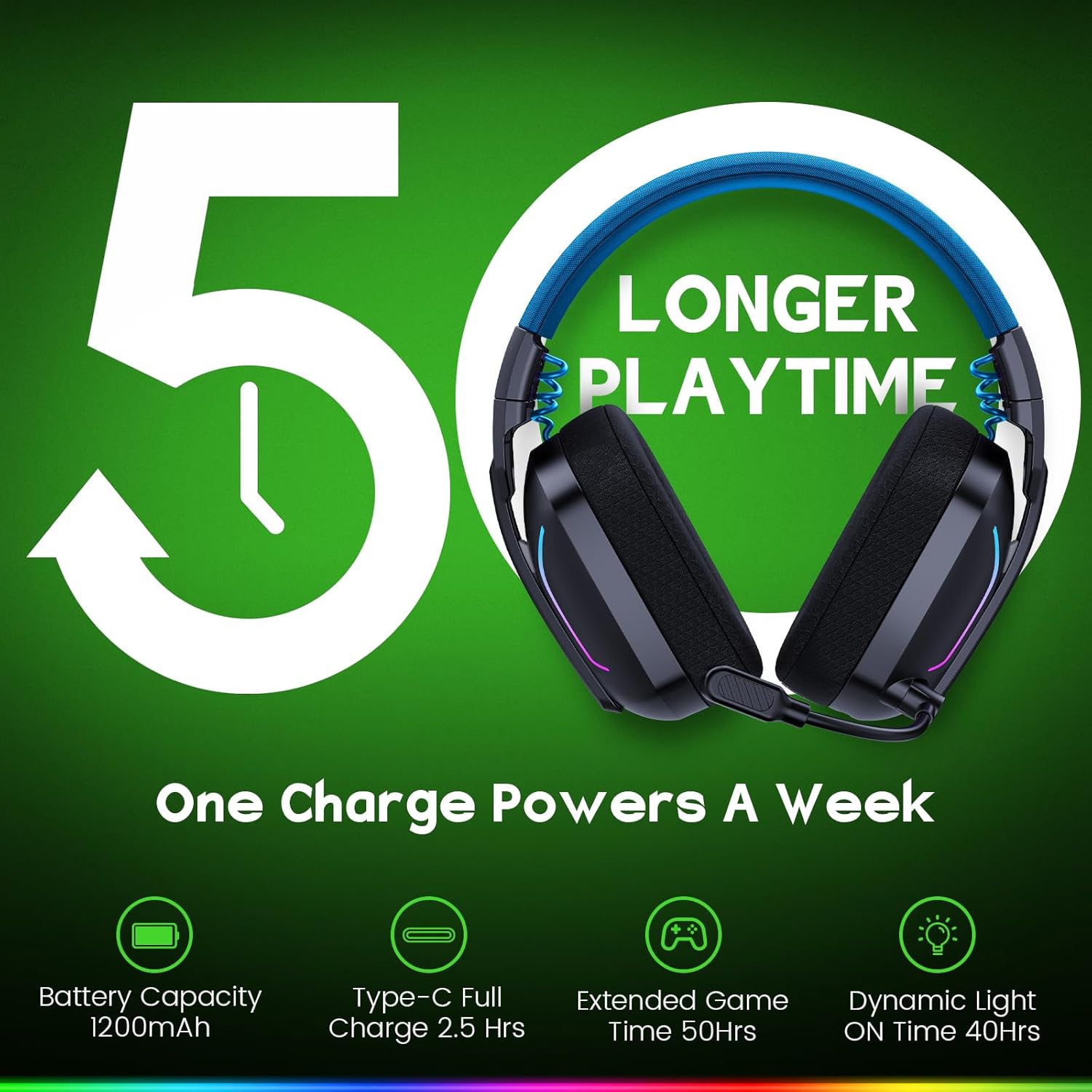
Image: The WESEARY WG1 headset with an overlay indicating its 1200mAh battery capacity and up to 50 hours of extended playtime on a single charge.
Dynamické LED osvětlení
The headset includes dynamic, color-shifting LED lights that can be activated with a single button press. This feature allows users to customize their gaming setup's aesthetic.
Omnidirectional Microphone with ENC
The integrated 360° omnidirectional microphone is designed for clear communication. Advanced Environmental Noise Cancellation (ENC) technology suppresses up to 95% of background noise, ensuring your voice is heard clearly by teammates. The microphone can be muted with a single click.

Image: The WESEARY WG1 headset's microphone, demonstrating its crystal-clear voice call capability with 95% background noise suppression. A note indicates microphone incompatibility with Nintendo Switch.
Nastavení
Nabíjení náhlavní soupravy
Before first use, fully charge the headset. Connect the provided USB-C charging cable to the headset's charging port and to a compatible USB power source. The LED indicator will show charging status. A full charge takes approximately 2.5 hours.
2.4GHz Wireless Connection (for PS5, PS4, PC, Laptop, Mac)
- Insert the 2.4GHz USB dongle into an available USB-A port on your device.
- If your device only has Type-C ports, use the provided Type-C adapter with the USB dongle.
- Power on the headset by long-pressing the power button for 3 seconds.
- The headset will automatically connect to the dongle. The LED indicator on the headset will show a stable light once connected.
- On your device's audio settings, ensure the WESEARY WG1 headset is selected as the input and output audio device.
Bluetooth Connection (for PC, Mac, Mobile, Laptops, Tablets)
- Zkontrolujte, zda je náhlavní souprava vypnutá.
- Long-press the power button for 3 seconds to turn on the headset.
- Long-press the microphone button for 2 seconds to toggle to Bluetooth mode. The LED indicator will flash, indicating pairing mode.
- Na svém zařízení přejděte do nastavení Bluetooth a vyhledejte dostupná zařízení.
- Select "WESEARY WG1" from the list to pair. The LED indicator on the headset will show a stable light once connected.
Důležité poznámky ke kompatibilitě:
- Both 2.4GHz and Bluetooth modes are NOT compatible with Xbox consoles.
- The microphone is NOT compatible with Nintendo Switch in either mode.
- Bluetooth mode is NOT compatible with PS5 or PS4 consoles.
Návod k obsluze

Obrázek: Podrobný view of the WESEARY WG1 headset's left earcup, illustrating the location and function of its various control buttons and ports.
Power and Playback Controls (Button 1)
- Zapnout / vypnout: Dlouze stiskněte po dobu 3 sekund.
- Přehrát / Pozastavit: Single click.
- Přijmout hovor: Single click.
- Zavěsit hovor: Single click.
- Odmítnout hovor: Dlouze stiskněte po dobu 2 sekund.
- Traceback (Redial last number): Dvojklik.
Volume Down / Previous Track (Button 2)
- Snížit hlasitost: Single click.
- Předchozí skladba: Dlouze stiskněte po dobu 2 sekund.
Volume Up / Next Track (Button 3)
- Zvýšit hlasitost: Single click.
- Další skladba: Dlouze stiskněte po dobu 2 sekund.
- Clear all devices (Reset pairing): Press Volume Up and Volume Down together for 6 seconds.
Microphone and Mode Toggle (Button 4)
- Mic on / off: Single click.
- Bluetooth mode ↔ Dongle mode: Long press for 2 seconds to switch between 2.4GHz and Bluetooth modes.
LED Control and Game/Music Mode (Button 5)
- LED Turn on / off: Single click.
- Herní režim / Hudební režim: Dvojklik.
- Re-pairing (BT mode): Long press for 3 seconds (when in Bluetooth mode).
Údržba
- Pravidelně čistěte sluchátka s mikrofonem měkkým, suchým hadříkem. Nepoužívejte agresivní chemikálie ani abrazivní materiály.
- Nevystavujte sluchátka extrémním teplotám, vlhkosti ani přímému slunečnímu záření.
- Pokud sluchátka nepoužíváte, skladujte je na chladném a suchém místě.
- Zabraňte pádu sluchátek na zem nebo jejich vystavení silným nárazům.
Odstraňování problémů
Žádný zvuk / nízká hlasitost
- Ujistěte se, že je sluchátko zapnuté a plně nabité.
- Zkontrolujte úroveň hlasitosti na sluchátkách i na připojeném zařízení.
- Verify that the headset is correctly connected via 2.4GHz dongle or Bluetooth.
- For 2.4GHz, ensure the dongle is properly inserted and recognized by the device.
- For Bluetooth, ensure the headset is paired and selected as the audio output device in your device's settings.
- Try clearing all paired devices (Volume Up + Volume Down for 6 seconds) and re-pairing.
Mikrofon nefunguje
- Ensure the microphone is not muted (single click on Button 4).
- Check the microphone input settings on your connected device to ensure the WESEARY WG1 is selected.
- Confirm compatibility: The microphone is NOT compatible with Nintendo Switch.
- Ensure the headset is in the correct mode (2.4GHz for PS5/PS4/PC/Laptop/Mac, Bluetooth for PC/Mac/Mobile/Laptops/Tablets).
Problémy s připojením
- Ensure the headset is within the operating range of your device.
- Minimalizujte rušení od jiných bezdrátových zařízení.
- Znovu spárujte sluchátka se zařízením.
- For 2.4GHz, ensure both USB and Type-C dongles are used if required by your device (e.g., PS5/PS4/PC/Laptop/Mac).
Specifikace
| Funkce | Detail |
|---|---|
| Název modelu | WG1 |
| Technologie připojení | Wireless (2.4GHz, Bluetooth) |
| Technologie bezdrátové komunikace | Bezdrátové 2.4 GHz, Bluetooth |
| Typ zvukového ovladače | Dynamický měnič (50 mm) |
| Kontrola hluku | Sound Isolation, Noise Cancellation (ENC Mic) |
| Životnost baterie | Up to 50 Hours (without LED), Up to 35 Hours (with LED) |
| Kapacita baterie | 1200 XNUMX mAh |
| Doba nabíjení | 2.5 hodiny (USB-C) |
| Materiál | Composite, Plastic |
| Hmotnost položky | 11.7 unce |
| Kompatibilní zařízení | PC, Mac, Laptop, Mobile, Nintendo Switch (Audio only, Mic invalid). Not compatible with Xbox series. Bluetooth mode not compatible with PS5/PS4. |
Oficiální video produktu
Video: Úředník u konceview of the WESEARY WG1 Wireless Gaming Headset, showcasinjeho klíčové vlastnosti a design.
Záruka a podpora
For warranty information and technical support, please refer to the contact details provided on the product packaging or visit the official WESEARY webUschovejte si účtenku jako doklad o koupi pro případné reklamace.