
1. Úvod
This manual provides detailed instructions for the safe and effective use of your MESTEK Pinless Wood Moisture Meter, model WM710-001. This device is designed for non-destructive measurement of moisture content in various materials including wood, drywall, masonry, and other building materials. Please read this manual thoroughly before operation and retain it for future reference.
2. Bezpečnostní informace
- Always operate the device within its specified temperature and humidity ranges.
- Do not expose the meter to extreme temperatures, direct sunlight, or high humidity.
- Zabraňte pádu zařízení nebo jeho vystavení silným nárazům.
- Udržujte zařízení mimo dosah vody a jiných kapalin.
- Nepokoušejte se zařízení otevírat ani upravovat. Opravy by měl provádět pouze kvalifikovaný personál.
- Baterie zlikvidujte v souladu s místními předpisy. Nekombinujte staré a nové baterie ani různé typy baterií.
- Toto zařízení není hračka. Uchovávejte mimo dosah dětí.
3. Konec produktuview
3.1 Komponenty
The MESTEK WM710-001 Pinless Wood Moisture Meter features a robust design for reliable moisture detection.
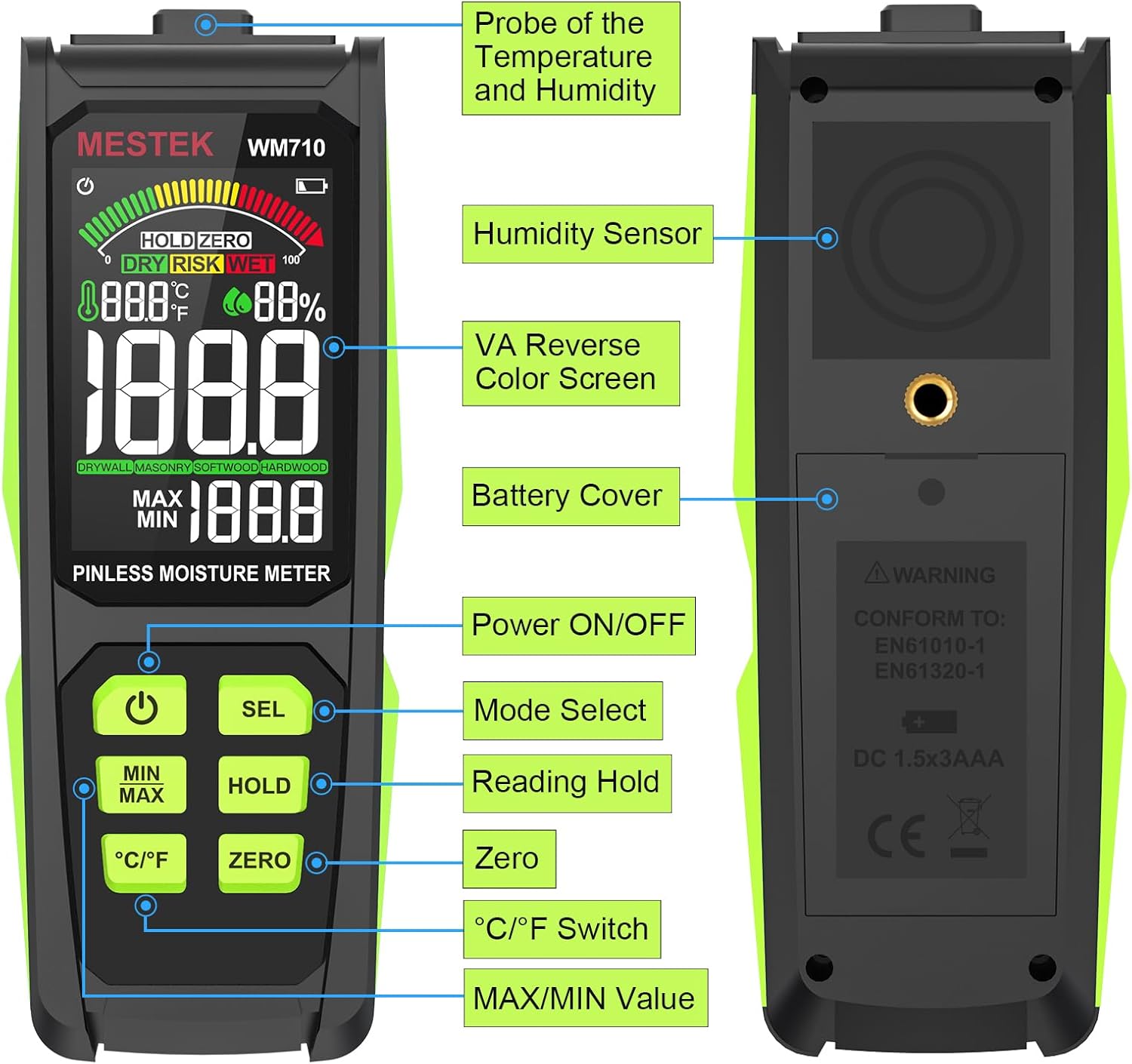
Obraz: Nadview of the MESTEK WM710-001 Pinless Moisture Meter, highlighting its key components such as the probe, display, and control buttons.
- Probe of Temperature and Humidity: Nachází se v horní části zařízení.
- Senzor vlhkosti: Nachází se na zadní straně zařízení.
- VA Reverse Color Screen: Displej s vysokým rozlišením pro jasné odečty.
- Kryt baterie: Located on the back for battery access.
- Tlačítko zapnutí/vypnutí napájení: Pro zapnutí nebo vypnutí zařízení.
- Mode Select (SEL) Button: To switch between material modes.
- Reading Hold (HOLD) Button: To freeze the current measurement on the display.
- Tlačítko nula: For zero calibration.
- Přepínač °C/°F: To toggle between Celsius and Fahrenheit for temperature display.
- Tlačítko MAX/MIN hodnoty: Na view maximum and minimum recorded measurements.
3.2 Funkce displeje
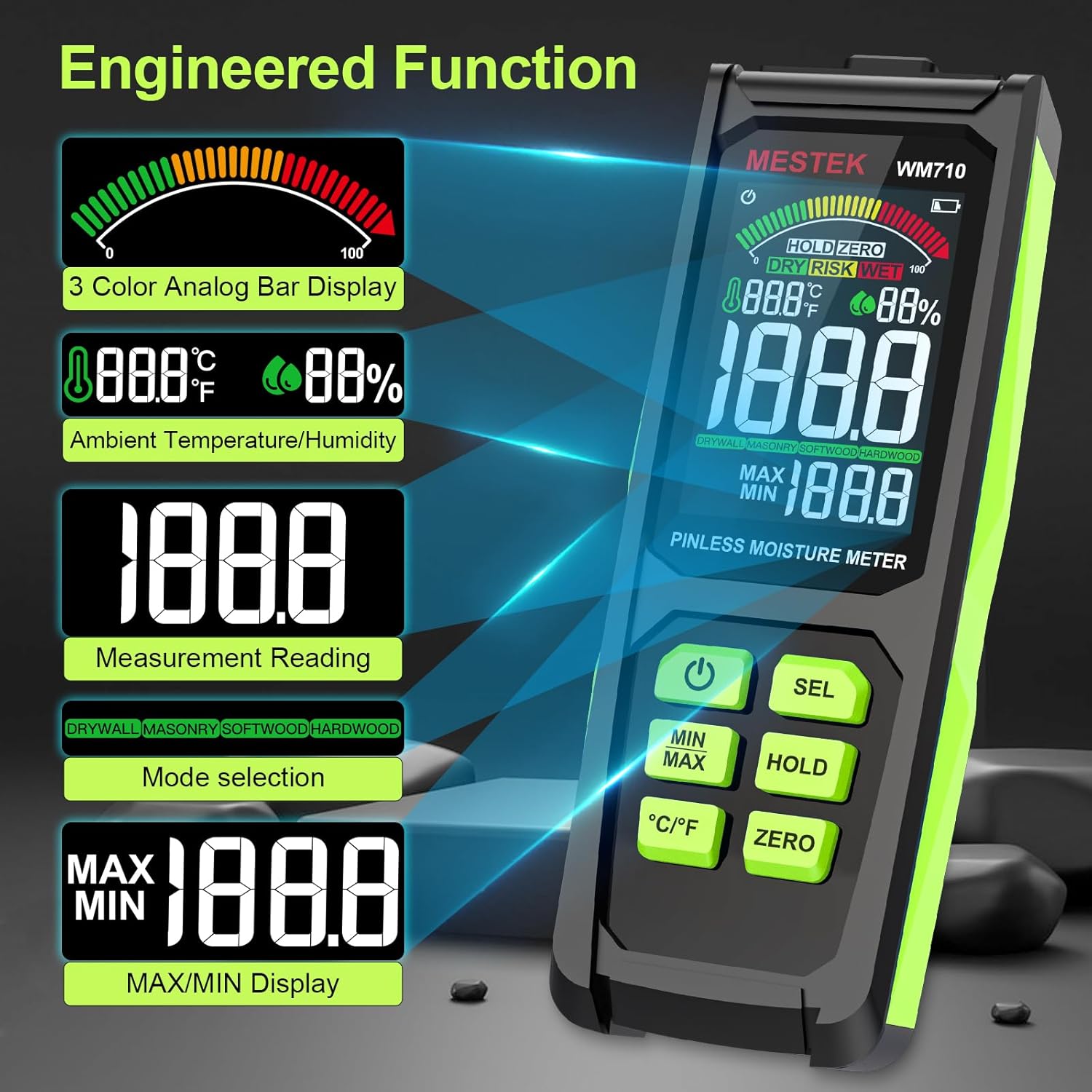
The meter is equipped with a 3-inch HD color screen that provides clear and intuitive information.

Obraz: The MESTEK WM710-001 display illustrating various engineered functions including the 3-color analog bar, ambient temperature/humidity, measurement reading, mode selection, and MAX/MIN display.
- 3-Color Analog Bar Display: Visually indicates moisture levels as DRY (Green), RISK (Yellow), or WET (Red).
- Ambient Temperature/Humidity: Displays current environmental temperature and humidity.
- Odečet měření: Shows the numerical moisture content.
- Mode Selection Indicator: Displays the currently selected material mode (Drywall, Masonry, Softwood, Hardwood).
- MAX/MIN Display: Shows the highest and lowest recorded moisture values.
- Indikátor baterie: Zobrazuje aktuální úroveň nabití baterie.
- HOLD Indicator: Appears when the HOLD function is active.
- ZERO Indicator: Appears when zero calibration is active.
4. Nastavení
4.1 Instalace baterie
The MESTEK WM710-001 requires three (3) AAA batteries for operation.
- Vyhledejte kryt baterie na zadní straně zařízení.
- Use a small screwdriver (often included) to loosen the screw securing the battery cover.
- Odstraňte kryt baterie.
- Insert three new AAA batteries, ensuring correct polarity (+/-) as indicated inside the battery compartment.
- Vraťte zpět kryt baterie a utáhněte šroub.
Poznámka: A low battery indicator will appear on the display when batteries need replacement.

Obraz: The MESTEK WM710-001 Pinless Moisture Meter shown with its included accessories: a carrying case, user manual, three AAA batteries, and a small screwdriver for battery compartment access.
5. Návod k obsluze
5.1 Zapnutí/vypnutí
Stiskněte tlačítko Zapnutí/vypnutí napájení button to turn the meter on. The device will perform a self-test and be ready for measurement within approximately 3 seconds. Press and hold the Zapnutí/vypnutí napájení button again to turn the meter off. The device also features an auto power-off function to conserve battery life after a period of inactivity.

Obraz: Detailní záběr view of the power button on the MESTEK WM710-001, indicating its function for turning the device on and off.
5.2 Výběr režimu
The meter offers different modes for various materials to ensure accurate readings.
- Zapněte měřič.
- Krátce stiskněte SEL button to cycle through the available material modes: Drywall, Masonry, Softwood, and Hardwood.
- Select the mode that corresponds to the material you are testing. The selected mode will be indicated on the display.
Obraz: The MESTEK WM710-001 display demonstrating non-invasive detection and the process of switching between Drywall, Masonry, Softwood, and Hardwood modes using the "SEL" button.
5.3 Provedení měření
The WM710-001 uses a non-destructive induction method to measure moisture.
- Ensure the correct material mode is selected (refer to Section 5.2).
- Place the back of the meter (where the sensor is located) flat against the surface of the material you wish to measure.
- The meter will display the moisture content reading. The maximum measuring depth is approximately 0.78 inches (20 mm).
- Observe the 3-color analog bar for a quick visual indication of moisture levels (Green for DRY, Yellow for RISK, Red for WET). An audible alarm will sound if the "WET" threshold is exceeded.

Obraz: The MESTEK WM710-001 in use, demonstrating accurate moisture measurement on wood logs, showing the digital reading and the analog bar.

Obraz: The MESTEK WM710-001 being used to measure moisture in various materials, including drywall, masonry, softwood, and hardwood, illustrating its wide range of applications.
5.4 Funkce HOLD
Stiskněte tlačítko DRŽET button to freeze the current measurement on the display. This is useful when taking readings in hard-to-reach areas where the display cannot be easily viewed. Press the DRŽET znovu stiskněte tlačítko pro uvolnění naměřené hodnoty a obnovení měření v reálném čase.

Obraz: Detailní záběr view of the HOLD button and the "HOLD ZERO" indicator on the MESTEK WM710-001 display, showing how to retain a measurement reading.
5.5 ZERO Calibration
The NULA function allows for calibration to ensure accuracy.
- Hold the meter in the air, away from any materials.
- Stiskněte tlačítko NULA button. The display should show a reading close to 0.0.
- This calibrates the meter for ambient conditions before taking measurements.
5.6 MAX/MIN Value
Stiskněte tlačítko MIN / MAX button to display the maximum or minimum moisture reading recorded during a measurement session. Pressing it repeatedly will cycle between MAX, MIN, and current readings.
5.7 Zobrazení teploty a vlhkosti
The meter also displays ambient temperature and humidity. Press the ° C / ° F tlačítko pro přepínání mezi teplotními jednotkami Celsia a Fahrenheita.

Obraz: Detailní záběr view of the °C/°F button on the MESTEK WM710-001, illustrating the ability to switch between Celsius and Fahrenheit temperature units.
6. Measurement Modes and Ranges
The MESTEK WM710-001 provides specific moisture content ranges for different material types, categorized by visual and audible indicators.

Obraz: The MESTEK WM710-001 Humidity Alarm comparison table, showing the moisture percentage ranges for DRY (Green), RISK (Yellow), and WET (Red) conditions across different measurement modes: Drywall, Masonry, Softwood, and Hardwood.
| Režim měření | Green / DRY | Yellow / RISK | Red / WET |
|---|---|---|---|
| Sádrokarton | 0.0 ~ 17.9 | 18.0 ~ 35.9 | 36.0 ~ 54.0 |
| ZDIVO | 0.0 ~ 11.9 | 12.0 ~ 23.9 | 24.0 ~ 36.0 |
| MĚKKÉ DŘEVO | 0.0 ~ 31.9 | 32.0 ~ 63.9 | 64.0 ~ 100 |
| TVRDÉ DŘEVO | 0.0 ~ 31.9 | 32.0 ~ 63.9 | 64.0 ~ 100 |
Poznámka: These ranges are indicative. Always consider other factors and professional advice for critical moisture assessments.
7. Údržba
- Čištění: Zařízení otřete měkkým, suchým hadříkem. Nepoužívejte abrazivní čisticí prostředky ani rozpouštědla.
- Skladování: When not in use for extended periods, remove the batteries to prevent leakage. Store the meter in its protective cloth bag in a cool, dry place, away from direct sunlight and extreme temperatures.
- Výměna baterie: Pro zajištění přesných údajů vyměňte baterie ihned po zobrazení indikátoru slabé baterie.
8. Řešení problémů
| Problém | Možná příčina | Řešení |
|---|---|---|
| Měřič se nezapne. | Vybité nebo nesprávně vložené baterie. | Zkontrolujte polaritu baterií. Vyměňte za nové baterie AAA. |
| Nepřesné nebo nekonzistentní hodnoty. | Incorrect mode selected; meter not properly zeroed; sensor not flat on surface; material too thick for pinless measurement. | Ensure correct material mode. Perform ZERO calibration. Ensure sensor is flush with the surface. Note maximum measuring depth is 20mm. |
| Displej je tlumený nebo bliká. | Slabá baterie. | Vyměňte baterie. |
| Zvukový alarm zní často. | Material moisture content is in the "WET" range. | This indicates high moisture. Refer to the Measurement Modes and Ranges table for specific thresholds. |
| "Out of Range" alarm. | Moisture content exceeds the meter's maximum measurable range. | The material is extremely wet. The meter cannot provide a precise numerical value beyond its range. |
9. Specifikace
| Funkce | Detail |
|---|---|
| Číslo modelu | WM710-001 |
| Typ měření | Pinless, Non-destructive Induction |
| Maximální hloubka měření | 0.78 palce (20 mm) |
| Rozsah měření | 0.0 - 100.0 (material dependent) |
| Přesnost měření | ±4 % |
| Přesnost teploty | ± 2.0 ° C / 3 ° F |
| Přesnost vlhkosti | ±5.0 % RH |
| Zobrazit | 3-inch HD Color LCD with 3-color analog bar |
| Zdroj napájení | 3 x AAA alkalické baterie |
| Zahrnuté komponenty | Moisture meter, batteries, carrying case, screwdriver, user manual |
| Hmotnost položky | 10.2 unce |
| Rozměry balení | 7.76 x 3.23 x 1.77 palce |
10. Záruka a podpora
The MESTEK WM710-001 Pinless Wood Moisture Meter comes with a 3-year replacement warranty. If you encounter any issues with your device, please contact MESTEK customer support for assistance.
For support inquiries, please refer to the contact information provided with your product packaging or visit the official MESTEK webmísto.