
1. Konec produktuview
The HEIBAS G7 Bluetooth Headset is designed for clear communication and audio playback, featuring advanced Bluetooth 6.0 connectivity, active and environmental noise cancellation, and a long-lasting battery. Its ergonomic design ensures a comfortable and secure fit for extended use.

Obrázek: Overview of the HEIBAS G7 Bluetooth Headset highlighting Bluetooth 6.0 features.
2. Obsah balení
Zkontrolujte prosím balení, zda neobsahuje následující položky:
- HEIBAS G7 Bluetooth Headset x 1
- Ear tips (S/M/L) x 3 pairs (6 pieces total)
- Nabíjecí kabel typu C x 1
- Návod k použití x 1

Image: Diagram showing the headset, charging case, ear tips, and charging cable included in the package.
3. Nastavení a párování
3.1 Počáteční poplatek
Before first use, fully charge the headset and its charging case using the provided Type-C cable. The LED display on the charging case indicates the battery level.

Image: The charging case with an LED display showing battery percentage, indicating the charging status.
3.2 Spárování se zařízením
- Ujistěte se, že je náhlavní souprava nabitá.
- Open the charging case. The headset will automatically enter pairing mode.
- Na smartphonu, tabletu nebo počítači povolte Bluetooth a vyhledejte dostupná zařízení.
- Select "G7" from the list of devices to connect.
- Once connected, the headset is ready for use.
The headset supports automatic connection to previously paired devices when taken out of the case.

Image: The headset and charging case next to a smartphone, illustrating automatic connection upon removal from the case.
4. Nošení headsetu
The G7 headset features an adjustable design for a secure and comfortable fit on either ear.
4.1 Nastavení velikosti
- The ear hook can be rotated 180° and 360° to fit various ear shapes.
- The head part can rotate 45° left or right, allowing use on either the left or right ear.
- Choose the appropriate ear tip size (S, M, L) for optimal comfort and sound quality.

Image: Diagrams illustrating the 180°, 360°, and 45° adjustment capabilities of the headset for a customized fit.
4.2 Wearing Method
- Rotate the ear hook 90 degrees to the left (for right ear use, rotate 90 degrees to the right).
- Rotate the ear hook 90 degrees upwards.
- Rotate the earphone head and adjust its position to fit your ear shape.
Image: Step-by-step guide on how to wear the headset, including selecting the correct ear tip size (S, M, L).
5. Ovládací prvky a funkce
The G7 headset features physical buttons for intuitive control of various functions.

Image: Diagram showing the physical buttons on the headset and their corresponding functions, including power, volume, play/pause, call control, mute, and Siri activation.
5.1 Základní operace
- Zapnutí/vypnutí: Stiskněte a podržte hlavní tlačítko po dobu 3 sekund.
- Přehrát/pozastavit: Single press the main button.
- Zvýšení/Snížení hlasitosti: Press the volume buttons (indicated by +/-).
- Další / předchozí skladba: Press and hold the volume buttons for 2 seconds.
5.2 Správa hovorů
- Přijmout/ukončit hovor: Single press the main button.
- Odmítnout hovor: Stiskněte a podržte hlavní tlačítko po dobu 2 sekund.
- Ztlumit/Zapnout: During a call, press the dedicated mute button (located on the side of the headset).
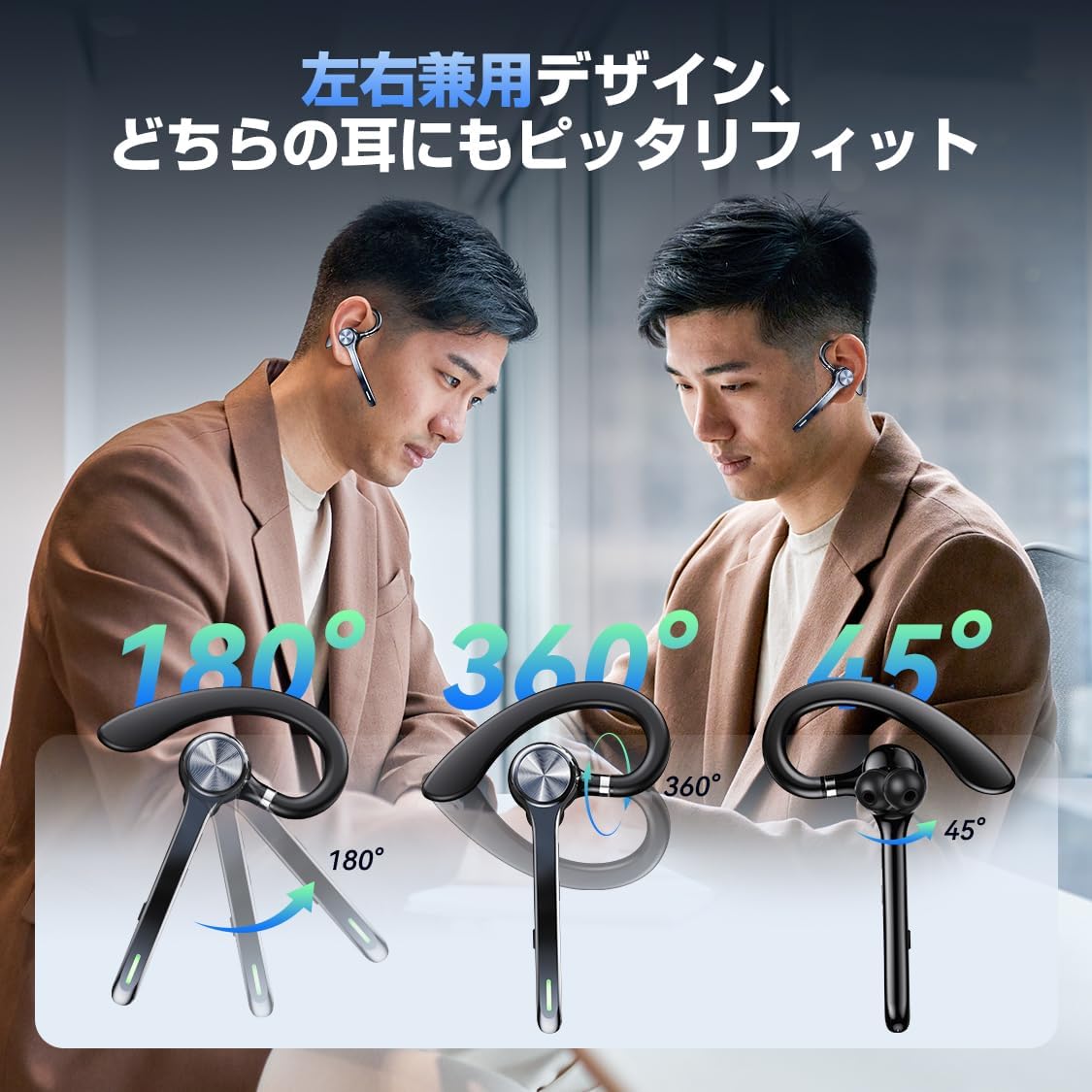
Image: A person using the headset during a call, demonstrating the mute function.
5.3 Voice Assistant (Siri)
- Aktivujte Siri: Dvakrát stiskněte hlavní tlačítko.
6. Pokročilé funkce
6.1 Vícebodové připojení
The G7 headset supports simultaneous connection to two devices (e.g., a smartphone and a PC). This allows for seamless switching between music playback on one device and calls on another.

Image: The headset connected to both a smartphone and a laptop, demonstrating the multipoint connection feature.
6.2 Noise Cancellation (ANC & ENC)
- Aktivní potlačení hluku (ANC): Reduces low-frequency ambient noise during music playback (e.g., train sounds, air conditioner hum).
- Environmentální potlačení hluku (ENC): Suppresses background noise during calls, ensuring your voice is transmitted clearly to the other party.

Image: Diagram illustrating the effect of ANC and ENC on sound, showing noise reduction before and after cancellation.
7. Baterie a nabíjení
The G7 headset offers extended battery life for prolonged use.
- Headset Playback Time: Approximately 21-23 hours on a single charge.
- Celková doba přehrávání (s nabíjecím pouzdrem): Až 108 hodiny.
- Kapacita nabíjecího pouzdra: 500 XNUMX mAh.
- Nabíjecí rozhraní: Typ-C.
- Doba nabíjení: Plné nabití trvá přibližně 2–2.5 hodiny.

Image: Visual representation of the headset's battery life, including single playback time, total time with the charging case, and standby time.
8. Specifikace
| Název modelu | G7 |
| Značka | HEIBAS (Origin qilin) |
| Technologie připojení | Bezdrátové připojení (Bluetooth 6.0) |
| Tvarový faktor sluchátek | Bluetooth Headset (Single Ear) |
| Potlačení hluku | ANC + ENC Dual Noise Cancellation |
| Výdrž baterie (sluchátka) | 21-23 hodin |
| Celková výdrž baterie (s pouzdrem) | Až 108 hodin |
| Kapacita nabíjecího pouzdra | 500 XNUMX mAh |
| Nabíjecí rozhraní | Typ-C |
| Hmotnost | Approx. 12g (headset) |
| Voděodolnost | Waterproof (level not specified, generally splash-proof) |
| Kompatibilní zařízení | Chytré telefony, tablety, notebooky |
| Zahrnuté komponenty | Bluetooth Headset, Ear tips, Cable, Instruction Manual |
9. Řešení problémů
9.1 Nelze zapnout
- Ujistěte se, že je náhlavní souprava plně nabitá.
- Stiskněte a podržte tlačítko napájení po dobu alespoň 3 sekund.
9.2 Nelze spárovat
- Make sure the headset is in pairing mode (usually indicated by a flashing LED).
- Vypněte a znovu povolte Bluetooth na vašem zařízení.
- Ensure the headset is within 10 meters of your device.
- Forget "G7" from your device's Bluetooth list and try pairing again.
9.3 Špatná kvalita zvuku nebo výpadky
- Ujistěte se, že je náhlavní souprava plně nabitá.
- Zmenšete vzdálenost mezi sluchátky a zařízením.
- Avoid obstacles (walls, large electronic devices) between the headset and your device.
- Zkontrolujte, zda nedochází k rušení jinými bezdrátovými zařízeními.
9.4 Problémy s mikrofonem
- Ensure the microphone is not muted during a call.
- Check your device's audio settings to ensure the headset is selected as the input/output device.
10. Údržba
- Pravidelně čistěte sluchátka s mikrofonem měkkým, suchým hadříkem.
- Avoid exposing the headset to extreme temperatures, humidity, or corrosive liquids.
- Pokud sluchátka nepoužíváte, uložte je do nabíjecího pouzdra, abyste je chránili a udrželi je nabitá.
- Do not attempt to disassemble or repair the headset yourself. Contact customer support if issues arise.
11. Záruka a podpora
For warranty information or technical support, please refer to the contact details provided on the product packaging or the official HEIBAS webmísto. Uschovejte si doklad o koupi pro případ záručních reklamací.
12. Produktové video
Video: Krátká předmluvaview demonstrating key features of the HEIBAS G7 Bluetooth Headset, including its design, charging, and controls.